



element14 Community
element14 Community
    Register Log In
  • Site
  • Search
  • Log In Register
  • Community Hub
    Community Hub
    • What's New on element14
    • Feedback and Support
    • Benefits of Membership
    • Personal Blogs
    • Members Area
    • Achievement Levels
  • Learn
    Learn
    • Ask an Expert
    • eBooks
    • element14 presents
    • Learning Center
    • Tech Spotlight
    • STEM Academy
    • Webinars, Training and Events
    • Learning Groups
  • Technologies
    Technologies
    • 3D Printing
    • FPGA
    • Industrial Automation
    • Internet of Things
    • Power & Energy
    • Sensors
    • Technology Groups
  • Challenges & Projects
    Challenges & Projects
    • Design Challenges
    • element14 presents Projects
    • Project14
    • Arduino Projects
    • Raspberry Pi Projects
    • Project Groups
  • Products
    Products
    • Arduino
    • Avnet & Tria Boards Community
    • Dev Tools
    • Manufacturers
    • Multicomp Pro
    • Product Groups
    • Raspberry Pi
    • RoadTests & Reviews
  • About Us
  • Store
    Store
    • Visit Your Store
    • Choose another store...
      • Europe
      •  Austria (German)
      •  Belgium (Dutch, French)
      •  Bulgaria (Bulgarian)
      •  Czech Republic (Czech)
      •  Denmark (Danish)
      •  Estonia (Estonian)
      •  Finland (Finnish)
      •  France (French)
      •  Germany (German)
      •  Hungary (Hungarian)
      •  Ireland
      •  Israel
      •  Italy (Italian)
      •  Latvia (Latvian)
      •  
      •  Lithuania (Lithuanian)
      •  Netherlands (Dutch)
      •  Norway (Norwegian)
      •  Poland (Polish)
      •  Portugal (Portuguese)
      •  Romania (Romanian)
      •  Russia (Russian)
      •  Slovakia (Slovak)
      •  Slovenia (Slovenian)
      •  Spain (Spanish)
      •  Sweden (Swedish)
      •  Switzerland(German, French)
      •  Turkey (Turkish)
      •  United Kingdom
      • Asia Pacific
      •  Australia
      •  China
      •  Hong Kong
      •  India
      • Japan
      •  Korea (Korean)
      •  Malaysia
      •  New Zealand
      •  Philippines
      •  Singapore
      •  Taiwan
      •  Thailand (Thai)
      • Vietnam
      • Americas
      •  Brazil (Portuguese)
      •  Canada
      •  Mexico (Spanish)
      •  United States
      Can't find the country/region you're looking for? Visit our export site or find a local distributor.
  • Translate
  • Profile
  • Settings
Raspberry Pi
  • Products
  • More
Raspberry Pi
Blog Pi Global Shutter Camera: What's Inside the Box?
  • Blog
  • Forum
  • Documents
  • Quiz
  • Events
  • Polls
  • Files
  • Members
  • Mentions
  • Sub-Groups
  • Tags
  • More
  • Cancel
  • New
Join Raspberry Pi to participate - click to join for free!
Featured Articles
Announcing Pi
Technical Specifications
Raspberry Pi FAQs
Win a Pi
GPIO Pinout
Raspberry Pi Wishlist
Comparison Chart
Quiz
  • Share
  • More
  • Cancel
Group Actions
  • Group RSS
  • More
  • Cancel
Engagement
  • Author Author: shabaz
  • Date Created: 11 Mar 2023 4:44 PM Date Created
  • Views 7404 views
  • Likes 14 likes
  • Comments 24 comments
Related
Recommended
  • machine vision
  • raspberry_pi
  • raspberrypi
  • raspeberry_pi_accessories
  • raspberry_pi_camera
  • global shutter camera

Pi Global Shutter Camera: What's Inside the Box?

shabaz
shabaz
11 Mar 2023

The new Pi Global Shutter Camera (see the announcement) may be suitable for AI experimentation, so I decided to get one! I believe it should be electrically compatible with both the Pi as well as the NVIDIA Jetson Nano, so I think I can get some good use out of it.

The Sony IMX296LQR-C sensor (sensor PDF flyer; see page 3-4) inside the camera is of a sensible resolution (not quite Full HD, but close, at 1440 x 1080 useful pixels), and it has a 1/3" sensor size, and square 3.45 x 3.45 um pixel size, and operates up to around 60 frames per second. Unlike the older non-global-shutter camera, this new camera uses a sensor intended for machine vision use. The older product used a sensor intended for consumer cameras.

The photo below shows everything that comes inside the box, apart from a little bag of silica gel. There's no static shielding bag or any instructions, you'll have to go to the Raspberry Pi website to access the camera documentation.

The little screwdriver is used if it becomes necessary to loosen or tighten a back-focus ring for trimming the distance between the lens and sensor (ordinarily one shouldn't need to make any adjustment if the ring is fully screwed in).

image

The flat flex is 150 mm long (I separately purchased a 300 mm length flat flex, in case it becomes necessary; you can also get cable joiner adapters, but there is a finite limit on how far it can be extended! these cameras are not intended for long-distance connections via flat flex, since high-frequency signals travel down them).

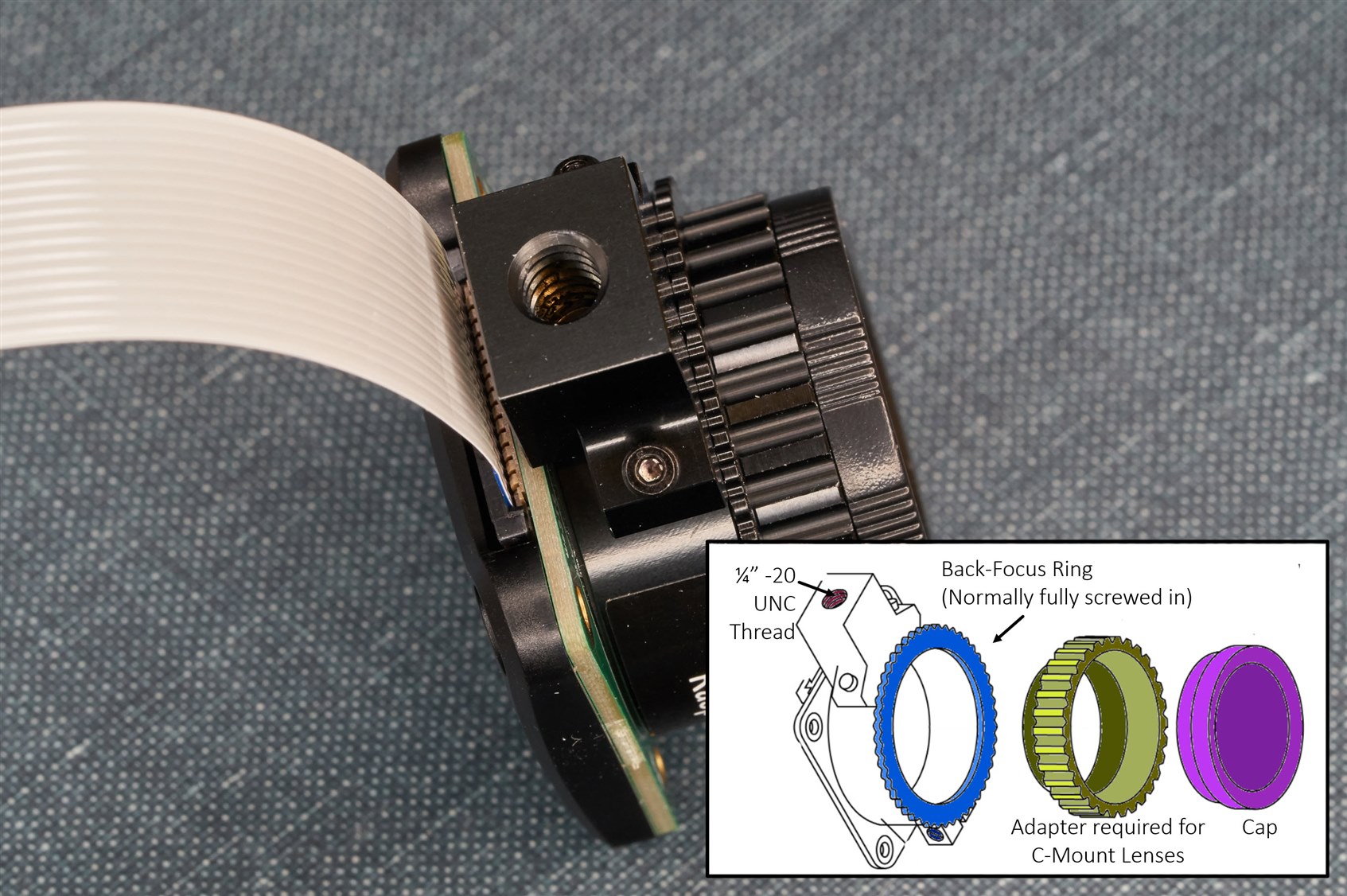
The photo below shows the various elements of the camera.
image

(Diagram source: The drawing is taken from the Raspberry Pi website)

The screw thread (indicated in the photo above) fits typical tripods, although the flat flex will get in the way a bit, so a bit of care is needed to be gentle when doing that.

The photo below shows there are some test points (the bottom one is labeled GND, I noticed afterward that I didn't capture that in the photo!). 

The rear cover is plastic, whereas the lens and tripod mounts on the other side are metal. The plastic is curved, it isn't used for mounting, and it seems to be acting as just a cover for the electronics. The four holes will suit M2.5 screws.

image

I don't get how this camera is supposed to be mounted; maybe I'm missing something, but it seems awkward because you won't want to screw the PCB because it may flex it (and the weight of any lens would also flex the PCB a certain amount, although I hope it would be negligible, I see no recommendation one way or another on the documentation page). That leaves just the tripod mount as a suitable mounting point, but then it seems odd to affix the enclosure and the tripod to that point. If anyone has a sensible enclosure recommendation, please share it!

In hindsight, I should have purchased a camera lens. I searched around and found a lens, but it's not going to be of high quality (it is from an old standard-definition CCTV camera). 

Note that C-mount and CS-mount lenses have the same thread, but if you have a CS-mount lens, the adapter ring (that was indicated in one of the photos above) would need to be unscrewed so that the focal plane of the lens can reach the sensor.

I fitted my temporary lens in an un-dusty location since it's not fun cleaning out a sensor when dust lands on it (rookie tip: never use a can of bottled air, even if it states it is just air, it will still definitely leave a chemical residue; instead, there are rubber-ball type air dusters that are useful if dust attaches).

image

I have not tried the camera yet, so I'll write some more once I have done that. Currently, I have no idea what the image will be like, but I can compare it with another (much older Sony IMX136LQJ [PDF flyer]) machine vision camera that I have.

The sensor in this Raspberry Pi camera is not the latest generation either, but it is a fraction of what an industrial machine vision camera would cost (although I wish more thought had been applied to enclosure mounting options instead of what seem like near-pointless plastic injection moldings!). Still, I'm excited to have what may turn out to be a fairly decent camera for machine vision and AI purposes, especially if the enclosure mounting issues are somehow worked around.

Thanks for reading!

  • Sign in to reply
  • shabaz
    shabaz over 2 years ago in reply to shabaz

    (Can't edit) I mean the machine sensors have larger pixels.

    • Cancel
    • Vote Up 0 Vote Down
    • Sign in to reply
    • More
    • Cancel
  • shabaz
    shabaz over 2 years ago in reply to baldengineer

    Hi James,

    I think it's just the different requirements, since a photo type sensor for consumers doesn't really need to show reality and can rely on all sorts of image processing to get rid of noise or dust etc, whereas the machine application would want closer to a true image.

    I believe it's inevitably always larger pixels these days since the camera sensors need tens of Mpixels, and less image processing that may accidentally remove true anomalies in the scene as mentioned. The size will nearly always suit C-mount, to support all the machine vision lenses, whereas photo sensors might not expect to be in a camera with such a lens size. The global shutter helps where parts are moving.

    Also, I get the impression the sensor has less need to be optimised for a specific aspect ratio to match a typical photo or video aspect ratio, which may affect the design of it. Plus more likely to be around for years.

    The machine vision sensors are more likely to be directly supported by software, since a lot of machine vision applications use standard SDKs and they contain configuration files for camera models with specific sensors. I don't know if the consumer photo sensors have less configurability or more, since I can only see the settings for the camera I have which isn't a consumer sensor.

    The screenshots below are for my older machine-vision camera. The icons with a lock against them are either things I cannot modify (or are readable values), or are things that are currently locked due to other settings, but nevertheless there's a lot of configurability and monitoring options. This is just mainly the camera sensor related options, there are others that are unrelated to it. I'd hope the Pi's software will allow adjustment and monitoring of these sorts of settings, even if it is a subset, because it's the clue to them about what sorts of things are, or could become relevant to users as they experiment with using the camera for the purposes that it could be useful at. 

    image

    • Cancel
    • Vote Up 0 Vote Down
    • Sign in to reply
    • More
    • Cancel
  • shabaz
    shabaz over 2 years ago in reply to beacon_dave

    I ordered a generic camera enclosure from Aliexpress so I'll try to adapt the camera or enclosure to find a solution, probably based on tapping more holes as suggested. It's super-disappointing that this wasn't considered in the product. It's the user intent that they should be focussed on,and I'm hardly unique in that. I'm no expert but if even as a novice it seems to me that a single tripod hole is not really a solution. Even a lightweight tap will cause an issue if the camera was ever not on a tripod and only secured by the four visible holes, it can't be healthy for the sensor to have its PCB lightly flexed each time it is knocked or fallen.

    • Cancel
    • Vote Up 0 Vote Down
    • Sign in to reply
    • More
    • Cancel
  • genebren
    genebren over 2 years ago

    Very interesting blog.  I would really like to get a bit more involved in image processing and this looks like a great front end. 

    • Cancel
    • Vote Up 0 Vote Down
    • Sign in to reply
    • More
    • Cancel
  • beacon_dave
    beacon_dave over 2 years ago in reply to shabaz

    I guess that it depends on what the original intention of those PCB holes were for. I've not seen an official enclosure for the HQ camera using those holes for that purpose.

    I've seen some stack-on PCBs using them e.g. for USB adaptor / HDMI cable extender adaptor.

    With the earlier camera modules they were used for some lightweight stands and even a pan-tilt mechanism but didn't have the mass of the lens to factor in.

    They may expect people to use a small CCTV style external housing for it, in which case the tripod mount secures the camera to the base rail of the enclosure and then the top cover fits over the module and attaches to the enclosure base.

    • Cancel
    • Vote Up 0 Vote Down
    • Sign in to reply
    • More
    • Cancel
<>
element14 Community

element14 is the first online community specifically for engineers. Connect with your peers and get expert answers to your questions.

  • Members
  • Learn
  • Technologies
  • Challenges & Projects
  • Products
  • Store
  • About Us
  • Feedback & Support
  • FAQs
  • Terms of Use
  • Privacy Policy
  • Legal and Copyright Notices
  • Sitemap
  • Cookies

An Avnet Company © 2026 Premier Farnell Limited. All Rights Reserved.

Premier Farnell Ltd, registered in England and Wales (no 00876412), registered office: Farnell House, Forge Lane, Leeds LS12 2NE.

ICP 备案号 10220084.

Follow element14

  • X
  • Facebook
  • linkedin
  • YouTube