element14 Community
element14 Community
    Register Log In
  • Site
  • Search
  • Log In Register
  • Community Hub
    Community Hub
    • What's New on element14
    • Feedback and Support
    • Benefits of Membership
    • Personal Blogs
    • Members Area
    • Achievement Levels
  • Learn
    Learn
    • Ask an Expert
    • eBooks
    • element14 presents
    • Learning Center
    • Tech Spotlight
    • STEM Academy
    • Webinars, Training and Events
    • Learning Groups
  • Technologies
    Technologies
    • 3D Printing
    • FPGA
    • Industrial Automation
    • Internet of Things
    • Power & Energy
    • Sensors
    • Technology Groups
  • Challenges & Projects
    Challenges & Projects
    • Design Challenges
    • element14 presents Projects
    • Project14
    • Arduino Projects
    • Raspberry Pi Projects
    • Project Groups
  • Products
    Products
    • Arduino
    • Avnet & Tria Boards Community
    • Dev Tools
    • Manufacturers
    • Multicomp Pro
    • Product Groups
    • Raspberry Pi
    • RoadTests & Reviews
  • About Us
    About the element14 Community
  • Store
    Store
    • Visit Your Store
    • Choose another store...
      • Europe
      •  Austria (German)
      •  Belgium (Dutch, French)
      •  Bulgaria (Bulgarian)
      •  Czech Republic (Czech)
      •  Denmark (Danish)
      •  Estonia (Estonian)
      •  Finland (Finnish)
      •  France (French)
      •  Germany (German)
      •  Hungary (Hungarian)
      •  Ireland
      •  Israel
      •  Italy (Italian)
      •  Latvia (Latvian)
      •  
      •  Lithuania (Lithuanian)
      •  Netherlands (Dutch)
      •  Norway (Norwegian)
      •  Poland (Polish)
      •  Portugal (Portuguese)
      •  Romania (Romanian)
      •  Russia (Russian)
      •  Slovakia (Slovak)
      •  Slovenia (Slovenian)
      •  Spain (Spanish)
      •  Sweden (Swedish)
      •  Switzerland(German, French)
      •  Turkey (Turkish)
      •  United Kingdom
      • Asia Pacific
      •  Australia
      •  China
      •  Hong Kong
      •  India
      •  Japan
      •  Korea (Korean)
      •  Malaysia
      •  New Zealand
      •  Philippines
      •  Singapore
      •  Taiwan
      •  Thailand (Thai)
      •  Vietnam
      • Americas
      •  Brazil (Portuguese)
      •  Canada
      •  Mexico (Spanish)
      •  United States
      Can't find the country/region you're looking for? Visit our export site or find a local distributor.
  • Translate
  • Profile
  • Settings
Raspberry Pi
  • Products
  • More
Raspberry Pi
Blog Pico PIO state machine implements a peripheral: CAN - 1: example
  • Blog
  • Forum
  • Documents
  • Quiz
  • Events
  • Polls
  • Files
  • Members
  • Mentions
  • Sub-Groups
  • Tags
  • More
  • Cancel
  • New
Join Raspberry Pi to participate - click to join for free!
Featured Articles
Announcing Pi
Technical Specifications
Raspberry Pi FAQs
Win a Pi
GPIO Pinout
Raspberry Pi Wishlist
Comparison Chart
Quiz
  • Share
  • More
  • Cancel
Group Actions
  • Group RSS
  • More
  • Cancel
Engagement
  • Author Author: Jan Cumps
  • Date Created: 4 Nov 2022 11:20 PM Date Created
  • Views 11458 views
  • Likes 11 likes
  • Comments 9 comments
Related
Recommended
  • pico
  • pico_eurocard
  • rp2040
  • PIO
  • can

Pico PIO state machine implements a peripheral: CAN - 1: example

Jan Cumps
Jan Cumps
4 Nov 2022

The Pico has a set of PIO co-processors. They are real-time controllers that can execute logic with deterministic timing. Ideal to run strict-timed sequences and state machines. And to implement extra peripherals (like a CAN here).
The PIO engine is not to easy to program, not easy to learn. But there are some great examples out there. I'm reviewing Kevin O'Connor's wonderful can2040 library.
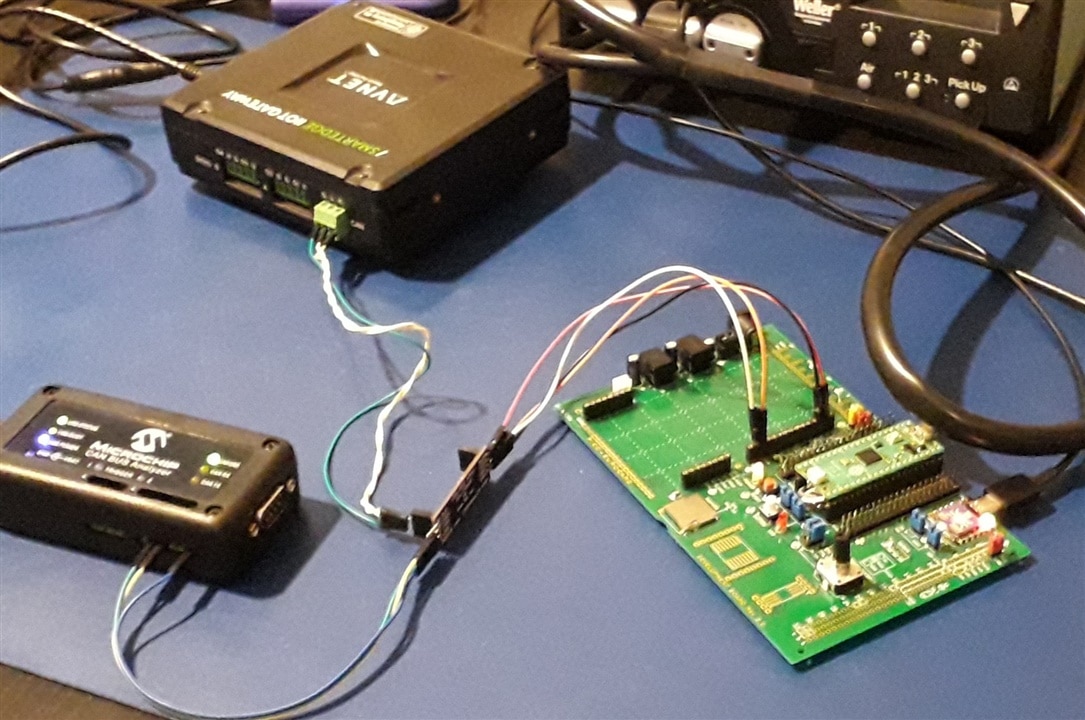
In this post: create a testbed and prove that I can receive CAN traffic.

image

The purpose of this blog isn't to write a PIO developer tutorial. I'm trying to backtrack how the developer implemented a standard protocol using the PIO instructions. I'm using C, CMake, VSCode and the Pico C SDK. Expected skill level: you can build and run the official pico-examples.

In a usual situation (skipping OSI here) CAN has two layers:

  • the logic - TTL, 5V, 3.3V, ... digital, implemented by somethings smart, like a peripheral, controller bit-banging, in this case the PIO state machine.
  • the bus, a physical layer usually implemented with driver/tranceiver ICs. I will use a physical driver IC here, an own little design that I use a lot. 
    You can also make your own Poor Man's CAN Driver, using only common resistors and diodes. 

As communication peers, I use two other CAN capable devices: A Raspberry Pi derivate with a CAN peripheral, and a Microchip CAN Bus analyser. An Arduino (MKR) with CAN shield works too. 

image

This post does not look into the code. It's just a test bed so that I can see if I can set up a CAN conversation. 

Get the can2040 library

Clone or download the sources from Kevin's github. 

git clone https://github.com/KevinOConnor/can2040.git

Set an environment variable that points to this location. This will take care that we can create a make script that's not dependent on where you keep 3rd party code. I'm using VSCode, and will define the environment variable there. You can also do it in your OS settings, shell script, ...
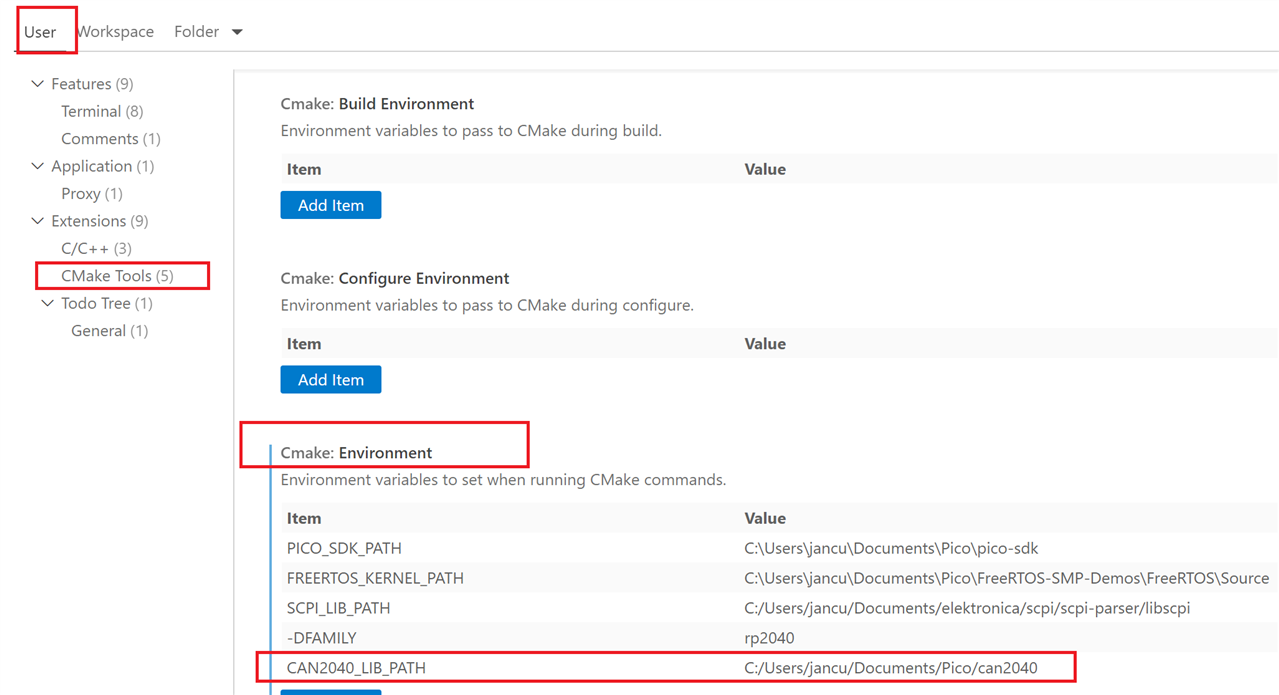
image

Project Folder

I created a directory with a CMake file, and a src folder to contain the very simple test file (taken from here, but I referenced the can2040 sources instead of importing them in the project).

src/main.c

// source: https://gitea.predevolution-technologies.de/anme/CAN2040_Test

#include <stdio.h>
#include <stdint.h>
#include "pico/stdlib.h"
#include "pico/binary_info.h"
#include "hardware/irq.h"
#include "can2040.h"
#include "RP2040.h"

static struct can2040 cbus;

static void can2040_cb(struct can2040 *cd, uint32_t notify, struct can2040_msg *msg)
{
    // Add message processing code here...
}

static void PIOx_IRQHandler(void)
{
    can2040_pio_irq_handler(&cbus);
}

void canbus_setup(void)
{
    uint32_t pio_num = 0;
    uint32_t sys_clock = 125000000, bitrate = 125000;
    uint32_t gpio_rx = 14, gpio_tx = 15;

    // Setup canbus
    can2040_setup(&cbus, pio_num);
    can2040_callback_config(&cbus, can2040_cb);

    // Enable irqs
    irq_set_exclusive_handler(PIO0_IRQ_0_IRQn, PIOx_IRQHandler);
    NVIC_SetPriority(PIO0_IRQ_0_IRQn, 1);
    NVIC_EnableIRQ(PIO0_IRQ_0_IRQn);

    // Start canbus
    can2040_start(&cbus, sys_clock, bitrate, gpio_rx, gpio_tx);
}

int main(void){

    const uint LED_PIN = PICO_DEFAULT_LED_PIN;
    gpio_init(LED_PIN);
    gpio_set_dir(LED_PIN, GPIO_OUT);
    int32_t ledState = 0;
    stdio_init_all();
    
    canbus_setup();

    while(1){
        printf("bla\n");
        gpio_put(LED_PIN, ledState);
        if (ledState == 0){
                ledState = 1;
            }
        else{
            ledState = 0;
        }
        sleep_ms(1000);
    }
}

./CMakeList.txt

cmake_minimum_required(VERSION 3.13)

# Pull in SDK (must be before project)
include(pico_sdk_import.cmake)

project(can2040_project0 C CXX ASM)
set(CMAKE_C_STANDARD 11)
set(CMAKE_CXX_STANDARD 17)

#I've set this to allow breakpoints on any source line
set(PICO_DEOPTIMIZED_DEBUG=1)

pico_sdk_init()


add_executable(can2040_project0
        source/main.c
        $ENV{CAN2040_LIB_PATH}/src/can2040.c
        )

target_include_directories(can2040_project0 PRIVATE
        ${CMAKE_CURRENT_LIST_DIR}/source
        $ENV{CAN2040_LIB_PATH}/src
        )


target_link_libraries(can2040_project0 pico_stdlib cmsis_core)

pico_add_extra_outputs(can2040_project0)

side bar: Pico PIO and other predictive, time critical, co-processors

The Pico PIO state machines are little co-controllers that execute each instruction at a predictable speed.
This type of controllers are never interrupted, don't listen to interrupts (but can fire them). They just clock along reliably and execute their little program.
Usually, they have fast access to some GIO pins.

There are a few other controllers and processors that have similar functionality:
The TI Hercules microcontroller has high-end timers. Very similar to the Pico PIO engines, but the Hercules instruction has additional support for angles, phases, ... (things you use for multi-phase power and for motor driving)
The (also TI) BeagleBone has PRU, a real time programmable unit. Also very close to what the Pico PIO engines have. With direct access to the memory and the DMA engine.
What all 3 have in common, is that they can not only generate well-timed signals. They can also sample input signals. And they are ultra-flexible timers that can handle counts, phase shifts, quadrature encoding, ..)

Testing

I started a debug session, with a breakpoint at the can2040_cb() callback function. From one of my other devices, I sent a CAN message:

image

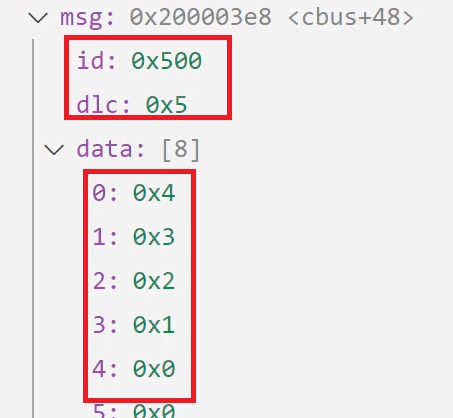
The RP2040 stops at the breakpoint, and I can see the message ID, DLC (length) and payload:
image

I'm attaching a ZIP of my VSCode project. Don't forget to download the can2040 source and set the environment variable.

can2040_project0_20221104.zip

  • Sign in to reply
  • dang74
    dang74 over 3 years ago

    I haven't used the RP2040 yet, but the PICO PIO state machine feature you mention sounds pretty interesting.

    • Cancel
    • Vote Up 0 Vote Down
    • Sign in to reply
    • More
    • Cancel
  • Jan Cumps
    Jan Cumps over 3 years ago in reply to shabaz

    It can send and receive messages. And mock payloads for sending.
    It's a great device, I have it from a road test. The value is excellent.

    Could it be more? yes, and Microchip intended it to be better. To support message filtering and triggering. But after the (acceptable) incomplete release, they (unacceptably) abandoned it.

    • Cancel
    • Vote Up 0 Vote Down
    • Sign in to reply
    • More
    • Cancel
  • shabaz
    shabaz over 3 years ago

    Nice work! 

    That CAN bus analyzer tool looks interesting too. Can it send messages too?

    • Cancel
    • Vote Up 0 Vote Down
    • Sign in to reply
    • More
    • Cancel
  • Jan Cumps
    Jan Cumps over 3 years ago

    I'm using the term VSCode in this blog a few times, but you don't need it.

    As long as you have CMake, Make and a GNU GCC toolchain compatible with the RP2040, you are good to go. 
    Maybe try CLion. It's an IDE I want to learn...

    • Cancel
    • Vote Up 0 Vote Down
    • Sign in to reply
    • More
    • Cancel
<
element14 Community

element14 is the first online community specifically for engineers. Connect with your peers and get expert answers to your questions.

  • Members
  • Learn
  • Technologies
  • Challenges & Projects
  • Products
  • Store
  • About Us
  • Feedback & Support
  • FAQs
  • Terms of Use
  • Privacy Policy
  • Legal and Copyright Notices
  • Sitemap
  • Cookies

An Avnet Company © 2026 Premier Farnell Limited. All Rights Reserved.

Premier Farnell Ltd, registered in England and Wales (no 00876412), registered office: Farnell House, Forge Lane, Leeds LS12 2NE.

ICP 备案号 10220084.

Follow element14

  • X
  • Facebook
  • linkedin
  • YouTube