



element14 Community
element14 Community
    Register Log In
  • Site
  • Search
  • Log In Register
  • Community Hub
    Community Hub
    • What's New on element14
    • Feedback and Support
    • Benefits of Membership
    • Personal Blogs
    • Members Area
    • Achievement Levels
  • Learn
    Learn
    • Ask an Expert
    • eBooks
    • element14 presents
    • Learning Center
    • Tech Spotlight
    • STEM Academy
    • Webinars, Training and Events
    • Learning Groups
  • Technologies
    Technologies
    • 3D Printing
    • FPGA
    • Industrial Automation
    • Internet of Things
    • Power & Energy
    • Sensors
    • Technology Groups
  • Challenges & Projects
    Challenges & Projects
    • Design Challenges
    • element14 presents Projects
    • Project14
    • Arduino Projects
    • Raspberry Pi Projects
    • Project Groups
  • Products
    Products
    • Arduino
    • Avnet & Tria Boards Community
    • Dev Tools
    • Manufacturers
    • Multicomp Pro
    • Product Groups
    • Raspberry Pi
    • RoadTests & Reviews
  • About Us
    About the element14 Community
  • Store
    Store
    • Visit Your Store
    • Choose another store...
      • Europe
      •  Austria (German)
      •  Belgium (Dutch, French)
      •  Bulgaria (Bulgarian)
      •  Czech Republic (Czech)
      •  Denmark (Danish)
      •  Estonia (Estonian)
      •  Finland (Finnish)
      •  France (French)
      •  Germany (German)
      •  Hungary (Hungarian)
      •  Ireland
      •  Israel
      •  Italy (Italian)
      •  Latvia (Latvian)
      •  
      •  Lithuania (Lithuanian)
      •  Netherlands (Dutch)
      •  Norway (Norwegian)
      •  Poland (Polish)
      •  Portugal (Portuguese)
      •  Romania (Romanian)
      •  Russia (Russian)
      •  Slovakia (Slovak)
      •  Slovenia (Slovenian)
      •  Spain (Spanish)
      •  Sweden (Swedish)
      •  Switzerland(German, French)
      •  Turkey (Turkish)
      •  United Kingdom
      • Asia Pacific
      •  Australia
      •  China
      •  Hong Kong
      •  India
      •  Japan
      •  Korea (Korean)
      •  Malaysia
      •  New Zealand
      •  Philippines
      •  Singapore
      •  Taiwan
      •  Thailand (Thai)
      •  Vietnam
      • Americas
      •  Brazil (Portuguese)
      •  Canada
      •  Mexico (Spanish)
      •  United States
      Can't find the country/region you're looking for? Visit our export site or find a local distributor.
  • Translate
  • Profile
  • Settings
Raspberry Pi
  • Products
  • More
Raspberry Pi
Blog Raspberry Pi speaks 1-wire with Adafruit's Occidentalis image
  • Blog
  • Forum
  • Documents
  • Quiz
  • Events
  • Polls
  • Files
  • Members
  • Mentions
  • Sub-Groups
  • Tags
  • More
  • Cancel
  • New
Join Raspberry Pi to participate - click to join for free!
Featured Articles
Announcing Pi
Technical Specifications
Raspberry Pi FAQs
Win a Pi
GPIO Pinout
Raspberry Pi Wishlist
Comparison Chart
Quiz
  • Share
  • More
  • Cancel
Group Actions
  • Group RSS
  • More
  • Cancel
Engagement
  • Author Author: fustini
  • Date Created: 8 Aug 2012 5:45 PM Date Created
  • Views 3937 views
  • Likes 0 likes
  • Comments 14 comments
Related
Recommended
  • ladyada
  • raspberry_pi
  • 1wire
  • raspberrypi
  • adafruit

Raspberry Pi speaks 1-wire with Adafruit's Occidentalis image

fustini
fustini
8 Aug 2012

Adafruit recently released their own Raspberry Pi image, Occidentalis v0.1:

http://learn.adafruit.com/system/assets/assets/000/001/532/medium800/occidentalis.png?1343962191

This is our first distro,  Occidentalis v0.1. Rubus occidentalis is the black raspberry.  It is derived from Raspbian Wheezy July 15


We have made a few key changes to make it more hardware-hacker friendly!

  • Updated to Hexxeh firmware
  • 4 Gig SD image (will not fit in 2 G cards!)
  • I2C and hardware SPI support
  • I2C/SPI modules initialized on boot
  • sshd on boot
  • ssh keygen on first boot
  • runs ahavi daemon (Bonjour client) and is called raspberrypi.local
  • Realtek RTL8188CUS wifi support
  • One wire support on GPIO #4 when loaded


I thought that looked like a nice list of improvements.  I'd already been using I2C with bootc.net's image, but the new 1-wire support piqued my interest.  I downloaded & flashed the Occidentalis image onto a SD card and then booted up:
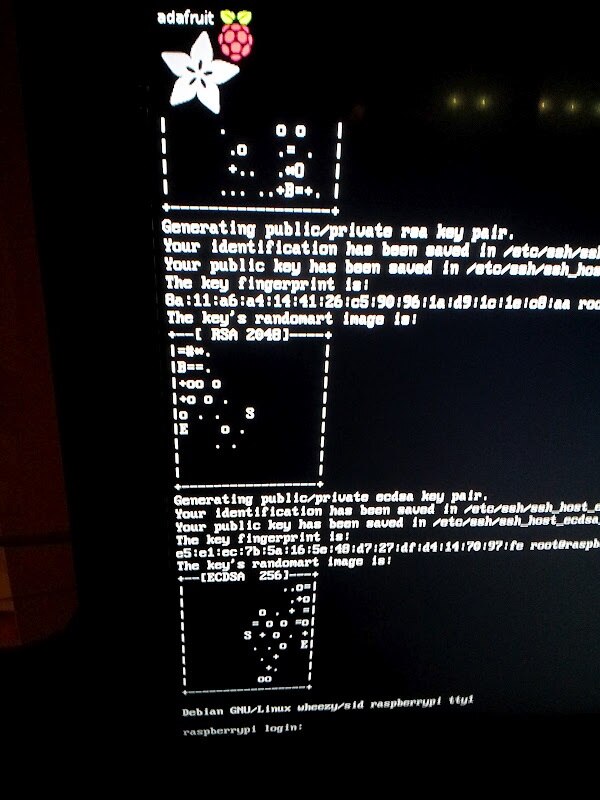
image

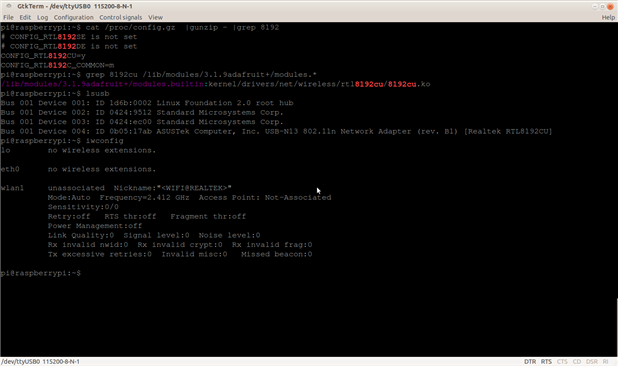
The login is the usual pi/raspberry.  Before I tested out 1-wire, I thought I would check to see if my Asus USB-N13 was supported as Adafruit compiled the driver it needs, rtl8192cu, into the kernel in their image.  To my delight, the USB-N13 was immediately recognized (unlike with the "regular" Raspbian Wheezy image):
image

Alright, on to some electronics!  The Occidentalis page states about 1-wire:

One wire is most commonly used for DS18B20 temp sensors. The Pi does not have 'hardware' 1-wire support but it can bitbang it with some success.

The page also highlights the commit that makes it possible:


Dallas one wire interface with the Linux w1 GPIO bitbanging implementation on GPIO 4


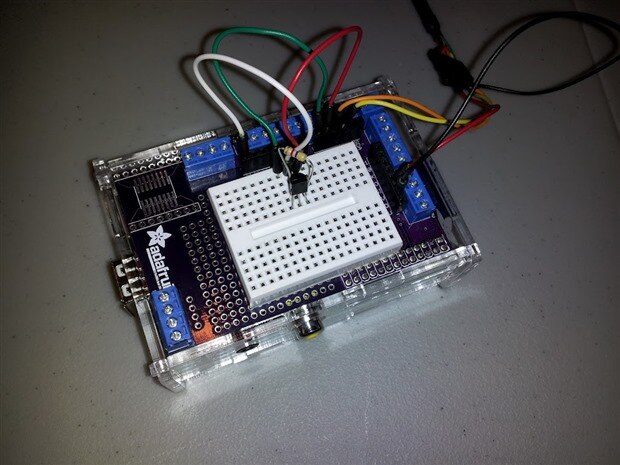
I already had the DS18B20 temperature sensors, so I just hooked it up as the page described:

Connect a DS18B20 with VCC to 3V, ground to ground and Data to GPIO #4. Then connect a 4.7K resistor from Data to VCC.
image

(note: I'm using the Adafruit Pi Plate on top of Raspberry Pi to make the connections; FTDI cable for serial console is also pictured)


I continued to follow the documentation:

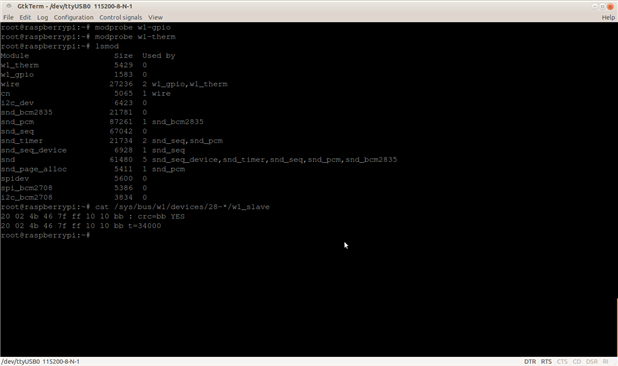
Then run as root: modprobe w1-gpio and then modprobe w1-therm to attach the temperature submodule. Then you can run cat /sys/bus/w1/devices/28-*/w1_slave to read the temperature data from the bus


The first line has the CRC, if its "NO" then the data is corrupted. If you get a good CRC check, the second line has t=temperature in 1/100 of a degree Centigrade. For example, below, the temperature is 24.5°C


Since 1-wire is bitbanged, its flakier than SPI or I2C.  We do not have any 1-wire tutorials for the RPi at this time

Here is a screenshot of my results:
image

The temperature value was 34000 which I believe would mean 34 C or 93 F.  This seems hotter than it actually was, so I'm planning to verify the results with the I2C TMP102 temp sensor next to the DS18B20.


Cheers,

Drew

  • Sign in to reply

Top Comments

  • morgaine
    morgaine over 13 years ago +1
    It was very interesting for me to see your article Drew, as I've had a soft spot for 1-Wire and iButtons since the early 90's and have lots of such devices here, mostly early serial number and storage…
  • dharr19
    dharr19 over 13 years ago in reply to fustini

    Is 1-Wire a thing (proper noun) given to devices that can send data, power or signals over 1 line?


    Cheers

    David

    • Cancel
    • Vote Up 0 Vote Down
    • Sign in to reply
    • More
    • Cancel
  • daloele
    daloele over 13 years ago

    Anyone interested in 1-wire ought to be aware of owfs, a long-running project supporting 1-wire networks. People have reported running it on a raspberry pi.

    • Cancel
    • Vote Up 0 Vote Down
    • Sign in to reply
    • More
    • Cancel
  • fustini
    fustini over 13 years ago in reply to Former Member

    Interesting... I'm at loss to see what the difference is.  I see you posted over on the Adafruit's forum: http://forums.adafruit.com/viewtopic.php?f=50&t=31774 so hopefully they'll have some suggestion after seeing you latest screenshots.


    one last note from my testing: I tried the ds18b20 out with my Arduino last night, too.  I noticed with Arduino I could either ground pin 3 (Vdd) or connect it to 5V or 3.3V on the Arduino and it would still work.  I think when Vdd is grounded, then the ds18b20 operates in parasitic power mode (data pin still needs to be pulled up).  However, it would only work on the Pi for me when I had Vdd connected to 3.3V which means I guess it doesn't support parasitic power mode for some reason.

    • Cancel
    • Vote Up 0 Vote Down
    • Sign in to reply
    • More
    • Cancel
  • Former Member
    Former Member over 13 years ago

    here is the "lsmode"" and "dmesg | tail -20" messages.

    image

    and proof, that it's connected fine, Raspbian + Frank Buss kernel, 2 sensors connected

    image

    • Cancel
    • Vote Up 0 Vote Down
    • Sign in to reply
    • More
    • Cancel
  • fustini
    fustini over 13 years ago

    I tried to use the sensors utility to read the I2C TMP102, but this did not work in Adafruit's image:

    image

    I then booted with bootc.net's image and was able to run sensors (see: Temperature sensing with the Raspberry Pi):

    image

    Booting again with the Adafruit image, I was able to verify the temperature reported by the 1-wire DS18B20 was very close to the I2C TMP102:

    image

    • Cancel
    • Vote Up 0 Vote Down
    • Sign in to reply
    • More
    • Cancel
<>
element14 Community

element14 is the first online community specifically for engineers. Connect with your peers and get expert answers to your questions.

  • Members
  • Learn
  • Technologies
  • Challenges & Projects
  • Products
  • Store
  • About Us
  • Feedback & Support
  • FAQs
  • Terms of Use
  • Privacy Policy
  • Legal and Copyright Notices
  • Sitemap
  • Cookies

An Avnet Company © 2026 Premier Farnell Limited. All Rights Reserved.

Premier Farnell Ltd, registered in England and Wales (no 00876412), registered office: Farnell House, Forge Lane, Leeds LS12 2NE.

ICP 备案号 10220084.

Follow element14

  • X
  • Facebook
  • linkedin
  • YouTube