element14 Community
element14 Community
    Register Log In
  • Site
  • Search
  • Log In Register
  • Community Hub
    Community Hub
    • What's New on element14
    • Feedback and Support
    • Benefits of Membership
    • Personal Blogs
    • Members Area
    • Achievement Levels
  • Learn
    Learn
    • Ask an Expert
    • eBooks
    • element14 presents
    • Learning Center
    • Tech Spotlight
    • STEM Academy
    • Webinars, Training and Events
    • Learning Groups
  • Technologies
    Technologies
    • 3D Printing
    • FPGA
    • Industrial Automation
    • Internet of Things
    • Power & Energy
    • Sensors
    • Technology Groups
  • Challenges & Projects
    Challenges & Projects
    • Design Challenges
    • element14 presents Projects
    • Project14
    • Arduino Projects
    • Raspberry Pi Projects
    • Project Groups
  • Products
    Products
    • Arduino
    • Avnet & Tria Boards Community
    • Dev Tools
    • Manufacturers
    • Multicomp Pro
    • Product Groups
    • Raspberry Pi
    • RoadTests & Reviews
  • About Us
    About the element14 Community
  • Store
    Store
    • Visit Your Store
    • Choose another store...
      • Europe
      •  Austria (German)
      •  Belgium (Dutch, French)
      •  Bulgaria (Bulgarian)
      •  Czech Republic (Czech)
      •  Denmark (Danish)
      •  Estonia (Estonian)
      •  Finland (Finnish)
      •  France (French)
      •  Germany (German)
      •  Hungary (Hungarian)
      •  Ireland
      •  Israel
      •  Italy (Italian)
      •  Latvia (Latvian)
      •  
      •  Lithuania (Lithuanian)
      •  Netherlands (Dutch)
      •  Norway (Norwegian)
      •  Poland (Polish)
      •  Portugal (Portuguese)
      •  Romania (Romanian)
      •  Russia (Russian)
      •  Slovakia (Slovak)
      •  Slovenia (Slovenian)
      •  Spain (Spanish)
      •  Sweden (Swedish)
      •  Switzerland(German, French)
      •  Turkey (Turkish)
      •  United Kingdom
      • Asia Pacific
      •  Australia
      •  China
      •  Hong Kong
      •  India
      •  Japan
      •  Korea (Korean)
      •  Malaysia
      •  New Zealand
      •  Philippines
      •  Singapore
      •  Taiwan
      •  Thailand (Thai)
      •  Vietnam
      • Americas
      •  Brazil (Portuguese)
      •  Canada
      •  Mexico (Spanish)
      •  United States
      Can't find the country/region you're looking for? Visit our export site or find a local distributor.
  • Translate
  • Profile
  • Settings
Raspberry Pi
  • Products
  • More
Raspberry Pi
Blog Raspberry PIO stepper library documentation - 5: simple ramp up and down
  • Blog
  • Forum
  • Documents
  • Quiz
  • Events
  • Polls
  • Files
  • Members
  • Mentions
  • Sub-Groups
  • Tags
  • More
  • Cancel
  • New
Join Raspberry Pi to participate - click to join for free!
Featured Articles
Announcing Pi
Technical Specifications
Raspberry Pi FAQs
Win a Pi
GPIO Pinout
Raspberry Pi Wishlist
Comparison Chart
Quiz
  • Share
  • More
  • Cancel
Group Actions
  • Group RSS
  • More
  • Cancel
Engagement
  • Author Author: Jan Cumps
  • Date Created: 11 May 2025 10:39 AM Date Created
  • Views 2906 views
  • Likes 9 likes
  • Comments 20 comments
Related
Recommended
  • raspberry
  • pico_pio_stepper_lib
  • pico
  • PIO

Raspberry PIO stepper library documentation - 5: simple ramp up and down

Jan Cumps
Jan Cumps
11 May 2025

Raspberry PIO stepper library (pio_stepper_lib) is a C++ library that runs stepper motors in PIO state machines. It's intended to be easy to integrate and use in Pico projects.

In this post: create ramps when motor starts, stops or changes direction.

The stepper motor is controlled by a PIO state machine. The Pico ARM (or RISC) cores are free at that time. While PIO is handling a command, we can use the cores to calculate if the next command is part of a direction change (or stop). And then slow down the motor for a smooth switch.

 image

The ramp logic is part of your firmware. It's not a stepper library function. It shows how you can use the library in complex scenarios, and use the cores to calculate the ideal path while PIO looks after the motor.

Ramp Logic

A stepper motor, when under load or at high speed, performs best if you ramp its stepping speed up and down. A motor will only be able to perform at its maximum, if you give it a little bump to reach. If you don't ramp, your motor may skip steps, overstep, or not step at all. Ramping up and down also makes movements less jerky.

When is a ramp advised?

  • motor start
  • motor changes direction
  • motor stop

Because the stepper library can handle a batch of commands, we can look forward in the command stack to see if we are dealing with a direction change. And because the controller is doing nothing while a motor is running, we can do this exercise for the next command, while we're running the current command. (even if the motor has to do a single step, there's ample time to do this)

You don't have permission to edit metadata of this video.
Edit media
x
image
Upload Preview
image

video: a linear stepper motor executing the example code on repeat. It ramps up and down at start, end, and at direction switching

Border conditions:

We can see inside a stack of commands if we are involved in a direction change, but we don't know how a previous batch ended, or how a new batch will start. That's why the logic has two parameters for first and last commands. If you pass true, the motor will ramp up / down. If you pass false, it will start or end at its high speed.

Software

This is the stack of commands that the motor has to perform:

    std::array<stepper::command, 12> cmd{{
        {10 * microstep_x, false},
        {40 * microstep_x, false},
        {10 * microstep_x, false},
        {10 * microstep_x, true},
        {100 * microstep_x, true},
        {10 * microstep_x, true},
        {10 * microstep_x, false},
        {100 * microstep_x, false},
        {10 * microstep_x, false},
        {10 * microstep_x, true},
        {40 * microstep_x, true},
        {10 * microstep_x, true}}};

I've prepared them for this exercise. The firmware should run every first and last command in a particular direction, at the low (ramp) speed. Commands that are in between other commands in the same direction, should run at high speed. I wrote down the direction of each command, and tried to find a pattern that's easily translated into software.

image

  • x: involved in direction change (previous, next, or both different direction
  • blank: same direction as previous and next
  • !: start or stop: we do what the programmer asks us

I chose this algorithm: If the flags of the before, current and after direction are added up for the next command, and the sum is 0 or 3, there is no direction change. Else there is.

Translated into code:

void run_with_ramp(const commands_t & cmd, uint32_t slow_delay, uint32_t fast_delay, bool start_slow, bool end_slow) {
    bool ramp = start_slow;
    bool next_ramp_found = false;
    unsigned int bits = 0U;

    for (size_t i = 0U; i < cmd.size(); i++) {
        motor1.set_delay(ramp ? slow_delay : fast_delay);
        motor1.take_steps(cmd[i]);
        while (motor1.commands() < 1) {  // motor has to complete before we can send another delay command
            // use motor run time to calculate next speed
            if (! next_ramp_found) {
                ramp = end_slow; // by default, think it's the last command
                if (i < cmd.size() - 2) { // if not, find if dir is changed or will change
                    // check if next command has different direction
                    bits = (cmd[i] & 1) + (cmd[i + 1] & 1) + (cmd[i + 2] & 1); // compare dir bits
                    if (! (bits % 3)) { // in a dir change cycle, unless prev, cur and next command identical
                        ramp = false; // go fast
                    }
                }
                next_ramp_found = true;
            }
        }
        next_ramp_found = false;
        motor1.reset_commands();
    }
}

When you look at the code, take in mind that it always tries to figure out if the next command needs to be ramped.
In that context, cmd[i] (the one that's currently being executed by PIO) is the previous step, cmd[i + 1] is the one we are investigating, and cmd[i + 2] is going to be the step after that.

To run the batch of commands:

run_with_ramp(cmd, 7000, 4300, true, true);

When you add this line in the loop, when the evaluation is done:

printf("next step: %d, checksum: %d, ramp: %s\n", i + 1, bits, bits %3 ? "yes" : "no");

You get this output (step 0 and 11 are determined by the start_slow and end_slow parameters. They aren't shown below):

delays: slow = 7000, fast = 4300
next step: 1, checksum: 3, ramp: no
next step: 2, checksum: 2, ramp: yes
next step: 3, checksum: 1, ramp: yes
next step: 4, checksum: 0, ramp: no
next step: 5, checksum: 1, ramp: yes
next step: 6, checksum: 2, ramp: yes
next step: 7, checksum: 3, ramp: no
next step: 8, checksum: 2, ramp: yes
next step: 9, checksum: 1, ramp: yes
next step: 10, checksum: 0, ramp: no

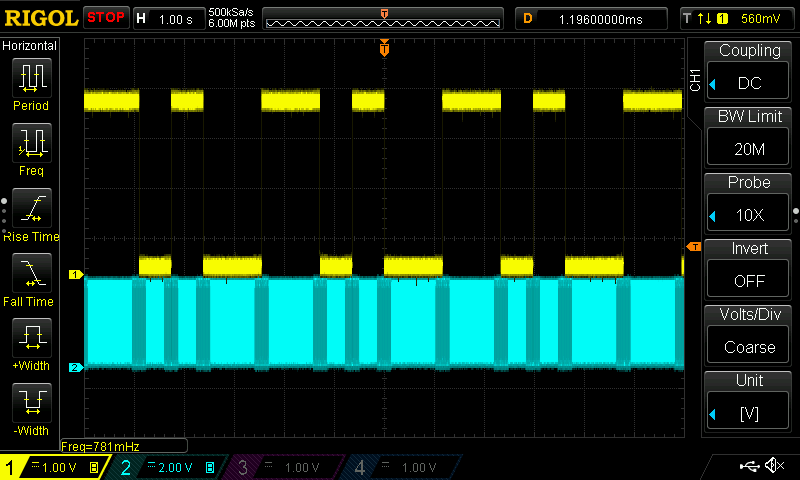
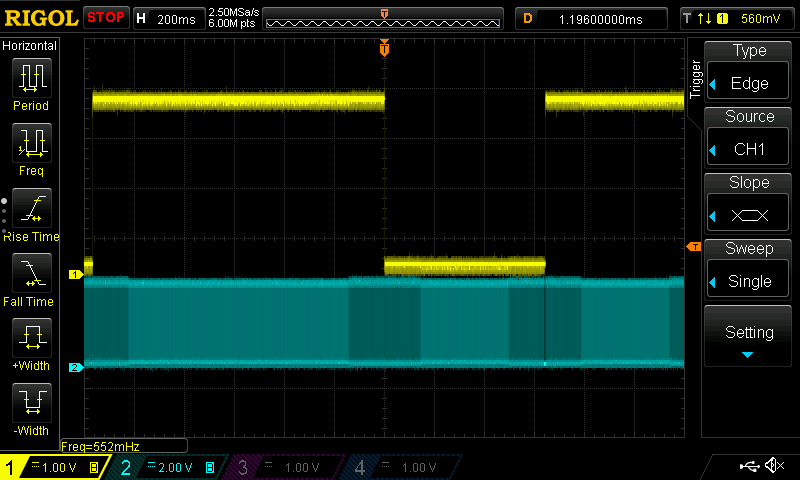
The oscilloscope capture of DIR (yellow) and STEP (blue) shows the behaviour at a direction change:
image
the black line before the last quarter of the image above is a 1ms pause I intentionally put there in my test code, to get a hint when a batch starts
image
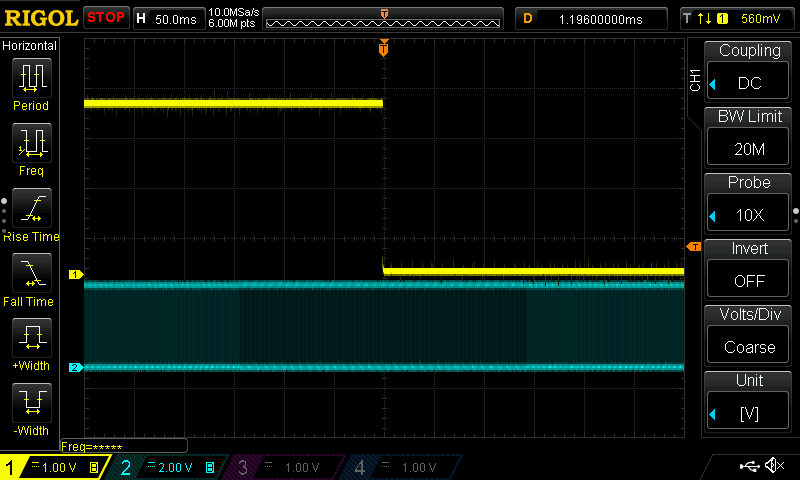
zoom in to a direction change with slow-down before and after. The firmware defines how many steps both part of the ramp last.

This example uses a rough ramp-up: slow speed and high speed. You can define how many slow steps it takes. In many cases that's enough to get the motor going. But there's enough core time available to construct more advanced up- and down-ramps. You could even write an algorithm that pre-analyses a set of commands, and compiles them into a new set with ideal (for your scenario) ramp patterns.

CMake project, with precompiled .uf2 file: pio_a4988_stepper_ramp_20250511.zip

view all posts

  • Sign in to reply

Top Comments

  • Jan Cumps
    Jan Cumps over 1 year ago +1
    First attempt for a more trapezoidal(ish) ramp: https://youtu.be/AyNQrvEplDw This (very early) attempt takes core (non-PIO) processor time. How do you ramp, as a library user? {{400 * microstep_x…
  • genebren
    genebren over 1 year ago in reply to Jan Cumps

    One approach to offloading the computations is to build a table at the initialization point and then to simply step through the table in real-time. For stepper projects in the past, we built all of the stepper controls into an FPGA and then we would command a move with a profile, and allow the FPGA to do the work.

    • Cancel
    • Vote Up 0 Vote Down
    • Sign in to reply
    • More
    • Cancel
  • Jan Cumps
    Jan Cumps over 1 year ago in reply to genebren

    To get the most out of steppers, it would be ideal to have flexible ramp curves for start, stop and direction switch (and even for speed change). 
    I'm currently doing this particular part in microcontroller cores (not in PIO state machines) because they take more calculation (and FIFO bandwidth) than any other part of stepper motor control. Even a simple linear autonomous ramp up / down requires a number of variables and registers just to hold the thresholds. That's without taking into account the assembly language commands to perform mall of this.
    Currently I use 11 of the available 32 instructions. I may be able to add some naive linear ramping - at the cost of the number of commands you can send to a motor in batch. Maybe.

    • Cancel
    • Vote Up 0 Vote Down
    • Sign in to reply
    • More
    • Cancel
  • genebren
    genebren over 1 year ago

    Ramping is a great approach to moving steppers.  It also a useful approach of working with servos.  I have created some projects around using servos in animatronic devices.  Some of these devices have a significant amount of mass connected to them and benefit greatly from soft starting/stopping.  Here is a captured trace of some multiple axis movements that use ramping start/stops, with fixed rate movements to create smooth motions:

     image

    • Cancel
    • Vote Up 0 Vote Down
    • Sign in to reply
    • More
    • Cancel
  • Jan Cumps
    Jan Cumps over 1 year ago

    a trace without pauses or prinf()s shows that this runs smooth.

    In this ramp example, several times the cores have to take over from PIO (we trickle-feed commands one by one). But it's unnoticeable, given the low speed of the stepper pulses:

    image

    • Cancel
    • Vote Up 0 Vote Down
    • Sign in to reply
    • More
    • Cancel
  • Jan Cumps
    Jan Cumps over 1 year ago

    This simple pattern, with a single step ramp up-and down speed, makes it possible to run the stepper at higher speed.

    The fast movement below was not achievable when I used a single fixed speed for all commands:

    You don't have permission to edit metadata of this video.
    Edit media
    x
    image
    Upload Preview
    image

    • Cancel
    • Vote Up 0 Vote Down
    • Sign in to reply
    • More
    • Cancel
<
element14 Community

element14 is the first online community specifically for engineers. Connect with your peers and get expert answers to your questions.

  • Members
  • Learn
  • Technologies
  • Challenges & Projects
  • Products
  • Store
  • About Us
  • Feedback & Support
  • FAQs
  • Terms of Use
  • Privacy Policy
  • Legal and Copyright Notices
  • Sitemap
  • Cookies

An Avnet Company © 2026 Premier Farnell Limited. All Rights Reserved.

Premier Farnell Ltd, registered in England and Wales (no 00876412), registered office: Farnell House, Forge Lane, Leeds LS12 2NE.

Follow element14

  • X
  • Facebook
  • linkedin
  • YouTube