element14 Community
element14 Community
    Register Log In
  • Site
  • Search
  • Log In Register
  • Community Hub
    Community Hub
    • What's New on element14
    • Feedback and Support
    • Benefits of Membership
    • Personal Blogs
    • Members Area
    • Achievement Levels
  • Learn
    Learn
    • Ask an Expert
    • eBooks
    • element14 presents
    • Learning Center
    • Tech Spotlight
    • STEM Academy
    • Webinars, Training and Events
    • Learning Groups
  • Technologies
    Technologies
    • 3D Printing
    • FPGA
    • Industrial Automation
    • Internet of Things
    • Power & Energy
    • Sensors
    • Technology Groups
  • Challenges & Projects
    Challenges & Projects
    • Design Challenges
    • element14 presents Projects
    • Project14
    • Arduino Projects
    • Raspberry Pi Projects
    • Project Groups
  • Products
    Products
    • Arduino
    • Avnet & Tria Boards Community
    • Dev Tools
    • Manufacturers
    • Multicomp Pro
    • Product Groups
    • Raspberry Pi
    • RoadTests & Reviews
  • About Us
  • Store
    Store
    • Visit Your Store
    • Choose another store...
      • Europe
      •  Austria (German)
      •  Belgium (Dutch, French)
      •  Bulgaria (Bulgarian)
      •  Czech Republic (Czech)
      •  Denmark (Danish)
      •  Estonia (Estonian)
      •  Finland (Finnish)
      •  France (French)
      •  Germany (German)
      •  Hungary (Hungarian)
      •  Ireland
      •  Israel
      •  Italy (Italian)
      •  Latvia (Latvian)
      •  
      •  Lithuania (Lithuanian)
      •  Netherlands (Dutch)
      •  Norway (Norwegian)
      •  Poland (Polish)
      •  Portugal (Portuguese)
      •  Romania (Romanian)
      •  Russia (Russian)
      •  Slovakia (Slovak)
      •  Slovenia (Slovenian)
      •  Spain (Spanish)
      •  Sweden (Swedish)
      •  Switzerland(German, French)
      •  Turkey (Turkish)
      •  United Kingdom
      • Asia Pacific
      •  Australia
      •  China
      •  Hong Kong
      •  India
      • Japan
      •  Korea (Korean)
      •  Malaysia
      •  New Zealand
      •  Philippines
      •  Singapore
      •  Taiwan
      •  Thailand (Thai)
      • Vietnam
      • Americas
      •  Brazil (Portuguese)
      •  Canada
      •  Mexico (Spanish)
      •  United States
      Can't find the country/region you're looking for? Visit our export site or find a local distributor.
  • Translate
  • Profile
  • Settings
Raspberry Pi
  • Products
  • More
Raspberry Pi
Blog Unboxing and first impressions of the Raspberry Pi 2
  • Blog
  • Forum
  • Documents
  • Quiz
  • Events
  • Polls
  • Files
  • Members
  • Mentions
  • Sub-Groups
  • Tags
  • More
  • Cancel
  • New
Join Raspberry Pi to participate - click to join for free!
Featured Articles
Announcing Pi
Technical Specifications
Raspberry Pi FAQs
Win a Pi
GPIO Pinout
Raspberry Pi Wishlist
Comparison Chart
Quiz
  • Share
  • More
  • Cancel
Group Actions
  • Group RSS
  • More
  • Cancel
Engagement
  • Author Author: johan825
  • Date Created: 15 Mar 2015 2:13 PM Date Created
  • Views 2097 views
  • Likes 0 likes
  • Comments 9 comments
Related
Recommended
  • RoadTest
  • raspberry
  • pi
  • 2
  • rpi2
  • raspberry_pi_space

Unboxing and first impressions of the Raspberry Pi 2

johan825
johan825
15 Mar 2015

Last friday the Raspberry Pi 2 Model B 1024MB, a credit card sized single-board computer, arrived from Element14.

First a big thank you to Element14 for letting me RoadTest this product.


In this blog post I will share some unboxing pictures and my initial thoughts.


Unboxing

Box contents and pictures

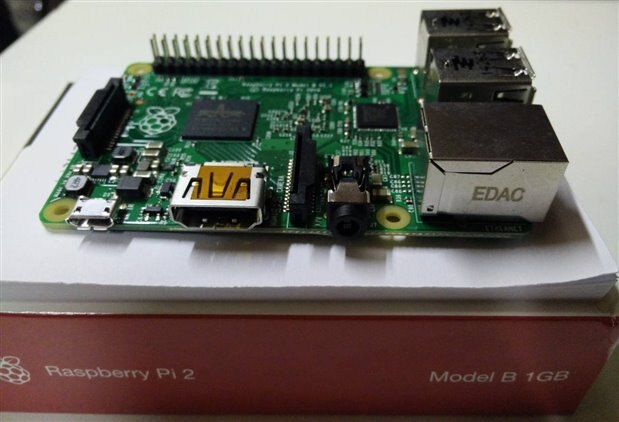
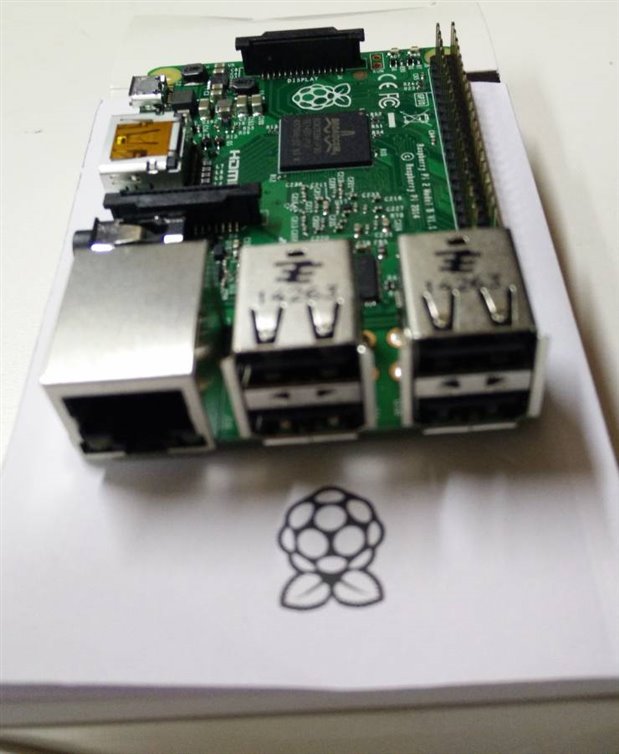
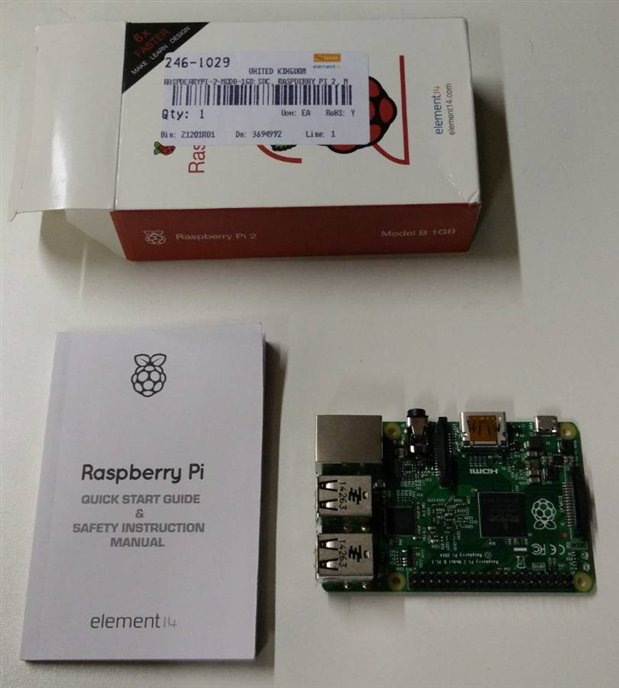
The box contained 2 items:


  • The Raspberry Pi 2 (*)
  • Quick start guide & safety instruction manual

(*) In the pictures the anti static bag, in which the RPi2 came, was already removed
image

image

image


Initial thoughts


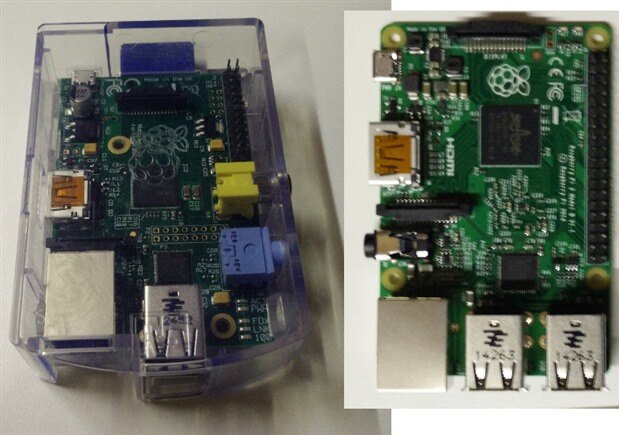
Raspberry Pi B vs. Raspberry Pi 2
image

Design Improvements

  • USB ports are not sticking out anymore
  • Composite video moved to 3,5mm jack
  • No in/output on all sides (RPiB : 3 sides, RPi2 : 2 sides)
  • No SD sticking out due to the replacement of SD with micro SD card

When you look at the design, improvements were made if you compare with the older Raspberry Pi B.

However these improvements were already introduced with the Raspberry Pi Model B plus (the form factor of a RPiB+ and RPi2 are the same).


Additional features

  • Extended GPIO to 40 pins
  • 2 extra USB ports


Enhancements (compared to both RPiB and RPiB+)

  • 900 MHz quad-core CPU (ARMv7) vs. 700MHz single core (ARMv6)
  • 1024MB of RAM vs. 512MB of RAM

More processing power was added by using a quad core CPU. Also because of the ARMv7 instruction set, it can run even more linux distributions (and a special Windows 10 verison).


Possible enhancements which are not (yet) present

  • On/Off, reset buttons
  • Gbit LAN
  • eMMC
  • SATA connector

There are actually a lot of things we can up with which are not present. But does the RPi2 need them to be better?

What I miss the most is an on/off switch, but the RPiB also did not have this. How did I solve this? I use a distribution plug with a separate switch.

And I connect an external HD to the RPi so I do not really need a SATA connector.


Getting started


Do we have everything we need to get started: yes and no.

If you buy the Raspberry Pi 2 keep in mind that the box does not contain everything you need to get started.

You at least need a micro sd card and a 5V micro USB power supply. A HDMI cable can also come in handy if you want to attach a display directly to the Pi.

I still have a 5V 2.1A and a 5V 1A power supply and I already prepared 2 micro sd cards, 1 with OpenELEC and 1 with Raspbian.

You might also considder buying a case.


Do you have questions and or comments? Do you want me to test something specific?

Let me know by posting a comment and/or sending a private message.

  • Sign in to reply

Top Comments

  • clem57
    clem57 over 10 years ago +1
    Nice blog. Can you see if you can overclock yours? Mine did not at 1000 Mhz. Thanks, Clem
  • Former Member
    Former Member over 10 years ago +1
    Looking forward to getting a few of these units. We run a book store in a beach town and visitors are always needing internet access. This will be a great way to provide it while keeping the costs down…
  • johan825
    johan825 over 10 years ago in reply to clem57

    Hi Clem,


    Thanks.

    I overclocked the RPi2 at 1000 Mhz and this does seem to work.

    I've made a new blog post and did some tests with default configuration and with arm_freq=1000 (I read there are also a lot of other parameters to use for overclocking, but I did not use these yet).

    Hope the new blog post contains some useful information for you too.


    Johan


    Edit: Link to the new blog post (once it's approved it will be available).

    • Cancel
    • Vote Up 0 Vote Down
    • Sign in to reply
    • More
    • Cancel
  • clem57
    clem57 over 10 years ago in reply to Former Member

    Ross,

         See link in previous post showing how to connect a laptop and have full screen window access without extra screen and keyboard/mouse.

    Clem

    • Cancel
    • Vote Up 0 Vote Down
    • Sign in to reply
    • More
    • Cancel
  • Former Member
    Former Member over 10 years ago in reply to Former Member

    Almost forgot: with a laptop you also have a builtin screen and keyboard guaranteed

    • Cancel
    • Vote Up 0 Vote Down
    • Sign in to reply
    • More
    • Cancel
  • Former Member
    Former Member over 10 years ago in reply to Former Member

    I mean in a scenario where you don't know what people will be using.  Will it overtax the power provided by the Pi's USB?  You just won't know till you find out.  That being expense clem is correct in using a dongle on a hub, If you are providing the base.  But that's more expense.

    • Cancel
    • Vote Up 0 Vote Down
    • Sign in to reply
    • More
    • Cancel
  • clem57
    clem57 over 10 years ago in reply to Former Member

    craig,

       I have more than one Pi at the moment. One right now has a wireless nano USB dongle EP-N8508 connected on a USB hub. It has been connected to the internet for a couple of months with no problem. See this for more information on networking with Raspberry Pi.


    Edit: For reference (the Nano was about $5-6 and the hub was ~$12 since it was old USB 2.0).

    • Cancel
    • Vote Up 0 Vote Down
    • Sign in to reply
    • More
    • Cancel
>
element14 Community

element14 is the first online community specifically for engineers. Connect with your peers and get expert answers to your questions.

  • Members
  • Learn
  • Technologies
  • Challenges & Projects
  • Products
  • Store
  • About Us
  • Feedback & Support
  • FAQs
  • Terms of Use
  • Privacy Policy
  • Legal and Copyright Notices
  • Sitemap
  • Cookies

An Avnet Company © 2025 Premier Farnell Limited. All Rights Reserved.

Premier Farnell Ltd, registered in England and Wales (no 00876412), registered office: Farnell House, Forge Lane, Leeds LS12 2NE.

ICP 备案号 10220084.

Follow element14

  • X
  • Facebook
  • linkedin
  • YouTube