







Raspberry published a VSCode extension for the Pico family. It's very useful and makes for an easy experience. I use it a lot.
But for projects I publish, I prefer that there is no dependency on either VSCode or the extension. That makes it easier for users and contributors that use another (or no) IDE.
What does the extension do?
- creates ready to use projects, empty or from examples
- downloads toolchains, SDK, debugger, make tools "as required by your project"
- lets you configure the board, which Pico controller, ARM vs RISC-V,
- lets you switch all of those later on
- helps with build, debug
- useful utilities

Why work without extension?
The extension leaves a footprint in your CMake file. Part of the inserted settings, I'd prefer not to have in a makefile that I publish on GitHub: SDK, toolchain and picotool version.
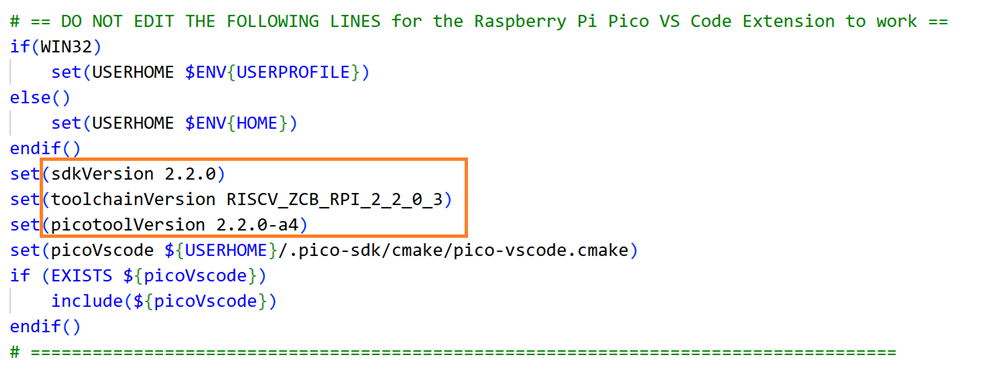
If you work with several users on the same project - or on multiple PCs - it would require that everyone uses the same version of these. While that may not be required for your project. This doesn't work well with version control and team efforts.
The rest of the extension footprint in the CMake file, I don't like either. But it doesn't put any restrictions on users with a different setup - or without the extension. I'm OK with those.
Second reason is that makefiles that don't rely on the extension are easier to use in GitHub Actions (and other continuous integration pipelines).
How do I use it?
I install the extension, because it's the easiest way on a Windows machine to get all required software. And the easiest way in VSCode to create a ready-to-go project.
When I create a project for myself, or something I want to try out, I use the extension. If that project has one single target, I use the full extension. If I want to create multiple firmware binaries (e.g.: an I2C and a SPI variant of the same project), I use the Extension, with CMake Tools enabled.
For a project that goes to GitHub, I use plain CMake scripts, without the extension. In VSCode, I then use the CMake Tools extension to manage toolchains, configure and build the project. This extension doesn't alter your build scripts.
An extension-less CMakeList example
This is an example script. It doesn't have undesired dependency versions in it:
cmake_minimum_required(VERSION 3.28)

set(CMAKE_C_STANDARD 11)
set(CMAKE_CXX_STANDARD 26)
set(CMAKE_EXPORT_COMPILE_COMMANDS ON)
set(CMAKE_CXX_FLAGS "${CMAKE_CXX_FLAGS} -fmodules-ts -fcommon -fno-rtti -fno-exceptions")
set(CMAKE_CXX_STANDARD_REQUIRED ON)

# path to PICO utilities (if needed)
if (NOT DEFINED ENV{PIOASM_DIR})
        message("PIOASM: set PIOASM_DIR env variable if you use PIO")
else()
        message("PIOASM: PIOASM_DIR env variable is set to '$ENV{PIOASM_DIR}'")
        set(pioasm_DIR $ENV{PIOASM_DIR})
endif()
if (NOT DEFINED ENV{PICOTOOL_DIR})
        message("PICOTOOL: set PICOTOOL_DIR env variable if you create uf2 output with pico_add_extra_outputs()")
else()
        message("PICOTOOL: PICOTOOL_DIR env variable is set to '$ENV{PICOTOOL_DIR}'")
        set(picotool_DIR $ENV{PICOTOOL_DIR})
endif()

set(PICO_PLATFORM rp2350-riscv CACHE STRING "Pico Platform")
set(PICO_BOARD pico2_w CACHE STRING "Board type")

include(pico_sdk_import.cmake)

project(pico2_riscv_cmake_example C CXX ASM)

pico_sdk_init()

add_executable(${CMAKE_PROJECT_NAME})
target_sources(${CMAKE_PROJECT_NAME}
        PUBLIC
        ${CMAKE_CURRENT_SOURCE_DIR}/source/main.cpp
)
target_sources(${CMAKE_PROJECT_NAME}
        PUBLIC
        FILE_SET cxx_modules TYPE CXX_MODULES FILES
)

target_link_libraries( ${CMAKE_PROJECT_NAME}
        pico_stdlib
)
There is version info in the fille (line 1 - 4). But they describe either a minimum version, or the standard used. You can use different toolchains or build infra, as long as they offer the required functionality or standard.
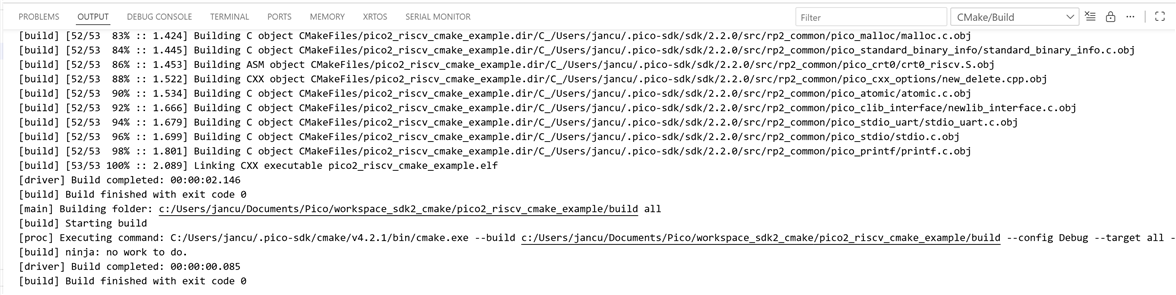
Config needed:
- set the Pico SDK location with PICO_SDK_PATH environment variable
- if you want .uf2 output: set picotool directory with PICOTOOL_DIR
- if you use the PIO controllers, set pioasm directory with PIOASM_DIR
If you use the extension, these are set for you.
You can set them in your operating system, on the CMake command line (with -D<variable>=<value>) or in your IDE, if you use one,
The image below shows how to set them in the VSCode CMake Tools extension:

- debug config : a follow up post, I'll show how to get a PicoProbe / Pi Debug Probe working in VSCode, when a project doesn't use the extension.
Thank you for reading
Top Comments