element14 Community
element14 Community
    Register Log In
  • Site
  • Search
  • Log In Register
  • Community Hub
    Community Hub
    • What's New on element14
    • Feedback and Support
    • Benefits of Membership
    • Personal Blogs
    • Members Area
    • Achievement Levels
  • Learn
    Learn
    • Ask an Expert
    • eBooks
    • element14 presents
    • Learning Center
    • Tech Spotlight
    • STEM Academy
    • Webinars, Training and Events
    • Learning Groups
  • Technologies
    Technologies
    • 3D Printing
    • FPGA
    • Industrial Automation
    • Internet of Things
    • Power & Energy
    • Sensors
    • Technology Groups
  • Challenges & Projects
    Challenges & Projects
    • Design Challenges
    • element14 presents Projects
    • Project14
    • Arduino Projects
    • Raspberry Pi Projects
    • Project Groups
  • Products
    Products
    • Arduino
    • Avnet & Tria Boards Community
    • Dev Tools
    • Manufacturers
    • Multicomp Pro
    • Product Groups
    • Raspberry Pi
    • RoadTests & Reviews
  • About Us
    About the element14 Community
  • Store
    Store
    • Visit Your Store
    • Choose another store...
      • Europe
      •  Austria (German)
      •  Belgium (Dutch, French)
      •  Bulgaria (Bulgarian)
      •  Czech Republic (Czech)
      •  Denmark (Danish)
      •  Estonia (Estonian)
      •  Finland (Finnish)
      •  France (French)
      •  Germany (German)
      •  Hungary (Hungarian)
      •  Ireland
      •  Israel
      •  Italy (Italian)
      •  Latvia (Latvian)
      •  
      •  Lithuania (Lithuanian)
      •  Netherlands (Dutch)
      •  Norway (Norwegian)
      •  Poland (Polish)
      •  Portugal (Portuguese)
      •  Romania (Romanian)
      •  Russia (Russian)
      •  Slovakia (Slovak)
      •  Slovenia (Slovenian)
      •  Spain (Spanish)
      •  Sweden (Swedish)
      •  Switzerland(German, French)
      •  Turkey (Turkish)
      •  United Kingdom
      • Asia Pacific
      •  Australia
      •  China
      •  Hong Kong
      •  India
      •  Japan
      •  Korea (Korean)
      •  Malaysia
      •  New Zealand
      •  Philippines
      •  Singapore
      •  Taiwan
      •  Thailand (Thai)
      •  Vietnam
      • Americas
      •  Brazil (Portuguese)
      •  Canada
      •  Mexico (Spanish)
      •  United States
      Can't find the country/region you're looking for? Visit our export site or find a local distributor.
  • Translate
  • Profile
  • Settings
Raspberry Pi
  • Products
  • More
Raspberry Pi
Raspberry Pi Forum Is the Raspberry B+ GPIO passed through with the Cirrus Audio card?
  • Blog
  • Forum
  • Documents
  • Quiz
  • Events
  • Polls
  • Files
  • Members
  • Mentions
  • Sub-Groups
  • Tags
  • More
  • Cancel
  • New
Join Raspberry Pi to participate - click to join for free!
Featured Articles
Announcing Pi
Technical Specifications
Raspberry Pi FAQs
Win a Pi
Raspberry Pi Wishlist
Actions
  • Share
  • More
  • Cancel
Forum Thread Details
  • Replies 37 replies
  • Subscribers 687 subscribers
  • Views 4411 views
  • Users 0 members are here
  • raspberry_pi
  • raspeberry_pi_accessories
Related

Is the Raspberry B+ GPIO passed through with the Cirrus Audio card?

gkzsolt
gkzsolt over 11 years ago

The previous Wolfson card has a 26 pin header with male pins to connect to the Raspberry GPIO header after pushed on top of it. Does the new audio card do the same for the 40 pin header? Sorry, but I cannot discern from the card images I have.


  • Sign in to reply
  • Cancel
Parents
  • fvan
    fvan over 11 years ago

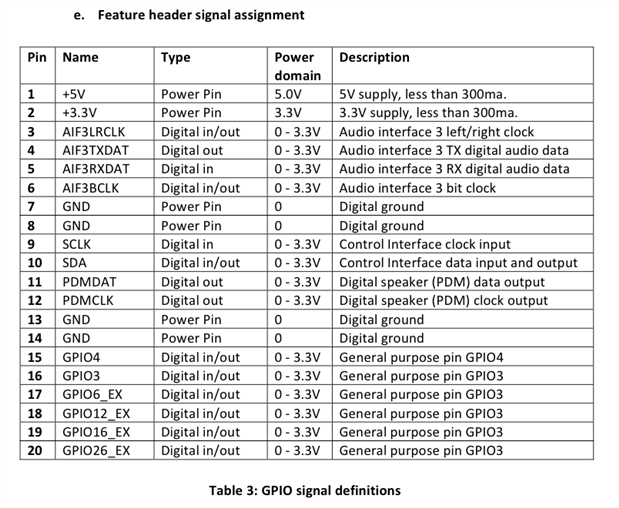
    There is a table in the user manual with the remaining I/O on the expansion header.


    image

    • Cancel
    • Vote Up +1 Vote Down
    • Sign in to reply
    • Cancel
  • tonyhansen
    tonyhansen over 11 years ago in reply to fvan

    In this table (e), pins 16-20 are ALL described as "General Purpose Pin GPIO 3", which looks to me like a copy/paste error from the pin 15 description.


    It would be nicer if table (e) were to read:


    PinNameType

    Power

    Domain

    Description
    17GPIO6_EXDigital In/Out0 - 3.3VRPI General Purpose Pin GPIO6 (RPI pin 31)
    18GPIO12_EXDigital In/Out0 - 3.3VRPI General Purpose Pin GPIO12 (RPI pin 32)
    19GPIO16_EXDigital In/Out0 - 3.3VRPI General Purpose Pin GPIO16 (RPI pin 36)
    20GPIO26_EXDigital In/Out0 - 3.3VRPI General Purpose Pin GPIO26 (RPI pin 37)


    However, there are discrepancies between this table (e) and the description within the schematic that need to be figured out.


    Pins 10 and 11 are flipped between the schematic and table (e). (In the schematic, pin 10 is listed as PDMOUT_DAT [3] while table (e) says pin 10 is SDA. And vice versa for pin 11.) Which is correct?


    In the schematic, pin 14 is listed as connected to "GPIO5_EX [7]", which SHOULD correspond to PI GPIO 5 (PI pin 29). However table (e) lists pin 14 as being GND. Which is correct?


    In the Cirrus Logic Audio Card Comparison Table, it says that there are 8 PI connections (including the UART). The UART is connected to the Cirrus J8 Header. (RPI pins 8&10)


    Can anyone confirm definitively which are the other two GPIO pins that are tied directly from the PI into the Cirrus expansion header?


    • Expansion header pin 15 and 16 are marked GPIO4 and GPIO3, but those appear to be connected to GPIO4&3 on the WM5102_CSP137 chip instead of the RPi GPIO pins.
    • Pin 14 might be one of them if the schematic is correct but table e is not.


    Any definitive clues?

    • Cancel
    • Vote Up +1 Vote Down
    • Sign in to reply
    • Cancel
Reply
  • tonyhansen
    tonyhansen over 11 years ago in reply to fvan

    In this table (e), pins 16-20 are ALL described as "General Purpose Pin GPIO 3", which looks to me like a copy/paste error from the pin 15 description.


    It would be nicer if table (e) were to read:


    PinNameType

    Power

    Domain

    Description
    17GPIO6_EXDigital In/Out0 - 3.3VRPI General Purpose Pin GPIO6 (RPI pin 31)
    18GPIO12_EXDigital In/Out0 - 3.3VRPI General Purpose Pin GPIO12 (RPI pin 32)
    19GPIO16_EXDigital In/Out0 - 3.3VRPI General Purpose Pin GPIO16 (RPI pin 36)
    20GPIO26_EXDigital In/Out0 - 3.3VRPI General Purpose Pin GPIO26 (RPI pin 37)


    However, there are discrepancies between this table (e) and the description within the schematic that need to be figured out.


    Pins 10 and 11 are flipped between the schematic and table (e). (In the schematic, pin 10 is listed as PDMOUT_DAT [3] while table (e) says pin 10 is SDA. And vice versa for pin 11.) Which is correct?


    In the schematic, pin 14 is listed as connected to "GPIO5_EX [7]", which SHOULD correspond to PI GPIO 5 (PI pin 29). However table (e) lists pin 14 as being GND. Which is correct?


    In the Cirrus Logic Audio Card Comparison Table, it says that there are 8 PI connections (including the UART). The UART is connected to the Cirrus J8 Header. (RPI pins 8&10)


    Can anyone confirm definitively which are the other two GPIO pins that are tied directly from the PI into the Cirrus expansion header?


    • Expansion header pin 15 and 16 are marked GPIO4 and GPIO3, but those appear to be connected to GPIO4&3 on the WM5102_CSP137 chip instead of the RPi GPIO pins.
    • Pin 14 might be one of them if the schematic is correct but table e is not.


    Any definitive clues?

    • Cancel
    • Vote Up +1 Vote Down
    • Sign in to reply
    • Cancel
Children
  • gkzsolt
    gkzsolt over 11 years ago in reply to tonyhansen

    Good call. I've seen only now the whole schematics, sorry.

    • Cancel
    • Vote Up 0 Vote Down
    • Sign in to reply
    • Cancel
  • Former Member
    Former Member over 11 years ago in reply to tonyhansen

    Yes, some of these errors I pointed out too in my comments to the CL manual.


    Pin 14 is GPIO 5 for sure. It is wired physically to the Pin 29 in 40-pin header.


    Pin 11 (Not Pin 10!) is wired to the Pin 03 of 40-pin header - GPIO 2 (SDA1, I2C). So, Pin 10 could be PDMDAT.


    As far as Pin 09 is SCL, and (I checked) it is connected to the Pin 05 of 40-pin header - it's GPIO 3. So the Pin 16 of Expansion header should be something else.

    Both of pins 15 and 16 are not connected to any of pins of 40-pin header.


    So we have 6 GPIOs that are tied directly from the RPI into the Cirrus L Expansion header (Pins 09, 11, 14, 17, 18, 19, 20).

    This is what can be easily verified by a simple multimeter.


    • Cancel
    • Vote Up 0 Vote Down
    • Sign in to reply
    • Cancel
  • Former Member
    Former Member over 11 years ago in reply to Former Member

    Sorry, I mean 7 GPIOs, of course...

    • Cancel
    • Vote Up 0 Vote Down
    • Sign in to reply
    • Cancel
  • tonyhansen
    tonyhansen over 11 years ago in reply to Former Member

    If what you say is correct, that means I count 9 GPIO pins that are passed through from the RPi, the 7 GPIOs (not 6) you list (Pins 09, 11, 14, 17, 18, 19, 20) that are passed through the Expansion header, and 2 more that are passed through the J8 header.


    I put together this table for my own notes and figured I'd share it:


    Cirrus Logic

    Audio Board

    Pin

    RPi GPIO

    Description

    RPI Alternate

    Description

    RPi pin

    1

    EX 9

    GPIO 3

    SCL I2C

    5

    2

    EX 11

    GPIO 2

    SDA1 I2C

    3

    3

    EX 14

    GPIO 5


    29

    4

    EX 17

    GPIO 6


    31

    5

    EX 18

    GPIO 12


    32

    6

    EX 19

    GPIO 16


    36

    7

    EX 20

    GPIO 26


    37

    8

    J8-1

    GPIO 14

    UART TX

    8

    9

    J8-2

    GPIO 15

    UART RX

    10


    Of course, this doesn't match the number 8 that is mentioned in the Cirrus Logic Audio Card Comparison Table. No reconciling that yet.

    • Cancel
    • Vote Up 0 Vote Down
    • Sign in to reply
    • Cancel
  • gkzsolt
    gkzsolt over 11 years ago in reply to tonyhansen

    Sorry to ask, what do you mean by GPIO pins that are passed through from the RPi? How can I access those? (I don't have a Cirrus card yet).

    • Cancel
    • Vote Up 0 Vote Down
    • Sign in to reply
    • Cancel
  • tonyhansen
    tonyhansen over 11 years ago in reply to gkzsolt

    The Cirrus Logic Audio Card (and the Wolfson Audio Card before) have a few headers sticking up. In particular, the Cirrus Logic Audio Card has a header known as the J2 Expand (or Expansion) Header and another header known as J8 (marked UART on the CL), some of whose pins are direct connections to (i.e., pass-throughs of) the GPIO pins on the Raspberry Pi itself. The other pins are instead connected to various features of the Audio Board itself.


    For more information, see

    • the table in previous posts for which CL header pins are hooked to which RPi pins,
    • the user manual (which currently has some typos in it), or
    • the schematic.
    • Cancel
    • Vote Up 0 Vote Down
    • Sign in to reply
    • Cancel
  • gkzsolt
    gkzsolt over 11 years ago in reply to tonyhansen

    Thank you again. I am sorry, I've misread your previous comment (and not looked at the schematic and table attentively.) Now I've done this.

    The user manual definitively needs major corrections. What is not clear now is what are pins 15 and 16 on the expansion header, if they are not GPIO4 and GPIO3.

    9 GPIO pins passed through from the RPi doesn't sound very bad, but what worries me very much is that the SPI bus pins (GPIO9, 10 and 11, not counting CE0 and CE1) are not between them. So how can I use any SPI device then?


    Another note. According to the Cirrus Logic Audio Card Comparison Table, the previous Wolfson Audio Card had only 3 available Pi GPIO pins, including UART. Is that true? It follows that using the new one would be a better choice. But on the old card and RPi I could access the general protocol pins, in particular the SPI bus because the whole RPi P1 header was available. Am I right?


    The pdf user manual I downloaded is not text searchable, at least I cannot search it with Linux evince. Is this my fault?

    • Cancel
    • Vote Up 0 Vote Down
    • Sign in to reply
    • Cancel
  • tonyhansen
    tonyhansen over 11 years ago in reply to gkzsolt

    Correct, pins 15&16 are marked GPIO4&3. But if you look at the schematic, you will see that those are GPIO connections from the AUDIO chip, and NOT the RPi. And I haven't seen any reports of anyone finding an interface for controlling those audio chip pins.


    You cannot directly use an SPI device when the audio board is mounted. But you can use UART and I2C.  If you >really< need SPI, you'll need to use a bridging device between I2C or UART and SPI.


    The older Wolfson Audio card has the same architecture as the newer board: it plugs into the RPi J8 header AND has contact pins to the P5 interface, then uses most of the available RPi GPIO pins for its own purposes, including the P5 GPIO pins. Your choices are limited.


    Hope this helps.

    • Cancel
    • Vote Up 0 Vote Down
    • Sign in to reply
    • Cancel
  • gkzsolt
    gkzsolt over 11 years ago in reply to tonyhansen

    Thanks for looking up the 15 & 16 pins.


    "You cannot directly use an SPI device when the audio board is mounted."


    Why? To my knowledge, the SPI control pins are general: the clock, MOSI and MISO are shared between all SPI devices (like on the I2C). There is one pin dedicated to each slave, a CHIP SELECT (and maybe some other pins too, depending on the device). I have an nRF24 device connected to my Raspberry now, what seems that I should abandon if I enter the Wolfson/Cirrus world. Do you see any reason for not using the SPI bus for several devices?


    "But you can use UART and I2C.  If you >really< need SPI, you'll need to use a bridging device between I2C or UART and SPI."


    I am not sure what kind of bridging device you mean, but if it would be a protocol translator chip, for ex. from SPI to I2C I would definitely avoid this. The I2C interface implementation on the Raspberry PI is quite (I would say "very") limited. It does not allow repeated starts (by the software driver), which already hinders the use of some devices. It also supports only single-master setups (by hardware), so you should carefully design your network. But you may understand if I would stay clear from translating other (and quicker) protocols to I2C.


    Regarding the UART, it's fine but allows a connection with only one device and you should decide to disable or not the kernel console on it. If you leave it enabled, you have a "single master" only operation (commands only from the connected device). If you disable it, you can implement a duplex communication (where each device can initiate write), but you loose the kernel messages.


    I am thinking of connecting the RPi to a controller (an Arduino), but even this has issues, knowing the mentioned limitations.

    • Cancel
    • Vote Up 0 Vote Down
    • Sign in to reply
    • Cancel
  • tonyhansen
    tonyhansen over 11 years ago in reply to gkzsolt

    For SPI, you're making a few assumptions:


    • that you can get at the pins for CLK, MOSI and MISO. They are not passed through to the audio card expansion header.
    • that they haven't been reassigned to other uses by the audio card. We don't know the answer to this.


    Some people have played around with resoldering some of the audio card connectors to gain access to hidden pins like CLK, MOSI, and MISO. Feel free to try that and let us know how it goes.


    With the Wolfson card, because of the P5 spring-loaded connector, there was little leeway to access the pins >from below< the audio card. But with the Cirrus Logic card, I don't see any reason that something like Element 14's RTC shim board wouldn't work.


    So you MIGHT be able to do something similar to the shim board to access the CLK/MISO/MOSI pins. They MAY or may NOT work for you as SPI access. Go go for it and let us know what happens.


    The thing to remember with the Wolfson and Cirrus Logic audio cards is that they were designed to take advantage of the RPi's capabilities to provide high-quality audio features. To do that, those cards use a LOT of the RPi's resources. Anything else we get to do with the RPi after that is a bonus. :-)

    • Cancel
    • Vote Up 0 Vote Down
    • Sign in to reply
    • Cancel
element14 Community

element14 is the first online community specifically for engineers. Connect with your peers and get expert answers to your questions.

  • Members
  • Learn
  • Technologies
  • Challenges & Projects
  • Products
  • Store
  • About Us
  • Feedback & Support
  • FAQs
  • Terms of Use
  • Privacy Policy
  • Legal and Copyright Notices
  • Sitemap
  • Cookies

An Avnet Company © 2026 Premier Farnell Limited. All Rights Reserved.

Premier Farnell Ltd, registered in England and Wales (no 00876412), registered office: Farnell House, Forge Lane, Leeds LS12 2NE.

ICP 备案号 10220084.

Follow element14

  • X
  • Facebook
  • linkedin
  • YouTube