element14 Community
element14 Community
    Register Log In
  • Site
  • Search
  • Log In Register
  • Community Hub
    Community Hub
    • What's New on element14
    • Feedback and Support
    • Benefits of Membership
    • Personal Blogs
    • Members Area
    • Achievement Levels
  • Learn
    Learn
    • Ask an Expert
    • eBooks
    • element14 presents
    • Learning Center
    • Tech Spotlight
    • STEM Academy
    • Webinars, Training and Events
    • Learning Groups
  • Technologies
    Technologies
    • 3D Printing
    • FPGA
    • Industrial Automation
    • Internet of Things
    • Power & Energy
    • Sensors
    • Technology Groups
  • Challenges & Projects
    Challenges & Projects
    • Design Challenges
    • element14 presents Projects
    • Project14
    • Arduino Projects
    • Raspberry Pi Projects
    • Project Groups
  • Products
    Products
    • Arduino
    • Avnet & Tria Boards Community
    • Dev Tools
    • Manufacturers
    • Multicomp Pro
    • Product Groups
    • Raspberry Pi
    • RoadTests & Reviews
  • About Us
  • Store
    Store
    • Visit Your Store
    • Choose another store...
      • Europe
      •  Austria (German)
      •  Belgium (Dutch, French)
      •  Bulgaria (Bulgarian)
      •  Czech Republic (Czech)
      •  Denmark (Danish)
      •  Estonia (Estonian)
      •  Finland (Finnish)
      •  France (French)
      •  Germany (German)
      •  Hungary (Hungarian)
      •  Ireland
      •  Israel
      •  Italy (Italian)
      •  Latvia (Latvian)
      •  
      •  Lithuania (Lithuanian)
      •  Netherlands (Dutch)
      •  Norway (Norwegian)
      •  Poland (Polish)
      •  Portugal (Portuguese)
      •  Romania (Romanian)
      •  Russia (Russian)
      •  Slovakia (Slovak)
      •  Slovenia (Slovenian)
      •  Spain (Spanish)
      •  Sweden (Swedish)
      •  Switzerland(German, French)
      •  Turkey (Turkish)
      •  United Kingdom
      • Asia Pacific
      •  Australia
      •  China
      •  Hong Kong
      •  India
      • Japan
      •  Korea (Korean)
      •  Malaysia
      •  New Zealand
      •  Philippines
      •  Singapore
      •  Taiwan
      •  Thailand (Thai)
      • Vietnam
      • Americas
      •  Brazil (Portuguese)
      •  Canada
      •  Mexico (Spanish)
      •  United States
      Can't find the country/region you're looking for? Visit our export site or find a local distributor.
  • Translate
  • Profile
  • Settings
Raspberry Pi
  • Products
  • More
Raspberry Pi
Raspberry Pi Forum Pi3 B+ to 8 channel relay CODING HELP
  • Blog
  • Forum
  • Documents
  • Quiz
  • Events
  • Polls
  • Files
  • Members
  • Mentions
  • Sub-Groups
  • Tags
  • More
  • Cancel
  • New
Join Raspberry Pi to participate - click to join for free!
Featured Articles
Announcing Pi
Technical Specifications
Raspberry Pi FAQs
Win a Pi
Raspberry Pi Wishlist
Actions
  • Share
  • More
  • Cancel
Forum Thread Details
  • State Verified Answer
  • Replies 7 replies
  • Answers 3 answers
  • Subscribers 675 subscribers
  • Views 2071 views
  • Users 0 members are here
  • 8 channel relay
  • home automation
  • automated
  • raspberry_pi
  • pi3
  • rasberry pi 3
Related

Pi3 B+ to 8 channel relay CODING HELP

Former Member
Former Member over 9 years ago

Hello, I will be blunt and honest, This is my first time looking at a Linux system let alone trying to learn to code in python and I'm struggling big time trying to learn this all. I need a coding mentor who is willing to communicate with me and help me get this done. Ahead of time, I apologize for my lack of vocabulary and my unorthodox techniques and perspective and thank you for your everlasting patients and I really appreciate any and all time you invest into helping me!


Question: Will you look over my project (posted below) and help me get it coded? ideally, i would be able to have an interface that would allow ease of use programmable on//off cycle on each outlet (all 8) and also in addition to, a simple toggle on//off of all 8 as well.    ( example:    [OUTLET 1]  on=15 minutes   off=45 minutes * repeat*

                                                                                                                 [OUTLET 2]  on= 16 minutes   off=44 minutes *repeat*

                                                                                                                 [OUTLET 3]       on=2pm         off=11pm

                                                                                                                 [OUTLET 4]      ON

                                                                                                                 etc....etc......)

Here's where i am so far the best i can sum it up;

Pi3

Relay       Diagram of relay

CanaKit GPIO to Breadboard Interface Board


This is how i wired the relay to the main power source
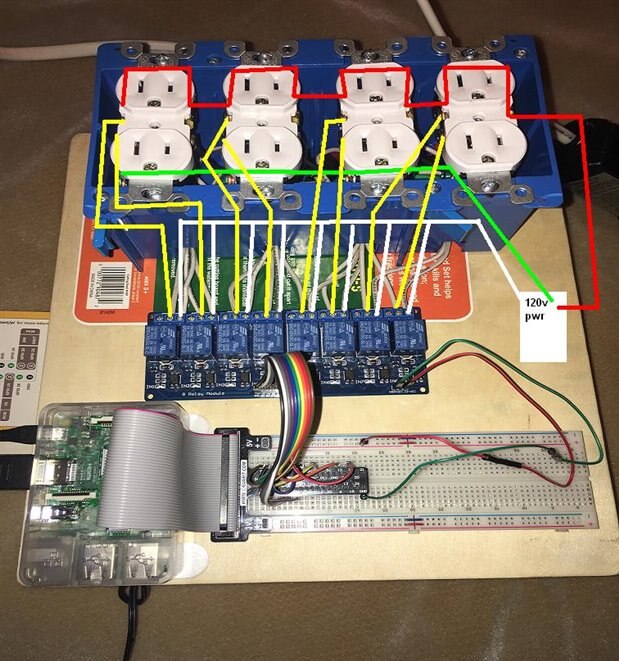


image


Below is a how I wired the breadboard to the relay. (Picture is visual rep of it written out)


Relay       |      Gpio# 

JD=Vcc            5v                                           

GND                GND


Vcc                  5v

1n1                GPIO 17

1n2                GPIO 27

1n3               GPIO 22

1n4               GPIO 23

1n5              GPIO 24

1n6              GPIO 26

1n7              GPIO 12

1n8              GPIO 16


image

what do you think? Can you tailor some code for me? I'm sure the code is out there some where, I most likely just need some guidance on how to fine tune it to my wiring/setup. 


                                                  Anxiously and hopefully awaiting a response 

                                                                      ~Mathew


* WORKING WITH ELECTRICITY IS EXTREMELY DANGEROUS. DO NOT TRY THIS. THIS IS A HYPOTHETICAL PROJECT NOT MEANT TO BE DUPLICATED OR REPRODUCED BUT FOR EDUCATION PURPOSES ONLY. ALWAYS USE ALL SAFETY STANDARDS WHEN WORKING WITH ELECTRICITY PER YOUR AREAS LAWS AND REGULATIONS*


Message was edited by: Mathew Rawlings THANKS PETER

  • Sign in to reply
  • Cancel
Parents
  • Robert Peter Oakes
    0 Robert Peter Oakes over 9 years ago

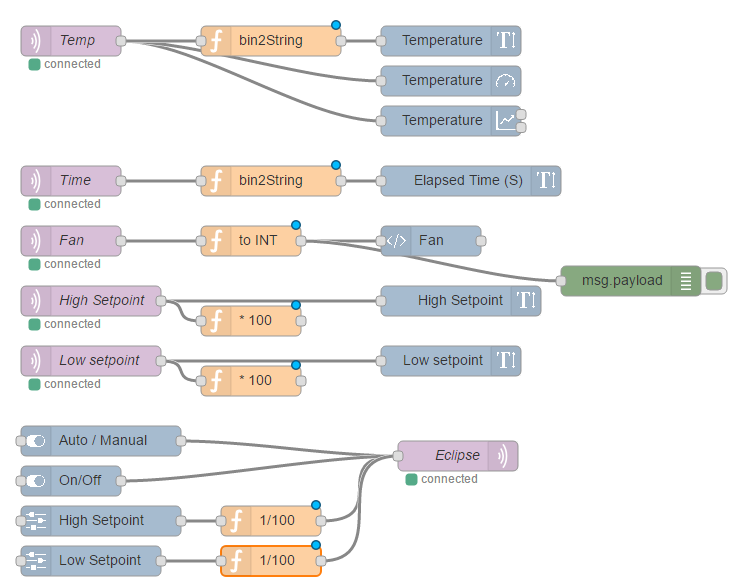
    Looking at what your doing with the GPIO etc and also the scheduling of the GPIO, I think using Node-Red would greatly simplify the design of the solution.


    Node-Red is a graphical Design environment and is fully supported on the Raspberry PI... And it is Free and with the latest versions of Raspbian, it is also part of the image.


    There are nodes designed to directly interact with the GPIO of the PI and you can also script in Java or call python if you want.


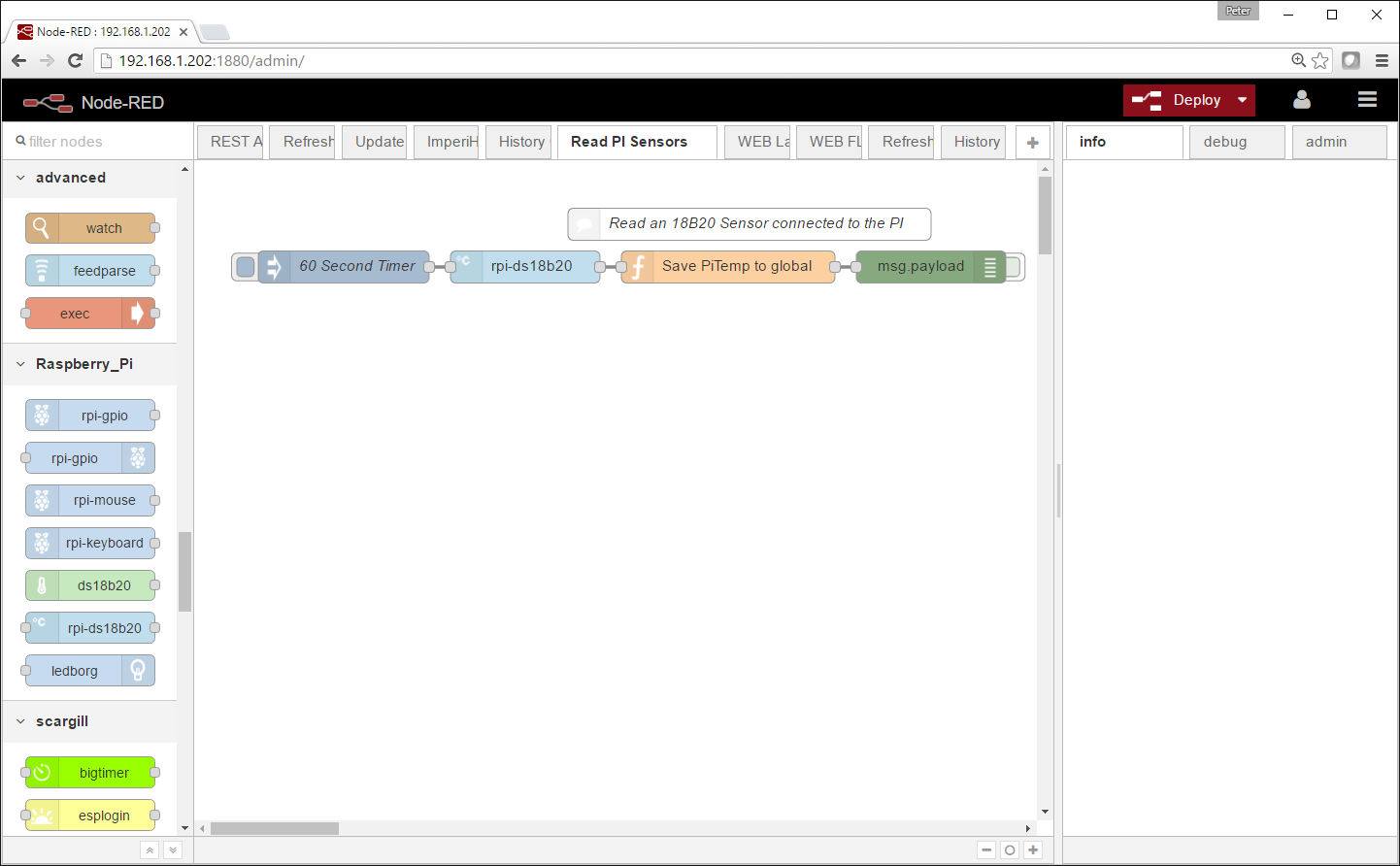
    This is what a design could look like

    ,image

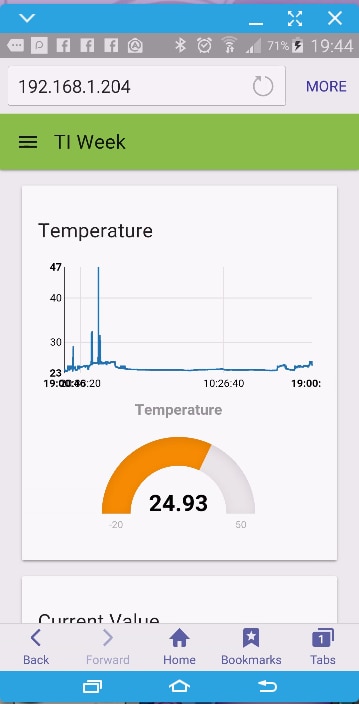
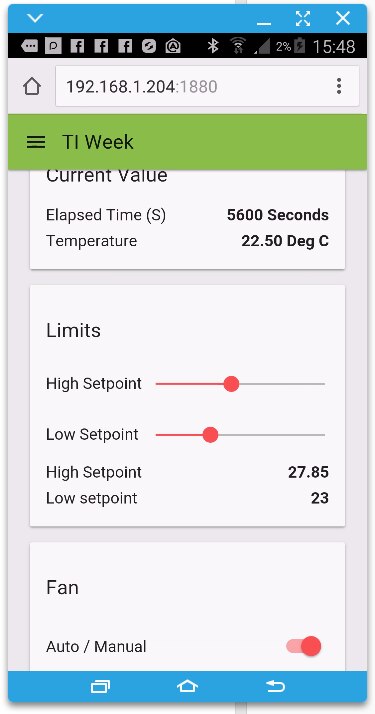
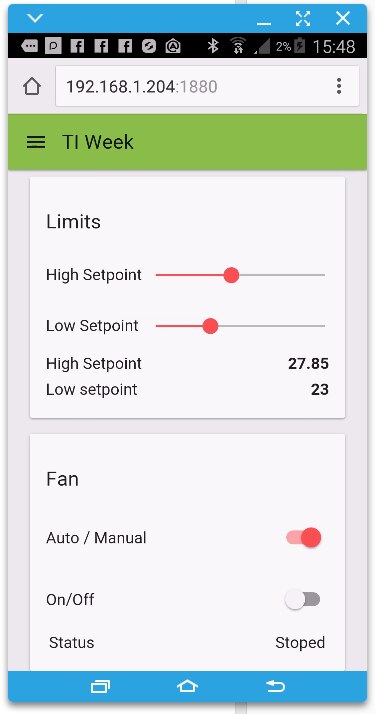
    this produces a WEB UI like this (I took 3 pics as I scrolled down)


    imageimageimage

    and for output to GPIO there are design elements like this

    image

    Note the set of Raspberry PI nodes on the left and the great big BIGTIMER below that. BIGTimer is a node that can handle scheduling for you and was written by a good friend of mine.


    Also note the light blue node second in that is used to automatically handle a DS18B20 temperature sensor.


    So in summary... Node Red can provide the interface to the hardware for you in an easy to use way, it can provide a WEB based UI for you to interact with your project from any smart device, it can schedule tasks. It is free and runs on Linux.


    Hope this helps

    • Cancel
    • Vote Up 0 Vote Down
    • Sign in to reply
    • Verify Answer
    • Reject Answer
    • Cancel
  • Robert Peter Oakes
    0 Robert Peter Oakes over 9 years ago in reply to Robert Peter Oakes

    Very quickly you will come across a program canned NPM, it is used to load the nodes into node red for you


    here are a few links you may find useful

    https://youtu.be/uyx2KZNxhe4?list=PL_atu5RtEPi7FbbB8yG__0eyztqYWFN5u

    https://youtu.be/5RdPFRs1cAc?list=PL_atu5RtEPi5I5YWx_wb_j9erZGCvnpvW


    https://www.youtube.com/watch?v=1p3OwICqQbc


    + the node-red site


    I will also be doing more videos on the subject in the coming weeks

    • Cancel
    • Vote Up +1 Vote Down
    • Sign in to reply
    • Verify Answer
    • Cancel
Reply
  • Robert Peter Oakes
    0 Robert Peter Oakes over 9 years ago in reply to Robert Peter Oakes

    Very quickly you will come across a program canned NPM, it is used to load the nodes into node red for you


    here are a few links you may find useful

    https://youtu.be/uyx2KZNxhe4?list=PL_atu5RtEPi7FbbB8yG__0eyztqYWFN5u

    https://youtu.be/5RdPFRs1cAc?list=PL_atu5RtEPi5I5YWx_wb_j9erZGCvnpvW


    https://www.youtube.com/watch?v=1p3OwICqQbc


    + the node-red site


    I will also be doing more videos on the subject in the coming weeks

    • Cancel
    • Vote Up +1 Vote Down
    • Sign in to reply
    • Verify Answer
    • Cancel
Children
No Data
element14 Community

element14 is the first online community specifically for engineers. Connect with your peers and get expert answers to your questions.

  • Members
  • Learn
  • Technologies
  • Challenges & Projects
  • Products
  • Store
  • About Us
  • Feedback & Support
  • FAQs
  • Terms of Use
  • Privacy Policy
  • Legal and Copyright Notices
  • Sitemap
  • Cookies

An Avnet Company © 2025 Premier Farnell Limited. All Rights Reserved.

Premier Farnell Ltd, registered in England and Wales (no 00876412), registered office: Farnell House, Forge Lane, Leeds LS12 2NE.

ICP 备案号 10220084.

Follow element14

  • X
  • Facebook
  • linkedin
  • YouTube