element14 Community
element14 Community
    Register Log In
  • Site
  • Search
  • Log In Register
  • Community Hub
    Community Hub
    • What's New on element14
    • Feedback and Support
    • Benefits of Membership
    • Personal Blogs
    • Members Area
    • Achievement Levels
  • Learn
    Learn
    • Ask an Expert
    • eBooks
    • element14 presents
    • Learning Center
    • Tech Spotlight
    • STEM Academy
    • Webinars, Training and Events
    • Learning Groups
  • Technologies
    Technologies
    • 3D Printing
    • FPGA
    • Industrial Automation
    • Internet of Things
    • Power & Energy
    • Sensors
    • Technology Groups
  • Challenges & Projects
    Challenges & Projects
    • Design Challenges
    • element14 presents Projects
    • Project14
    • Arduino Projects
    • Raspberry Pi Projects
    • Project Groups
  • Products
    Products
    • Arduino
    • Avnet & Tria Boards Community
    • Dev Tools
    • Manufacturers
    • Multicomp Pro
    • Product Groups
    • Raspberry Pi
    • RoadTests & Reviews
  • About Us
  • Store
    Store
    • Visit Your Store
    • Choose another store...
      • Europe
      •  Austria (German)
      •  Belgium (Dutch, French)
      •  Bulgaria (Bulgarian)
      •  Czech Republic (Czech)
      •  Denmark (Danish)
      •  Estonia (Estonian)
      •  Finland (Finnish)
      •  France (French)
      •  Germany (German)
      •  Hungary (Hungarian)
      •  Ireland
      •  Israel
      •  Italy (Italian)
      •  Latvia (Latvian)
      •  
      •  Lithuania (Lithuanian)
      •  Netherlands (Dutch)
      •  Norway (Norwegian)
      •  Poland (Polish)
      •  Portugal (Portuguese)
      •  Romania (Romanian)
      •  Russia (Russian)
      •  Slovakia (Slovak)
      •  Slovenia (Slovenian)
      •  Spain (Spanish)
      •  Sweden (Swedish)
      •  Switzerland(German, French)
      •  Turkey (Turkish)
      •  United Kingdom
      • Asia Pacific
      •  Australia
      •  China
      •  Hong Kong
      •  India
      • Japan
      •  Korea (Korean)
      •  Malaysia
      •  New Zealand
      •  Philippines
      •  Singapore
      •  Taiwan
      •  Thailand (Thai)
      • Vietnam
      • Americas
      •  Brazil (Portuguese)
      •  Canada
      •  Mexico (Spanish)
      •  United States
      Can't find the country/region you're looking for? Visit our export site or find a local distributor.
  • Translate
  • Profile
  • Settings
Raspberry Pi
  • Products
  • More
Raspberry Pi
Raspberry Pi Forum Pi3 B+ to 8 channel relay CODING HELP
  • Blog
  • Forum
  • Documents
  • Quiz
  • Events
  • Polls
  • Files
  • Members
  • Mentions
  • Sub-Groups
  • Tags
  • More
  • Cancel
  • New
Join Raspberry Pi to participate - click to join for free!
Featured Articles
Announcing Pi
Technical Specifications
Raspberry Pi FAQs
Win a Pi
Raspberry Pi Wishlist
Actions
  • Share
  • More
  • Cancel
Forum Thread Details
  • State Verified Answer
  • Replies 7 replies
  • Answers 3 answers
  • Subscribers 675 subscribers
  • Views 2067 views
  • Users 0 members are here
  • 8 channel relay
  • home automation
  • automated
  • raspberry_pi
  • pi3
  • rasberry pi 3
Related

Pi3 B+ to 8 channel relay CODING HELP

Former Member
Former Member over 9 years ago

Hello, I will be blunt and honest, This is my first time looking at a Linux system let alone trying to learn to code in python and I'm struggling big time trying to learn this all. I need a coding mentor who is willing to communicate with me and help me get this done. Ahead of time, I apologize for my lack of vocabulary and my unorthodox techniques and perspective and thank you for your everlasting patients and I really appreciate any and all time you invest into helping me!


Question: Will you look over my project (posted below) and help me get it coded? ideally, i would be able to have an interface that would allow ease of use programmable on//off cycle on each outlet (all 8) and also in addition to, a simple toggle on//off of all 8 as well.    ( example:    [OUTLET 1]  on=15 minutes   off=45 minutes * repeat*

                                                                                                                 [OUTLET 2]  on= 16 minutes   off=44 minutes *repeat*

                                                                                                                 [OUTLET 3]       on=2pm         off=11pm

                                                                                                                 [OUTLET 4]      ON

                                                                                                                 etc....etc......)

Here's where i am so far the best i can sum it up;

Pi3

Relay       Diagram of relay

CanaKit GPIO to Breadboard Interface Board


This is how i wired the relay to the main power source
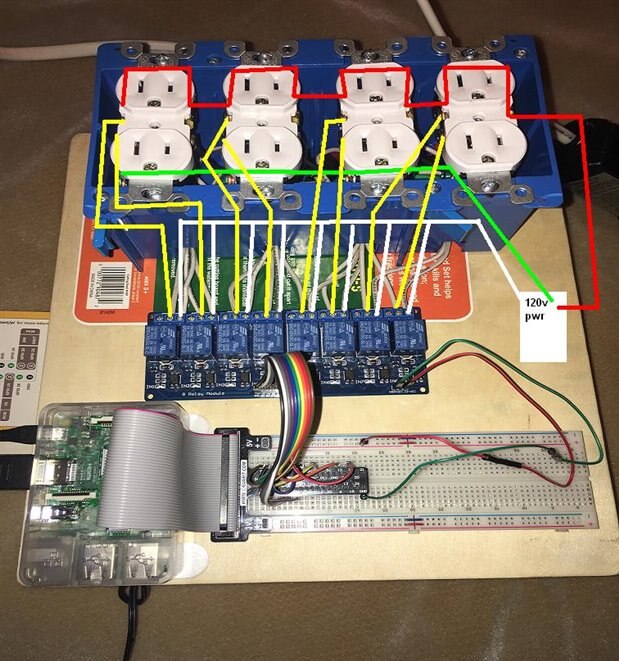


image


Below is a how I wired the breadboard to the relay. (Picture is visual rep of it written out)


Relay       |      Gpio# 

JD=Vcc            5v                                           

GND                GND


Vcc                  5v

1n1                GPIO 17

1n2                GPIO 27

1n3               GPIO 22

1n4               GPIO 23

1n5              GPIO 24

1n6              GPIO 26

1n7              GPIO 12

1n8              GPIO 16


image

what do you think? Can you tailor some code for me? I'm sure the code is out there some where, I most likely just need some guidance on how to fine tune it to my wiring/setup. 


                                                  Anxiously and hopefully awaiting a response 

                                                                      ~Mathew


* WORKING WITH ELECTRICITY IS EXTREMELY DANGEROUS. DO NOT TRY THIS. THIS IS A HYPOTHETICAL PROJECT NOT MEANT TO BE DUPLICATED OR REPRODUCED BUT FOR EDUCATION PURPOSES ONLY. ALWAYS USE ALL SAFETY STANDARDS WHEN WORKING WITH ELECTRICITY PER YOUR AREAS LAWS AND REGULATIONS*


Message was edited by: Mathew Rawlings THANKS PETER

  • Sign in to reply
  • Cancel
  • Robert Peter Oakes
    0 Robert Peter Oakes over 9 years ago

    Logically, everything looks good.


    Electrically ti are not following safe standards and while it is up to you if you do this on your projects, you need to consider that others will follow your example


    The relay board should be in a safe housing. It has mains on it and as such should be correctly protected from people sticking their fingers into it.

    Using standard and approved power outlets is a good thing, especially if they are in the approved enclosure and with the right covers in place.


    You need to add words of wisdom indicating to viewers that if they are not familiar with working with mains then they should get help from someone that is., add the fact that not doing this can lead to death or worse.


    You need to add that Electrical Code is different for each country and province so people should be aware and follow their local codes of practice or dont do this.


    Hope this helps

    Peter

    • Cancel
    • Vote Up 0 Vote Down
    • Sign in to reply
    • Verify Answer
    • Reject Answer
    • Cancel
  • rew
    0 rew over 9 years ago

    The fact that this runs on Linux means you can split the project into easily manageable parts.


    First you like to refer to the relays as relay 1-8. So I recommend you create a directory "relays" that has a symlink "relay1" that links to the proper gpio. You could also use more useful names like "water" and "fan" (things that apply to what you're switching).


    You could also automatically generate those from a configuration file.


    Next instead of having one program do everything, you should create separate programs tthat  do just one thing. I would make a program called "PWM" and call it using PWM <relay> <ontime> <offtime>. Writing this in bash is for me much easier than in python. So here goes in bash:


    #!/bin/sh

    relay=$1

    ontime=$2

    offtime=$3

    while true ; do

       echo 1 > $relay

       sleep $ontime

       echo 0 > $relay

       sleep $offtime

    done

    call it with PWM /home/pi/relays/water 960 2640 to run the water for 16 minutes and then turn it off for 44 minutes.

    Another simple program should "turn on a relay". So you can put "on at 11PM" in a crontab.


    Breaking things down this way makes the bigger project several smaller projects that are all easily managed.

    • Cancel
    • Vote Up +1 Vote Down
    • Sign in to reply
    • Verify Answer
    • Reject Answer
    • Cancel
  • Former Member
    0 Former Member over 9 years ago in reply to rew

    I think we are on the same page roger, I just cant read or write :-p  so it makes it a little difficult.   I'm down with having 8 programs or w.e so its not 600 pages of code in one sheet, that kinda makes sense i think... just thought maybe we could have one program to rule them all, a "Lord of the programs" or at least manage them all if you will.


    I agree, I like to call them relays 1-8 that's easiest for me. i understand what you said like this, then I added my "want" into it; (obviously this is not how code looks,thats why i need your help, i know what i want, just not how to do it)


    Folder name: Relays

                                  [symlink]-GPIO 17 to <relay1>  [start 1]-->[cycle 1 ON}= 3 minutes--> [cycle 1 OFF]= 5 minutes--->[loop to start 1]


                                  [symlink]-GPIO 27 to <relay2> [start 1]--> [cycle 1] ON= 3 minutes-->[cycle 1 OFF]= 5 minutes--->[loop to start 1]


                                  [symlink]-GPIO 22 to <relay3> [start 2]--> [cycle 2] ON=30 sec delay from [cycle 1 "ON TIME"]--> OFF= 1 minute delay from [cycle 1 "OFF TIME"]


                                  [symlink]-GPIO 23 to <relay 4> [start 3]--> {insert time}--> [cycle 3] ON= 7:00 pm--->[cycle 3] OFF=2:00 pm---->{loop to start 3]


                                  [symlink]-GPIO 24 to <relay 5> [start 4]--> {insert time} -->[cycle 4]  ON= 1:00 pm--> [cycle 4] OFF=8:00 pm--->[loop to start 4]


                                  [symlink]-GPIO 25 to <relay 6> wifi controlled Toggle switch On or OFF

                                  [symlink]-GPIO 12 to <relay 7> wifi controlled Toggle switch On or OFF

                                  [symlink]-GPIO 16 to <relay 8> wifi controlled Toggle switch On or OFF


        The BOLD font i would like to be able to manipulate via wifi connection, its not a must but would be amazing to have access control on my cell phone. i believe thats done some how over email by granting access to change word docs or something. If not by wifi the BOLD fonts would still need an interface to change them                                                             


               I'm not sure if anyone else can make sense of my gibberish, but that's basically what I want my relay to do with a hopefully ' easy to use UI"


        Any advise, even a point in the right direction would be greatly appreciated!!!   

    • Cancel
    • Vote Up 0 Vote Down
    • Sign in to reply
    • Verify Answer
    • Cancel
  • Robert Peter Oakes
    0 Robert Peter Oakes over 9 years ago

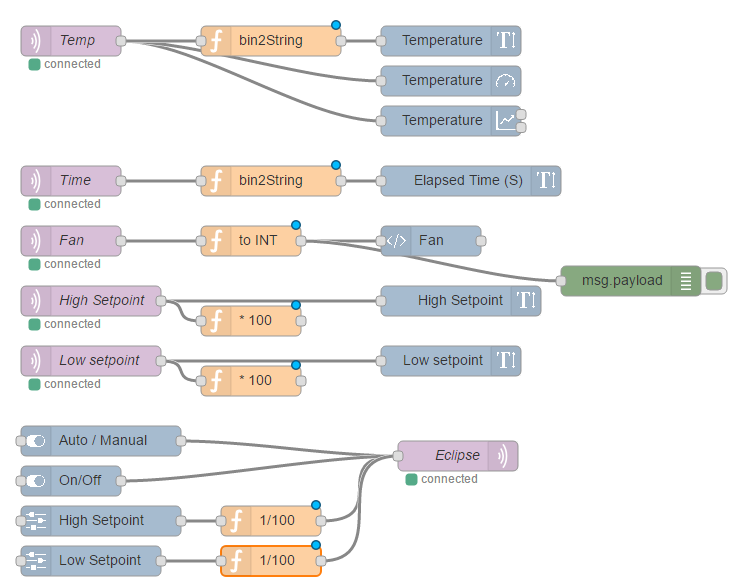
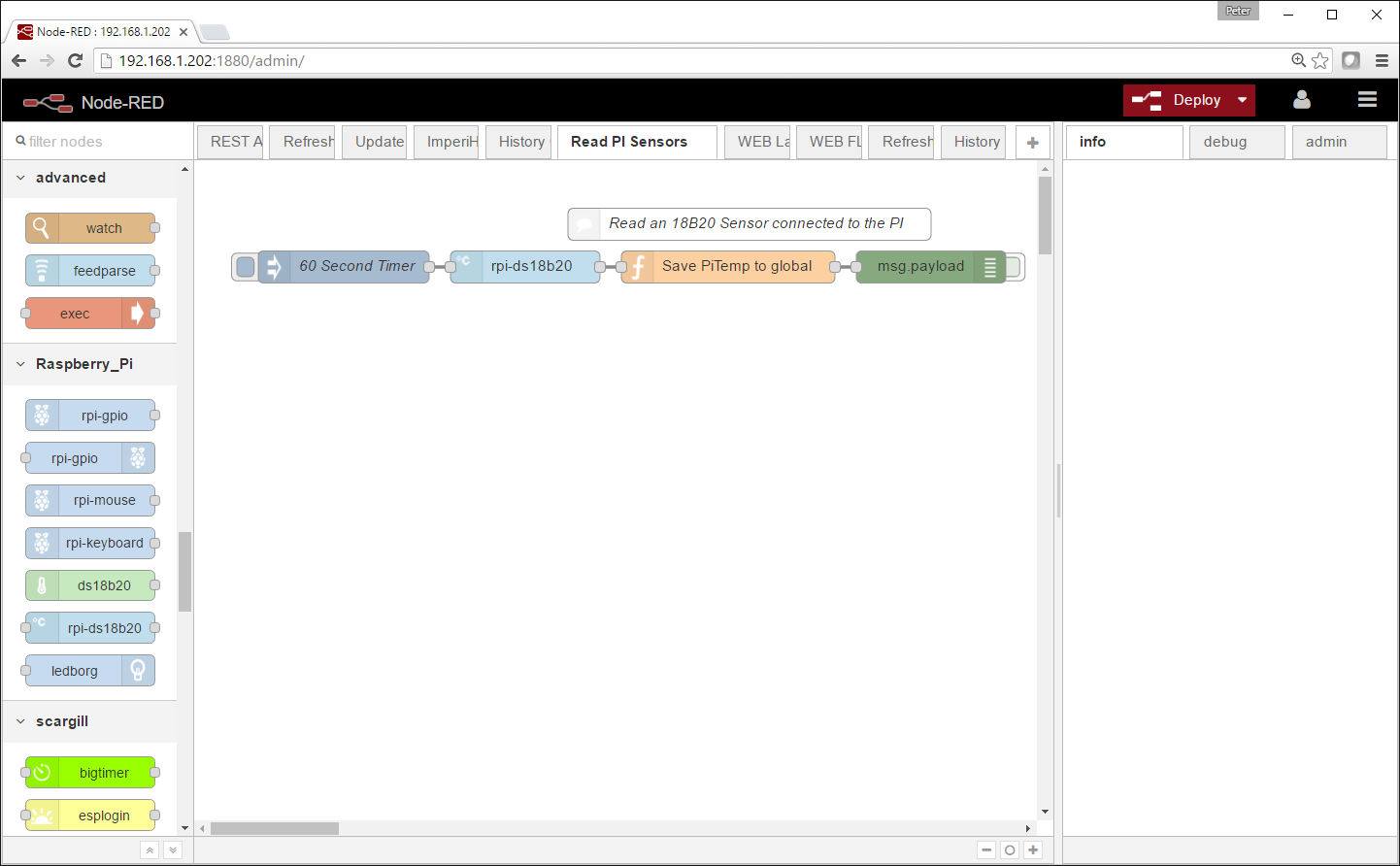
    Looking at what your doing with the GPIO etc and also the scheduling of the GPIO, I think using Node-Red would greatly simplify the design of the solution.


    Node-Red is a graphical Design environment and is fully supported on the Raspberry PI... And it is Free and with the latest versions of Raspbian, it is also part of the image.


    There are nodes designed to directly interact with the GPIO of the PI and you can also script in Java or call python if you want.


    This is what a design could look like

    ,image

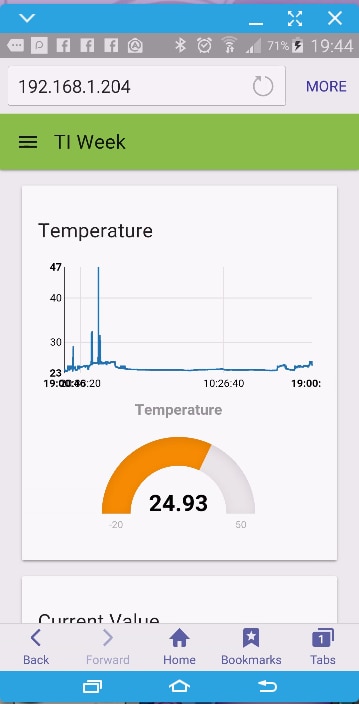
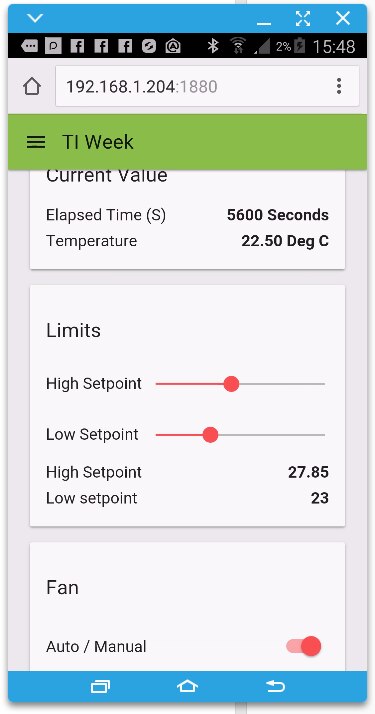
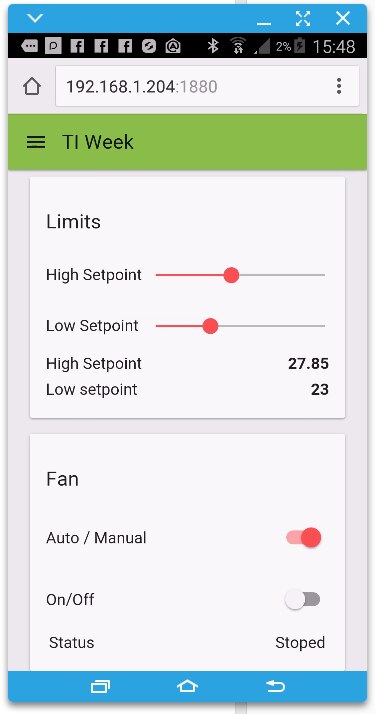
    this produces a WEB UI like this (I took 3 pics as I scrolled down)


    imageimageimage

    and for output to GPIO there are design elements like this

    image

    Note the set of Raspberry PI nodes on the left and the great big BIGTIMER below that. BIGTimer is a node that can handle scheduling for you and was written by a good friend of mine.


    Also note the light blue node second in that is used to automatically handle a DS18B20 temperature sensor.


    So in summary... Node Red can provide the interface to the hardware for you in an easy to use way, it can provide a WEB based UI for you to interact with your project from any smart device, it can schedule tasks. It is free and runs on Linux.


    Hope this helps

    • Cancel
    • Vote Up 0 Vote Down
    • Sign in to reply
    • Verify Answer
    • Reject Answer
    • Cancel
  • phoenixcomm
    0 phoenixcomm over 9 years ago

    I will add my 2cents in as well you kind of have it right. but you have one huge error:

    The language does not  accept whitespace in a variable name!

    • Variable names in C are made up of letters (upper and lower case) and digits.
    • The underscore character ("_") is also permitted.
    • Names must not begin with a digit.

    Also, remember that this variable outlet1  is not the same as Outlet1 or outlet_1.  As C is case sensitive!! (common bobo)

    Oh yes please stay away from full caps on names. And please don't do this   _Outlet1  As names that start with the underscore are normally reserved for system calls and libraries.

    And one last comment and that is to comment by using // after a variable to describe what is or used for.


    And BTW use a good IDE!! Personally, I love Eclipse! you should go to https://yoxos.eclipsesource.com/  use their installer and you are always you will be up to date.

    Cris Harrison


    • Cancel
    • Vote Up +1 Vote Down
    • Sign in to reply
    • Verify Answer
    • Reject Answer
    • Cancel
  • Former Member
    0 Former Member over 9 years ago in reply to Robert Peter Oakes

    I think you hit the nail on the head peter. This looks way more up my alley. I did see the Node-red program on my pi, just knew nothing about it.


    I believe you just pushed me down the right road my friend. Now I know where to start putting my efforts into learning. based off of my ignorance and what i got from what you said i need to go research (forgive me for not using proper terminology) how to install nodes, so i can see my breadboard, then dl BIGTIMER, your friends code because it sound like the tailored code that i need. then start dinking around till everything is connected like i want it....


    while im here asking questions, any advise on where to dl the nodes from? How do i find your friends node?


    I have been on github a couple times trying to read some code for relays and Dht22 sensors but i get confused on what im looking at because my eyes are not tuned properly yet, so many different options and people updating files I couldn't even understand what was an update, an add on or the original file. any perspective tips anyone?  

    • Cancel
    • Vote Up +1 Vote Down
    • Sign in to reply
    • Verify Answer
    • Cancel
  • Robert Peter Oakes
    0 Robert Peter Oakes over 9 years ago in reply to Robert Peter Oakes

    Very quickly you will come across a program canned NPM, it is used to load the nodes into node red for you


    here are a few links you may find useful

    https://youtu.be/uyx2KZNxhe4?list=PL_atu5RtEPi7FbbB8yG__0eyztqYWFN5u

    https://youtu.be/5RdPFRs1cAc?list=PL_atu5RtEPi5I5YWx_wb_j9erZGCvnpvW


    https://www.youtube.com/watch?v=1p3OwICqQbc


    + the node-red site


    I will also be doing more videos on the subject in the coming weeks

    • Cancel
    • Vote Up +1 Vote Down
    • Sign in to reply
    • Verify Answer
    • Cancel
element14 Community

element14 is the first online community specifically for engineers. Connect with your peers and get expert answers to your questions.

  • Members
  • Learn
  • Technologies
  • Challenges & Projects
  • Products
  • Store
  • About Us
  • Feedback & Support
  • FAQs
  • Terms of Use
  • Privacy Policy
  • Legal and Copyright Notices
  • Sitemap
  • Cookies

An Avnet Company © 2025 Premier Farnell Limited. All Rights Reserved.

Premier Farnell Ltd, registered in England and Wales (no 00876412), registered office: Farnell House, Forge Lane, Leeds LS12 2NE.

ICP 备案号 10220084.

Follow element14

  • X
  • Facebook
  • linkedin
  • YouTube