element14 Community
element14 Community
    Register Log In
  • Site
  • Search
  • Log In Register
  • Community Hub
    Community Hub
    • What's New on element14
    • Feedback and Support
    • Benefits of Membership
    • Personal Blogs
    • Members Area
    • Achievement Levels
  • Learn
    Learn
    • Ask an Expert
    • eBooks
    • element14 presents
    • Learning Center
    • Tech Spotlight
    • STEM Academy
    • Webinars, Training and Events
    • Learning Groups
  • Technologies
    Technologies
    • 3D Printing
    • FPGA
    • Industrial Automation
    • Internet of Things
    • Power & Energy
    • Sensors
    • Technology Groups
  • Challenges & Projects
    Challenges & Projects
    • Design Challenges
    • element14 presents Projects
    • Project14
    • Arduino Projects
    • Raspberry Pi Projects
    • Project Groups
  • Products
    Products
    • Arduino
    • Avnet & Tria Boards Community
    • Dev Tools
    • Manufacturers
    • Multicomp Pro
    • Product Groups
    • Raspberry Pi
    • RoadTests & Reviews
  • About Us
  • Store
    Store
    • Visit Your Store
    • Choose another store...
      • Europe
      •  Austria (German)
      •  Belgium (Dutch, French)
      •  Bulgaria (Bulgarian)
      •  Czech Republic (Czech)
      •  Denmark (Danish)
      •  Estonia (Estonian)
      •  Finland (Finnish)
      •  France (French)
      •  Germany (German)
      •  Hungary (Hungarian)
      •  Ireland
      •  Israel
      •  Italy (Italian)
      •  Latvia (Latvian)
      •  
      •  Lithuania (Lithuanian)
      •  Netherlands (Dutch)
      •  Norway (Norwegian)
      •  Poland (Polish)
      •  Portugal (Portuguese)
      •  Romania (Romanian)
      •  Russia (Russian)
      •  Slovakia (Slovak)
      •  Slovenia (Slovenian)
      •  Spain (Spanish)
      •  Sweden (Swedish)
      •  Switzerland(German, French)
      •  Turkey (Turkish)
      •  United Kingdom
      • Asia Pacific
      •  Australia
      •  China
      •  Hong Kong
      •  India
      • Japan
      •  Korea (Korean)
      •  Malaysia
      •  New Zealand
      •  Philippines
      •  Singapore
      •  Taiwan
      •  Thailand (Thai)
      • Vietnam
      • Americas
      •  Brazil (Portuguese)
      •  Canada
      •  Mexico (Spanish)
      •  United States
      Can't find the country/region you're looking for? Visit our export site or find a local distributor.
  • Translate
  • Profile
  • Settings
Raspberry Pi
  • Products
  • More
Raspberry Pi
Raspberry Pi Forum Raspberry Pi 2 Not booting
  • Blog
  • Forum
  • Documents
  • Quiz
  • Events
  • Polls
  • Files
  • Members
  • Mentions
  • Sub-Groups
  • Tags
  • More
  • Cancel
  • New
Join Raspberry Pi to participate - click to join for free!
Featured Articles
Announcing Pi
Technical Specifications
Raspberry Pi FAQs
Win a Pi
Raspberry Pi Wishlist
Actions
  • Share
  • More
  • Cancel
Forum Thread Details
  • State Verified Answer
  • Replies 23 replies
  • Answers 2 answers
  • Subscribers 678 subscribers
  • Views 5369 views
  • Users 0 members are here
  • raspberry
  • pi
  • 2
  • raspberry_pi
  • not
  • booting
Related

Raspberry Pi 2 Not booting

Former Member
Former Member over 10 years ago

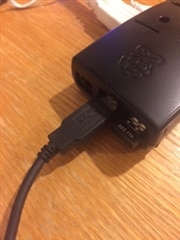
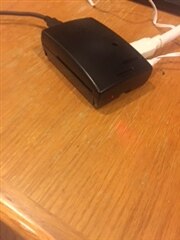
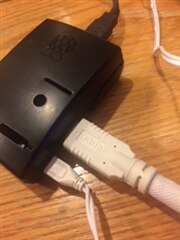
When I power on the Pi, the HDMI attached monitor shows a screen with shades of various colors and I have no clue where to go from there.  The keyboard is attached to one USB port and the a Wi Pi to another.  Of course the power cable is connected and the SD card (with the OS) is installed.  Ive gone through the Start Up video but the things that are suppose to be happening are not.  This is my first experience with the Raspberry Pi.  But I have years of experience using Microsoft and OS X.  Can someone kindly help this Pi newbie get started?imageimage


imageimage

  • Sign in to reply
  • Cancel
Parents
  • Gough Lui
    0 Gough Lui over 10 years ago

    I personally don't use Noobs myself, but it seems like you might be having issues with your microSD card contacts. Are you sure you are inserting your microSD cards fully into the slots until they "click" and hold in place? Does the green SD-activity light flicker when you start the board up? Is the red power LED solidly on, or does it blink? (Blinking would be an indication of power issues - low quality microB cables can cause this).


    Other than that, could you take a screenshot of the contents of the card and check the filesystem. Are you unzipping the files into the root directory complete with paths, or has it unzipped into a folder inside the root directory - please check.


    I'm sure there are other qualified people around here that can help - next time, please consider opening your own thread for your issue.


    - Gough

    • Cancel
    • Vote Up +1 Vote Down
    • Sign in to reply
    • Verify Answer
    • Cancel
  • HarrySatt
    0 HarrySatt over 10 years ago in reply to Gough Lui

    Hi

    The red LED (Power) goes off when the colour splash screen is shown and than the RPi restarts. OK I try a dedicated power supply for the RPi. Have ordered on already. maybe the D-LINK USB switch with power supply connected and 3A supply USB connectors is not stabe enough.

    Is there a description what the LEDs show us.

    Thanx for help.

    Harald.

    • Cancel
    • Vote Up 0 Vote Down
    • Sign in to reply
    • Verify Answer
    • Cancel
  • Gough Lui
    0 Gough Lui over 10 years ago in reply to HarrySatt

    That might be your problem. At no point should the Red LED turn off, as if it does, it indicates you have a power supply issue. This can be because you've overloaded the USB ports (which draw their power from the Pi), or you have a low quality USB cable, connector or power supply.


    There are only two LEDs on the Raspberry Pi A+/B+ and Raspberry Pi2 B models, one coloured Red for power, and the other coloured Green for SD card activity. The Red LED is connected to an a power supervisor IC, and turns off if the 5v voltage falls below about 4.83v from memory.


    You might want to try a different microUSB cable - one with a thicker wire (i.e. 24AWG is thicker than 26AWG which is thicker than 28AWG), and a different adapter (preferably high quality, OEM phone chargers are a good choice). Remove any unnecessary USB port connections (try with just a basic keyboard and mouse, and wireless if necessary).


    - Gough

    • Cancel
    • Vote Up 0 Vote Down
    • Sign in to reply
    • Verify Answer
    • Cancel
  • HarrySatt
    0 HarrySatt over 10 years ago in reply to Gough Lui

    Hi

    You again are right. Thanxs a lot. I borowed a power supply for a tablet from ASUS 2A / 5V and the RPi worked fine. The D-LINK USB route does not give a stabel enough output although the specs are right.

    Sorry for bothering you and again thank you.

    Harald

    • Cancel
    • Vote Up +1 Vote Down
    • Sign in to reply
    • Verify Answer
    • Cancel
  • Gough Lui
    0 Gough Lui over 10 years ago in reply to HarrySatt

    Great to hear! And good luck with your Raspberry Pi adventures!


    - Gough

    • Cancel
    • Vote Up 0 Vote Down
    • Sign in to reply
    • Verify Answer
    • Cancel
  • rew
    0 rew over 10 years ago in reply to HarrySatt

    You know what?
    I took a DLINK gigabit switch home (from work) that was marked "BROKEN". Turns out the DLINK is just fine. It's the powersupply that was broken..... So IMHO, you would do well to mistrust the DLINK powersupplies a little bit.....

    • Cancel
    • Vote Up 0 Vote Down
    • Sign in to reply
    • Verify Answer
    • Cancel
  • HarrySatt
    0 HarrySatt over 10 years ago in reply to rew

    Hi

    You are right. But I checked two D-LINK USB Hubs with 3A chrging support. Both were working well with a RPi A from 2011.12 but did not for the new RPi. Curious. Now it is working with an tablet ASUS power supply.

    • Cancel
    • Vote Up 0 Vote Down
    • Sign in to reply
    • Verify Answer
    • Cancel
  • Former Member
    0 Former Member over 10 years ago in reply to HarrySatt

    Thanks for the follow-up Harald.  Interesting write-up in "Nuts and Volts" a couple of months ago, about power supplies and real behavior vs. stated specs.  That was focused more on PSU's being overvoltage without a load; but it got me checking several PSU's to see what happens.  I'd be curious with the D-Link USB hub if it was actually supplying a consistent 5VDC/3A, and if anything else was plugged into the hub.  More just idle curiosity, since you've solved the problem.

    • Cancel
    • Vote Up 0 Vote Down
    • Sign in to reply
    • Verify Answer
    • Cancel
  • Former Member
    0 Former Member over 9 years ago in reply to Gough Lui

    Hi Lui,

    I am not able to see the bootup screen when i connected raspberry pi 3 to my laptop using HDMI cable.The green light flicked when i started my raspberry pi.what could be the problem?

    • Cancel
    • Vote Up 0 Vote Down
    • Sign in to reply
    • Verify Answer
    • Cancel
  • Gough Lui
    0 Gough Lui over 9 years ago in reply to Former Member

    I'm not quite sure what you are doing here. Most laptops have HDMI output but not HDMI input, so you can't use them as a display for a Raspberry Pi unless the laptop accepts HDMI *input*.


    Secondly, the green power LED on most modern Raspberry Pi (i.e. Model A+ onwards) will turn off if the power supervision chip detects a power dip below a given voltage. This indicates you're not using a power supply that can provide enough current without dropping the voltage *and/or* the cable you are using may not be thick enough (longer cables, and thinner cables - e.g. AWG28 might not be good enough). Sometimes the connectors might not be seating well as well. I would suggest looking at all of this because they are not designed to be powered from regular USB ports, as they draw significantly more power than most USB devices, especially if you have downstream USB devices connected.


    Other members can chime in as well, although next time, you might consider starting your own thread.


    - Gough

    • Cancel
    • Vote Up 0 Vote Down
    • Sign in to reply
    • Verify Answer
    • Cancel
  • rew
    0 rew over 9 years ago in reply to Former Member

    Well...  The raspberry pi HDMI connection is an OUTPUT. The laptop has an HDMI OUTPUT as well. Connecting them together is not a good idea. So. I am not surprised that you don't see anything on your laptop screen. The green light flickering could be just fine. So, connect your raspberry pi to a monitor and  have a look what's going on....


    Gough Lui, the power led is RED, the green led is the activity led...

    • Cancel
    • Vote Up 0 Vote Down
    • Sign in to reply
    • Verify Answer
    • Cancel
  • Gough Lui
    0 Gough Lui over 9 years ago in reply to rew

    Indeed it is. My bad! I'm interstate at a hotel after a long days' travel, so forgive my confusion.

    • Cancel
    • Vote Up 0 Vote Down
    • Sign in to reply
    • Verify Answer
    • Cancel
Reply
  • Gough Lui
    0 Gough Lui over 9 years ago in reply to rew

    Indeed it is. My bad! I'm interstate at a hotel after a long days' travel, so forgive my confusion.

    • Cancel
    • Vote Up 0 Vote Down
    • Sign in to reply
    • Verify Answer
    • Cancel
Children
No Data
element14 Community

element14 is the first online community specifically for engineers. Connect with your peers and get expert answers to your questions.

  • Members
  • Learn
  • Technologies
  • Challenges & Projects
  • Products
  • Store
  • About Us
  • Feedback & Support
  • FAQs
  • Terms of Use
  • Privacy Policy
  • Legal and Copyright Notices
  • Sitemap
  • Cookies

An Avnet Company © 2025 Premier Farnell Limited. All Rights Reserved.

Premier Farnell Ltd, registered in England and Wales (no 00876412), registered office: Farnell House, Forge Lane, Leeds LS12 2NE.

ICP 备案号 10220084.

Follow element14

  • X
  • Facebook
  • linkedin
  • YouTube