element14 Community
element14 Community
    Register Log In
  • Site
  • Search
  • Log In Register
  • Community Hub
    Community Hub
    • What's New on element14
    • Feedback and Support
    • Benefits of Membership
    • Personal Blogs
    • Members Area
    • Achievement Levels
  • Learn
    Learn
    • Ask an Expert
    • eBooks
    • element14 presents
    • Learning Center
    • Tech Spotlight
    • STEM Academy
    • Webinars, Training and Events
    • Learning Groups
  • Technologies
    Technologies
    • 3D Printing
    • FPGA
    • Industrial Automation
    • Internet of Things
    • Power & Energy
    • Sensors
    • Technology Groups
  • Challenges & Projects
    Challenges & Projects
    • Design Challenges
    • element14 presents Projects
    • Project14
    • Arduino Projects
    • Raspberry Pi Projects
    • Project Groups
  • Products
    Products
    • Arduino
    • Avnet & Tria Boards Community
    • Dev Tools
    • Manufacturers
    • Multicomp Pro
    • Product Groups
    • Raspberry Pi
    • RoadTests & Reviews
  • About Us
  • Store
    Store
    • Visit Your Store
    • Choose another store...
      • Europe
      •  Austria (German)
      •  Belgium (Dutch, French)
      •  Bulgaria (Bulgarian)
      •  Czech Republic (Czech)
      •  Denmark (Danish)
      •  Estonia (Estonian)
      •  Finland (Finnish)
      •  France (French)
      •  Germany (German)
      •  Hungary (Hungarian)
      •  Ireland
      •  Israel
      •  Italy (Italian)
      •  Latvia (Latvian)
      •  
      •  Lithuania (Lithuanian)
      •  Netherlands (Dutch)
      •  Norway (Norwegian)
      •  Poland (Polish)
      •  Portugal (Portuguese)
      •  Romania (Romanian)
      •  Russia (Russian)
      •  Slovakia (Slovak)
      •  Slovenia (Slovenian)
      •  Spain (Spanish)
      •  Sweden (Swedish)
      •  Switzerland(German, French)
      •  Turkey (Turkish)
      •  United Kingdom
      • Asia Pacific
      •  Australia
      •  China
      •  Hong Kong
      •  India
      • Japan
      •  Korea (Korean)
      •  Malaysia
      •  New Zealand
      •  Philippines
      •  Singapore
      •  Taiwan
      •  Thailand (Thai)
      • Vietnam
      • Americas
      •  Brazil (Portuguese)
      •  Canada
      •  Mexico (Spanish)
      •  United States
      Can't find the country/region you're looking for? Visit our export site or find a local distributor.
  • Translate
  • Profile
  • Settings
Raspberry Pi
  • Products
  • More
Raspberry Pi
Raspberry Pi Forum Raspberry Pi 2 Not booting
  • Blog
  • Forum
  • Documents
  • Quiz
  • Events
  • Polls
  • Files
  • Members
  • Mentions
  • Sub-Groups
  • Tags
  • More
  • Cancel
  • New
Join Raspberry Pi to participate - click to join for free!
Featured Articles
Announcing Pi
Technical Specifications
Raspberry Pi FAQs
Win a Pi
Raspberry Pi Wishlist
Actions
  • Share
  • More
  • Cancel
Forum Thread Details
  • State Verified Answer
  • Replies 23 replies
  • Answers 2 answers
  • Subscribers 679 subscribers
  • Views 5339 views
  • Users 0 members are here
  • raspberry
  • pi
  • 2
  • raspberry_pi
  • not
  • booting
Related

Raspberry Pi 2 Not booting

Former Member
Former Member over 10 years ago

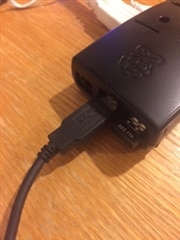
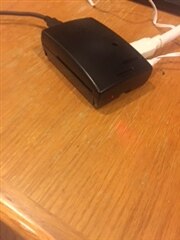
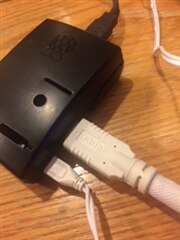
When I power on the Pi, the HDMI attached monitor shows a screen with shades of various colors and I have no clue where to go from there.  The keyboard is attached to one USB port and the a Wi Pi to another.  Of course the power cable is connected and the SD card (with the OS) is installed.  Ive gone through the Start Up video but the things that are suppose to be happening are not.  This is my first experience with the Raspberry Pi.  But I have years of experience using Microsoft and OS X.  Can someone kindly help this Pi newbie get started?imageimage


imageimage

  • Sign in to reply
  • Cancel
Parents
  • royleith
    0 royleith over 10 years ago

    Hi Mel,


    I've just spent the best part of a day on my Raspi 2 and so I may be able to save you some future grief.


    First, your immediate problem is that the Raspi 2 requires the very latest Raspbian image. I think you are using an earlier image. Get the latest one from http://www.raspberrypi.org/downloads/  The one I am using is the 2015-01-31 version of Raspbian. That may be all you need to do.


    However, I have been having problems after an OS upgrade that you may wish to avoid. From your photos I think you are using a powered hub to connect your mouse, keyboard and wifi dongle. Please continue to do that for the time being. I have found that using the four USB ports directly for mouse/keyboard wireless dongles and wifi dongles can cause problems in booting to the desktop with the Raspberry 2.


    Also, once you have burnt the up-to-date image on to your card, access the boot partition in Windows or Mac and open config.txt in a text editor.  Change the lines,


    # uncomment to increase signal to HDMI, if you have interference, blanking, or
    # no display
    #config_hdmi_boost=4
    to,

    # uncomment to increase signal to HDMI, if you have interference, blanking, or

    # no display

    config_hdmi_boost=4


    Sometimes the Raspberry Pi may boot to a blank screen because there is not enough HDMI signal to drive the monitor. Most of my Raspberry Pis are happier booting to the desktop with this setting, although it may not be necessary at all with your system or you may only need a boost of 2. Once you are booting up and closing down without problems then you can restore this line and see if it is OK for you. If you boot to a blank screen, the only way out is to turn the power off and this may corrupt some of the files. You may want to jump ahead, at this point, and read the bit about backing up the partitions.


    All of my Raspberry Pis work well at 1000MHz. When you first boot up, a program called raspi-config will run automatically. I suggest you use option 7 for Overclock and choose the option,


    Pi2    1000MHz ARM, 500MHz core, 500MHz SDRAM, 2 overvolt│


    DON'T USE ANY OF THE OTHER OPTIONS except for the 700Mhz or 800Mhz lines.


    Finally, if you have partition backup software on your Windows PC, back up the two partitions on the SDHC card once you have set up the desktop with the programs and configuration that you want. I use Linux with partimage for partition 1 and fsarchiver for partition 2. That way, if any experiments go wrong, you can repartition the card and restore the partition contents. This, of course, preserves all your system configuration, data files and installed programs from the moment you made the backup. The reason I suggest this is that if you boot to a blank screen or the mouse and keyboard stop working then the only answer is to turn the power off. You may well corrupt the files on either of the partitions, but especially the FAT16 boot partition.


    Once you have done this, it is safe to try plugging the mouse, keyboard and wifi dongle straight into the Raspberry Pi and putting the hub to one side until you need it for an external hard drive or a DVD burner.


    • Cancel
    • Vote Up +1 Vote Down
    • Sign in to reply
    • Verify Answer
    • Reject Answer
    • Cancel
  • Former Member
    0 Former Member over 10 years ago in reply to royleith

    Thank you for the suggestions.  I will work my way through them and let you know if it works.  BTW I am not using a powered USB hub, but I may try one.  Everything is plugged into the Raspberry Pi 2 Model B, as shown in the pictures.

    • Cancel
    • Vote Up 0 Vote Down
    • Sign in to reply
    • Verify Answer
    • Cancel
Reply
  • Former Member
    0 Former Member over 10 years ago in reply to royleith

    Thank you for the suggestions.  I will work my way through them and let you know if it works.  BTW I am not using a powered USB hub, but I may try one.  Everything is plugged into the Raspberry Pi 2 Model B, as shown in the pictures.

    • Cancel
    • Vote Up 0 Vote Down
    • Sign in to reply
    • Verify Answer
    • Cancel
Children
No Data
element14 Community

element14 is the first online community specifically for engineers. Connect with your peers and get expert answers to your questions.

  • Members
  • Learn
  • Technologies
  • Challenges & Projects
  • Products
  • Store
  • About Us
  • Feedback & Support
  • FAQs
  • Terms of Use
  • Privacy Policy
  • Legal and Copyright Notices
  • Sitemap
  • Cookies

An Avnet Company © 2025 Premier Farnell Limited. All Rights Reserved.

Premier Farnell Ltd, registered in England and Wales (no 00876412), registered office: Farnell House, Forge Lane, Leeds LS12 2NE.

ICP 备案号 10220084.

Follow element14

  • X
  • Facebook
  • linkedin
  • YouTube