element14 Community
element14 Community
    Register Log In
  • Site
  • Search
  • Log In Register
  • Community Hub
    Community Hub
    • What's New on element14
    • Feedback and Support
    • Benefits of Membership
    • Personal Blogs
    • Members Area
    • Achievement Levels
  • Learn
    Learn
    • Ask an Expert
    • eBooks
    • element14 presents
    • Learning Center
    • Tech Spotlight
    • STEM Academy
    • Webinars, Training and Events
    • Learning Groups
  • Technologies
    Technologies
    • 3D Printing
    • FPGA
    • Industrial Automation
    • Internet of Things
    • Power & Energy
    • Sensors
    • Technology Groups
  • Challenges & Projects
    Challenges & Projects
    • Design Challenges
    • element14 presents Projects
    • Project14
    • Arduino Projects
    • Raspberry Pi Projects
    • Project Groups
  • Products
    Products
    • Arduino
    • Avnet & Tria Boards Community
    • Dev Tools
    • Manufacturers
    • Multicomp Pro
    • Product Groups
    • Raspberry Pi
    • RoadTests & Reviews
  • About Us
  • Store
    Store
    • Visit Your Store
    • Choose another store...
      • Europe
      •  Austria (German)
      •  Belgium (Dutch, French)
      •  Bulgaria (Bulgarian)
      •  Czech Republic (Czech)
      •  Denmark (Danish)
      •  Estonia (Estonian)
      •  Finland (Finnish)
      •  France (French)
      •  Germany (German)
      •  Hungary (Hungarian)
      •  Ireland
      •  Israel
      •  Italy (Italian)
      •  Latvia (Latvian)
      •  
      •  Lithuania (Lithuanian)
      •  Netherlands (Dutch)
      •  Norway (Norwegian)
      •  Poland (Polish)
      •  Portugal (Portuguese)
      •  Romania (Romanian)
      •  Russia (Russian)
      •  Slovakia (Slovak)
      •  Slovenia (Slovenian)
      •  Spain (Spanish)
      •  Sweden (Swedish)
      •  Switzerland(German, French)
      •  Turkey (Turkish)
      •  United Kingdom
      • Asia Pacific
      •  Australia
      •  China
      •  Hong Kong
      •  India
      • Japan
      •  Korea (Korean)
      •  Malaysia
      •  New Zealand
      •  Philippines
      •  Singapore
      •  Taiwan
      •  Thailand (Thai)
      • Vietnam
      • Americas
      •  Brazil (Portuguese)
      •  Canada
      •  Mexico (Spanish)
      •  United States
      Can't find the country/region you're looking for? Visit our export site or find a local distributor.
  • Translate
  • Profile
  • Settings
Raspberry Pi
  • Products
  • More
Raspberry Pi
Raspberry Pi Forum Raspberry Pi 2 Not booting
  • Blog
  • Forum
  • Documents
  • Quiz
  • Events
  • Polls
  • Files
  • Members
  • Mentions
  • Sub-Groups
  • Tags
  • More
  • Cancel
  • New
Join Raspberry Pi to participate - click to join for free!
Featured Articles
Announcing Pi
Technical Specifications
Raspberry Pi FAQs
Win a Pi
Raspberry Pi Wishlist
Actions
  • Share
  • More
  • Cancel
Forum Thread Details
  • State Verified Answer
  • Replies 23 replies
  • Answers 2 answers
  • Subscribers 679 subscribers
  • Views 5339 views
  • Users 0 members are here
  • raspberry
  • pi
  • 2
  • raspberry_pi
  • not
  • booting
Related

Raspberry Pi 2 Not booting

Former Member
Former Member over 10 years ago

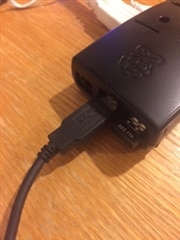
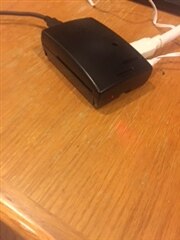
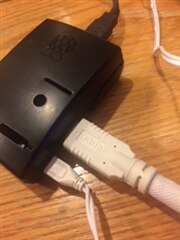
When I power on the Pi, the HDMI attached monitor shows a screen with shades of various colors and I have no clue where to go from there.  The keyboard is attached to one USB port and the a Wi Pi to another.  Of course the power cable is connected and the SD card (with the OS) is installed.  Ive gone through the Start Up video but the things that are suppose to be happening are not.  This is my first experience with the Raspberry Pi.  But I have years of experience using Microsoft and OS X.  Can someone kindly help this Pi newbie get started?imageimage


imageimage

  • Sign in to reply
  • Cancel
Parents
  • Gough Lui
    0 Gough Lui over 10 years ago

    The coloured screen generally indicates a failure to boot from the MicroSD card. Can you provide details of what type of MicroSD card you are using, and how you imaged it, and whether you used the latest 2015 Raspbian or Noobs images? Please check the card is inserted correctly - it should be firmly "clicked in" to the latching slot, with the text facing the bottom side of the Raspberry Pi. It should not protrude from the board by much - it should look like this: http://cdn1.goughlui.com/wp-content/uploads/2014/08/DSC_7716.jpg


    Please note that I've had compatibility and stability issues with certain cards, inclusive of the Samsung Plus and Samsung Evo cards - could you try a different card?


    The next possibility is a lack of power - the multi-cored Pi 2 does need at least 700mA of power on its own, with no peripherals. The USB cable is of vital importance as well - your cable doesn't look particularly high quality or beefy. Please try another microUSB B cable - preferably an original one from an Android Phone or Tablet, which generally has thicker conductors to ensure high current charging works.


    If you still have no success, it could be indicative that the image is not correctly written to the microSD card, or you have some other potential hardware issues.

    • Cancel
    • Vote Up 0 Vote Down
    • Sign in to reply
    • Verify Answer
    • Cancel
  • Former Member
    0 Former Member over 10 years ago in reply to Gough Lui

    Thank you.  That info was useful.  My MicroSD card came from Newark Element14 (SKU 68X3795).  It is a Samsung (Mfr Part# MMCTR08GUBCH-RMLMK-FARN/KIT).  NOOBS came preinstalled.  The MicroSD was inserted in the Pi 2 as shown in the photo that you included.  There are folders and files on the SDcard because I am able to view them on my Mac and on a PC. Here is what I see.


    First the Root directory.

    2275.contentimage_178311.tiff


    Next the OS folder:

    3755.contentimage_178312.tiff


    Here is the Raspbian directory.

    2768.contentimage_178313.tiff

    Finally, the the boot and config.txt files are included as attachments.


    My initial post included a picture of the splash screen that appears on the monitor when I attempt to boot.


    I agree that the power card is not very beefy.  It was recommended by a sales rep at Newart Element 14.


    I look forward to hearing from you about this new information that I have included.


    Mel

    • Cancel
    • Vote Up 0 Vote Down
    • Sign in to reply
    • Verify Answer
    • Cancel
Reply
  • Former Member
    0 Former Member over 10 years ago in reply to Gough Lui

    Thank you.  That info was useful.  My MicroSD card came from Newark Element14 (SKU 68X3795).  It is a Samsung (Mfr Part# MMCTR08GUBCH-RMLMK-FARN/KIT).  NOOBS came preinstalled.  The MicroSD was inserted in the Pi 2 as shown in the photo that you included.  There are folders and files on the SDcard because I am able to view them on my Mac and on a PC. Here is what I see.


    First the Root directory.

    2275.contentimage_178311.tiff


    Next the OS folder:

    3755.contentimage_178312.tiff


    Here is the Raspbian directory.

    2768.contentimage_178313.tiff

    Finally, the the boot and config.txt files are included as attachments.


    My initial post included a picture of the splash screen that appears on the monitor when I attempt to boot.


    I agree that the power card is not very beefy.  It was recommended by a sales rep at Newart Element 14.


    I look forward to hearing from you about this new information that I have included.


    Mel

    • Cancel
    • Vote Up 0 Vote Down
    • Sign in to reply
    • Verify Answer
    • Cancel
Children
No Data
element14 Community

element14 is the first online community specifically for engineers. Connect with your peers and get expert answers to your questions.

  • Members
  • Learn
  • Technologies
  • Challenges & Projects
  • Products
  • Store
  • About Us
  • Feedback & Support
  • FAQs
  • Terms of Use
  • Privacy Policy
  • Legal and Copyright Notices
  • Sitemap
  • Cookies

An Avnet Company © 2025 Premier Farnell Limited. All Rights Reserved.

Premier Farnell Ltd, registered in England and Wales (no 00876412), registered office: Farnell House, Forge Lane, Leeds LS12 2NE.

ICP 备案号 10220084.

Follow element14

  • X
  • Facebook
  • linkedin
  • YouTube