element14 Community
element14 Community
    Register Log In
  • Site
  • Search
  • Log In Register
  • Community Hub
    Community Hub
    • What's New on element14
    • Feedback and Support
    • Benefits of Membership
    • Personal Blogs
    • Members Area
    • Achievement Levels
  • Learn
    Learn
    • Ask an Expert
    • eBooks
    • element14 presents
    • Learning Center
    • Tech Spotlight
    • STEM Academy
    • Webinars, Training and Events
    • Learning Groups
  • Technologies
    Technologies
    • 3D Printing
    • FPGA
    • Industrial Automation
    • Internet of Things
    • Power & Energy
    • Sensors
    • Technology Groups
  • Challenges & Projects
    Challenges & Projects
    • Design Challenges
    • element14 presents Projects
    • Project14
    • Arduino Projects
    • Raspberry Pi Projects
    • Project Groups
  • Products
    Products
    • Arduino
    • Avnet & Tria Boards Community
    • Dev Tools
    • Manufacturers
    • Multicomp Pro
    • Product Groups
    • Raspberry Pi
    • RoadTests & Reviews
  • About Us
    About the element14 Community
  • Store
    Store
    • Visit Your Store
    • Choose another store...
      • Europe
      •  Austria (German)
      •  Belgium (Dutch, French)
      •  Bulgaria (Bulgarian)
      •  Czech Republic (Czech)
      •  Denmark (Danish)
      •  Estonia (Estonian)
      •  Finland (Finnish)
      •  France (French)
      •  Germany (German)
      •  Hungary (Hungarian)
      •  Ireland
      •  Israel
      •  Italy (Italian)
      •  Latvia (Latvian)
      •  
      •  Lithuania (Lithuanian)
      •  Netherlands (Dutch)
      •  Norway (Norwegian)
      •  Poland (Polish)
      •  Portugal (Portuguese)
      •  Romania (Romanian)
      •  Russia (Russian)
      •  Slovakia (Slovak)
      •  Slovenia (Slovenian)
      •  Spain (Spanish)
      •  Sweden (Swedish)
      •  Switzerland(German, French)
      •  Turkey (Turkish)
      •  United Kingdom
      • Asia Pacific
      •  Australia
      •  China
      •  Hong Kong
      •  India
      •  Japan
      •  Korea (Korean)
      •  Malaysia
      •  New Zealand
      •  Philippines
      •  Singapore
      •  Taiwan
      •  Thailand (Thai)
      •  Vietnam
      • Americas
      •  Brazil (Portuguese)
      •  Canada
      •  Mexico (Spanish)
      •  United States
      Can't find the country/region you're looking for? Visit our export site or find a local distributor.
  • Translate
  • Profile
  • Settings
Raspberry Pi
  • Products
  • More
Raspberry Pi
Raspberry Pi Forum Pi Code
  • Blog
  • Forum
  • Documents
  • Quiz
  • Events
  • Polls
  • Files
  • Members
  • Mentions
  • Sub-Groups
  • Tags
  • More
  • Cancel
  • New
Join Raspberry Pi to participate - click to join for free!
Featured Articles
Announcing Pi
Technical Specifications
Raspberry Pi FAQs
Win a Pi
Raspberry Pi Wishlist
Actions
  • Share
  • More
  • Cancel
Forum Thread Details
  • Replies 4 replies
  • Subscribers 682 subscribers
  • Views 667 views
  • Users 0 members are here
  • raspberry_pi
Related

Pi Code

samirjisan
samirjisan over 9 years ago

I want to run DC motors with raspberry pi 3 using relay can any one please give me the code ?

  • Sign in to reply
  • Cancel
Parents
  • ajens23
    ajens23 over 9 years ago

    Hi Samir,


    Do you want us to cook and eat your breakfast for you too?


    You can get better responses by offering more information and perhaps doing a quick Google search before posting.


    At a minimum you will need to amplify the 3.3V GPIO pin to whatever your relay requires a 2n2222 transistor or equivalent should do the trick

    but you may need an external power supply.


    How big of a motor, what voltage? Current draw?

    What language are you programming in?

    What PI do you have?

    How much electronics knowledge do you have?

    What is your ultimate goal.....?

    Have you tried any of the PI tutorial sites?

    https://www.engadget.com/2012/09/04/raspberry-pi-getting-started-guide-how-to/


    https://business.tutsplus.com/tutorials/controlling-dc-motors-using-python-with-a-raspberry-pi--cms-20051


    The people on here want to help, but the same old low content questions get old fast.


    Al

    • Cancel
    • Vote Up +1 Vote Down
    • Sign in to reply
    • Cancel
  • samirjisan
    samirjisan over 9 years ago in reply to ajens23

    imageimage


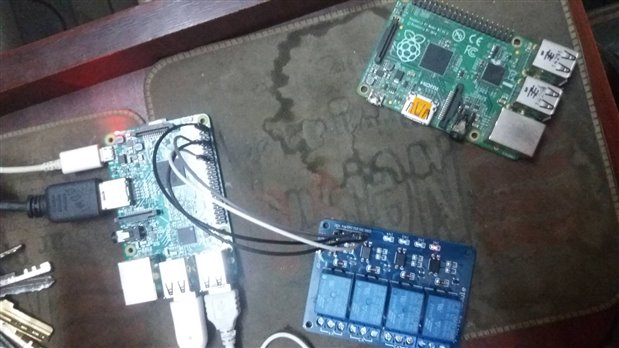
    I use 12V power source for relay and this is not the connection. I want to know is the code is correct?  The code I use given bellow.


    import RPi.GPIO as gpio

    import time

    import sys

    import Tkinter as tk


    def init():

        gpio.setmode(gpio.BOARD)

        gpio.setup(7, gpio.OUT)

        gpio.setup(11, gpio.OUT)

        gpio.setup(13, gpio.OUT)

        gpio.setup(15, gpio.OUT)


    def forward(tf):

        gpio.output(7, gpio.HIGH)

        gpio.output(11, gpio.LOW)

        gpio.output(13, gpio.HIGH)

        gpio.output(15, gpio.LOW)

        time.sleep(tf)

        gpio.cleanup()


    def reverse(tf):

        gpio.output(7, gpio.LOW)

        gpio.output(11, gpio.HIGH)

        gpio.output(13, gpio.LOW)

        gpio.output(15, gpio.HIGH)

        time.sleep(tf)

        gpio.cleanup()


    def turn_left(tf):

        gpio.setup(7, True)

        gpio.setup(11, True)

        gpio.setup(13, True)

        gpio.setup(15, False)

        time.sleep(tf)

        gpio.cleanup()


    def turn_right(tf):

        gpio.setup(7, False)

        gpio.setup(11, True)

        gpio.setup(13, False)

        gpio.setup(15, False)

        time.sleep(tf)

        gpio.cleanup()


    def pivot_left(tf):

        gpio.setup(7, True)

        gpio.setup(11, False)

        gpio.setup(13, True)

        gpio.setup(15, False)

        time.sleep(tf)

        gpio.cleanup()


    def pivot_right(tf):

        gpio.setup(7, False)

        gpio.setup(11, True)

        gpio.setup(13, False)

        gpio.setup(15, True)

        time.sleep(tf)

        gpio.cleanup()


    def key_input(event):

        init()

        print 'key:', event.char

        key_press = event.char

        sleep_time = 0.001


        if key_press.lower() =='w':

            forward(sleep_time)

        elif key_press.lower() =='s':

            reverse(sleep_time)

        elif key_press.lower() =='a':

            turn_left(sleep_time)

        elif key_press.lower() =='d':

            turn_right(sleep_time)

        elif key_press.lower() =='q':

            pivot_left(sleep_time)

        elif key_press.lower() =='e':

            pivot_right(sleep_time)

        else :

            print "try again "


    command = tk.Tk()

    command.bind('<KeyPress>', key_input)

    command.mainloop()

    • Cancel
    • Vote Up 0 Vote Down
    • Sign in to reply
    • Cancel
Reply
  • samirjisan
    samirjisan over 9 years ago in reply to ajens23

    imageimage


    I use 12V power source for relay and this is not the connection. I want to know is the code is correct?  The code I use given bellow.


    import RPi.GPIO as gpio

    import time

    import sys

    import Tkinter as tk


    def init():

        gpio.setmode(gpio.BOARD)

        gpio.setup(7, gpio.OUT)

        gpio.setup(11, gpio.OUT)

        gpio.setup(13, gpio.OUT)

        gpio.setup(15, gpio.OUT)


    def forward(tf):

        gpio.output(7, gpio.HIGH)

        gpio.output(11, gpio.LOW)

        gpio.output(13, gpio.HIGH)

        gpio.output(15, gpio.LOW)

        time.sleep(tf)

        gpio.cleanup()


    def reverse(tf):

        gpio.output(7, gpio.LOW)

        gpio.output(11, gpio.HIGH)

        gpio.output(13, gpio.LOW)

        gpio.output(15, gpio.HIGH)

        time.sleep(tf)

        gpio.cleanup()


    def turn_left(tf):

        gpio.setup(7, True)

        gpio.setup(11, True)

        gpio.setup(13, True)

        gpio.setup(15, False)

        time.sleep(tf)

        gpio.cleanup()


    def turn_right(tf):

        gpio.setup(7, False)

        gpio.setup(11, True)

        gpio.setup(13, False)

        gpio.setup(15, False)

        time.sleep(tf)

        gpio.cleanup()


    def pivot_left(tf):

        gpio.setup(7, True)

        gpio.setup(11, False)

        gpio.setup(13, True)

        gpio.setup(15, False)

        time.sleep(tf)

        gpio.cleanup()


    def pivot_right(tf):

        gpio.setup(7, False)

        gpio.setup(11, True)

        gpio.setup(13, False)

        gpio.setup(15, True)

        time.sleep(tf)

        gpio.cleanup()


    def key_input(event):

        init()

        print 'key:', event.char

        key_press = event.char

        sleep_time = 0.001


        if key_press.lower() =='w':

            forward(sleep_time)

        elif key_press.lower() =='s':

            reverse(sleep_time)

        elif key_press.lower() =='a':

            turn_left(sleep_time)

        elif key_press.lower() =='d':

            turn_right(sleep_time)

        elif key_press.lower() =='q':

            pivot_left(sleep_time)

        elif key_press.lower() =='e':

            pivot_right(sleep_time)

        else :

            print "try again "


    command = tk.Tk()

    command.bind('<KeyPress>', key_input)

    command.mainloop()

    • Cancel
    • Vote Up 0 Vote Down
    • Sign in to reply
    • Cancel
Children
  • ajens23
    ajens23 over 9 years ago in reply to samirjisan

    Hi Samir,


    That is a much better post, thank you.


    Sorry I don't code for the PI myself, but it looks wonky (anyone else?)

    Why are forward and reverse coded differently than  the turns and pivots?


    Are you using 2 motors or 4?

    Are those solid state relays or mechanical?

    Why does it look like your are running the GPIO pins as if you had direct motor hookup; when you are using a relay board?


    So you have control of IO pins, and your relay has a power amplifier already.

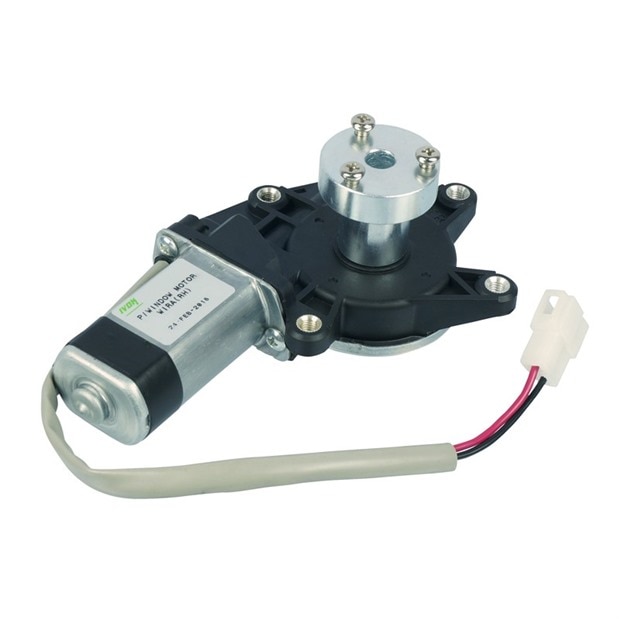
    What are you using as a power supply for the motor? Those window motors tend to draw a lot of amps. I have a slightly larger one that will pull up to 20 amps locked rotor.

    If you are going to drive 4 of them you will need a pretty stout power supply. 


    Take a moment and walk me through your code and what you are expecting it to do.


    Thanks,


    Al

    • Cancel
    • Vote Up 0 Vote Down
    • Sign in to reply
    • Cancel
element14 Community

element14 is the first online community specifically for engineers. Connect with your peers and get expert answers to your questions.

  • Members
  • Learn
  • Technologies
  • Challenges & Projects
  • Products
  • Store
  • About Us
  • Feedback & Support
  • FAQs
  • Terms of Use
  • Privacy Policy
  • Legal and Copyright Notices
  • Sitemap
  • Cookies

An Avnet Company © 2026 Premier Farnell Limited. All Rights Reserved.

Premier Farnell Ltd, registered in England and Wales (no 00876412), registered office: Farnell House, Forge Lane, Leeds LS12 2NE.

ICP 备案号 10220084.

Follow element14

  • X
  • Facebook
  • linkedin
  • YouTube