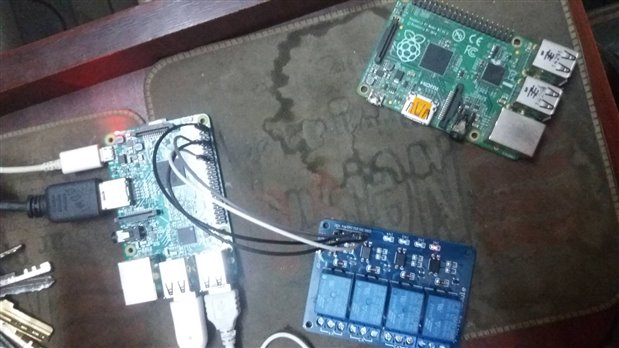
I want to run DC motors with raspberry pi 3 using relay can any one please give me the code ?
Hi Samir,
Do you want us to cook and eat your breakfast for you too?
You can get better responses by offering more information and perhaps doing a quick Google search before posting.
At a minimum you will need to amplify the 3.3V GPIO pin to whatever your relay requires a 2n2222 transistor or equivalent should do the trick
but you may need an external power supply.
How big of a motor, what voltage? Current draw?
What language are you programming in?
What PI do you have?
How much electronics knowledge do you have?
What is your ultimate goal.....?
Have you tried any of the PI tutorial sites?
https://www.engadget.com/2012/09/04/raspberry-pi-getting-started-guide-how-to/
The people on here want to help, but the same old low content questions get old fast.
Al
I use 12V power source for relay and this is not the connection. I want to know is the code is correct? The code I use given bellow.
import RPi.GPIO as gpio
import time
import sys
import Tkinter as tk
def init():
gpio.setmode(gpio.BOARD)
gpio.setup(7, gpio.OUT)
gpio.setup(11, gpio.OUT)
gpio.setup(13, gpio.OUT)
gpio.setup(15, gpio.OUT)
def forward(tf):
gpio.output(7, gpio.HIGH)
gpio.output(11, gpio.LOW)
gpio.output(13, gpio.HIGH)
gpio.output(15, gpio.LOW)
time.sleep(tf)
gpio.cleanup()
def reverse(tf):
gpio.output(7, gpio.LOW)
gpio.output(11, gpio.HIGH)
gpio.output(13, gpio.LOW)
gpio.output(15, gpio.HIGH)
time.sleep(tf)
gpio.cleanup()
def turn_left(tf):
gpio.setup(7, True)
gpio.setup(11, True)
gpio.setup(13, True)
gpio.setup(15, False)
time.sleep(tf)
gpio.cleanup()
def turn_right(tf):
gpio.setup(7, False)
gpio.setup(11, True)
gpio.setup(13, False)
gpio.setup(15, False)
time.sleep(tf)
gpio.cleanup()
def pivot_left(tf):
gpio.setup(7, True)
gpio.setup(11, False)
gpio.setup(13, True)
gpio.setup(15, False)
time.sleep(tf)
gpio.cleanup()
def pivot_right(tf):
gpio.setup(7, False)
gpio.setup(11, True)
gpio.setup(13, False)
gpio.setup(15, True)
time.sleep(tf)
gpio.cleanup()
def key_input(event):
init()
print 'key:', event.char
key_press = event.char
sleep_time = 0.001
if key_press.lower() =='w':
forward(sleep_time)
elif key_press.lower() =='s':
reverse(sleep_time)
elif key_press.lower() =='a':
turn_left(sleep_time)
elif key_press.lower() =='d':
turn_right(sleep_time)
elif key_press.lower() =='q':
pivot_left(sleep_time)
elif key_press.lower() =='e':
pivot_right(sleep_time)
else :
print "try again "
command = tk.Tk()
command.bind('<KeyPress>', key_input)
command.mainloop()
Hi Samir,
That is a much better post, thank you.
Sorry I don't code for the PI myself, but it looks wonky (anyone else?)
Why are forward and reverse coded differently than the turns and pivots?
Are you using 2 motors or 4?
Are those solid state relays or mechanical?
Why does it look like your are running the GPIO pins as if you had direct motor hookup; when you are using a relay board?
So you have control of IO pins, and your relay has a power amplifier already.
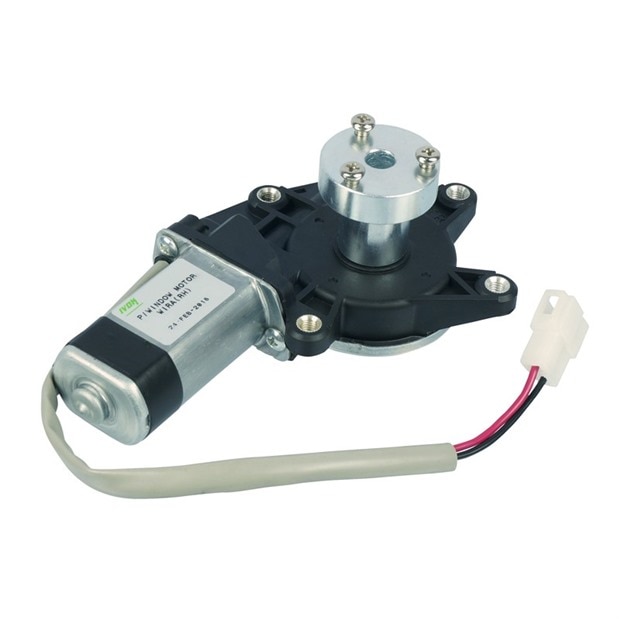
What are you using as a power supply for the motor? Those window motors tend to draw a lot of amps. I have a slightly larger one that will pull up to 20 amps locked rotor.
If you are going to drive 4 of them you will need a pretty stout power supply.
Take a moment and walk me through your code and what you are expecting it to do.
Thanks,
Al
The code looks like it is for a full H bridge driver, not a couple of relays. The code is using 4 outputs in total and you only have two connected in your diagram
Also in the diagram it looks like you have pin 8 connected to ground of the relay board. It should be pin6, 9 or 14.
Lastly it looks like you're powering the relay board from the 5V of the PI (Pin 2). Is this just for the opto isolators or is it powering the relays as well, if so this may be too much noise / load for the PI. I can't see what is behind the wires to be sure.
The basic code methodology looks correct as a basis to work from, but you need to change the various functions (Forward, Back, Left, Right, Pivot etc) to drive the relays instead of the H Bridge seems it is coded for
If you can show how your wiring the motor to the relays, we can help you move forward.