element14 Community
element14 Community
    Register Log In
  • Site
  • Search
  • Log In Register
  • Community Hub
    Community Hub
    • What's New on element14
    • Feedback and Support
    • Benefits of Membership
    • Personal Blogs
    • Members Area
    • Achievement Levels
  • Learn
    Learn
    • Ask an Expert
    • eBooks
    • element14 presents
    • Learning Center
    • Tech Spotlight
    • STEM Academy
    • Webinars, Training and Events
    • Learning Groups
  • Technologies
    Technologies
    • 3D Printing
    • FPGA
    • Industrial Automation
    • Internet of Things
    • Power & Energy
    • Sensors
    • Technology Groups
  • Challenges & Projects
    Challenges & Projects
    • Design Challenges
    • element14 presents Projects
    • Project14
    • Arduino Projects
    • Raspberry Pi Projects
    • Project Groups
  • Products
    Products
    • Arduino
    • Avnet & Tria Boards Community
    • Dev Tools
    • Manufacturers
    • Multicomp Pro
    • Product Groups
    • Raspberry Pi
    • RoadTests & Reviews
  • About Us
  • Store
    Store
    • Visit Your Store
    • Choose another store...
      • Europe
      •  Austria (German)
      •  Belgium (Dutch, French)
      •  Bulgaria (Bulgarian)
      •  Czech Republic (Czech)
      •  Denmark (Danish)
      •  Estonia (Estonian)
      •  Finland (Finnish)
      •  France (French)
      •  Germany (German)
      •  Hungary (Hungarian)
      •  Ireland
      •  Israel
      •  Italy (Italian)
      •  Latvia (Latvian)
      •  
      •  Lithuania (Lithuanian)
      •  Netherlands (Dutch)
      •  Norway (Norwegian)
      •  Poland (Polish)
      •  Portugal (Portuguese)
      •  Romania (Romanian)
      •  Russia (Russian)
      •  Slovakia (Slovak)
      •  Slovenia (Slovenian)
      •  Spain (Spanish)
      •  Sweden (Swedish)
      •  Switzerland(German, French)
      •  Turkey (Turkish)
      •  United Kingdom
      • Asia Pacific
      •  Australia
      •  China
      •  Hong Kong
      •  India
      • Japan
      •  Korea (Korean)
      •  Malaysia
      •  New Zealand
      •  Philippines
      •  Singapore
      •  Taiwan
      •  Thailand (Thai)
      • Vietnam
      • Americas
      •  Brazil (Portuguese)
      •  Canada
      •  Mexico (Spanish)
      •  United States
      Can't find the country/region you're looking for? Visit our export site or find a local distributor.
  • Translate
  • Profile
  • Settings
Raspberry Pi
  • Products
  • More
Raspberry Pi
Raspberry Pi Forum New reworked driver for Wolfson/Cirrus Logic audio card
  • Blog
  • Forum
  • Documents
  • Quiz
  • Events
  • Polls
  • Files
  • Members
  • Mentions
  • Sub-Groups
  • Tags
  • More
  • Cancel
  • New
Join Raspberry Pi to participate - click to join for free!
Featured Articles
Announcing Pi
Technical Specifications
Raspberry Pi FAQs
Win a Pi
Raspberry Pi Wishlist
Actions
  • Share
  • More
  • Cancel
Forum Thread Details
  • Replies 390 replies
  • Subscribers 743 subscribers
  • Views 42460 views
  • Users 0 members are here
  • raspberry_pi
  • raspeberry_pi_accessories
Related

New reworked driver for Wolfson/Cirrus Logic audio card

hiassoft
hiassoft over 9 years ago

I've been working on a driver rework, mainly to get rid of the requirement to carry around a bunch of patches to upstream driver code, and also to fix some outstanding issues and introduce some new features.


Most issues have been ironed out so here's the first public release.


Edit: the driver has been included in official RPi kernels. Just run sudo rpi-update to install it.

You still have to install the mixer scripts and add the /etc/modprobe.d file. See my website for details

RPi Linux driver for Wolfson / Cirrus Logic Audio Card


Source: https://github.com/HiassofT/rpi-linux/tree/cirrus-ng-4.9.0

Precompiled kernel: http://www.horus.com/~hias/tmp/cirrus/cirrus-ng-linux-4.9.0.tgz

New mixer scripts: http://www.horus.com/~hias/tmp/cirrus/cirrus-ng-scripts.tgz


Important notes:

  • The new driver bases on the rather fresh kernel 4.9.0 which means there's some risk of (yet unknown) issues. Use it at your own risk and please run "rpi-update" to get the latest firmware before installing the new driver.
  • The soundcard name has been changed from "snd_rpi_wsp" to "RPi-Cirrus", also several ALSA controls have been removed and new ones were added. This means the old usecase scripts and any custom-made scripts will no longer work. Use the new mixer scripts instead of the old usecase/listen scripts.
  • The new driver supports setting (and receiving) of the S/PDIF channel status bits (aka AES bits). If you add an ALSA card configuration file this means applications like Kodi can do proper AC3/DTS passthrough. A sample card configuration file (plus the mixer scripts) can be found here: https://github.com/HiassofT/rpi-cirrus-config
  • I haven't fully updated the documentation on my website RPi Linux driver for Wolfson / Cirrus Logic Audio Card  yet, will do that during the next weeks/months. But except for the things noted above most stuff should still work as in previous driver versions.


Please report back if you tested the driver (either successfully or unsuccessfully), any feedback will help me!


so long,


Hias

  • Sign in to reply
  • Cancel
Parents
  • timg73
    timg73 over 8 years ago

    Hias,

    A huge thank-you for all the work you've put into supporting the Cirrus Audio card.  Until now I've been using your kernel packages, and have just got round to trying the latest official 4.9 kernel which is also working very nicely.  It's a real shame that the Cirrus card has (or appears to have) gone out of production just when the software support became so good.  The older Wolfson cards are still available, so perhaps I'll get a couple and try modifying them to fit a 40-pin header.  Anyway, thanks again for everything you've done.  I really do appreciate it.

    Tim

    • Cancel
    • Vote Up 0 Vote Down
    • Sign in to reply
    • Cancel
  • hystrix
    hystrix over 8 years ago in reply to timg73

    The Cirrus Card does seem to be out of stock everywhere - what a shame.  I just started working on an alternative ultrasound sensistive microphone, since the electret type I was using has been out of production for years and is now virtually impossible to get hold of.


    What other options are there for recording audio at 192kHz with the Raspberry Pi?


    • Cancel
    • Vote Up 0 Vote Down
    • Sign in to reply
    • Cancel
  • hystrix
    hystrix over 8 years ago in reply to psyj

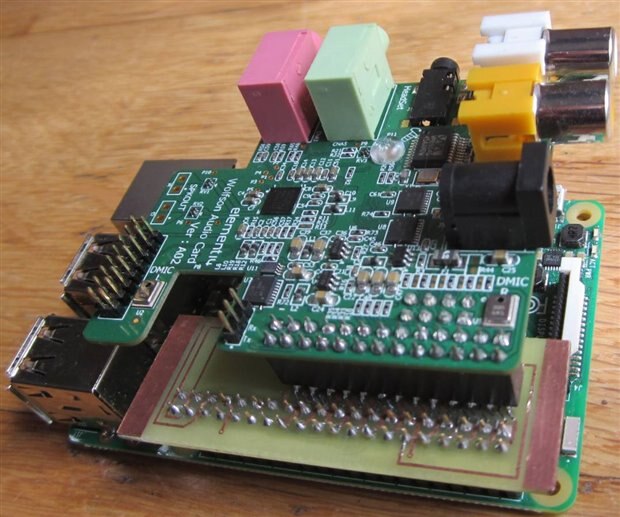
    Ha!  I knew someone would mention the strain caused by the pogo pin protector. image   This was an early photo - I actually trimmed off some more of the plastic on the left-hand side.  You can see the black header is catching on it in the photo - it's much better now.


    My only concern is whether the springs in the pogo pins will eventually start to push the audio card off the header.  Time will tell.  I may even file off some of the plastic from the bottom of the pin protector, so the springs aren't compressed as much.


    I look foward to the photos of the piggy-back board.


    • Cancel
    • Vote Up 0 Vote Down
    • Sign in to reply
    • Cancel
  • hiassoft
    hiassoft over 8 years ago in reply to hystrix

    I got my "Frankenson" sound card working with a Pi2 .


    I didn't de-solder the pogo pins. I found a cover that fits over them nicely - made from a UK 3-pin mains plug protector that all new electrical devices come with. I cut the end off the Earth pin end of the protector. It fits neatly onto the pogo pins. Once the Wolfson card is attached to the Pi, the cover is held nicely in place, and stops them shorting on anything on the Pi.

    That's looking really nice, well done! And I think the cap over the pogo pins is a rather clever idea!


    so long,


    Hias

    • Cancel
    • Vote Up 0 Vote Down
    • Sign in to reply
    • Cancel
  • psyj
    psyj over 8 years ago in reply to psyj

    All,


    I promised an update on the piggy back card approach. Apologies for the delay, real world demands ...


    First a photo

    image


    Herewith my observations


    1)  Making the pcb at home is a pain for the following reasons.

    1.     Drilling the board exactly (for the headers) is difficult.
    2.      I can do only single sided boards and this approach demands "creativity" when installing the 26 pin header for the Wolfson. Plated through holes would be better/easier/stronger
    3.     (and worst) the pads to receive the pogo connectors must be gold plated (So whilst my card works at the moment, I await the effects of O2)

    So the board needs to be made professionally to be a good long term option  .... and that will mean 10 of them!


    2) The Wolfson is well clear of the main board.  This is good for ventilation and for access to the ribbon cable connectors if you need them. It is bad in terms of mechanical support of the card.


    3) It does offer a zero mod way of connecting the Wolfson to a pi 2/3


    Overall I shall probably "sacrifice" a pi 3 and cut pin 12 off the Pi header and connect Wolfson direct to pi 3, ie not bother with a piggy back board .  It is a minor mod and will have probably no impact on any future project  ... and a pi is easier to source than these sound cards!  So, with the exception of not removing R39, I will probably follow the same route as others on the forum.   But if your project needs easy access to those ribbon sockets, the piggy back route is worth considering.


    Good job I am a Brit (expat) and still have one of those mains plug shrouds!

    • Cancel
    • Vote Up 0 Vote Down
    • Sign in to reply
    • Cancel
  • hystrix
    hystrix over 8 years ago in reply to psyj

    Nice PCB!  If you are taking orders for a professionally made piggy-back board, put me down for one image.


    By the way, I emailed Cirrus Logic earlier in the week about the status of the Audio Card, because I assume that once the Wolfson Card stocks are depleted, we have no means of recording audio with a Pi at 192 kHz. image

    • Cancel
    • Vote Up 0 Vote Down
    • Sign in to reply
    • Cancel
  • psyj
    psyj over 8 years ago in reply to hystrix

    Hystrix,


    thank you for those kind words.  No promises about the board, but Matthias rightly pointed out that the piggy back board should support the Wolfson card.  So do you have any feelings about how to use the extra board space? (Around 12cm2).  I really need a good digitally controlled attenuator, much better to run the Wolfson to full 24 bit accuracy,  but that is an output too high for most power amps..  I have a really nice design (not mine), based on relays .  Yes the clicky things! But it needs around 50cm2.


    Yes.  I have a stock of 3 Wolfson cards at the moment, but I am thinking of getting a couple more. Perhaps we could persuade Cirrus to release the design into the public domain  .... and then we would have to whip enough enthusiasm  for a group build!  But I suspect that Cirrus would like to lose the design in favour of their own devices   ..... though I do note the existence of the wm8281 (datasheet Jan 2017),  which looks very much like an update of the WM5102 .... it might even be upward driver compatible. I note too that some linux kernels have been adapted

    • Cancel
    • Vote Up 0 Vote Down
    • Sign in to reply
    • Cancel
  • psyj
    psyj over 8 years ago in reply to hiassoft

    Matthias,


    Really sorry to bother you, but having got my piggy back +pi 3 working, I played with the kernel. Fatal mistake.  I had been running Runeaudio + your(?) 4.4.14 kernel, but I have messed up.  I could spend days finding the problem (and 5 minutes fixing it), but perhaps it is time to leave the past behind. What kernel would you recommend to run headless MPD, with linux shell available over SSH and the ability to run brutefir? It sounds like I dont need Jessie (which you kindly support) nor the librelec kernel (which you kindly support).


    Many thanks in advance

    • Cancel
    • Vote Up 0 Vote Down
    • Sign in to reply
    • Cancel
  • hiassoft
    hiassoft over 8 years ago in reply to psyj

    Hi John!

    What kernel would you recommend to run headless MPD, with linux shell available over SSH and the ability to run brutefir? It sounds like I dont need Jessie (which you kindly support) nor the librelec kernel (which you kindly support).

    I'd recommend using Raspbian Lite (Jessie), this is what I'm using for my (mostly headless) test setups as well. The Lite version comes with a minimal set of packages preinstalled, no desktop environment and unnecessary cruft for headless setups, and you can easily install the packages you want. mpd and brutefir are all available from the Raspbian repo, "sudo apt-get install mpd brutefir" and you can get going image Ah, well, and "sudo rpi-update" for the 4.9 kernel with cirrus drivers plus downloading the mixer scripts, of course image


    so long,


    Hias

    • Cancel
    • Vote Up +1 Vote Down
    • Sign in to reply
    • Cancel
  • psyj
    psyj over 8 years ago in reply to hiassoft

    Matthias,


    As always, thanks for the rapid reply.  It all went smoothly, though not as quickly as I would like.  Below I have listed the steps I took in painstaking detail ....  Obviously this is stuff you already know!  But if somebody else wants to do the same thing, it saves you from having to reply.  Your instructions at RPi Linux driver for Wolfson / Cirrus Logic Audio Card are concise and 100% correct.  Here I just spell it out.


    1) Download jessie lite and unzip it from the base repository


    2) In a terminal on a linux machine with a blank memory card inserted (at device $)

            sudo dd bs=4M if=2017-03-02-raspbian-jessie-lite.img of=/dev/sd$


    3) SSH is enabled in jessie by creating a file with name "ssh" in the boot partition


    4) Install card and boot pi (with wired ethernet)


    5) SSH to device  ssh $.$.$.$ -l pi (password=raspberry), thence


        sudo apt-get install rpi-update


        sudo rpi-update (y at prompt.  We do this to get the 4.9 kernel to get the driver for the Wolfson)


        sudo raspi-config (to enable i2c and spi, follow the menus)


        sudo reboot


    6) SSH to device (again)


        uname -a (just to check at kernel 4.9)


        sudo apt-get install mpd brutefir (to install my tools for later)

    (this failed, so)

        sudo apt-get update


        sudo apt-get install mpd brutefir (to install my tools for later)

    (locale warnings from perl, but unpacks a lot more, esp stuff for brutefir like fft)


        sudo apt-get install mpc (useful add on to mpd)


        sudo apt-get install i2c-tools (to check device presence.  8804 on card shows at 3b using  sudo i2cdetect -y 1)


        sudo apt-get install vim to get vim editor (easier to edit through SSH than playing the permissions game through ftp)


    (you could wrap all those gets up into a single line, skip the reboot etc, this is just my log!)


       sudo vim /boot/config.txt (uncomment #dtparam=i2s=on and add the line "dtoverlay=rpi-cirrus-wm5102")

        sudo vim /etc/modprobe.d/cirrus.conf (to create new file, with content "softdep arizona-spi pre: arizona-ldo1")


        sudo reboot


    SSH to device


    At this point aplay -l shows the (piggy backed) Wolfson card and alsamixer allows you to play with it


    (Apologies to all, I must learn the correct protocol for doing this on the board)

    • Cancel
    • Vote Up 0 Vote Down
    • Sign in to reply
    • Cancel
  • psyj
    psyj over 8 years ago in reply to psyj

    Postscript,


    The rest of getting the new system working went very smoothly, a bog standard MPD configuration and moving the system to run from HD (I don't like writing to SD ad infinitum) .  The only hiccup came when I imported my alsactl state file (alsactl allows you to store and restore complete configurations for the sound card, very useful when playing with something as complex as this sound card).  Matthias has indicated in an earlier post that the driver had changed and so my import failed    ...... my own silly fault .......


    alsactl: set_control:1325: failed to obtain info for control #36 (No such file or directory)        (ditto 37,38,39)

    alsactl: set_control:1325: failed to obtain info for control #162 (No such file or directory)

    alsactl: set_control:1325: failed to obtain info for control #298 (No such file or directory)       (ditto 299,300,301)

    alsactl: set_control:1325: failed to obtain info for control #461 (No such file or directory)       (ditto 462,463,464)


    The first group are the EQn filter equalisation parameters, which I use as a partial room correction filters....... in fact a large number of other controls have changed numbering too, so I do not suggest this path for migrating parameters


    So now a few tweaks and I am done!


    (Matthias,  I remember you mentioning the EQ parameters changing from 42 to 40 bytes, so no need to reply, unless you want to.  It is only when you look at the state file that you realise how enormous the driver is.  Yet again, many thanks)

    • Cancel
    • Vote Up 0 Vote Down
    • Sign in to reply
    • Cancel
  • psyj
    psyj over 8 years ago in reply to hiassoft

    Matthias,


    It is a 100 to one shot I know, but by any chance did you compile WISCEbridge support into your driver?  (From what I can find WISCEbridge allows raw register read/write through ports 22348/22349 using a "simple" protocol)  I am guessing not, but it has proved impossible for me to find a copy of WISCEbridge for Linux (which is in the WISCE SDK).


    From an ideological point of view, I am guessing that it would not be correct to integrate what would effectively be a back-door for this control route into the driver for the 5102. I ask because I would like to know what you would see as the correct way of setting up the EQ parameters .... raw writes to your driver, a cosmetic layer or direct access to the registers via i2c/spi (I've rewired one of my Wolfson to make the 5102 visible on i2c).  Of course direct access could well give rise to clashes with your driver.


    So I am guessing I have many happy evenings with wireshark ahead of me!

    • Cancel
    • Vote Up 0 Vote Down
    • Sign in to reply
    • Cancel
Reply
  • psyj
    psyj over 8 years ago in reply to hiassoft

    Matthias,


    It is a 100 to one shot I know, but by any chance did you compile WISCEbridge support into your driver?  (From what I can find WISCEbridge allows raw register read/write through ports 22348/22349 using a "simple" protocol)  I am guessing not, but it has proved impossible for me to find a copy of WISCEbridge for Linux (which is in the WISCE SDK).


    From an ideological point of view, I am guessing that it would not be correct to integrate what would effectively be a back-door for this control route into the driver for the 5102. I ask because I would like to know what you would see as the correct way of setting up the EQ parameters .... raw writes to your driver, a cosmetic layer or direct access to the registers via i2c/spi (I've rewired one of my Wolfson to make the 5102 visible on i2c).  Of course direct access could well give rise to clashes with your driver.


    So I am guessing I have many happy evenings with wireshark ahead of me!

    • Cancel
    • Vote Up 0 Vote Down
    • Sign in to reply
    • Cancel
Children
  • hiassoft
    hiassoft over 8 years ago in reply to psyj

    Hi John!

    It is a 100 to one shot I know, but by any chance did you compile WISCEbridge support into your driver? (From what I can find WISCEbridge allows raw register read/write through ports 22348/22349 using a "simple" protocol) I am guessing not, but it has proved impossible for me to find a copy of WISCEbridge for Linux (which is in the WISCE SDK).


    I didn't have much luck with WISCE so far. Downloaded the latest version (3.6.1.3) and installed the WM5102 setup from cirrus.com but I just got an error message when trying to create a simulation project. WISCE log says "Internal Error - WARNING: Firmware on WM5102's DSP1 core is NOT valid" - not sure what's going wrong there.


    Do you have the original installation files and could you upload them somewhere?


    As for direct register access: I wrote a simple program to do that, via I2C, needed that for debugging as well image http://www.horus.com/~hias/tmp/cirrus-reg.c


    The kernel driver accesses the WM5102 chip via SPI but the chip is also connected via I2C. The I2C interface is only available when the chip is active (i.e. not in standby), so you either need to have aplay/arecord running in the background or run a listen script - otherwise the WM5102 will enter standby mode and only react on SPI.


    As for the EQ registers: WM5102 has 21 16-bit registers for each equalizer, EQ1 registers are 0xE10-0xE24. The first 2 registers control the 5 band volumes and are exposed via alsa mixer controls ("EQ1 B1 Volume" .. "EQ1 B5 Volume"). The EQ enable bit in the first EQ register is controlled via DAPM, that means whenever you route signals through the EQ it'll automatically be enabled.


    The mixer control "EQ1 Coefficients" sets registers 0xE11-0xE24 - which means they overlap with the B4 and B5 controls in 0xE11.


    For details about the register and mixer definitions look at include/linux/mfd/arizona/registers.h and sound/soc/codecs/wm5102.c in the kernel tree - just search for _EQ1_


    so long,


    Hias

    • Cancel
    • Vote Up 0 Vote Down
    • Sign in to reply
    • Cancel
  • psyj
    psyj over 8 years ago in reply to hiassoft

    Hias,


    Many thanks.  Here is a link https://www.dropbox.com/s/q5syxn3asr2yirq/WISCESetup.zip?dl=0 to the WISCE I use, without any problems. Cannot help with the error, I have never seen it. I have noted that WISCE does a lot of parameter checking.  Is it posssible that you have some DSP microcode loaded (or are trying to load) that WISCE does not like? (Which is to say that WISCE is working perfectly, it is just that it doesnt like DSP code).  As I understand it, none of us are using/loading the DSP. 


    I have been digging around this evening looking for an alternative to WISCEBridge for connecting to the 5102 from WISCE (which would be ideal since there is WISCEbridge for linux)  ..... WISCE will allow a direct i2c/spi connection to the 5102 via an Aardvark USB interface  ...... which has the same pinout as the USBi/ freeUSBi   ...... so it is JUST possible that the freeUSBi interface will allow a USB -> i2c/spi connection from WISCE to the 5102  .... but of course there are bus master problems if the pi is connected as well


    I have been using i2c-tools to write to the 5102 directly  .... and it took a while to find out that nothing worked except when playing some music!  It is buried away in the 5102 documentation  .... the device will respond to SPI and/or I2C when being clocked, but only the original bus used at boot time if the device is "stopped". So your explanation that you use spi at boot fits well :- except that I am confused! My reading of the Wolfson circuit schematic suggests that there is only an i2c connection to the 8804, so I added a couple of wires to link in the 5102  ... but that does not fit with what you say, unless of course you added two link wires as well.


    I'll look at cirrus-reg.c .... I am sure that it will be easier that using i2cwrite/read! (Postscript:- yes that will make life simpler, thanks)


    And the Wolfson documentation is invaluable for working out how to program the 400 odd registers for the four EQ!!  At the moment I am not optimistic about getting good low frequency equalisation


    Best Wishes


    John

    • Cancel
    • Vote Up 0 Vote Down
    • Sign in to reply
    • Cancel
  • hiassoft
    hiassoft over 8 years ago in reply to psyj

    Hi John!

    Many thanks. Here is a link https://www.dropbox.com/s/q5syxn3asr2yirq/WISCESetup.zip?dl=0 to the WISCE I use, without any problems. Cannot help with the error, I have never seen it. I have noted that WISCE does a lot of parameter checking. Is it posssible that you have some DSP microcode loaded (or are trying to load) that WISCE does not like? (Which is to say that WISCE is working perfectly, it is just that it doesnt like DSP code). As I understand it, none of us are using/loading the DSP.

    Thanks for the link, but I didn't have much luck with this version either. Here's what I did:

    • start up my WindowsXP virtualbox VM
    • uninstall previous WISCE version and WM5102 setup
    • install your WISCE, using default settings (I even let it install the FTDI drivers)
    • in WISCE click on "Add System" and choose "Create a new simulated system"
    • Add device dialog pops up, only selectable chip is WM5102 Rev C, I accept the default settings (SMBUS, address 0x34)
    • After a few seconds a dialog pops up with the message "Failure adding device 'WM5102'. Please contact WISCESupport@cirrus.com with the details of the device you were trying to use"


    Then I checked the logfile, found this at the end of it:

    06-04-2017 10:23:52.369 * Detecting devices for Simulated system.
    06-04-2017 10:23:52.369 *    - No devices detected.
    06-04-2017 10:25:22.178 *    - fully loaded c:\programme\wolfson evaluation software\devices\wm5102_regmap_revc 2v9.wxd
    06-04-2017 10:25:23.340 * Internal Error - WARNING: Firmware on WM5102's DSP1 core is NOT valid.
    06-04-2017 10:25:23.570 * Internal Error - Failure adding device entity for region 'WM5102': System.IO.FileLoadException: Eine von "Wolfson.WISCE.Filters.dll" importierte Prozedur konnte nicht geladen werden.
    Dateiname: "Wolfson.WISCE.Filters.dll"
       bei System.Windows.Forms.Control.MarshaledInvoke(Control caller, Delegate method, Object[] args, Boolean synchronous)
       bei System.Windows.Forms.Control.Invoke(Delegate method, Object[] args)
       bei System.Windows.Forms.WindowsFormsSynchronizationContext.Send(SendOrPostCallback d, Object state)
       bei Wolfson.WISCE.Entities.DeviceEntity.Initialize(IDataRegion region)
       bei Wolfson.WISCE.Entities.DeviceEntity..ctor(SystemEntity system, IDataRegion dataRegion, String deviceName)
       bei Wolfson.WISCE.Entities.DeviceEntity.Create(SystemEntity system, IDataRegion dataRegion)
       bei Wolfson.WISCE.Entities.SystemEntity.GDNNINCJKLLEILDPMMHMEAAEBPCLDIJFCBAH(IDataRegion  )
    
    
    06-04-2017 10:25:23.570 * Error - Failure adding device 'WM5102'. Please contact 'WISCESupport@cirrus.com' with details of the device you were trying to use.
    06-04-2017 10:27:14.810 * --------------------Closing WISCE™--------------------


    Not quite sure what's going wrong there, the DSP firmware warning could be a red herring and the real issue some dll/system incompatibility. I guess I'll leave it there.


    I have been using i2c-tools to write to the 5102 directly .... and it took a while to find out that nothing worked except when playing some music! It is buried away in the 5102 documentation .... the device will respond to SPI and/or I2C when being clocked, but only the original bus used at boot time if the device is "stopped". So your explanation that you use spi at boot fits well :- except that I am confused! My reading of the Wolfson circuit schematic suggests that there is only an i2c connection to the 8804, so I added a couple of wires to link in the 5102 ... but that does not fit with what you say, unless of course you added two link wires as well.

    Just checked the schematics, on the Cirrus card I2C of the WM5102 is connected to RPi as well, but on the original Wolfson card the I2C interface of the WM5102 seems only to be routed to the ext connector. See page 3 of the schematic PDFs, CIF1SCLK and CIF1SDA signals.


    I did most tests with the Cirrus card so that explains why I didn't have to modify anything image


    BTW: Why are you trying to access the WM5102 directly? The majority of the WM5102 registers are exposed via alsa controls and if you access the chip directly the register contents of the WM5102 will be out of sync with the (cached) register settings used by ASoC/Linux - check /sys/kernel/debug/regmap/spi0.1/registers for example. This can quickly lead to a mess, so be very careful with that. Better stick to the alsa controls and only use direct access for registers that are not exposed via alsa.


    so long,


    Hias

    • Cancel
    • Vote Up +1 Vote Down
    • Sign in to reply
    • Cancel
  • psyj
    psyj over 8 years ago in reply to hiassoft

    Hias,


    Well on the WISCE software, perhaps it is the 5102 exe file that is the problem ..... so just in case  ....  https://www.dropbox.com/s/lwokz6h2bn81pvt/WM5102Setup_Rev2_9.zip?dl=0  > It seems quite possible, since the problem only occurs when you load the device.  I have also uploaded the 8804 specific file  https://www.dropbox.com/s/sen92d6zv2mazss/WM8804Setup_Rev1_1.zip?dl=0   , that way you can try starting WISCE without loading the 5102 information.


    On the I2C, I did wonder whether that was the explanation


    As to direct writes, you are of course right  ..... it is just that repeatedly typing 80 quasi random hex charecters is pretty error prone when I want to change one byte (well strictly 2 bytes).  I guess I could write a script, but I might end up spending more time on the temporary fix than on the experiment.  The purpose of my earlier email was to find out what way you thought best  ..... and I will happily follow your advice.  Any final system, I will use the alsa set/get  .... but like you I need a quick debug route to find out whether I can get low frequency (less than 500hz) filtering working to my needs before investing lots of time on scripts (in which I am not particularly well experienced.  My plan is to use php to serve up pages of possible settings and receive user adjustments.  Have some basic stuff working, but have not tried the complex maths that is going to be needed to convert.  By the way, is there an easy way to determine current sample rate through an alsa call to the driver, because this will be set by MPD autonomously and it is a key number in filter calculations)


    Cheers


    John

    • Cancel
    • Vote Up 0 Vote Down
    • Sign in to reply
    • Cancel
  • psyj
    psyj over 8 years ago in reply to psyj

    Hias,


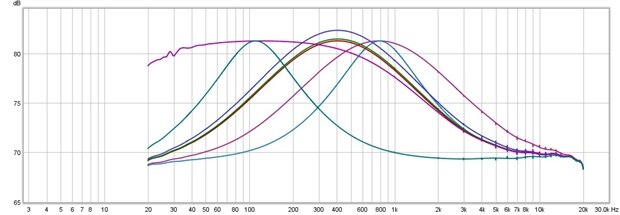
    Bad form replying to my own post, but I have started playing with the EQ filter parameters, guided by WISCE.  herewith some results

    image


    The curves here are not particularly important. what is important is that WISCE only allows certain, heavily quantised frequencies, all of them above 100Hz.  The purple curve might give a clue why,  I think that (for obvious reasons) it is seeking to have zero gain at 0Hz.  Well that is all sensible, but when I try to "ski off piste" by putting raw values into amixer set commands (nothing extreme, just shifting the frequencies slightly) the linux driver throws me out with an "invalid parameter" warning. So not only WISCE , but ALSA as well are doing parameter checking.  So in answer to your earlier question, it would seem the only way to use other parameters is by direct register access via i2c   ....... accepting of course the risks involved!


    (Postscript:  any idea where the parameter checking is done?    ...... .with a bit of generous help from A.N.Other it is done in arizona.c  . which fails all A and B parameters whose absolute value exceeds 4095 and also does a ratio check between A and B)


    John

    • Cancel
    • Vote Up 0 Vote Down
    • Sign in to reply
    • Cancel
  • hiassoft
    hiassoft over 8 years ago in reply to psyj

    Hi John!


    Thanks a lot for the WM5102/8804 setup files, but I did get the same error(s) as before. When using the WM8804 I also got the DLL error - which seems to be the root cause for both WM5102 and WM8804 failing. I'll leave it there, no interest in entering the windows DLL rabbit hole (after all it could be caused by using Windows XP).


    As for the filter coefficients: the wm5102 driver has been written by Wolfson/Cirrus so I'd guess they put the checks in there for a reason image


    The datasheet indicates that the allowed filter cuefficients depend on sysclk which is either ~49MHz (when using 32/48/... kHz) or ~45MHz (at 44.1/88.4/... kHz) - so the actual samplerate shouldn't have be a huge issue. Anyways, you can check the current audio device playback settings via /proc/asound/card0/pcm0p/sub0/hw_params (or pcm0c for capture/recording).


    so long,


    Hias

    • Cancel
    • Vote Up 0 Vote Down
    • Sign in to reply
    • Cancel
  • psyj
    psyj over 8 years ago in reply to hiassoft

    All,


    OK, to close off my thinking on the equalisation blocks.  Finding the parameter checking in the driver (the bit provided by Wolfson in arizona.c) has revealed a lot about the parameters you should pass to the equalisation blocks in the Wolfson.


    The checking is exactly that needed to check for stability in second order biquad filters and corresponds perfectly with the checking done by the WISCE software.


    No big suprises there.


    But what that means is that if the WISCE software will not let you have a certain set of parameters, it is for good reason and no amount of bit tinkering elsewhere will give you extra functionality from the WM5102.  Worse, you will have unstable filters.  I have for example verified that (at 44100) the first three frequency bands you can have are 110 156 and 191Hz.  Not only does this show from the WISCE software, it corresponds exactly with the quantisation of the a1, a2 parameters in a biquad filter  ...... 1+a1+a2= 1/4096,2/4096,3/4096 (read www.st.com/resource/en/application_note/cd00222512.pdf if you want.  It is the least mathematical explanation I can find, and predicts perfectly filter frequencies)


    So what does all that mean.  Basically that you cannot have accurate low frequency band pass /cut filters with the Wolfson. I would suggest that the accuracy becomes sufficiently good at 300Hz and above for 44100 data( the first 10 bands are 110, 156, 191, 221, 247, 270, 292, 312, 331, 349 HZ, shifting a bit depending on Q).  And the situation is in reality worse for higher sampling rates (the band frequencies are those I have mentioned multiplied by the ratio of the sample rates, so at 88.2 the bands are at twice the frequency) .


    So the EQ units can be used effectively as tone controls but not as an effective DRC (digital room correction) for the sized rooms I live in. The Low/High pass filters are much more useful with set points only 2-3Hz apart.


    I guess that is already more than enough, but if anybody needs further details, I am happy to provide.


    (postscript .... and the parameter for the low/high pass filters on the Wolfson follows perfectly the same maths, that is to say (quoting the above source)


    First-order filter design

    As a first step to obtain the coefficients for the 1st-order low-pass or high-pass filter the following equations can be used:

         θ C = 2 ∗ π ∗ f C / f S (= the normalized cut-off frequency)

         K = tan(θ C / 2)

         α = 1 + K.

    The denominator coefficients are identical for both low-pass and high-pass filters designed for the same cut-off frequency and are computed as follows:


    a1 = -(1 - K) / α =-(1-K)/(1+K)


    All you need to do to generate the the Wolfson parameter is multiply a1 by 4096 and make the result 16 bit signed

    • Cancel
    • Vote Up 0 Vote Down
    • Sign in to reply
    • Cancel
  • psyj
    psyj over 8 years ago in reply to psyj

    I have now managed to decipher the 5102 parameters for EQ and LHPF .  I hesitate to share here, but if somebody needs a steer

    • Cancel
    • Vote Up 0 Vote Down
    • Sign in to reply
    • Cancel
  • psyj
    psyj over 8 years ago in reply to hiassoft

    Hias,

    hiassoft


    Hi.  Having "finished" working out the parameters for the EQ and LHPF blocks (well nearly finished:- I can generate "good enough" parameters for everything and bit perfect for LHPF, the shelving filters in the EQ and A and B for the biquads)  ...... I have turned my attention to the DSP core.  I have located several firmware files that the WISCE software will happily load as legitimate files for the 5102. I note too that wm_adsp.c references several firmware files for the DSP, some of which I have.  I am guessing that this appears in your kernel as well (??).... since the wm_adsp.c work was done by those nice teccies at Wolfson shortly before the Cirrus buy-out. But what I have yet to determine is how to instruct the driver to load the firmware.


    I really do not want to waste yet more of your time:- since this question relates to calling conventions in Linux generally, could you please point me to an easy (already written!) guide.


    And then of course I will need to work out how to talk to the firmware!!  The files I have come with corresponding bin files, which I presume are plug-ins to some windows App.  But nothing for you to do there I am pleased to say.

    • Cancel
    • Vote Up 0 Vote Down
    • Sign in to reply
    • Cancel
  • psyj
    psyj over 8 years ago in reply to hiassoft

    Hias,


    Just a close-off on the WISCE software, I know you do not want to waste time with Windows (and hey!)

    I have already tried running WISCE under WINE .... with zero success!  But perhaps somebody else out on this group, who is a wizz with Wine, could give it a go    ....... a benefit that I had not thought about until this second (probably because it is too ambitious) is that WISCE running 100% under Wine on the target would have huge benefits.


    POSTSCRIPT


    I have installed WISCE under Wine (32 bit environment , Windows 2003 (for net problems) and .Net45.  It needs at least 1024 768 screen. I runs perfectly with the 8804 device file, but falls over on the 5102 file. At this moment I do not know why.  Oh and yes, I get a bad firmware message too!)

    • Cancel
    • Vote Up 0 Vote Down
    • Sign in to reply
    • Cancel
element14 Community

element14 is the first online community specifically for engineers. Connect with your peers and get expert answers to your questions.

  • Members
  • Learn
  • Technologies
  • Challenges & Projects
  • Products
  • Store
  • About Us
  • Feedback & Support
  • FAQs
  • Terms of Use
  • Privacy Policy
  • Legal and Copyright Notices
  • Sitemap
  • Cookies

An Avnet Company © 2026 Premier Farnell Limited. All Rights Reserved.

Premier Farnell Ltd, registered in England and Wales (no 00876412), registered office: Farnell House, Forge Lane, Leeds LS12 2NE.

ICP 备案号 10220084.

Follow element14

  • X
  • Facebook
  • linkedin
  • YouTube