element14 Community
element14 Community
    Register Log In
  • Site
  • Search
  • Log In Register
  • Community Hub
    Community Hub
    • What's New on element14
    • Feedback and Support
    • Benefits of Membership
    • Personal Blogs
    • Members Area
    • Achievement Levels
  • Learn
    Learn
    • Ask an Expert
    • eBooks
    • element14 presents
    • Learning Center
    • Tech Spotlight
    • STEM Academy
    • Webinars, Training and Events
    • Learning Groups
  • Technologies
    Technologies
    • 3D Printing
    • FPGA
    • Industrial Automation
    • Internet of Things
    • Power & Energy
    • Sensors
    • Technology Groups
  • Challenges & Projects
    Challenges & Projects
    • Design Challenges
    • element14 presents Projects
    • Project14
    • Arduino Projects
    • Raspberry Pi Projects
    • Project Groups
  • Products
    Products
    • Arduino
    • Avnet & Tria Boards Community
    • Dev Tools
    • Manufacturers
    • Multicomp Pro
    • Product Groups
    • Raspberry Pi
    • RoadTests & Reviews
  • About Us
    About the element14 Community
  • Store
    Store
    • Visit Your Store
    • Choose another store...
      • Europe
      •  Austria (German)
      •  Belgium (Dutch, French)
      •  Bulgaria (Bulgarian)
      •  Czech Republic (Czech)
      •  Denmark (Danish)
      •  Estonia (Estonian)
      •  Finland (Finnish)
      •  France (French)
      •  Germany (German)
      •  Hungary (Hungarian)
      •  Ireland
      •  Israel
      •  Italy (Italian)
      •  Latvia (Latvian)
      •  
      •  Lithuania (Lithuanian)
      •  Netherlands (Dutch)
      •  Norway (Norwegian)
      •  Poland (Polish)
      •  Portugal (Portuguese)
      •  Romania (Romanian)
      •  Russia (Russian)
      •  Slovakia (Slovak)
      •  Slovenia (Slovenian)
      •  Spain (Spanish)
      •  Sweden (Swedish)
      •  Switzerland(German, French)
      •  Turkey (Turkish)
      •  United Kingdom
      • Asia Pacific
      •  Australia
      •  China
      •  Hong Kong
      •  India
      •  Japan
      •  Korea (Korean)
      •  Malaysia
      •  New Zealand
      •  Philippines
      •  Singapore
      •  Taiwan
      •  Thailand (Thai)
      •  Vietnam
      • Americas
      •  Brazil (Portuguese)
      •  Canada
      •  Mexico (Spanish)
      •  United States
      Can't find the country/region you're looking for? Visit our export site or find a local distributor.
  • Translate
  • Profile
  • Settings
3D Printing
  • Technologies
  • More
3D Printing
Documents 3D Printing Wishlist - What do I need to begin 3D Printing?
  • Blog
  • Forum
  • Documents
  • Events
  • Polls
  • Files
  • Members
  • Mentions
  • Sub-Groups
  • Tags
  • More
  • Cancel
  • New
Join 3D Printing to participate - click to join for free!
Actions
  • Share
  • More
  • Cancel
Engagement
  • Author Author: e14phil
  • Date Created: 20 Oct 2021 2:54 PM Date Created
  • Last Updated Last Updated: 17 Jan 2023 5:52 PM
  • Views 31636 views
  • Likes 7 likes
  • Comments 22 comments
Related
Recommended

3D Printing Wishlist - What do I need to begin 3D Printing?

image


One of the coolest technologies to emerge in the last decade is 3D printing. 3D printers are incredibly versatile tools that can print virtually anything you need. The technology has improved by leaps and bounds since its inception, and incredibly accurate, high resolution 3D prints can now be made pretty inexpensively.

We've put together a wish list with all the fundamental items needed to set you up for a life in 3D Printing

3D Printers

Let's start with the 3D printer itself. There is a wide range to choose from. Select based on what you want to print, your skill level, the materials you want to print with, the size of the prints you want to make, and most importantly, budget. Whether you're printing industrial parts for machine automation or little knick-knacks to decorate your desk, there's a 3D printer for you.

Flashforge Adventurer 3

Flashforge Adventurer 3


image

Ultimaker S3

Glue Stick

In order to create a great 3D print, build plate adhesion is extremely important. If your print won't stay still, accuracy will suffer. Hairspray is popular for adhesion, but glue is more precise and creates less of a mess.

image

Magigoo Glue Stick

Deburring Tool

Many 3D prints end up with small pieces of protruding plastic that have to be cleaned up. A deburring tool makes the process easier, and with less chance of screwing up and destroying your print. Deburring tools are especially good for cleaning up modeled holes.

image

Ruko Deburring Tool

Pliers

Pliers are useful on any bench and 3D printing is no exception. Use your pliers for print core maintenance, repairs, or removing support material.

Needle-nose pliers

Flat Nosed Pliers

Masking Tape

Masking tape is incredibly versatile in 3D printing. Add it to the print bed to protect it from scratches and to help 3D prints adhere. Heat resistant masking tape is preferred for heated beds.

Masking Tape

Masking Tape

Dremel

Dremels make smoothing a lot easier, but be careful! A Dremel can get hot, and material like PLA can melt. The sanding attachments work well, but keep those RPMs low.

image

Dremel Multitool

Different-sized Nozzles

Grab a vriety of nozzles for your 3D printer. Larger ones can print faster at the expense of resolution. Smaller ones can print with more detail, but are slower.

This example works with Ultimaker 3D printers.

0.4mm

image

0.4mm Nozzles

Filament

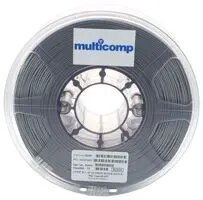
Don't forget to stock up on filaments in a variety of colors, including the shiny and translucent ones.
image

Multicomp Silver PLA Filament

Measuring Tools

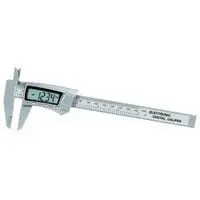
Measuring tools are required for checking machine setup and print accuracy. You've probably already got a nice ruler, but adding something like digital calipers will take your accuracy to a new level.
image

Digital Calipers

Raspberry Pi to run OctoPrint.

OctoPrint (https://octoprint.org) is software that can control and monitor every aspect of your 3D printer from within a browser. You can do things like viewing a webcam feed of your print, monitor temperatures, or start/stop/pause the current print job. It's completely free. OctoPrint is also open source, and there are already a bunch of plugins from 3rd party developers available for it.

imageimage

Raspberry Pi 4 Starter Kit

How to 3D Print Webinar Series

Watch our 4 Part Webinar Series on 3D Printing on demand. We'll take you from your first print to designing prototypes.

image

Introduction to 3D Printing

image

Create your own 3D Models

image

Maintenance and Diagnosing Bad Prints

image

First Print Basics

  • 3d printer giveaway
  • 3D Printing
  • 3dprinting
  • 3dprintin
  • 3d print
  • Share
  • History
  • More
  • Cancel
  • Sign in to reply

Top Comments

  • qbytes.dq
    qbytes.dq over 4 years ago +11
    1) What's the first thing you're going to print and why? I would print a flow rate square. After printing, I would calculate my flow rate and update my Extrusion Multiplier (you should do this for every…
  • Fred27
    Fred27 over 4 years ago +1
    1) I've bought a couple of printers over the last couple of years - an Anycubic Photon resin printer and a Creality Ender 3 to replace a very old FDM printer that broke. One of the first things I printed…
  • fmilburn
    fmilburn over 4 years ago +1
    3D printers don’t make precise holes, especially on vertical sides, so a drill and bits / step bits are useful. A pin vise and small set of bits works well for small holes. I now use 3mm heat set threaded…
Parents
  • colporteur
    colporteur over 4 years ago

    3D printing for me would be enclosures. Small unique boxes to fit electronic projects.


    I'm frustrated having to spend money on project boxes. I never find one that fits just right. I usually have to find something that is close and live with it.


    I dream of a selection of box templates of different sizes. Length, width and depth are all customisation. The cover is four screw minimum at the corners and for boxes of greater length the option to add additional holes. Inside the box you can conveniently position mounting holes to secure a printed circuit board of point to secure a cable tie.


    If I was to purchase a 3D printer I suspect there would be a proliferation of boxes of all shapes and sizes.


    Since I have no experience with 3D printing, I'm pitching two tools I find extremely useful when working with plastic models. I have also had reason to use them on 3D printed items I have ordered online. The Exacto Knife and sidecutters.  They are great for extracting items and cleaning of any small plastic burrs.


    image

    • Cancel
    • Vote Up +1 Vote Down
    • Sign in to reply
    • More
    • Cancel
  • dougw
    dougw over 4 years ago in reply to colporteur

    Good choices colporteur That style of craft knife is by far the most useful tool in 3D printing. Lots of blades are needed as PLA will dull the blades quite quickly. The flush side cutters would be the next most useful, followed by a sharp edged putty knife for removing prints form beds. Other useful items are a sanding block, files, a rubber jaw vise, a nozzle spanner and a chisel. Has anyone ever found a set of rubber-jawed vise grip pliers?

    I don't "need" another 3D printer right now, but filament and 3D printing accessories are always useful.

    One of my bucket list of printer projects is to design and build a filament spool holder that will prevent all tangles and jamming of filament on the spool. The most common cause for my prints to fail is a filament jam on the spool. It doesn't happen on every spool, but needless to say, encountering a jam near the end of a long unattended print can be vey disappointing. When the filament coming off gets gets caught under another layer that loosened off, puling on the filament just tightens the "knot" and the filament can no longer come off the reel. This is a glaring gap in 3D printer technology offerings - they don't even have an alarm or automatic pause when a knot happens.

    • Cancel
    • Vote Up +1 Vote Down
    • Sign in to reply
    • More
    • Cancel
Comment
  • dougw
    dougw over 4 years ago in reply to colporteur

    Good choices colporteur That style of craft knife is by far the most useful tool in 3D printing. Lots of blades are needed as PLA will dull the blades quite quickly. The flush side cutters would be the next most useful, followed by a sharp edged putty knife for removing prints form beds. Other useful items are a sanding block, files, a rubber jaw vise, a nozzle spanner and a chisel. Has anyone ever found a set of rubber-jawed vise grip pliers?

    I don't "need" another 3D printer right now, but filament and 3D printing accessories are always useful.

    One of my bucket list of printer projects is to design and build a filament spool holder that will prevent all tangles and jamming of filament on the spool. The most common cause for my prints to fail is a filament jam on the spool. It doesn't happen on every spool, but needless to say, encountering a jam near the end of a long unattended print can be vey disappointing. When the filament coming off gets gets caught under another layer that loosened off, puling on the filament just tightens the "knot" and the filament can no longer come off the reel. This is a glaring gap in 3D printer technology offerings - they don't even have an alarm or automatic pause when a knot happens.

    • Cancel
    • Vote Up +1 Vote Down
    • Sign in to reply
    • More
    • Cancel
Children
No Data
element14 Community

element14 is the first online community specifically for engineers. Connect with your peers and get expert answers to your questions.

  • Members
  • Learn
  • Technologies
  • Challenges & Projects
  • Products
  • Store
  • About Us
  • Feedback & Support
  • FAQs
  • Terms of Use
  • Privacy Policy
  • Legal and Copyright Notices
  • Sitemap
  • Cookies

An Avnet Company © 2026 Premier Farnell Limited. All Rights Reserved.

Premier Farnell Ltd, registered in England and Wales (no 00876412), registered office: Farnell House, Forge Lane, Leeds LS12 2NE.

ICP 备案号 10220084.

Follow element14

  • X
  • Facebook
  • linkedin
  • YouTube