element14 Community
element14 Community
    Register Log In
  • Site
  • Search
  • Log In Register
  • Community Hub
    Community Hub
    • What's New on element14
    • Feedback and Support
    • Benefits of Membership
    • Personal Blogs
    • Members Area
    • Achievement Levels
  • Learn
    Learn
    • Ask an Expert
    • eBooks
    • element14 presents
    • Learning Center
    • Tech Spotlight
    • STEM Academy
    • Webinars, Training and Events
    • Learning Groups
  • Technologies
    Technologies
    • 3D Printing
    • FPGA
    • Industrial Automation
    • Internet of Things
    • Power & Energy
    • Sensors
    • Technology Groups
  • Challenges & Projects
    Challenges & Projects
    • Design Challenges
    • element14 presents Projects
    • Project14
    • Arduino Projects
    • Raspberry Pi Projects
    • Project Groups
  • Products
    Products
    • Arduino
    • Avnet & Tria Boards Community
    • Dev Tools
    • Manufacturers
    • Multicomp Pro
    • Product Groups
    • Raspberry Pi
    • RoadTests & Reviews
  • About Us
  • Store
    Store
    • Visit Your Store
    • Choose another store...
      • Europe
      •  Austria (German)
      •  Belgium (Dutch, French)
      •  Bulgaria (Bulgarian)
      •  Czech Republic (Czech)
      •  Denmark (Danish)
      •  Estonia (Estonian)
      •  Finland (Finnish)
      •  France (French)
      •  Germany (German)
      •  Hungary (Hungarian)
      •  Ireland
      •  Israel
      •  Italy (Italian)
      •  Latvia (Latvian)
      •  
      •  Lithuania (Lithuanian)
      •  Netherlands (Dutch)
      •  Norway (Norwegian)
      •  Poland (Polish)
      •  Portugal (Portuguese)
      •  Romania (Romanian)
      •  Russia (Russian)
      •  Slovakia (Slovak)
      •  Slovenia (Slovenian)
      •  Spain (Spanish)
      •  Sweden (Swedish)
      •  Switzerland(German, French)
      •  Turkey (Turkish)
      •  United Kingdom
      • Asia Pacific
      •  Australia
      •  China
      •  Hong Kong
      •  India
      •  Korea (Korean)
      •  Malaysia
      •  New Zealand
      •  Philippines
      •  Singapore
      •  Taiwan
      •  Thailand (Thai)
      • Americas
      •  Brazil (Portuguese)
      •  Canada
      •  Mexico (Spanish)
      •  United States
      Can't find the country/region you're looking for? Visit our export site or find a local distributor.
  • Translate
  • Profile
  • Settings
FPGA
  • Technologies
  • More
FPGA
Forum HDMI Display not working for Ultra96V2 board
  • Blog
  • Forum
  • Documents
  • Quiz
  • Events
  • Polls
  • Files
  • Members
  • Mentions
  • Sub-Groups
  • Tags
  • More
  • Cancel
  • New
Join FPGA to participate - click to join for free!
Actions
  • Share
  • More
  • Cancel
Forum Thread Details
  • Replies 4 replies
  • Subscribers 559 subscribers
  • Views 1856 views
  • Users 0 members are here
  • fpga
  • display
  • ultra -96
  • ultra96-v2_dpu
Related

HDMI Display not working for Ultra96V2 board

darshancg
darshancg over 4 years ago

Hi Team,

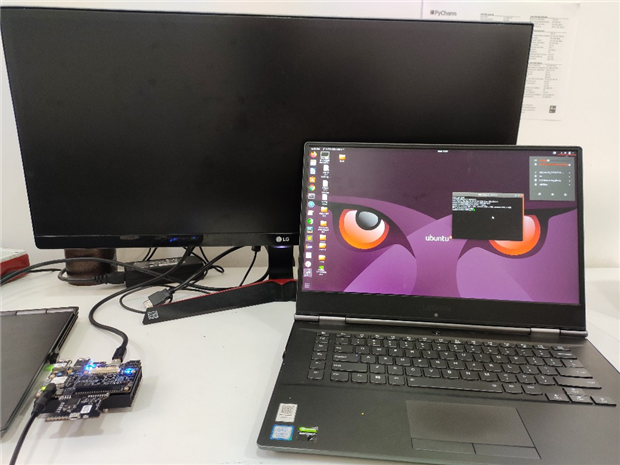
Actually, my Ultra 96 v2 board is not able to connect to the Display monitor. I had tested with Active and Passive Mini-DP to HDMI Converter, but it is not working. I had also tested with 2 HDMI Monitors, but still the same.
I am using DPU Image for the Ultra96v2 board.
Can anyone help me to resolve this issue? Would be a great help from your side.
image
image
image
Thanks,
Darshan
  • Sign in to reply
  • Cancel

Top Replies

  • albertabeef
    albertabeef over 4 years ago +2
    Darshan, Can you be more precise about which image you are using ? Is it one of the Vitis-AI images from AlbertaBeef's projects ? If yes, which one : Vitis-AI 1.0, 1.1, 1.2, 1.3 ? First, the fact that…
  • drozwood90
    drozwood90 over 4 years ago in reply to albertabeef +2
    Hi there, To expand on this, it might be helpful to check out this thread: Ultra96-v2 mini-DP to HDMI adapter It has links to an accessory page where we have tested known good adapters. Not all adapters…
Parents
  • albertabeef
    albertabeef over 4 years ago

    Darshan,


    Can you be more precise about which image you are using ?

    Is it one of the Vitis-AI images from AlbertaBeef's projects ?

    If yes, which one : Vitis-AI 1.0, 1.1, 1.2, 1.3 ?


    First, the fact that "xrandr --query" is reporting 1024x768 (the default setting),

    may indicate that the U96V2 did not "see" the DP monitor.
    Some monitors which have multiple inputs, disable the unused connectors.Are you able to "select" the DP input you are using with the monitor's menu buttons or


    For reference, here is what I get with my Vitis-AI 1.3 image:


    After powering up Ultra96-V2, I get the same as you :

       root@u96v2-sbc-base-2020-2:~# export DISPLAY=:0.0

       root@u96v2-sbc-base-2020-2:~# xrandr --query

       Screen 0: minimum 320 x 200, current 1024 x 768, maximum 4096 x 4096

       DP-1 disconnected primary

       root@u96v2-sbc-base-2020-2:~#


    After selecting the DP input on my monitor with the monitor's menu buttons,

    I can see some verbose on the serial console (you may not see this verbose in your putty console)

       [  117.335480] Console: switching to colour frame buffer device 480x135

       [  117.341928] zynqmp-display fd4a0000.zynqmp-display: fb0: xlnxdrmfb frame buffer device


    Also, I can see the chromium browser appear on the monitor.


    Re-trying the xrandr query, now returns:

       root@u96v2-sbc-base-2020-2:~# xrandr --query

       Screen 0: minimum 320 x 200, current 1920 x 1080, maximum 4096 x 4096

       DP-1 connected primary 1920x1080+0+0 607mm x 345mm

          1920x1080     60.00*+  59.94

          3840x2160     30.00    29.97

          2560x1440     59.95

          1680x1050     59.95

          1600x900      60.00

          1280x1024     75.02    60.02

          1440x900      59.89

          1280x800      59.81

          1152x864      75.00

          1280x720      60.00    59.94

          1024x768      75.03    70.07    60.00

          832x624       74.55

          800x600       72.19    75.00    60.32    56.25

          640x480       75.00    72.81    66.67    60.00    59.94

          720x400       70.08

       root@u96v2-sbc-base-2020-2:~#


    Regards,


    Mario (AlbertaBeef)

    • Cancel
    • Vote Up +2 Vote Down
    • Sign in to reply
    • Cancel
  • darshancg
    darshancg over 4 years ago in reply to albertabeef

    Hi Mario,


    I am using Vitis-AI 1.2 and the image is from AlbertaBeef's projects.


    I believe that the Active converter which I have will not support the Ultra 96 v2 board.


    How about using VNC Server?

    Will it be a better option?


    Thanks,

    Darshan


    • Cancel
    • Vote Up 0 Vote Down
    • Sign in to reply
    • Cancel
  • albertabeef
    albertabeef over 4 years ago in reply to darshancg

    Darshan,

    AlbertaBeef is me, those are the projects I created.

    The HDMI issue is not specific to the Vitis-AI design, unless you were successful with the HDMI monitor using a different design ?


    Other options are to use X11 forwarding.  This was done in the hackster.io AI Technical Training Course (TTC-AI).

    Let me know if this option interests you, I can re-purpose and test that flow with this latest design.


    I have never used VNC server with the Ultra96-V2, so cannot be of any use there ...

    Do you know how to do this ?


    Regards,


    Mario.

    • Cancel
    • Vote Up 0 Vote Down
    • Sign in to reply
    • Cancel
Reply
  • albertabeef
    albertabeef over 4 years ago in reply to darshancg

    Darshan,

    AlbertaBeef is me, those are the projects I created.

    The HDMI issue is not specific to the Vitis-AI design, unless you were successful with the HDMI monitor using a different design ?


    Other options are to use X11 forwarding.  This was done in the hackster.io AI Technical Training Course (TTC-AI).

    Let me know if this option interests you, I can re-purpose and test that flow with this latest design.


    I have never used VNC server with the Ultra96-V2, so cannot be of any use there ...

    Do you know how to do this ?


    Regards,


    Mario.

    • Cancel
    • Vote Up 0 Vote Down
    • Sign in to reply
    • Cancel
Children
No Data
element14 Community

element14 is the first online community specifically for engineers. Connect with your peers and get expert answers to your questions.

  • Members
  • Learn
  • Technologies
  • Challenges & Projects
  • Products
  • Store
  • About Us
  • Feedback & Support
  • FAQs
  • Terms of Use
  • Privacy Policy
  • Legal and Copyright Notices
  • Sitemap
  • Cookies

An Avnet Company © 2025 Premier Farnell Limited. All Rights Reserved.

Premier Farnell Ltd, registered in England and Wales (no 00876412), registered office: Farnell House, Forge Lane, Leeds LS12 2NE.

ICP 备案号 10220084.

Follow element14

  • X
  • Facebook
  • linkedin
  • YouTube