element14 Community
element14 Community
    Register Log In
  • Site
  • Search
  • Log In Register
  • Community Hub
    Community Hub
    • What's New on element14
    • Feedback and Support
    • Benefits of Membership
    • Personal Blogs
    • Members Area
    • Achievement Levels
  • Learn
    Learn
    • Ask an Expert
    • eBooks
    • element14 presents
    • Learning Center
    • Tech Spotlight
    • STEM Academy
    • Webinars, Training and Events
    • Learning Groups
  • Technologies
    Technologies
    • 3D Printing
    • FPGA
    • Industrial Automation
    • Internet of Things
    • Power & Energy
    • Sensors
    • Technology Groups
  • Challenges & Projects
    Challenges & Projects
    • Design Challenges
    • element14 presents Projects
    • Project14
    • Arduino Projects
    • Raspberry Pi Projects
    • Project Groups
  • Products
    Products
    • Arduino
    • Avnet & Tria Boards Community
    • Dev Tools
    • Manufacturers
    • Multicomp Pro
    • Product Groups
    • Raspberry Pi
    • RoadTests & Reviews
  • About Us
    About the element14 Community
  • Store
    Store
    • Visit Your Store
    • Choose another store...
      • Europe
      •  Austria (German)
      •  Belgium (Dutch, French)
      •  Bulgaria (Bulgarian)
      •  Czech Republic (Czech)
      •  Denmark (Danish)
      •  Estonia (Estonian)
      •  Finland (Finnish)
      •  France (French)
      •  Germany (German)
      •  Hungary (Hungarian)
      •  Ireland
      •  Israel
      •  Italy (Italian)
      •  Latvia (Latvian)
      •  
      •  Lithuania (Lithuanian)
      •  Netherlands (Dutch)
      •  Norway (Norwegian)
      •  Poland (Polish)
      •  Portugal (Portuguese)
      •  Romania (Romanian)
      •  Russia (Russian)
      •  Slovakia (Slovak)
      •  Slovenia (Slovenian)
      •  Spain (Spanish)
      •  Sweden (Swedish)
      •  Switzerland(German, French)
      •  Turkey (Turkish)
      •  United Kingdom
      • Asia Pacific
      •  Australia
      •  China
      •  Hong Kong
      •  India
      •  Japan
      •  Korea (Korean)
      •  Malaysia
      •  New Zealand
      •  Philippines
      •  Singapore
      •  Taiwan
      •  Thailand (Thai)
      •  Vietnam
      • Americas
      •  Brazil (Portuguese)
      •  Canada
      •  Mexico (Spanish)
      •  United States
      Can't find the country/region you're looking for? Visit our export site or find a local distributor.
  • Translate
  • Profile
  • Settings
Internet of Things
  • Technologies
  • More
Internet of Things
Blog Fail of the week with ESP8266 Cheap Wifi
  • Blog
  • Forum
  • Documents
  • Quiz
  • Events
  • Polls
  • Members
  • Mentions
  • Sub-Groups
  • Tags
  • More
  • Cancel
  • New
Join Internet of Things to participate - click to join for free!
  • Share
  • More
  • Cancel
Group Actions
  • Group RSS
  • More
  • Cancel
Engagement
  • Author Author: camuyano
  • Date Created: 17 Oct 2014 11:24 PM Date Created
  • Views 4156 views
  • Likes 4 likes
  • Comments 24 comments
  • uart_to_wifi_convert_module
  • hobbyist
  • esp8266
Related
Recommended

Fail of the week with ESP8266 Cheap Wifi

camuyano
camuyano
17 Oct 2014

A little more than a month ago a friend told me about a cheap wifi module. So I searched for this piece of wifi magic and founded the ESP8266 Wifi module. And it is really cheap. Depending on where you get it and the version we can say is between $5 and $8 for one module. Told myself I can spare $8 for this Wifi promise land so I ordered two for a little more than $8.

Yesterday I got them, right away I got very exited!! On yes, new toy!

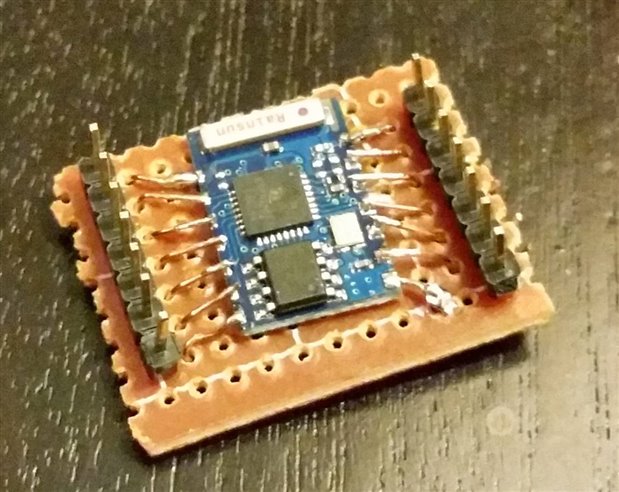
First I realized that I ordered the ESP8266 ESP-03 model. Seems to be one of the favorites (from the forums) because it has several exposed digital IOs. But .... (there is always a but) it has no pin headers, so I said, no problem I solder a few and get done with it. Pin space separation is not the same as my pin headers. I then move to plan B (or C, hard to keep track when you are exited to get this working). Anyhow, the idea was to place it on a perf board and solder small wires to the position of some pin headers so I can wire this up.

I did manage to hook up some wires then the moment came. I got the usb to serial, connected to the device, opened the terminal window and.... and..... nothing! Nothing at all.

As of now I do not know if I damaged the device or the soldering is not good enough or even if I am totally wiring it incorrectly. For that I air my frustration here while I manage to get a lease from sleeping time to continue working on this.

It may be nothing, but this board has the antenna upside down. Comparing it to the other, and to others in the web. It might be nothing.
image

What is my future plan:

I got two of this, in the new un-touched one I will be more carefull.

1. Only wire the needed pins to avoid overheating the thing.

2. Hook everything through a level shifter to make sure I am on the safe side of the 3.3V

3. Pray

4. See what happens


Also there is one of the other versions in the way so I will try with other versions. I am sure this will be sorted out, and I will be able to use this for the Christmas decorations. But if someone is using one of these modules, or just have any comment, please do.

I will update with progress about this for others to benefit, there are not that many youtube videos about this device. However it seems to be working for a lot of folks.


I don't easily give up. Hope tonight I have the time to make this work.

  • Sign in to reply

Top Comments

  • hansaya
    hansaya over 11 years ago +2
    YAY!, got it working after countless hours of playing with this. Connect these lines CONNECT GPIO15 TO GROUND CONNECT CH_PD TO HIGH test this with serial terminal with 9600bud This should get the device…
  • jw0752
    jw0752 over 11 years ago +1
    Hi Javier, This type of problem happens to me frequently. The good part is that I usually end up learning more from my experience than I would have if the thing worked right the first time. I look forward…
  • e14 Contributor
    e14 Contributor over 11 years ago +1
    Hi Guys I'm very confused about this ESP03 chip. After watching countless hours of videos and reading, what do i actually have to connect to get this to work? I understand that I can only use 3.3volts…
Parents
  • camuyano
    camuyano over 11 years ago

    Update:

    I manage to get some data on the terminal window but not much. Still all a fail. I soldered a second module, and wire it up using a voltage divider circuit to protect the module. However I found no good results.

    Reading on the chip documentation, there is a chip enable. I am pulling it up high, however it makes no difference. Only thing I get is gibberish when plugin the module.

    Anything I send to the module I get nothing. I am not giving up and soon I should get other versions of the module to keep on trying.

    I have tried as many serial baud rates as I can. Also changed the bits size, parity and what not. Also tried with several power sources. On the web it says this module is power hungry. I do not have much options for power sources for now. Might need to build me a 3.3V power supply that has plenty of power.

    All tests were done with the same laptop on Linux Mint and Windows 7. Tried several serial software including the Arduino serial monitoring.

    Tried with a usb to serial TTL as well as with an Arduino Uno board.

    Also tried to connect from the native serial port of the Raspberry pi (since it is 3.3V) but nothing.


    All feels like I am sending data to an incorrect pin. There is limited documentation on these boards but should be more than enough to make it work. This battle is in a difficult place, but the war is far from finish. I will continue hacking on this until it works. But if I get a different version working before this one, this may be postponed until I get more ideas. This specific model will look very nice into a custom board, because it is very small but first I need to work with it on the bread board. I will love to get this working and soon it will be.


    This is a picture of the only thing I am seeing (exactly the same with two boards).

    image

    I am doing something wrong here, but do not know what. Hope to find out, if this happen to anyone else drop a line on what got it working.

    • Cancel
    • Vote Up 0 Vote Down
    • Sign in to reply
    • More
    • Cancel
Comment
  • camuyano
    camuyano over 11 years ago

    Update:

    I manage to get some data on the terminal window but not much. Still all a fail. I soldered a second module, and wire it up using a voltage divider circuit to protect the module. However I found no good results.

    Reading on the chip documentation, there is a chip enable. I am pulling it up high, however it makes no difference. Only thing I get is gibberish when plugin the module.

    Anything I send to the module I get nothing. I am not giving up and soon I should get other versions of the module to keep on trying.

    I have tried as many serial baud rates as I can. Also changed the bits size, parity and what not. Also tried with several power sources. On the web it says this module is power hungry. I do not have much options for power sources for now. Might need to build me a 3.3V power supply that has plenty of power.

    All tests were done with the same laptop on Linux Mint and Windows 7. Tried several serial software including the Arduino serial monitoring.

    Tried with a usb to serial TTL as well as with an Arduino Uno board.

    Also tried to connect from the native serial port of the Raspberry pi (since it is 3.3V) but nothing.


    All feels like I am sending data to an incorrect pin. There is limited documentation on these boards but should be more than enough to make it work. This battle is in a difficult place, but the war is far from finish. I will continue hacking on this until it works. But if I get a different version working before this one, this may be postponed until I get more ideas. This specific model will look very nice into a custom board, because it is very small but first I need to work with it on the bread board. I will love to get this working and soon it will be.


    This is a picture of the only thing I am seeing (exactly the same with two boards).

    image

    I am doing something wrong here, but do not know what. Hope to find out, if this happen to anyone else drop a line on what got it working.

    • Cancel
    • Vote Up 0 Vote Down
    • Sign in to reply
    • More
    • Cancel
Children
No Data
element14 Community

element14 is the first online community specifically for engineers. Connect with your peers and get expert answers to your questions.

  • Members
  • Learn
  • Technologies
  • Challenges & Projects
  • Products
  • Store
  • About Us
  • Feedback & Support
  • FAQs
  • Terms of Use
  • Privacy Policy
  • Legal and Copyright Notices
  • Sitemap
  • Cookies

An Avnet Company © 2026 Premier Farnell Limited. All Rights Reserved.

Premier Farnell Ltd, registered in England and Wales (no 00876412), registered office: Farnell House, Forge Lane, Leeds LS12 2NE.

Follow element14

  • X
  • Facebook
  • linkedin
  • YouTube