element14 Community
element14 Community
    Register Log In
  • Site
  • Search
  • Log In Register
  • Community Hub
    Community Hub
    • What's New on element14
    • Feedback and Support
    • Benefits of Membership
    • Personal Blogs
    • Members Area
    • Achievement Levels
  • Learn
    Learn
    • Ask an Expert
    • eBooks
    • element14 presents
    • Learning Center
    • Tech Spotlight
    • STEM Academy
    • Webinars, Training and Events
    • Learning Groups
  • Technologies
    Technologies
    • 3D Printing
    • FPGA
    • Industrial Automation
    • Internet of Things
    • Power & Energy
    • Sensors
    • Technology Groups
  • Challenges & Projects
    Challenges & Projects
    • Design Challenges
    • element14 presents Projects
    • Project14
    • Arduino Projects
    • Raspberry Pi Projects
    • Project Groups
  • Products
    Products
    • Arduino
    • Avnet & Tria Boards Community
    • Dev Tools
    • Manufacturers
    • Multicomp Pro
    • Product Groups
    • Raspberry Pi
    • RoadTests & Reviews
  • About Us
    About the element14 Community
  • Store
    Store
    • Visit Your Store
    • Choose another store...
      • Europe
      •  Austria (German)
      •  Belgium (Dutch, French)
      •  Bulgaria (Bulgarian)
      •  Czech Republic (Czech)
      •  Denmark (Danish)
      •  Estonia (Estonian)
      •  Finland (Finnish)
      •  France (French)
      •  Germany (German)
      •  Hungary (Hungarian)
      •  Ireland
      •  Israel
      •  Italy (Italian)
      •  Latvia (Latvian)
      •  
      •  Lithuania (Lithuanian)
      •  Netherlands (Dutch)
      •  Norway (Norwegian)
      •  Poland (Polish)
      •  Portugal (Portuguese)
      •  Romania (Romanian)
      •  Russia (Russian)
      •  Slovakia (Slovak)
      •  Slovenia (Slovenian)
      •  Spain (Spanish)
      •  Sweden (Swedish)
      •  Switzerland(German, French)
      •  Turkey (Turkish)
      •  United Kingdom
      • Asia Pacific
      •  Australia
      •  China
      •  Hong Kong
      •  India
      •  Japan
      •  Korea (Korean)
      •  Malaysia
      •  New Zealand
      •  Philippines
      •  Singapore
      •  Taiwan
      •  Thailand (Thai)
      •  Vietnam
      • Americas
      •  Brazil (Portuguese)
      •  Canada
      •  Mexico (Spanish)
      •  United States
      Can't find the country/region you're looking for? Visit our export site or find a local distributor.
  • Translate
  • Profile
  • Settings
Internet of Things
  • Technologies
  • More
Internet of Things
Blog Fail of the week with ESP8266 Cheap Wifi
  • Blog
  • Forum
  • Documents
  • Quiz
  • Events
  • Polls
  • Members
  • Mentions
  • Sub-Groups
  • Tags
  • More
  • Cancel
  • New
Join Internet of Things to participate - click to join for free!
  • Share
  • More
  • Cancel
Group Actions
  • Group RSS
  • More
  • Cancel
Engagement
  • Author Author: camuyano
  • Date Created: 17 Oct 2014 11:24 PM Date Created
  • Views 3310 views
  • Likes 4 likes
  • Comments 24 comments
  • uart_to_wifi_convert_module
  • hobbyist
  • esp8266
Related
Recommended

Fail of the week with ESP8266 Cheap Wifi

camuyano
camuyano
17 Oct 2014

A little more than a month ago a friend told me about a cheap wifi module. So I searched for this piece of wifi magic and founded the ESP8266 Wifi module. And it is really cheap. Depending on where you get it and the version we can say is between $5 and $8 for one module. Told myself I can spare $8 for this Wifi promise land so I ordered two for a little more than $8.

Yesterday I got them, right away I got very exited!! On yes, new toy!

First I realized that I ordered the ESP8266 ESP-03 model. Seems to be one of the favorites (from the forums) because it has several exposed digital IOs. But .... (there is always a but) it has no pin headers, so I said, no problem I solder a few and get done with it. Pin space separation is not the same as my pin headers. I then move to plan B (or C, hard to keep track when you are exited to get this working). Anyhow, the idea was to place it on a perf board and solder small wires to the position of some pin headers so I can wire this up.

I did manage to hook up some wires then the moment came. I got the usb to serial, connected to the device, opened the terminal window and.... and..... nothing! Nothing at all.

As of now I do not know if I damaged the device or the soldering is not good enough or even if I am totally wiring it incorrectly. For that I air my frustration here while I manage to get a lease from sleeping time to continue working on this.

It may be nothing, but this board has the antenna upside down. Comparing it to the other, and to others in the web. It might be nothing.
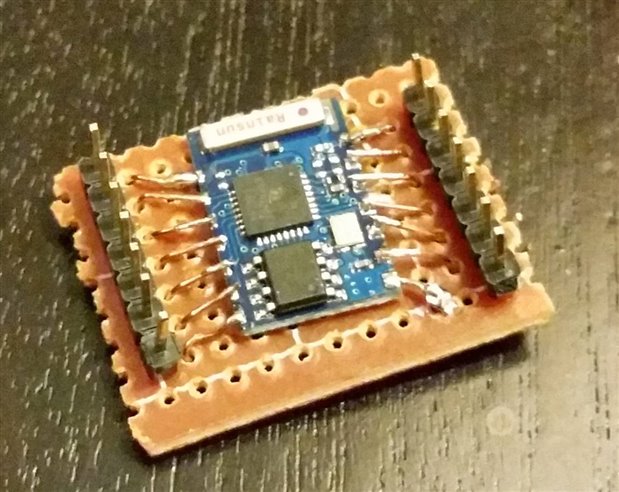
image

What is my future plan:

I got two of this, in the new un-touched one I will be more carefull.

1. Only wire the needed pins to avoid overheating the thing.

2. Hook everything through a level shifter to make sure I am on the safe side of the 3.3V

3. Pray

4. See what happens


Also there is one of the other versions in the way so I will try with other versions. I am sure this will be sorted out, and I will be able to use this for the Christmas decorations. But if someone is using one of these modules, or just have any comment, please do.

I will update with progress about this for others to benefit, there are not that many youtube videos about this device. However it seems to be working for a lot of folks.


I don't easily give up. Hope tonight I have the time to make this work.

  • Sign in to reply

Top Comments

  • hansaya
    hansaya over 11 years ago +2
    YAY!, got it working after countless hours of playing with this. Connect these lines CONNECT GPIO15 TO GROUND CONNECT CH_PD TO HIGH test this with serial terminal with 9600bud This should get the device…
  • jw0752
    jw0752 over 11 years ago +1
    Hi Javier, This type of problem happens to me frequently. The good part is that I usually end up learning more from my experience than I would have if the thing worked right the first time. I look forward…
  • Former Member
    Former Member over 11 years ago +1
    Hi Guys I'm very confused about this ESP03 chip. After watching countless hours of videos and reading, what do i actually have to connect to get this to work? I understand that I can only use 3.3volts…
  • camuyano
    camuyano over 11 years ago in reply to Former Member

    I have not connected the ESP -03 but on the esp 02 or 01. You must connect CH_PD to 3.3, I connect the RST to 3.3 as well. On that other model the GPIO0 is grounded for firmware update. And when doing so it must be grounded on power up of the device, and the device will go into "firmware update" mode. The 03 version described here I tried but since I was not able to make it work I continue working on the esp01 or 02 (I keep messing the versions).

    You must definitely some sort of voltage divider for the TX and RX. I have used several level shifter methods working (again with the other version).

    Here is how I connected the one I am working with http://www.element14.com/community/groups/internet-of-things/blog/2014/11/04/esp8266-developing-using-an-arduino

    I am on the way of building a new board for the surface mount esp model but I have not tested (http://www.element14.com/community/blogs/nerdito/2014/12/13/other-board-for-the-esp8266).


    A voltage divider can be two resistor or just get a level shifter from ebay or sparkfun. I used a bidirectional level shifter to avoid my "skils" to burn the chip.

    People that has commented here have used successfully the model so they might help you more.

    When connected correctly please post back, I know I will (but I might as well burned mine).

    Try to connect it as best as you can and do firmware update then continue from there. Default firmware may be very buggy and produce weird results.

    • Cancel
    • Vote Up 0 Vote Down
    • Sign in to reply
    • More
    • Cancel
  • Former Member
    Former Member over 11 years ago

    Hi Guys I'm very confused about this ESP03 chip. After watching countless hours of videos and reading, what do i actually have to connect to get this to work? I understand that I can only use 3.3volts. I cannot find a valid print to use to possibly get this to work. Do I only have to connect those wires as mentioned above

    "Connect these lines

    CONNECT GPIO15 TO GROUND

    CONNECT CH_PD TO HIGH"

    to be able to talk to this or do I have to connect VCC , GND, UTXD and URXD also? Also I believe that the Arduino RX and TX is 5 volts as well, so I guess I would have to use a voltage divider with those as well. Am I on the right track?


    I burned up one chip soldering it together. Then I think I might have blown another one connecting the TX and RX to the arduino. Got two left so Help would be appreciated.


    Thanks,


    Dave

    • Cancel
    • Vote Up +1 Vote Down
    • Sign in to reply
    • More
    • Cancel
  • scargill
    scargill over 11 years ago

    In my humble opinion the ESP-01 is marginally the better bet - sure it does not have all the pins brought out - but then I can get 2 working IO pins out of the ESP-01 - but 5 out of the ESP-03 - if I don't mind struggling with those 2mm spacings (which are a PAIN if you're using normal breadboard) - at least the ESP-01 uses a 0.1" double pole header. What I would like to see is the ESP-01 with a decent 3v3 reg (DON'T try using a tiny one) and level shift on input and reset... that would make it directly compatible with many systems out there like Arduinos for example. Now, given that you can get an ESP-01 for £2.20 and an Arduino for just under £3 - that just raises a whole lot of possibilities


    Regards


    Peter Scargill

    • Cancel
    • Vote Up 0 Vote Down
    • Sign in to reply
    • More
    • Cancel
  • hansaya
    hansaya over 11 years ago in reply to camuyano

    I had the same experience, only simple one works not the blinky. let me know if you had any luck with it. Look at this guy's example; I'm trying to figure out how to compile his example and seems like, good place to start

    wifi | FreeIO

    • Cancel
    • Vote Up 0 Vote Down
    • Sign in to reply
    • More
    • Cancel
  • camuyano
    camuyano over 11 years ago in reply to hansaya

    I compiled the AT sample from the sdk with some guy toolchain on linux. But failed to run it on the device. Also the other example I wasn't able to even compile it.
    If I am not mistaken this was the link I used https://github.com/esp8266/esp8266-wiki/wiki/Toolchain

    This module most definitely work as a great stand alone wifi sensor for a security system. I have only been able to download firmware to the module from windows, there is a script to download from python but I had no luck with it.

    • Cancel
    • Vote Up 0 Vote Down
    • Sign in to reply
    • More
    • Cancel
<>
element14 Community

element14 is the first online community specifically for engineers. Connect with your peers and get expert answers to your questions.

  • Members
  • Learn
  • Technologies
  • Challenges & Projects
  • Products
  • Store
  • About Us
  • Feedback & Support
  • FAQs
  • Terms of Use
  • Privacy Policy
  • Legal and Copyright Notices
  • Sitemap
  • Cookies

An Avnet Company © 2026 Premier Farnell Limited. All Rights Reserved.

Premier Farnell Ltd, registered in England and Wales (no 00876412), registered office: Farnell House, Forge Lane, Leeds LS12 2NE.

ICP 备案号 10220084.

Follow element14

  • X
  • Facebook
  • linkedin
  • YouTube