


Table of Contents
For all blog posts in this series, click here, or type simple_dcr in the search box at the top of this page!
Introduction
This blog post is about a fairly popular, low-cost, easy-to-build radio receiver project, intended for speech and tones (not music) on radio channels at approximately 7 MHz. You need a radio license to transmit in the 7 MHz amateur radio band, but it’s legal for anyone to construct a receiver and listen to that band.
I decided to create a printed circuit board (PCB) and assemble the circuit.
In the first blog post, I started construction back-to-front, at the very last part of the audio power amplifier stage that connects to an 8-ohm speaker, and determined that the stage works best with an audio input limited to a ballpark of about 40-80 mV p-p, depending on how much distortion one is willing to tolerate. Beyond 80 mV p-p, the distortion is very bad.
In this blog post, I decided to continue working back-to-front and assemble the amplifier stage immediately preceding the final stage assembled in the last blog.
Circuit Diagram
The green portion of the circuit was constructed and tested in blog #1. For this blog 2, the blue portion was assembled. Also, the capacitor C8 was temporarily disconnected at the spot marked with X, so that the blue stage could be tested in isolation.

Dealing with Inputs and Outputs
Usually, one uses oscilloscope probes to view signals in a circuit under test. Sometimes I use a thin coax cable instead. It’s not recommended, but you can get away with it for some tests, especially at very low frequencies, such as for audio amplifiers. Where a coax cable becomes important is for delivering signals from a signal generator or for viewing signals at higher frequencies, provided that the cable end has a 50-ohm termination.
In any case, I used coax cables with small SMA connectors on the ends, because SMA sockets can be low-cost, and are easy to solder onto a PCB with short lengths of wire, but you could use proper oscilloscope probes as recommended.
Power Supply Problem!
For initial testing, I shorted the input of the audio amplifier (actually, I just attached an SMA attenuator because it was close at hand; that’s almost a short), and then probed the output at the output capacitor, with the last stage disconnected at the spot labelled X as discussed earlier.
You’d expect to see a flat line on the ‘scope, close to 0V (or 0V if you’ve set the oscilloscope to AC input).
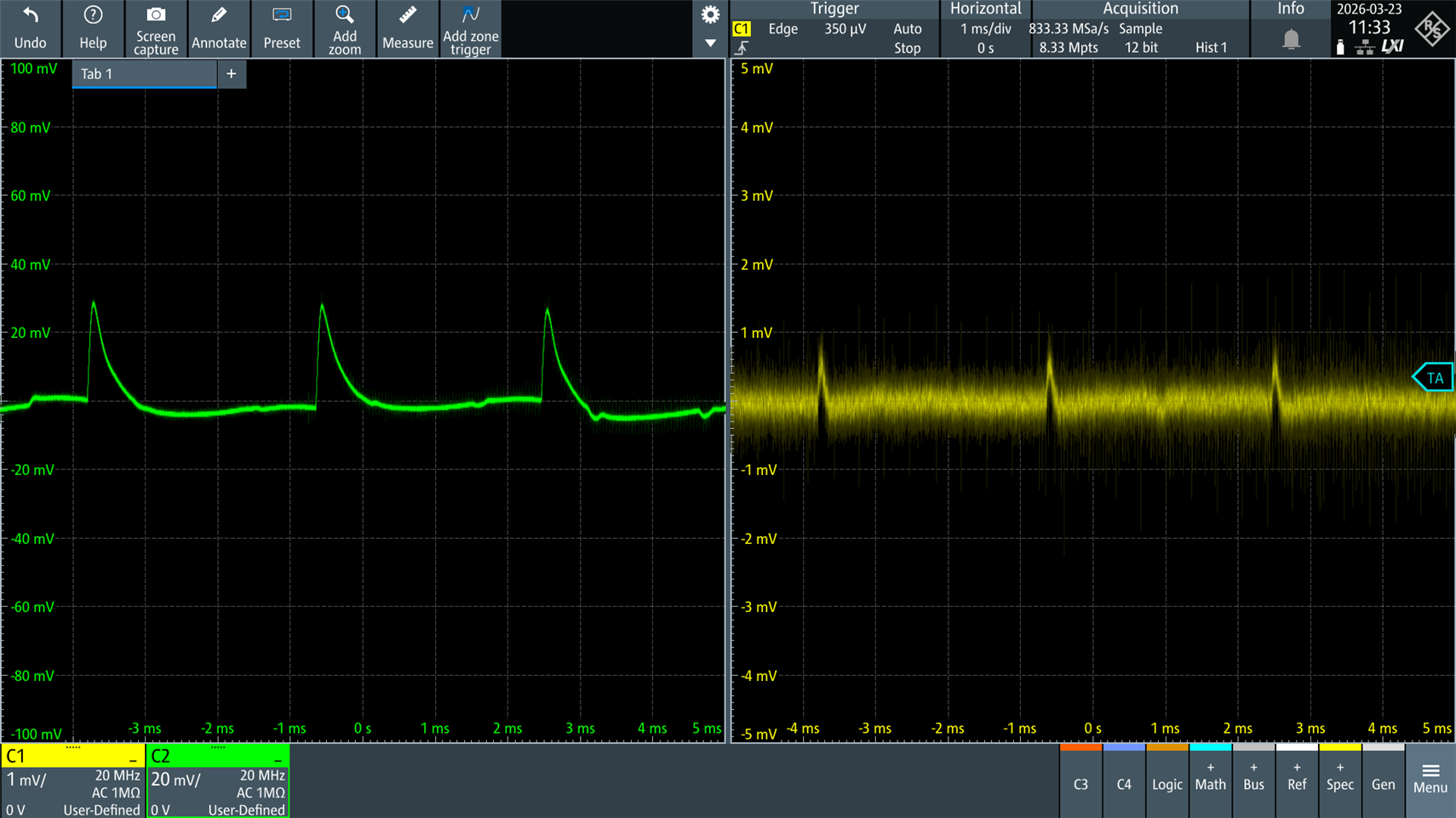
The project is intended to run from a nominal 9V supply, specifically a 9V battery. For testing, I was using a bench power supply that had an unfortunate fault: approximately 30 mV amplitude pulses at about 300 Hz (I don’t know why; I’ll open it up sometime). The power supply pulses are shown in green in the screenshot below.
The yellow trace is the amplifier stage output! It’s unusable, since if the expected output from the amplifier stage is to be about 40mV p-p, the pulses are of a similar ballpark amplitude; it would completely destroy the signal-to-noise ratio for the desired signal!
The problem occurs because the amplifier is not very good at rejecting power supply ripple. Ordinarily, this might be unnoticeable when powered by a 9V battery, but as soon as you connect any realistic power supply, the noise on the supply rail will swamp the output, because all typical power supplies have noise. The problem will be even worse for the amplifier stage that will be built in blog 3, since that stage handles even lower-amplitude signals at its input, but I’ll cross that bridge when I come to it. If you have any suggestions, please let me know! (ideally in-tune with the circuit philosophy, which is discrete parts; perhaps I need a Zener supply? The amplifier stage's current consumption will be just a few milliamperes.

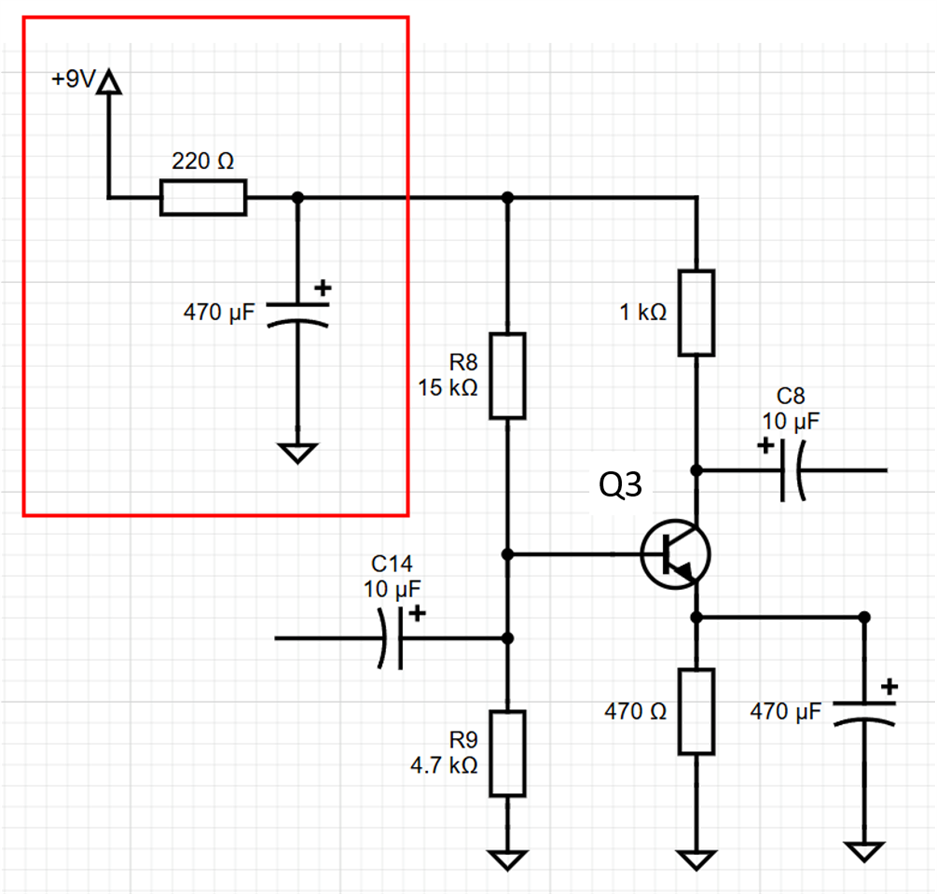
One solution is to decouple the supply using some filtering. To do that, I disconnected the two resistors from the 9V supply rail, and inserted a resistor and capacitor as shown in the red box. Apologies for the poor circuit diagram; my PC was missing KiCad.
Now the result was usable. As can be seen, the 30 mV PSU spikes (green) are now just 1 mV spikes (yellow). Hopefully, most typical power supplies will have a bit less noise than my faulty PSU.
To summarize, the main takeaway is that such basic amplifiers need a stable power supply, especially when the output signal is expected to be low amplitude, and at a minimum, it could be a resistor and capacitor filter in the supply rail to the amplifier.
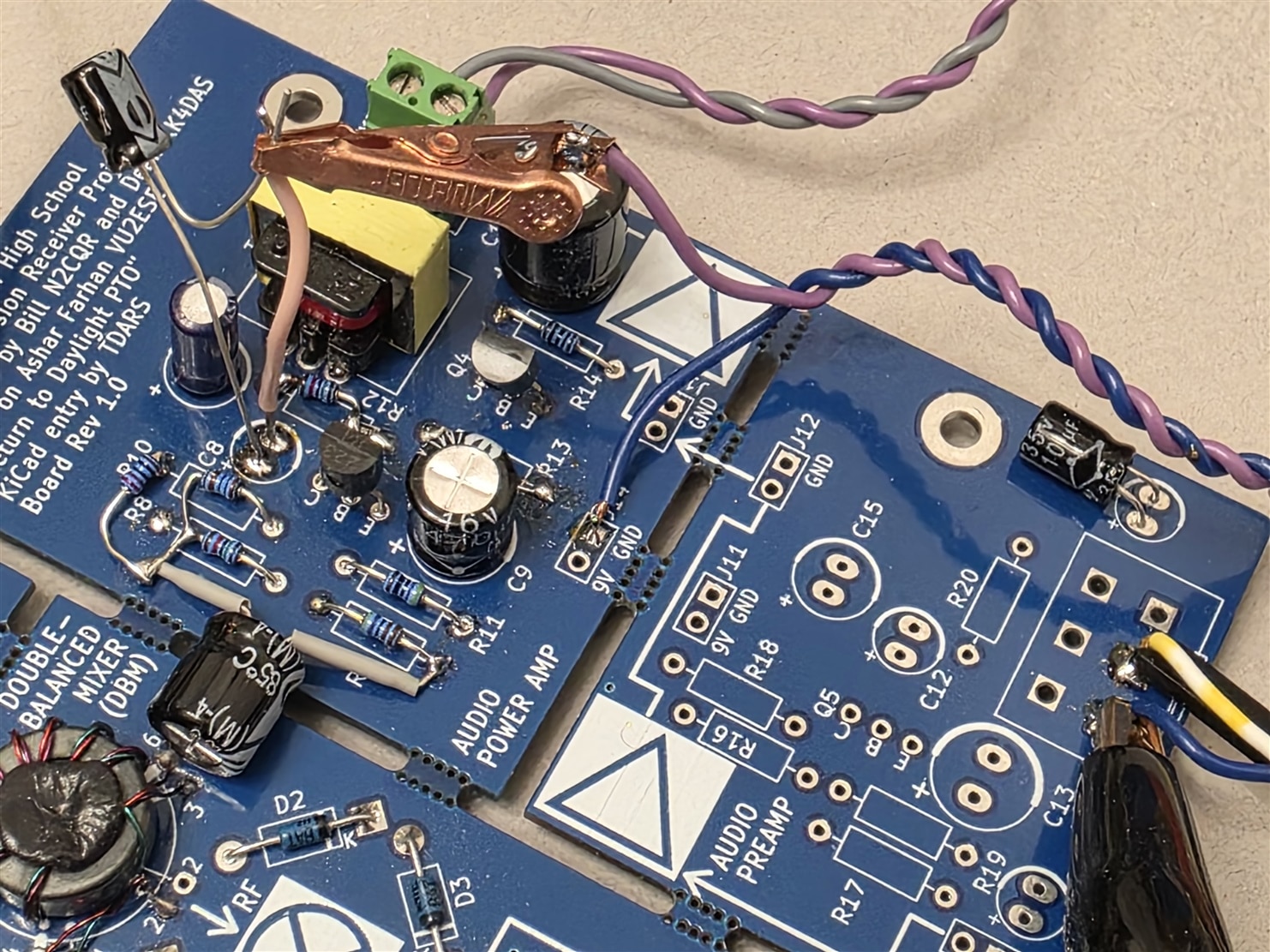
The photo here shows the extra resistor and capacitor bodged onto the PCB. The alligator clip attaches to the amplifier's output (the negative lead of capacitor C8), and the pink wire next to it is used to reconnect the amplifier to the next stage when required. The amplifier input is lower-right in the photo (where the potentiometer would normally go).
Applying a Signal
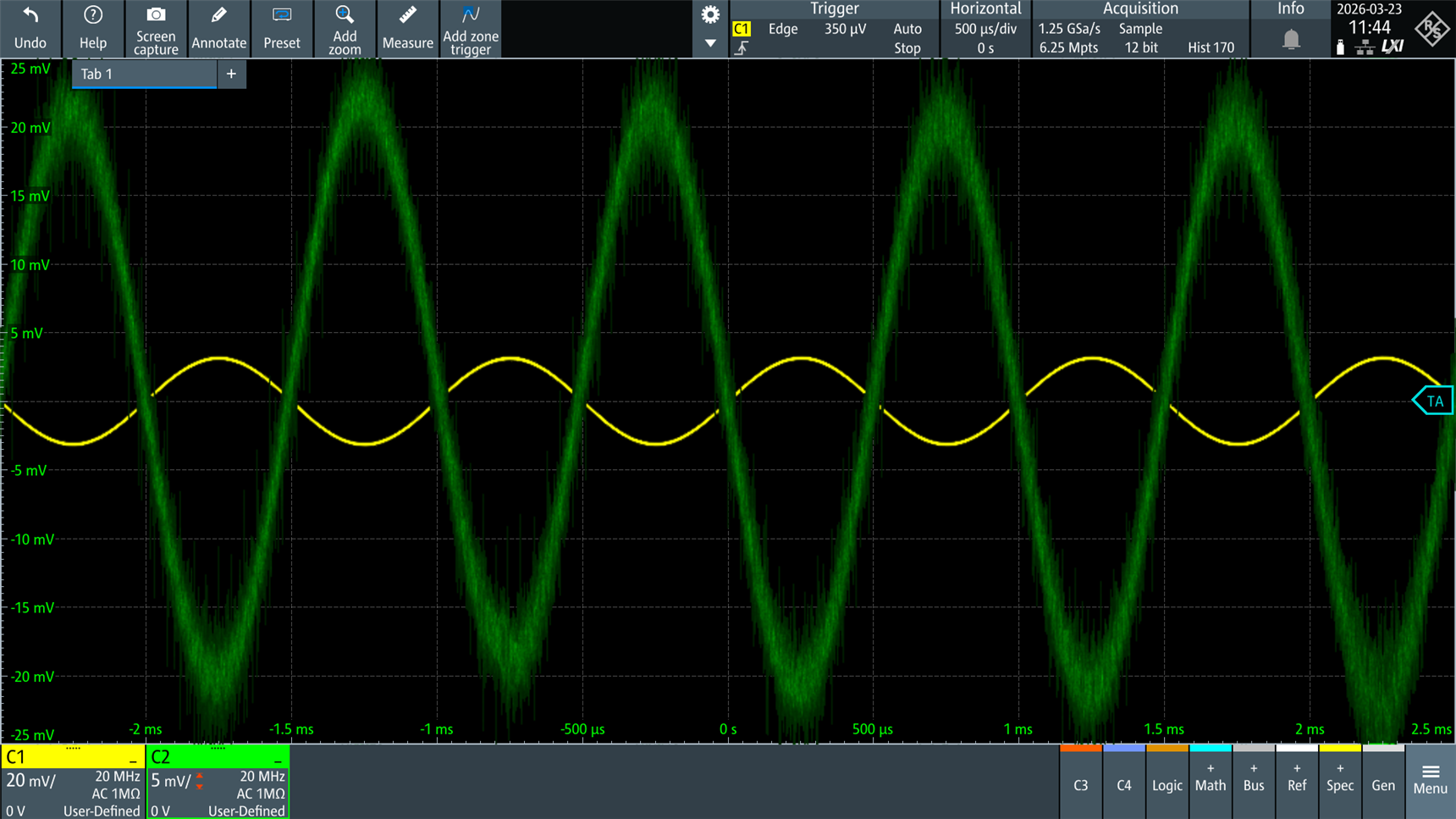
Now that the power supply problem was not as much of an issue, I decided to apply a sine-wave input to the amplifier. Here, there’s a test equipment-related issue to overcome: the amplifier has a gain of approximately 95, so for a desired output of 40 mV p-p (to avoid overdriving the final amplifier stage), the input signal needs to be about 0.4 mV p-p.
Typical signal generators cannot create such low-amplitude signals. I decided to attach some SMA attenuators in line to drop the amplitude a bit. It’s worth having a few attenuators on hand if you’re working with signal generators; you can DIY them too.
Decent attenuators cost a fair bit, but for very non-critical work, there are AliExpress options (this is definitely not advised for real work, because a failure would be very easy to miss, would be extremely easy to occur, and there’s a high chance it could destroy test equipment or circuitry under test, when working with higher power sources). Plus, even when functioning, they likely won’t meet the advertised specs, especially at higher frequencies. If you’re purchasing for work purposes, they absolutely need to be known brand attenuators from a distributor.

I applied a signal, added attenuators as required, and adjusted the signal generator output so the green output was about 40 mV p-p. The yellow signal shows the signal generator output, but the amplifier input was connected to an attenuated version of that, therefore the displayed amplitude of the yellow trace can be disregarded; the amplifier gain is about 95, so the attenuated input will have been approximately 400 uV p-p.
Frequency Response
The screenshot below shows the frequency response in blue over the range of 100 Hz to 10 kHz; as can be seen, it’s essentially flat. The dB value on the left is not relevant, since the signal at the amplifier input was attenuated, as mentioned earlier, whereas the oscilloscope was attached directly to the unattenuated signal.

Loading the Amplifier
So far, the amplifier had been tested in isolation, with capacitor C8 temporarily disconnected from the final power amplifier stage. Next, C8 was reconnected, and the frequency response was measured again at the same point in the circuit. It can be seen that the output drops with that load, reducing from the 4 dB shown in the response chart above, down to -1 dB (i.e. a 5 dB difference, which is about half the amplitude) at 100 Hz, and then falling to about – 6 dB (a 10 dB difference from the unloaded response, i.e. the output is about a third of the unloaded amplitude) by 1 kHz.

While the non-flat loaded response isn’t great, it’s probably not that big a deal for speech and tones.
Testing Both Stages Together
From the first blog post, we know that the final audio amplifier stage requires about 40 mV p-p before the speaker output distorts.
The amplifier stage discussed in this blog has its amplitude drop to about a third to a half as it gets loaded by the final stage, therefore the input needs to be driven to about 2 mV p-p to drive the final stage to a comfortable level.
The screenshot below shows the 2 mV p-p input in green, and the output across an 8-ohm load attached to the final stage is shown in white.

Here’s the frequency response (ignore the dB value, since I again used an attenuator, whereas the frequency response chart uses the direct signal generator output). While not perfect, I think it’s very acceptable for speech and tones:

The proof is in the pudding, so I attached a real 8-ohm speaker (rather than the 8-ohm resistor I had been using) and connected the input to an audio source. The video here shows the audio input signal; a little overdriven as you can see from the amplitude, but as you can hear, the audio is still very intelligible – and loud enough for such a basic amplifier. There is audible fan noise in the recording, picked up by the microphone; that's from the nearby power supply.
Summary
A common-emitter amplifier was constructed, but the poor power-supply rejection ratio needed to be improved to prevent supply noise from swamping the low-amplitude signal. An RC filter was used to decouple the supply, and it greatly improved the output.
The frequency response isn’t flat once the amplifier is loaded with the final amplifier stage, but the overall audio can still sound reasonably intelligible, even with a bit of distortion when the input is slightly overdriven.
The combined amplifiers from this blog and blog 1 require an input signal of several millivolts peak-to-peak to produce usable volume from the 8-ohm speaker at an acceptable level of distortion. Eventually, the audio amplifier will get replaced with a better design, but for now, it’s usable.
The next step is to build the first audio amplifier stage (based around transistor Q5 in the circuit in blog 1), and try to improve the power supply rejection significantly, since it’s more critical the smaller the amplitude of wanted signals there are.
Thanks for reading!


