element14 Community
element14 Community
    Register Log In
  • Site
  • Search
  • Log In Register
  • Community Hub
    Community Hub
    • What's New on element14
    • Feedback and Support
    • Benefits of Membership
    • Personal Blogs
    • Members Area
    • Achievement Levels
  • Learn
    Learn
    • Ask an Expert
    • eBooks
    • element14 presents
    • Learning Center
    • Tech Spotlight
    • STEM Academy
    • Webinars, Training and Events
    • Learning Groups
  • Technologies
    Technologies
    • 3D Printing
    • FPGA
    • Industrial Automation
    • Internet of Things
    • Power & Energy
    • Sensors
    • Technology Groups
  • Challenges & Projects
    Challenges & Projects
    • Design Challenges
    • element14 presents Projects
    • Project14
    • Arduino Projects
    • Raspberry Pi Projects
    • Project Groups
  • Products
    Products
    • Arduino
    • Avnet & Tria Boards Community
    • Dev Tools
    • Manufacturers
    • Multicomp Pro
    • Product Groups
    • Raspberry Pi
    • RoadTests & Reviews
  • About Us
  • Store
    Store
    • Visit Your Store
    • Choose another store...
      • Europe
      •  Austria (German)
      •  Belgium (Dutch, French)
      •  Bulgaria (Bulgarian)
      •  Czech Republic (Czech)
      •  Denmark (Danish)
      •  Estonia (Estonian)
      •  Finland (Finnish)
      •  France (French)
      •  Germany (German)
      •  Hungary (Hungarian)
      •  Ireland
      •  Israel
      •  Italy (Italian)
      •  Latvia (Latvian)
      •  
      •  Lithuania (Lithuanian)
      •  Netherlands (Dutch)
      •  Norway (Norwegian)
      •  Poland (Polish)
      •  Portugal (Portuguese)
      •  Romania (Romanian)
      •  Russia (Russian)
      •  Slovakia (Slovak)
      •  Slovenia (Slovenian)
      •  Spain (Spanish)
      •  Sweden (Swedish)
      •  Switzerland(German, French)
      •  Turkey (Turkish)
      •  United Kingdom
      • Asia Pacific
      •  Australia
      •  China
      •  Hong Kong
      •  India
      • Japan
      •  Korea (Korean)
      •  Malaysia
      •  New Zealand
      •  Philippines
      •  Singapore
      •  Taiwan
      •  Thailand (Thai)
      • Vietnam
      • Americas
      •  Brazil (Portuguese)
      •  Canada
      •  Mexico (Spanish)
      •  United States
      Can't find the country/region you're looking for? Visit our export site or find a local distributor.
  • Translate
  • Profile
  • Settings
Test & Tools
  • Technologies
  • More
Test & Tools
Blog PST.. Experimental event / trigger support for Pico SCPI labTool - 2: design the registers
  • Blog
  • Forum
  • Documents
  • Files
  • Members
  • Mentions
  • Sub-Groups
  • Tags
  • More
  • Cancel
  • New
Join Test & Tools to participate - click to join for free!
  • Share
  • More
  • Cancel
Group Actions
  • Group RSS
  • More
  • Cancel
Engagement
  • Author Author: Jan Cumps
  • Date Created: 17 Sep 2023 5:44 PM Date Created
  • Views 811 views
  • Likes 10 likes
  • Comments 5 comments
  • pico_usbtmc_scpi
  • pico
  • USBTMC
  • Pico SCPI labTool
  • labview
  • scpi
Related
Recommended

PST.. Experimental event / trigger support for Pico SCPI labTool - 2: design the registers

Jan Cumps
Jan Cumps
17 Sep 2023
PST.. Experimental event / trigger support for Pico SCPI labTool - 2: design the registers

The Pico SCPI labTool (PST) allows you to connect your PC to equipment to control and monitor all sorts of things. It runs on a Raspberry Pico. It would be nice if the PST could supports device dependent SCPI registers. They can be used to notify a LabVIEW flow from the device. I'd be happy if we can notify LabVIEW when a GPIO input changed logic level.
In this post: implement instrument dependent registers, and a test of the register trickle process.

image

thank you ggabe and Gough Lui for the help.

part 1: PST.. Experimental event / trigger support for Pico SCPI labTool - 1: investigate 
part 2: PST.. Experimental event / trigger support for Pico SCPI labTool - 2: design the registers 
part 3: PST.. Experimental event / trigger support for Pico SCPI labTool - 3: Instrument Specific Registers Test
part 4: PST.. Experimental event / trigger support for Pico SCPI labTool - 4: let TinyUSB USBTMC code use SCPI-LIB's Status Byte register 
part 5:  PST.. Experimental event / trigger support for Pico SCPI labTool - 5: Propagation to IEEE488.2 SCPI Registers Test 
part 6: PST.. Experimental event / trigger support for Pico SCPI labTool - 6: Service Request from Instrument to LabVIEW flow 
part 7: PST.. Experimental event / trigger support for Pico SCPI labTool - 7: Test Service Request from Instrument to LabVIEW flow 

Implement real Instrument Specific Registers

The first post ended when I had created empty definitions for the registers and related infratructure:

#define USER_REGISTERS
#define USER_REGISTER_GROUPS
#define USER_REGISTER_DETAILS
#define USER_REGISTER_GROUP_DETAILS

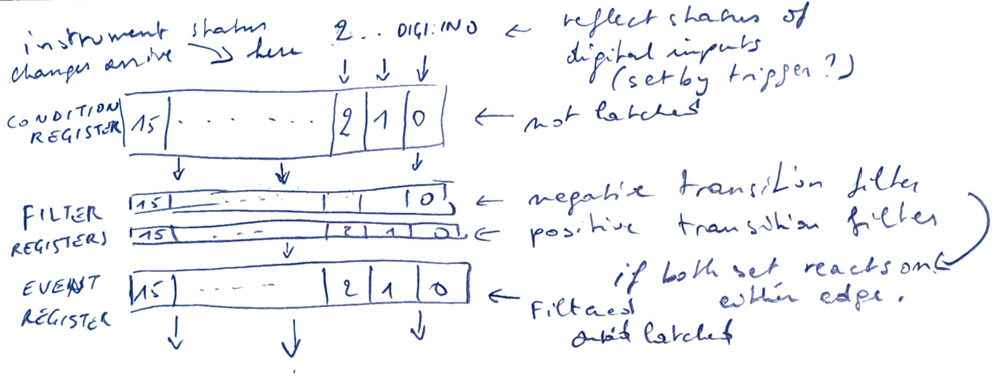
Now I'm building the whole configuration to capture device settings and events, and promote them up the hierarchy:
image

scpi_user_config.h

#ifndef _SCPI_USER_CONFIG_H
#define _SCPI_USER_CONFIG_H

// define instrument specific registers
#define USE_CUSTOM_REGISTERS 1

#define USER_REGISTERS \
        USER_REG_DIGINEVENT, /* Digital In event status Register */ \
        USER_REG_DIGINEVENTE, /* Digital In event status enable Register */ \
        USER_REG_DIGINEVENTC, /* Digital In event status condition Register */ \
        USER_REG_DIGINEVENTP, /* Digital In event status positive filter Register */ \
        USER_REG_DIGINEVENTN, /* Digital In event status negative register Register */

#define USER_REGISTER_GROUPS \
        USER_REG_GROUP_DIGINEVENT,

#define USER_REGISTER_DETAILS \
    { SCPI_REG_CLASS_EVEN, USER_REG_GROUP_DIGINEVENT }, \
    { SCPI_REG_CLASS_ENAB, USER_REG_GROUP_DIGINEVENT }, \
    { SCPI_REG_CLASS_COND, USER_REG_GROUP_DIGINEVENT }, \
    { SCPI_REG_CLASS_PTR, USER_REG_GROUP_DIGINEVENT }, \
    { SCPI_REG_CLASS_NTR, USER_REG_GROUP_DIGINEVENT },

#define USER_REGISTER_GROUP_DETAILS \
{ \
        USER_REG_DIGINEVENT, \
        USER_REG_DIGINEVENTE, \
        USER_REG_DIGINEVENTC, \
		USER_REG_DIGINEVENTP, \
		USER_REG_DIGINEVENTN, \
		SCPI_REG_OPER, \
		1  /* TODO this defines to what bit of the parent we trickle through */ \
    }, /* USER_REG_GROUP_DIGINEVENT */

#endif // _SCPI_USER_CONFIG_H

I designed a user condition, event and enable register, with the OPERATION STATUS register as parent.

  • I can change values in the condition register.
  • the value trickles and  latches in the corresponding bit in the event register 
  • the value trickles down to a bit of my choice in the OPERATION STATUS register (also latched)

That means that I can listen to GPIO, and set a condition register bit. Library infra will manage the latching and clearing

I designed 2 additional registers to indicate if I want to listen to positive and/or negative transitions. The latching will only apply if the transition is requested to be monitored.

All is handled by the lib. It seems that I only have to define the user registers, configure the behaviour. And that results in changes in the standard OPERATION STATUS register.
Existing SCPI commands in the lib can take care that these trickle down further to standard OPERATION bit of the STATUS BYTE register

image

link to all posts

  • Sign in to reply
Parents
  • Jan Cumps
    Jan Cumps over 2 years ago

    making the usbtmc event service request channel work is still a far dream, but I have progress on dealing with the registers.
    All required SCPI commands are now implemented:

        // instrument specific registers commands
        {.pattern = "STATus:OPERation:DIGItal:INPut:EVENt?", .callback = SCPI_StatusOperationDigitalInputEventQ,},
        {.pattern = "STATus:OPERation:DIGItal:INPut:CONDition?", .callback = SCPI_StatusOperationDigitalInputConditionQ,},
        {.pattern = "STATus:OPERation:DIGItal:INPut:ENABle", .callback = SCPI_StatusOperationDigitalInputEnable,},
        {.pattern = "STATus:OPERation:DIGItal:INPut:ENABle?", .callback = SCPI_StatusOperationDigitalInputEnableQ,},
        {.pattern = "STATus:OPERation:DIGItal:INPut:PTRansition", .callback = SCPI_StatusOperationDigitalInputPTransition,},
        {.pattern = "STATus:OPERation:DIGItal:INPut:PTRansition?", .callback = SCPI_StatusOperationDigitalInputPTransitionQ,},
        {.pattern = "STATus:OPERation:DIGItal:INPut:NTRansition", .callback = SCPI_StatusOperationDigitalInputNTransition,},
        {.pattern = "STATus:OPERation:DIGItal:INPut:NTRansition?", .callback = SCPI_StatusOperationDigitalInputNTransitionQ,},
    

    Test with NI Visa Interactive

    image

    output:

    # button not pressed: input 27 (bit 3) high
    1: Write Operation (STATus:OPERation:DIGItal:INPut:CONDition?\n)
    2: Read Operation
    4\r\n
    
    # button pressed: input 27 (bit 3) low
    3: Write Operation (STATus:OPERation:DIGItal:INPut:CONDition?\n)
    4: Read Operation
    0\r\n


    • Cancel
    • Vote Up 0 Vote Down
    • Sign in to reply
    • More
    • Cancel
Comment
  • Jan Cumps
    Jan Cumps over 2 years ago

    making the usbtmc event service request channel work is still a far dream, but I have progress on dealing with the registers.
    All required SCPI commands are now implemented:

        // instrument specific registers commands
        {.pattern = "STATus:OPERation:DIGItal:INPut:EVENt?", .callback = SCPI_StatusOperationDigitalInputEventQ,},
        {.pattern = "STATus:OPERation:DIGItal:INPut:CONDition?", .callback = SCPI_StatusOperationDigitalInputConditionQ,},
        {.pattern = "STATus:OPERation:DIGItal:INPut:ENABle", .callback = SCPI_StatusOperationDigitalInputEnable,},
        {.pattern = "STATus:OPERation:DIGItal:INPut:ENABle?", .callback = SCPI_StatusOperationDigitalInputEnableQ,},
        {.pattern = "STATus:OPERation:DIGItal:INPut:PTRansition", .callback = SCPI_StatusOperationDigitalInputPTransition,},
        {.pattern = "STATus:OPERation:DIGItal:INPut:PTRansition?", .callback = SCPI_StatusOperationDigitalInputPTransitionQ,},
        {.pattern = "STATus:OPERation:DIGItal:INPut:NTRansition", .callback = SCPI_StatusOperationDigitalInputNTransition,},
        {.pattern = "STATus:OPERation:DIGItal:INPut:NTRansition?", .callback = SCPI_StatusOperationDigitalInputNTransitionQ,},
    

    Test with NI Visa Interactive

    image

    output:

    # button not pressed: input 27 (bit 3) high
    1: Write Operation (STATus:OPERation:DIGItal:INPut:CONDition?\n)
    2: Read Operation
    4\r\n
    
    # button pressed: input 27 (bit 3) low
    3: Write Operation (STATus:OPERation:DIGItal:INPut:CONDition?\n)
    4: Read Operation
    0\r\n


    • Cancel
    • Vote Up 0 Vote Down
    • Sign in to reply
    • More
    • Cancel
Children
No Data
element14 Community

element14 is the first online community specifically for engineers. Connect with your peers and get expert answers to your questions.

  • Members
  • Learn
  • Technologies
  • Challenges & Projects
  • Products
  • Store
  • About Us
  • Feedback & Support
  • FAQs
  • Terms of Use
  • Privacy Policy
  • Legal and Copyright Notices
  • Sitemap
  • Cookies

An Avnet Company © 2025 Premier Farnell Limited. All Rights Reserved.

Premier Farnell Ltd, registered in England and Wales (no 00876412), registered office: Farnell House, Forge Lane, Leeds LS12 2NE.

ICP 备案号 10220084.

Follow element14

  • X
  • Facebook
  • linkedin
  • YouTube