element14 Community
element14 Community
    Register Log In
  • Site
  • Search
  • Log In Register
  • Community Hub
    Community Hub
    • What's New on element14
    • Feedback and Support
    • Benefits of Membership
    • Personal Blogs
    • Members Area
    • Achievement Levels
  • Learn
    Learn
    • Ask an Expert
    • eBooks
    • element14 presents
    • Learning Center
    • Tech Spotlight
    • STEM Academy
    • Webinars, Training and Events
    • Learning Groups
  • Technologies
    Technologies
    • 3D Printing
    • FPGA
    • Industrial Automation
    • Internet of Things
    • Power & Energy
    • Sensors
    • Technology Groups
  • Challenges & Projects
    Challenges & Projects
    • Design Challenges
    • element14 presents Projects
    • Project14
    • Arduino Projects
    • Raspberry Pi Projects
    • Project Groups
  • Products
    Products
    • Arduino
    • Avnet & Tria Boards Community
    • Dev Tools
    • Manufacturers
    • Multicomp Pro
    • Product Groups
    • Raspberry Pi
    • RoadTests & Reviews
  • About Us
    About the element14 Community
  • Store
    Store
    • Visit Your Store
    • Choose another store...
      • Europe
      •  Austria (German)
      •  Belgium (Dutch, French)
      •  Bulgaria (Bulgarian)
      •  Czech Republic (Czech)
      •  Denmark (Danish)
      •  Estonia (Estonian)
      •  Finland (Finnish)
      •  France (French)
      •  Germany (German)
      •  Hungary (Hungarian)
      •  Ireland
      •  Israel
      •  Italy (Italian)
      •  Latvia (Latvian)
      •  
      •  Lithuania (Lithuanian)
      •  Netherlands (Dutch)
      •  Norway (Norwegian)
      •  Poland (Polish)
      •  Portugal (Portuguese)
      •  Romania (Romanian)
      •  Russia (Russian)
      •  Slovakia (Slovak)
      •  Slovenia (Slovenian)
      •  Spain (Spanish)
      •  Sweden (Swedish)
      •  Switzerland(German, French)
      •  Turkey (Turkish)
      •  United Kingdom
      • Asia Pacific
      •  Australia
      •  China
      •  Hong Kong
      •  India
      •  Japan
      •  Korea (Korean)
      •  Malaysia
      •  New Zealand
      •  Philippines
      •  Singapore
      •  Taiwan
      •  Thailand (Thai)
      •  Vietnam
      • Americas
      •  Brazil (Portuguese)
      •  Canada
      •  Mexico (Spanish)
      •  United States
      Can't find the country/region you're looking for? Visit our export site or find a local distributor.
  • Translate
  • Profile
  • Settings
Test & Tools
  • Technologies
  • More
Test & Tools
Documents Programmable Electronic Load - Power Stage
  • Blog
  • Forum
  • Documents
  • Files
  • Members
  • Mentions
  • Sub-Groups
  • Tags
  • More
  • Cancel
  • New
Join Test & Tools to participate - click to join for free!
Actions
  • Share
  • More
  • Cancel
Engagement
  • Author Author: Jan Cumps
  • Date Created: 20 Dec 2017 7:20 PM Date Created
  • Last Updated Last Updated: 11 Oct 2020 8:07 AM
  • Views 6952 views
  • Likes 7 likes
  • Comments 68 comments
Related
Recommended

Programmable Electronic Load - Power Stage

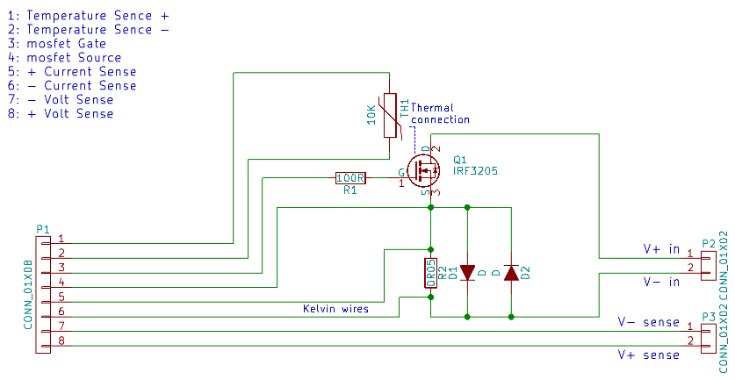
This blog documents focuses on the power stage of the electronic load that Robert Peter Oakes, jc2048 and Jan Cumps are designing.


image

In this post we're laying out a PCB for the power stage - as much as possible with surface mount components. The FET is close to the one Robert Peter Oakes uses in the original design.


The BOM


ComponentHeader 2Header 3Header 4
P18 pin header, 2.54mm
P2 abinding post, redhirschmann 931714101hirschmann 931714101 -  SOCKET, 4MM, BLACK, PK5 , MLS
P2 bbinding post, blackhirschmann 931714100hirschmann 931714100 -  SOCKET, 4MM, BLACK, PK5 , MLS
P3 abinding post, blacktenma 2301tenma 2301 - Binding Post, 36 A, 500 V, Nickel Plated Contacts, Panel Mount, Black
P3 bbinding post, redtenma 2302tenma 2302 - Binding Post, 36 A, 500 V, Nickel Plated Contacts, Panel Mount, Red
TH1NTC Thermistor, 10KVishay NTCS0805E3103JLTVishay NTCS0805E3103JLT -  THERMISTOR, 10K, 5%, SMD, NTC
Q1N-Channel MosfetInfineon IRF3205SPBFInfineon IRF3205SPBF -  MOSFET Transistor, N Channel, 110 A, 55 V, 8 mohm, 10 V, 4 V
D1, D2DiodeDIODES SBR2A40P1-7DIODES SBR2A40P1-7 -  Standard Recovery Diode, PowerdiRegistered, 40 V, 2 A, Single, 500 mV, 50 A
R1100R1206 any brand
R20R05Vishay WSHP2818R0500FEBVishay WSHP2818R0500FEB -  SMD Current Sense Resistor, 0.05 ohm, 10 W, 2818 [7146 Metric], ± 1%, WSHP2818 Series
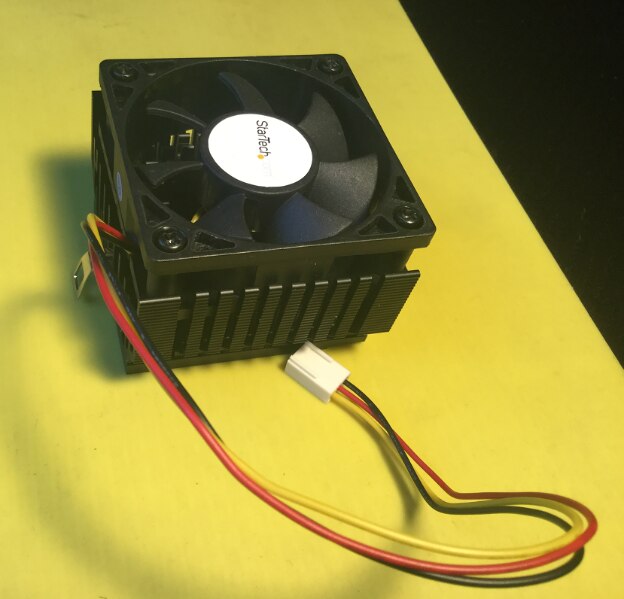
Cooler HeatsinkStartech.com FAN370PRO - Socket 7/370 CPU Cooler Heatsink and Fan


NTC


For a detailed description on the temperature protection mechanism, check Programmable Electronic Load - Temperature Protection.


The voltage sent to the ADC is very dependent on the NTC. I've selected a Vishay NTCS0805E3103JLTVishay NTCS0805E3103JLT -  THERMISTOR, 10K, 5%, SMD, NTC.

I'll program the key values. The behaviour is non-linear and it's easier to make a lookup table if the firmware has to be able to deal with different components.

This will require access to flash to permanently store tha values, and a SCPI function to alter the table if another component is used.

For the first version I'm going to be selfish and just program for the device that I've ordered.
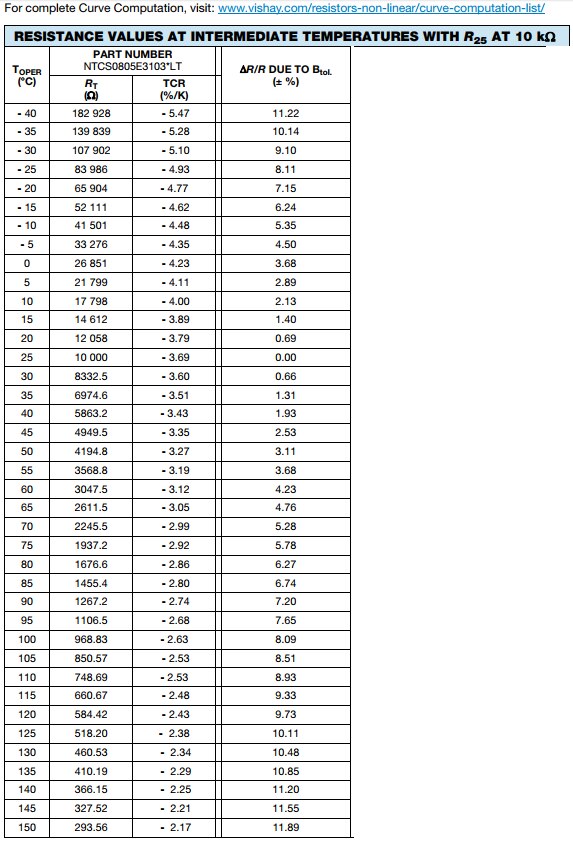
image


PCB


Exposed copper


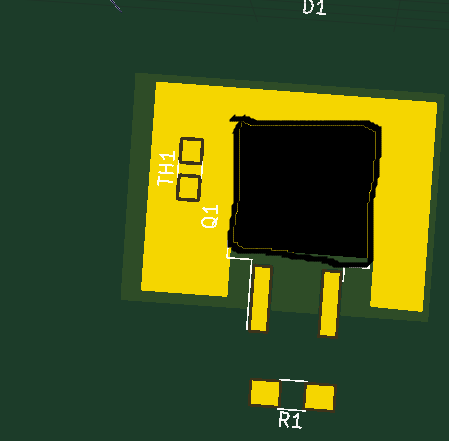
For good thermal relief, and to get the NTC as good termally coupled to the FET as possible,

I placed a copper pour (here on the front, I'll do the same on the back and stitch them for thermal transport with vias)

Then i drew a pour on the front mask. The area of pour will expose copper. That means that the NTC has physical contact with the copper that the FET is soldered on.

In the fine-tuning I will place that NTC closer to the FET so that I can put a tad of heat paste in between. Or I could put a tad of paste between the NTC and exposed copper ...
image


Attention when placing the binding posts. For the power input, RED is 1 and BLACK is 2.

For the sense input, BLACK is 1 and RED is 2.

This is the result of me labeling pin 7 and 8 of the connectors between the driver board and FET board wrong, on both boards image.

The documentation and KiCAD zips are now updated with corrected schematics.


I used these 2 Contextual Electronics videos to refresh how to expose copper layers and place VIA arrays:
You don't have permission to edit metadata of this video.
Edit media
x
image
Upload Preview
image
You don't have permission to edit metadata of this video.
Edit media
x
image
Upload Preview
image


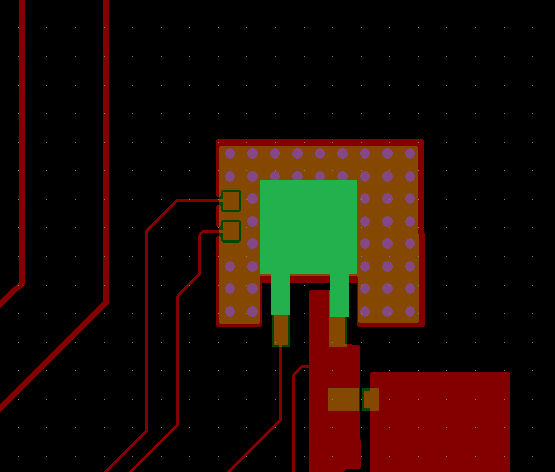
Here's the top side of the completed design. I've drawn the FET in green to give perspective.
image

In red you see the copper layer, orange is where the solder mask is removed and copper exposed.

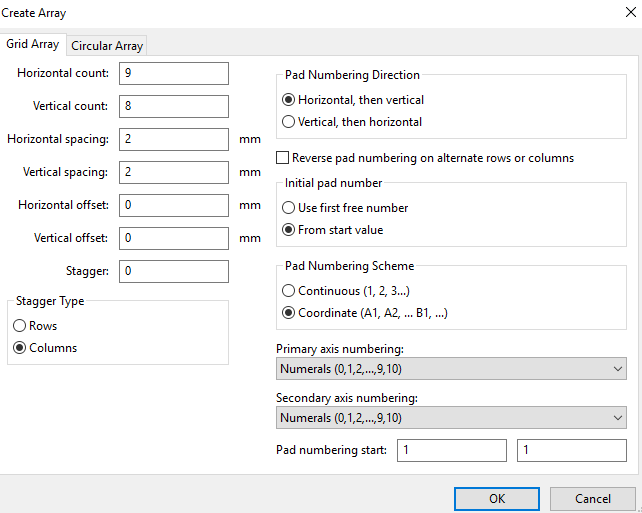
Pink are the drill holes. They are 0.9652 mm, in an array of 9 * 8, spaced 2 mm apart.
image


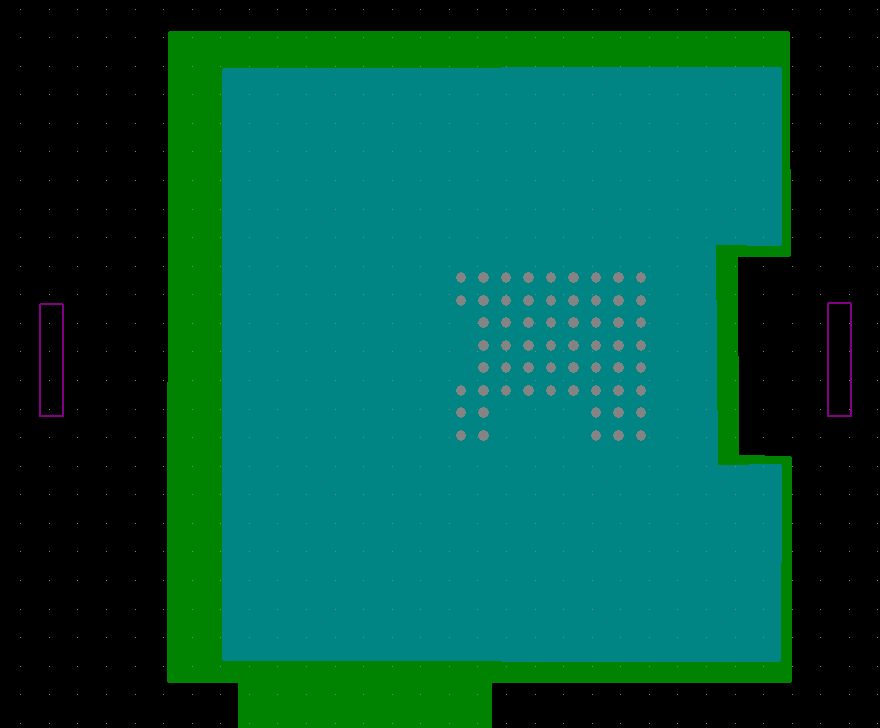
On the bottom, the copper pad (green) has the size of my heat sink + some. The removed mask (blue) has the exact size of the sink's bottom profile.

The pink lines are the mounting slots for the heat sink (see below).
image


Slots


My heat sink has brackets for mounting. I've cut out slots to allow the brackets to through the PCB and fix them on the top side.
 

image


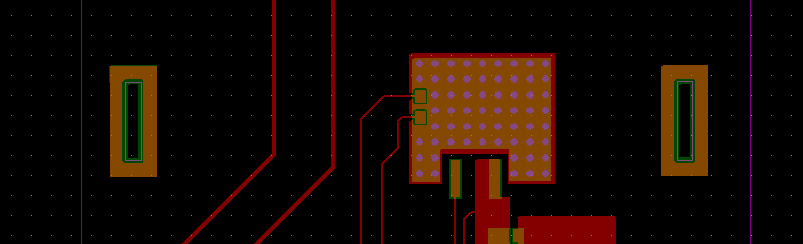
I've put some exposed non-connected copper pour around the slots for strength.

The slot is drawn on the Edge.Cuts layer. I hope that the PCB fab interprets that as slots to be milled out ...
image


I've attached the KiCAD project, component libs and Gerbers in a single zip. Also the VIA lib that's used here as a separate file (because I share that one across projects).

Attachments:
vias.pretty.zip
eload_offboard_20171227.zip
  • mosfet
  • metrology
  • ntc
  • msp432
  • scpi
  • laboratory
  • instrument
  • Share
  • History
  • More
  • Cancel
  • Sign in to reply

Top Comments

  • shabaz
    shabaz over 8 years ago in reply to Jan Cumps +4
    That looks great! Looks like Kicad is quite usable, you're getting good results. I've yet to try it.
  • Jan Cumps
    Jan Cumps over 8 years ago +3
    PCBs have arrived from Seeed. The heatsink fits perfect on the pad. The slots for the mounting bracket turned out OK.
  • Robert Peter Oakes
    Robert Peter Oakes over 8 years ago in reply to Jan Cumps +3
    They look great
  • Jan Cumps
    Jan Cumps over 8 years ago

    I've attached the KiCad project and dependencies.

    • Cancel
    • Vote Up +2 Vote Down
    • Sign in to reply
    • More
    • Cancel
  • Jan Cumps
    Jan Cumps over 8 years ago in reply to michaelkellett

    I've ordered these from Seeed Studio. OSH Park, attractive for small size boards, charges 72 € for 3, including standard shipping.

    • Cancel
    • Vote Up +1 Vote Down
    • Sign in to reply
    • More
    • Cancel
  • michaelkellett
    michaelkellett over 8 years ago in reply to Jan Cumps

    I'll be interested to see how well it works.

    Where did you get the boards  - that's a much lower price than I pay.


    Thanks.


    MK

    • Cancel
    • Vote Up 0 Vote Down
    • Sign in to reply
    • More
    • Cancel
  • Jan Cumps
    Jan Cumps over 8 years ago in reply to Jan Cumps

    This is the layout I submitted. Top left, bottom with pad for heat sink right.

    If everything is right, the two copper rectangular pads left and right of the FET should be routed out and become slots .

    These are for the mounting bracket of the heat sink ...

    image

    • Cancel
    • Vote Up 0 Vote Down
    • Sign in to reply
    • More
    • Cancel
  • Jan Cumps
    Jan Cumps over 8 years ago in reply to michaelkellett

    michaelkellett  wrote:


    ... there's an interesting document from Cree about thermal design of pcbs (focused on LED applications but generally useful).


    You can find it by Googling 'XLamp_PCB_Thermal'.


    It's good because it gives numbers for via conductivity and even compares solder filled with plain as well as other useful stuff.


    ...

    I've checked out that document. Very interesting.

    I have 61 VIAs, hole size 0.95mm. According to the document I could have done with a lower amount (for the Cree LED, they found that 14 0.25mm holes very close to each other under the core, were optimal).

    They advice to fill the holes with copper.


    Just for info, my PCB is FR-4,  1.6 mm thick, Copper Weight - 1oz.

    36 € including shipping for 10 boards.

    • Cancel
    • Vote Up +1 Vote Down
    • Sign in to reply
    • More
    • Cancel
  • michaelkellett
    michaelkellett over 8 years ago in reply to Jan Cumps

    Good luck - there's an interesting document from Cree about thermal design of pcbs (focused on LED applications but generally useful).


    You can find it by Googling 'XLamp_PCB_Thermal'.


    It's good because it gives numbers for via conductivity and even compares solder filled with plain as well as other useful stuff.


    I know it's  a bit late now since you've designed your board image


    MK

    • Cancel
    • Vote Up +1 Vote Down
    • Sign in to reply
    • More
    • Cancel
  • Jan Cumps
    Jan Cumps over 8 years ago in reply to michaelkellett

    Michael, I will be paying a hit for this design. But it has been used in other similar designs too.

    The best is to mount the heat sink on the iron of a through-hole transistor. Anything in between is a heat resistor and will degrade cooling.


    In my case, the transistor's heat sink is soldered to copper. That's a fairly good transfer.

    Then the heat is transferred to the underside copper pad of the PCB via an array of 60+ VIAs that will be filled up by solder. Another decent transfer.

    That copper pad on the backside has the same shape as my decent heat sink with fan. I can mount that straight on that bottom copper pad (the solder mask is removed, so it's copper on heatsink.


    It's not the ideal world but I expect it to be good enough. I will test this once it's built up. Components and PCB are ordered ...

    • Cancel
    • Vote Up 0 Vote Down
    • Sign in to reply
    • More
    • Cancel
  • michaelkellett
    michaelkellett over 8 years ago

    Won't putting the power device on a pcb rather than directly on a heat sink rather limit the maximum power you can dump. I have a couple of commercial loads and they can both put away 250W+. (Which is  a lot but only yesterday I was putting 15W into one and I've often needed 50W or more).


    MK

    • Cancel
    • Vote Up +1 Vote Down
    • Sign in to reply
    • More
    • Cancel
<
element14 Community

element14 is the first online community specifically for engineers. Connect with your peers and get expert answers to your questions.

  • Members
  • Learn
  • Technologies
  • Challenges & Projects
  • Products
  • Store
  • About Us
  • Feedback & Support
  • FAQs
  • Terms of Use
  • Privacy Policy
  • Legal and Copyright Notices
  • Sitemap
  • Cookies

An Avnet Company © 2026 Premier Farnell Limited. All Rights Reserved.

Premier Farnell Ltd, registered in England and Wales (no 00876412), registered office: Farnell House, Forge Lane, Leeds LS12 2NE.

ICP 备案号 10220084.

Follow element14

  • X
  • Facebook
  • linkedin
  • YouTube