


Abstract
This project presents EdgeCare, an experimental wearable system designed for continuous physiological monitoring and metabolic trend analysis through the integration of multiple biomedical and environmental sensors. The proposed architecture combines a low-power wearable device based on the XIAO ESP32-C6 microcontroller with a laboratory-grade data acquisition and visualization platform developed in LabVIEW.
The system acquires heart rate, blood oxygen saturation, body temperature, galvanic skin response and skin dielectric parameters. Data are transmitted via Bluetooth Low Energy (BLE) to a gateway node and subsequently processed using custom LabVIEW virtual instruments.
A novel component of the project is the indirect estimation of hydration status through dielectric skin characterization using dry electrodes. Processed data are stored locally, visualized in real time and integrated into a Smart Home environment through Node-RED. Experimental results demonstrate stable wireless communication, reliable real-time monitoring and successful estimation of hydration-related parameters.
1. Introduction
The rapid evolution of wearable electronics has enabled continuous acquisition of physiological parameters outside clinical environments. Most commercially available devices focus primarily on fitness tracking, providing isolated measurements such as heart rate or blood oxygen saturation.
However, human physiological status is the result of multiple correlated processes involving cardiovascular regulation, thermoregulation, hydration balance and autonomic nervous system activity.
The purpose of the EdgeCare project is to develop a flexible research platform capable of collecting, correlating and analyzing multiple physiological indicators in real time.
The proposed system aims to:
- monitor cardiovascular parameters;
- estimate hydration status through skin dielectric properties;
- track body temperature;
- record long-term physiological data;
- integrate biomedical measurements into Smart Home environments.
Unlike conventional wearable systems, EdgeCare introduces an experimental hydration assessment approach based on the electrical behavior of the skin, allowing the study of metabolic and autonomic responses using low-cost hardware.
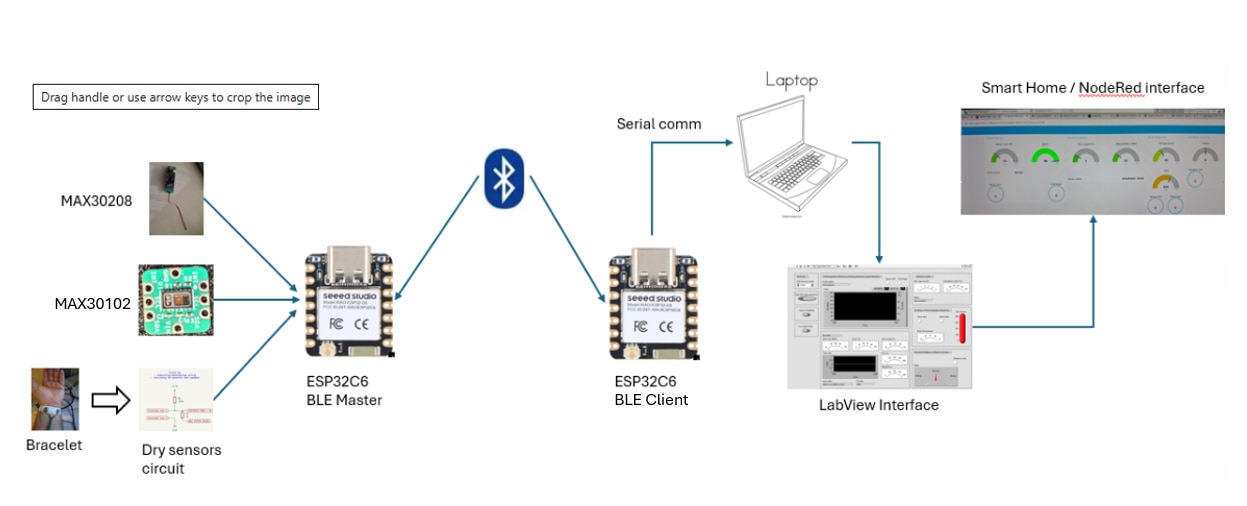
Block diagram of the entire system:
2. System Architecture
The complete architecture consists of three layers:
Layer 1: Wearable Data Acquisition Node
Hardware components:
- Seeed Studio XIAO ESP32-C6
- MAX30100 / MAX30102 optical sensor
- MAX30208 clinical temperature sensor
- DS18B20 temperature sensor (backup)
- Dry electrode interface
- OLED display
The wearable node performs:
- sensor acquisition;
- initial filtering;
- packet generation;
- BLE transmission.
Layer 2: Gateway Communication Node
A second ESP32-C6 acts as a BLE client and serial gateway.
Functions include:
- Bluetooth connection management;
- packet validation;
- forwarding measurements to the PC.
Layer 3: Data Processing Platform
A LabVIEW application performs:
- acquisition;
- visualization;
- storage;
- physiological calculations;
- Smart Home communication.
This architecture separates sensor acquisition from computational processing, reducing power consumption on the wearable node.
3. Physiological monitoring and metabolic trends
In this party I will explain the implementation of physiological monitoring and metabolic trends splitted in three category:
A. Determination of body hydration using the dielectric profile (using GSR, Tau and Temp);
B. Cardiorespiratory efficiency and tissue perfusion (using HR and SpO2);
C. The body's thermoregulatory response (using Temp + GSR);
D. Estimated Metabolic Inflection Indicator.
A. Determination of body hydration using the dielectric profile (using GSR, Tau and Temp)
The circuit used to determine the dielectric profile for skin and to show the hydratation indes on the body can be one of the following solutions:
- a simple one with two resistors;
- with a specialized circuit, like AD5933 or MAX30009 (future implementation/upgrade).
I used first option, with two resistors and two ports from ESP32C6, like in the schematic diagram:
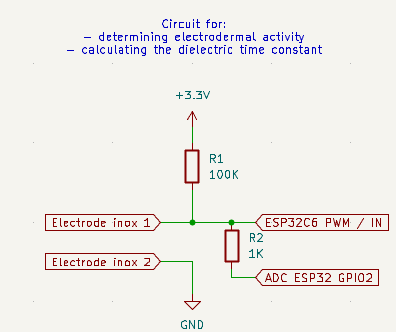
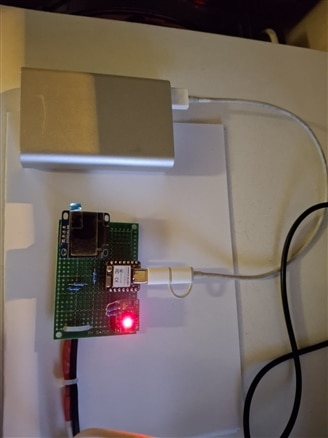
OBS: the circuit used to read the braceled dry electrodes are powered borm an power bank to avoid interferenced induced by the switching power supply and to have a total separation between sensors and PC with Labview.
All the calculation are done in LabView.
Parameter used:
- GSR (Rskin in Kohm) - measure the DC resistance of the skin; It is particularly influenced by surface moisture, perspiration and electrolytes.
- Skin capacity (Cskin) - It reflects the dielectric properties of deep cellular tissue (dermis and living epidermis); It depends directly on the bound and free water within the cells and in the interstitial space.
- Tau (Rskin x Cskin in us) - It measures the response speed to a transient pulse; It measures the rate at which the skin's dielectric capacitance charges and discharges in response to a pulse applied by the ESP32-C6.
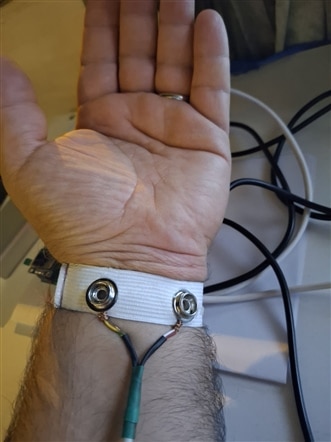
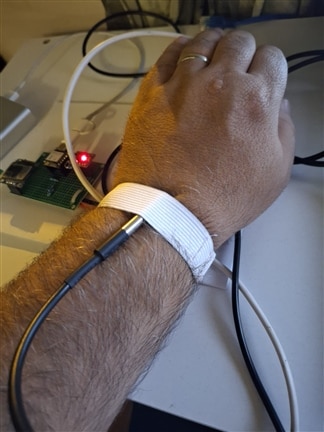
The parameters Temp (using DS10B20 one-wire temp sensor with metalic capsule), GSR and Tau (using the bracelet two electrodes) are read by the ESP32C6 (see the photos below) and sent to LabVIEW for processing and display:
Algorithm: the processing is carried out in four main stages in LabVIEW (within the Formula Node):
Step 1: Thermal Compensation (DS18B20 Sensor)
Skin temperature alters electrical resistance through vasodilation/vasoconstriction. To eliminate temperature-induced errors:
| Status | GSR value (Rskin) | Skin capacity Cskin | Fisiologin interpretation |
|---|---|---|---|
| Dehydrated / Dried | Big (> 200 kΩ) | Low (<0.8 nF) | Dry stratum corneum, low cellular volume. |
| Moderate hydratation | Medium (80 - 180 kΩ) | Medium (1.0 - 2.2 nF) | Optimal dermal/epidermal water balance. |
| Hydrated / optimal | Normal-low (50 - 100kΩ) | Big (2.2 - 3.5 nF) | Well-hydrated interstitial tissue. |
| Surface perspiration | Very low (< 40 kΩ) | Rapidly Changing | Excess electrolytes on the surface (surface perspiration, not cellular hydration). |
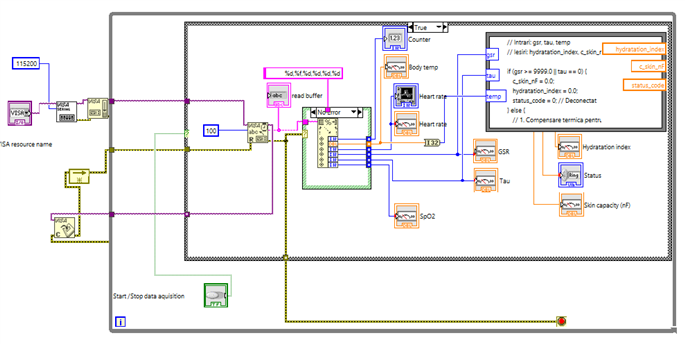
The function used in Labview for all above calculatiuon is this (in formula node):
// Intrari: gsr, tau, temp
// Iesiri: hydratation_index, c_skin_nF, status_code

if (gsr >= 9999.0 || tau == 0) {
    c_skin_nF = 0.0;
    hydratation_index = 0.0;
    status_code = 0; // Deconectat
} else {
    // 1. Compensare termica pentru GSR (Referinta: 33.0 °C, Coeficient: 2% per °C)
    float t_ref = 33.0;
    float alpha = 0.02;

    // Corectam GSR-ul daca temperatura este valida
    float gsr_corr = gsr;
    if (temp > 25.0 && temp < 42.0) {
        gsr_corr = gsr * (1.0 + alpha * (temp - t_ref));
    }

    // 2. Calcul capacitate dielectrici compensata
    c_skin_nF = tau / gsr_corr;
    // 3. Scalare Indice de Hidratare (0 - 100%)
    float c_min = 0.5; // nF
    float c_max = 3.0; // nF

    float raw_index = ((c_skin_nF - c_min) / (c_max - c_min)) * 100.0;

    if (raw_index < 0.0) raw_index = 0.0;
    if (raw_index > 100.0) raw_index = 100.0;

    hydratation_index = raw_index;

    // 4. Clasificare stare
    if (gsr_corr < 40.0) {
        status_code = 4; // Transpiratie / Hiperhidroza
    } else if (hydratation_index >= 60.0) {
        status_code = 3; // Hidratat / Optim
    } else if (hydratation_index >= 30.0) {
        status_code = 2; // Hidratare Moderata
    } else {
        status_code = 1; // Deshidratat / Uscat
    }
} 
Demo:
OBS: The EdgeCare system utilizes the parallel RC equivalent model for epidermal impedance described by Geddes & Baker (1989) and Martinsen & Grimnes (2011).
The determination of the dielectric capacitance (Cskin = Tau / R) and its scaling to derive the hydration index follow the dynamics of electrodermal activity (EDA) variation established by Boucsein (2012),
with a thermal correction using an alpha coefficient of 0.02°C applied in accordance with Wenig & Martinsen (2000).
B. Cardiorespiratory efficiency and tissue perfusion; apnea detection
This module assesses in real time how efficiently the cardiovascular system delivers oxygen to peripheral tissues and how the body reacts to stress or hypoxia.
To achive this, an new parameter is introduced: PI (Tissue Perfusion Index).
How it is working: PI it represents the ratio between the pulsatile alternating component (AC, pulsating arterial blood) and the non-pulsatile continuous component (DC, tissue, bone, static venous blood)
The formula used is this: PI = (AC / DC ) * 100%
Interpretation:
- PI >=1.0% - indicates good tissue perfusion in the finger;
- PI < 0.5% - indicates peripheral vasoconstriction, cold fingers, or a weak signal.
SpO2 and HR are both displayed on the same Waveform Chart with double Y-axes:
- on the left side is displayed HW that monitors variations in ventricular rate (40 --180 BPM), in pink colour;
- on the right side is displayed SpO2 that mMonitors arterial oxygenation levels (70-100\%).
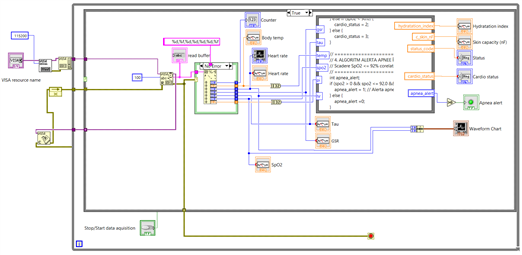
Apnea detection: the algorithm runs inside the Formula Node block in LabVIEW and evaluates the conditions for an episode of obstructive or central sleep apnea.
The algorithm and Labview implementation:
// Intrari: gsr, tau, temp, pi, spo2
// Iesiri: hydratation_index, c_skin_nF, status_code, low_perfusion, cardio_status, apnea_alert

// ==========================================
// 1. EVALUARE PROFIL DIELECTRIC (GSR + TAU)
// ==========================================

if (gsr >= 9999.0 || tau == 0) {
    c_skin_nF = 0.0;
    hydratation_index = 0.0;
    status_code = 0; // Deconectat
} else {
    // 1. Compensare termica pentru GSR (Referinta: 33.0 °C, Coeficient: 2% per °C)
    float t_ref = 33.0;
    float alpha = 0.02;

    // Corectam GSR-ul daca temperatura este valida
    float gsr_corr = gsr;
    if (temp > 25.0 && temp < 42.0) {
        gsr_corr = gsr * (1.0 + alpha * (temp - t_ref));
    }

    // 2. Calcul capacitate dielectrici compensata
    c_skin_nF = tau / gsr_corr;
    // 3. Scalare Indice de Hidratare (0 - 100%)
    float c_min = 0.5; // nF
    float c_max = 3.0; // nF

    float raw_index = ((c_skin_nF - c_min) / (c_max - c_min)) * 100.0;

    if (raw_index < 0.0) raw_index = 0.0;
    if (raw_index > 100.0) raw_index = 100.0;

    hydratation_index = raw_index;

    // 4. Clasificare stare
    if (gsr_corr < 40.0) {
        status_code = 4; // Transpiratie / Hiperhidroza
    } else if (hydratation_index >= 60.0) {
        status_code = 3; // Hidratat / Optim
    } else if (hydratation_index >= 30.0) {
        status_code = 2; // Hidratare Moderata
    } else {
        status_code = 1; // Deshidratat / Uscat
    }
}

// ==========================================
// 2. EVALUARE INDICE DE PERFUZIE (PI)
// ==========================================
int low_perfusion = 0;
if (pi > 0.0 && pi < 0.5) {
    low_perfusion = 1; // Vasoconstruc?ie / Degete reci
}

// ==========================================
// 3. STARE CARDIORESPIRATORIE
// ==========================================
// 0: Deconectat | 1: Normal | 2: Hipoxie | 3: Aritmie/Anormal
if (spo2 == 0 || hr == 0) {
    cardio_status = 0;
} else if (spo2 >= 95.0 && hr >= 50.0 && hr <= 100.0) {
    cardio_status = 1;
} else if (spo2 < 90.0) {
    cardio_status = 2;
} else {
    cardio_status = 3;
}

// ==========================================
// 4. ALGORITM ALERTA APNEE ÎN SOMN
// Scadere SpO2 <= 92% corelata cu micro-trezire (HR >= 85 BPM)
// ==========================================
int apnea_alert;
if (spo2 > 0 && spo2 <= 92.0 && hr >= 85.0) {
    apnea_alert = 1; // Alerta apnee / desaturare
} else {
    apnea_alert = 0;
}
Working mechanism:
- Respiratory pause (Apnea): During the cessation of breathing, blood oxygen levels begin to drop progressively;
- Desaturation (SpO_2 <= 92\%): When the SpO_2 level falls below the critical threshold of 92\%, the body enters a state of mild hypoxia;
- Micro-arousal / Sympathetic stress response (HR >= 85 BPM): The brain detects the lack of oxygen and activates the sympathetic nervous system, triggering a sudden increase in heart rate (compensatory tachycardia) to circulate the remaining oxygenated blood more rapidly;
- Signal validation (SpO_2 > 0): Prevents false alarms from triggering when the sensor is removed from the finger (disconnected state).
Demo:
OBS: The perfusion index (PI) was evaluated according to the methodology described by Allen [5], while the arterial desaturation thresholds for apnea follow the recommendations of Penzel et al. [7].
C. Detection of febrile conditions or heat shock.
The Temp + GSR (Body Thermoregulatory Response) module complements the EdgeCare biometric system by adding the component of metabolic and autonomic nervous system (ANS) assessment.
If oximetry (HR, SpO_2, PI) measures cardiorespiratory function, the combination Temperature + GSR monitors heat stress and electrodermal reactivity.
The role of parameters:
a. Peripheral/Skin Temperature (Temp):
- Febrile State / Hyperthermia (Temp > 37.5C): The body tries to eliminate excessive heat through peripheral vasodilatation and sweating.
- Heat Shock / Hypothermia / Vasoconstriction (Temp < 35.0C): The body redirects blood from the periphery to the vital organs (fingers become cold, correlated with a massive drop in PI).
b. Galvanic Skin Response (GSR / Electrodermal Conductance)
- The eccrine sweat glands are innervated exclusively by the sympathetic nervous system.
- In case of intense physical exertion, thermal shock, pain or emotional stress, sweat activity increases instantly.
- Water and minerals in sweat remove skin resistance and increase GSR conductance.
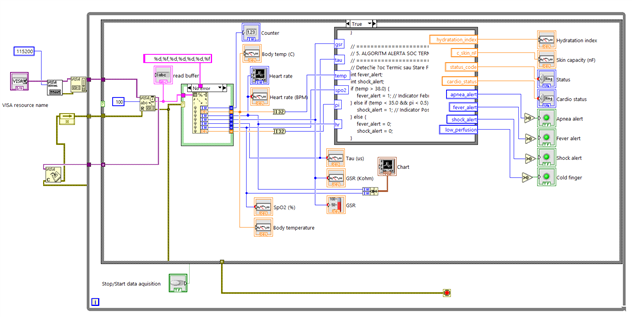
Code for this module (this code will be added in Formula node from Labview):
// Detectie Soc Termic sau Stare Febrila
if (temp > 38.0) {
    fever_alert = 1; // Indicator Febrăa/ Hipertermie
} else if (temp < 35.0 && pi < 0.5) {
    shock_alert = 1; // Indicator Posibil Soc Termic / Hipotermie
} else {
    fever_alert = 0;
    shock_alert = 0;
}
Demo:
OBS: to simulate fever in "The Body's termoregulatory Response" area I heated the temperature sensor a little above the trigger threshold of the alert.
D. Estimated Metabolic Inflection Indicator.
What is "Estimated Metabolic Inflection Indicator": this is a multisensor fusion algorithm that evaluates, in real time, the direction of blood glucose fluctuation (rising, stable, or rapidly falling). Without requiring blood sampling or subcutaneous sensors, the method monitors the neurovascular and autonomic footprint that metabolic changes leave on the body.
How is working: the algorithm relies on the involuntary reaction of the sympathetic nervous system (SNS) and the cardiovascular response to glucose fluctuations:
- During rapid drops in blood glucose (risk of hypoglycemia): The body releases adrenaline, triggering an acute "fight-or-flight" response. This manifests as cold sweating (a sudden rise in skin conductance/GSR), compensatory tachycardia (increased heart rate/HR), and peripheral vasoconstriction (a drop in the perfusion index/PI).
- During postprandial states (rise in blood glucose): The reaction is more gradual, characterized by incremental adjustments in skin temperature and GSR, without sudden adrenergic surges.
Code for this module (this code will be added in Formula node from Labview):
// ==========================================
// 6. ALGORITM pentru Indicator Estimat de Inflexiune Metabolica
// ==========================================
// Declarare variabile interne pentru stocare stare anterioara memorare esantion
float gsr_prev;
float hr_prev;

// Calculul variatiei rapide (derivata discreta)
float delta_gsr = gsr - gsr_prev;
float delta_hr = hr - hr_prev;

// Initializare scor: 0 = Stabil / Homeostazie
glycemic_trend = 0;
glycemic_alert = 0;

// Verificare validitate date (evita alarme false la deconectare)
if (spo2 > 0.0 && hr > 0.0) {

    // 1. Trend de Scadere Rapida / Stres Metabolic Sympathetic (Risc Hipoglicemic)
    // Caracterizat prin: crestere brusca GSR (transpiratie) + accelerare HR + PI scazut (vasoconstructie)
    if (delta_gsr > 15.0 && delta_hr > 3.0 && pi < 1.0) {
        glycemic_trend = -1; // Trend descrescator (Scadere rapida)
        glycemic_alert = 1;  // Declansare alerta vizuala
    }

    // 2. Trend de Crestere / Raspuns Postprandial
    // Caracterizat prin: crestere lenta Temp/GSR fara peak-uri sau fluctuatii majore de HR
    else if (delta_gsr < -5.0 && temp > 36.6 && delta_hr >= -2.0 && delta_hr <= 2.0) {
        glycemic_trend = 1;  // Trend crescator
        glycemic_alert = 0;
    }

    // 3. Stare Stabila / Homeostazie
    else {
        glycemic_trend = 0;  // Stare neutra / stabila
        glycemic_alert = 0;
    }
}

// Salvare valori curente pentru esantionul urmator
gsr_prev = gsr;
hr_prev = hr;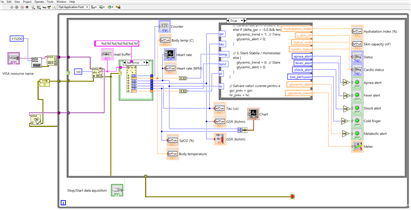
The front panel in Labview (no video provided, see last note):
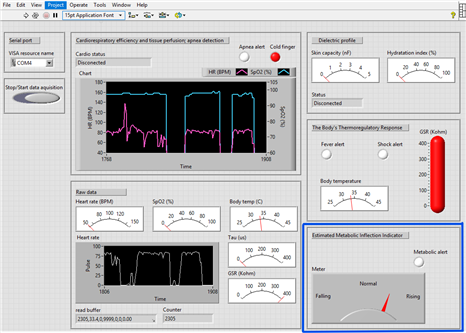
OBS: The metabolic trend monitoring method integrated into the EdgeCare system is based on the multisensory fusion hypothesis validated in the scientific literature.
According to recent studies on autonomic responses to metabolic imbalances, a drop in glucose levels triggers acute sympathetic activation, manifested as rapid variations in electrodermal conductance (GSR) and peripheral hemodynamic adjustments derived from the PPG signal (HR, PI).
The algorithm developed in LabVIEW utilizes these discrete metrics to classify the trend of variation without requiring invasive devices.
IMPORTANT: With this final feature, I aimed to create a device capable of indicating potential rises, falls, or periods of stability in estimated blood glucose levels. To generate this estimate, I utilized GSR, HR, PI, and temperature parameters. This device is not intended to replace a standard glucometer, as the goal is to provide a rough estimate of the trend rather than a precise blood glucose reading; consequently, it should be regarded as an experimental device.
Note: this last module is purely theoretical and experimental; calibrating the algorithm requires a significant number of measurements taken at various times of the day, such as in the morning, after breakfast, before and after lunch, before and after dinner, and at night.
Therefore, this module will be updated once I have created the final hardware version: the wristband with the sensors and power supply installed.
4. Datalogger/save data and Smart home connection
A. Save data from LabView to the PC in excel format
Saving the data is a good thing because they can be analyzed for bebuging, improvment of the system behavior and long time observations.
To achive this I chosen to save data in excel format directly from LabView.
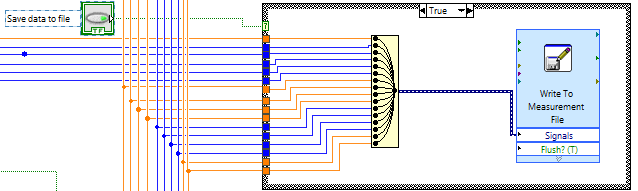
For that I added the "Write to measurement file" block; inside I set the file path were the file will be saved (this is generic and can be modified);
Because i have 16 signals + timestamp, I used "merge signals" block to gather all the signals in one entrance, to be sabed in the excel file.
I added also an button to start/stop the saving data; this button/option is used especially in the development phase:
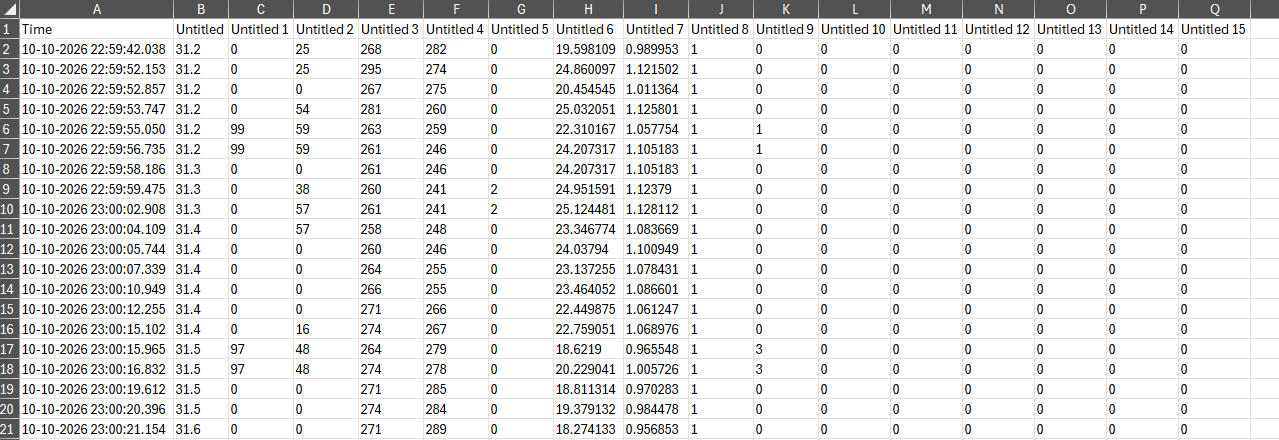
OBS: it is not easy to set the name of the signals saved in the top of each column in LabView; that why I modified the original file with the signal names and then, for analisys, the first from the log file will be replaced with the modified one:

B. Connect the LabView to my smart home based on NodeRed
After configuring all the parameters, I thought it would be useful to integrate this system with an smart home environment, to have all these information available in one place.
This "Smart Home" project runs on a Mixtile Edge 2 PC kit—using Debian Linux and a Node-RED environment.
Communication with this PC—and by extension, the smart home/Node-RED system—takes place via the HTTP protocol, as it is much easier to configure in LabVIEW than MQTT.
I added a button in LabVIEW to toggle data transmission to Node-RED; this is useful for debugging and development, but especially for handling situations where Node-RED is shut down (otherwise, LabVIEW would generate a series of communication errors).
Link with my Smart house project: My Smart house project
Here is the communication implementation:
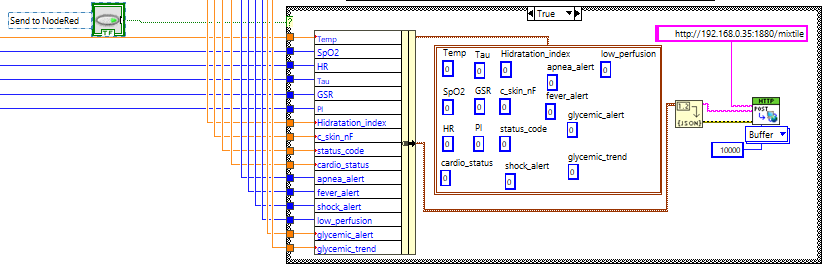
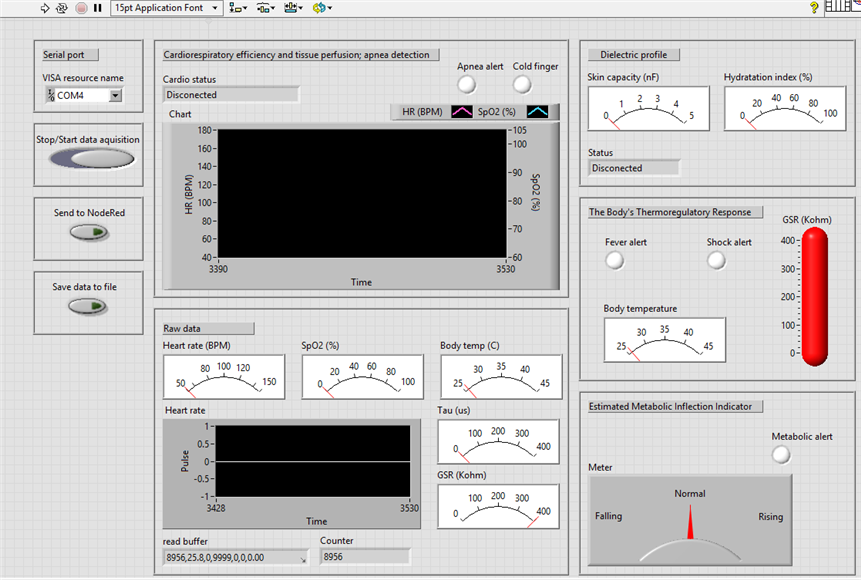
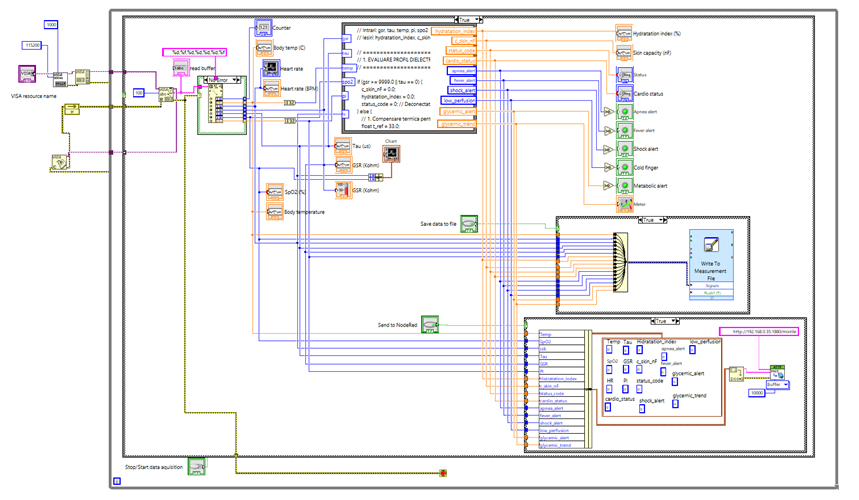
Now, this is the final LabView panel and implementation:
NodeRed implementation and panel:
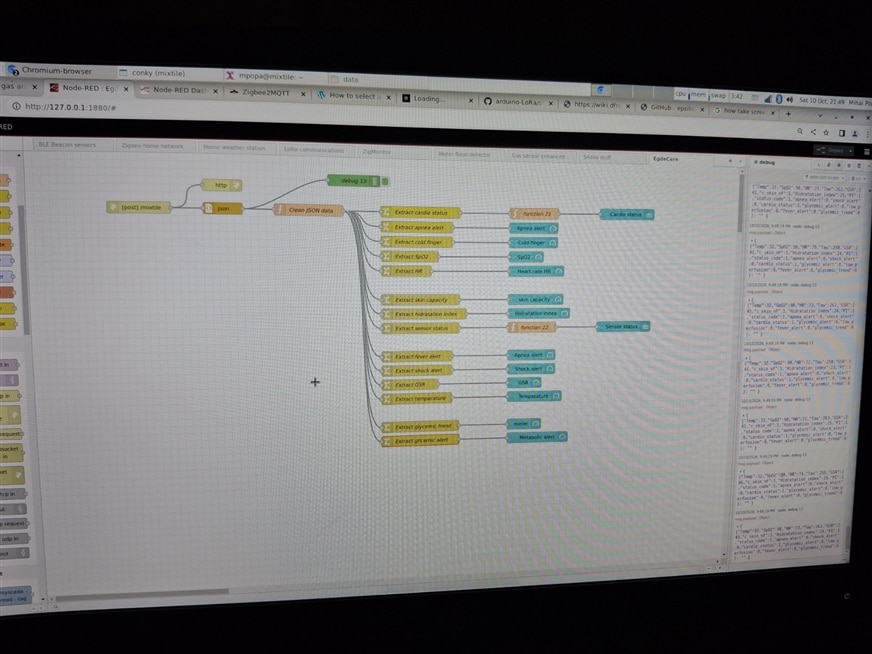
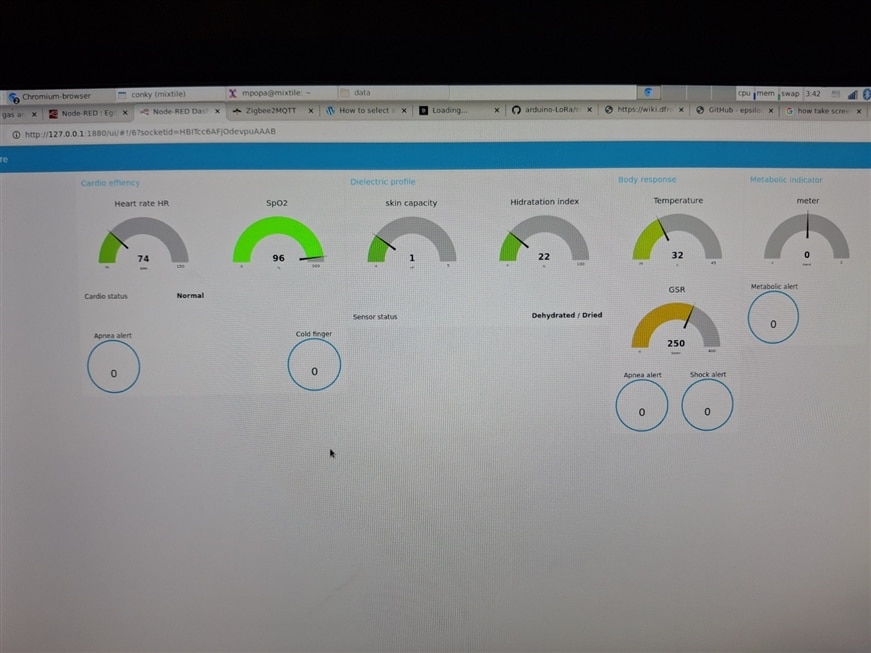
The code used in NodeRed will be available in the final project post.
Demo:
5. Integration of MAX30102 and MAX30208 sensors
In this phase of the project I replaced the initial HR and SpO2 sensors used with ones received from element14.
The MAX30208 temperature sensor proved somewhat problematic to use because it shared the same I2C bus with another chip—an I2C-to-OneWire bridge—which required specific configuration; otherwise, after a certain amount of time, the two chips would conflict, causing the I2C stack on the ESP32C6 to enter a locked state. Once I separated the two sensors on the Analog Devices development board, I was able to communicate reliably with this temperature sensor. Details on what I did can be found here: Question: Is the MAX30208EVSYS Board working for you? - element14 Community
I replaced also the MAX30100 with the received MAX30102. This sensor features an improved optical component, allowing it to be used on other parts of the body—not just the fingertip; it can even be placed on the back of the hand, in an area with hair, while still providing consistent readings.
Additionally, I installed a small OLED display that shows three key measurements: temperature, heart rate (HR), and blood oxygen level (SpO2).
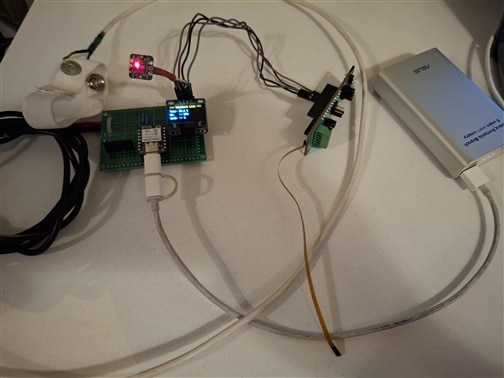
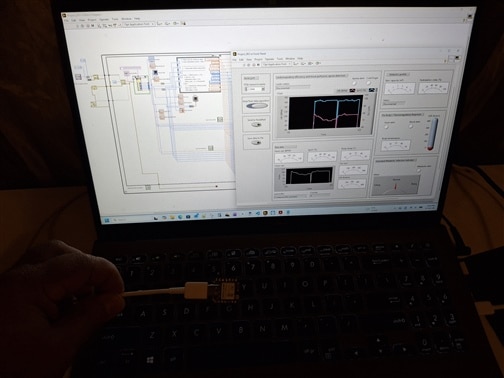
Video with new installed sensors and OLED display:
OBS: I also kept the DS18B28 sensor (used initially) as a backup for the MAX30208; in the software, I included a function that checks whether the MAX30208 readings are consistent—if not, the value from the DS18B20 is used instead:
    // read DS18B20; used as backup for MAX30208
    float realTemp = readDS18B20Temp();

    // read MAX30208
    float max30208Temp = readMAX30208Temp();
    if (max30208Temp > -100) {
      realTemp = max30208Temp; // Use MAX30208 value if is valid
    }
The code for this project is written using PlatformIO along with the Arduino framework:
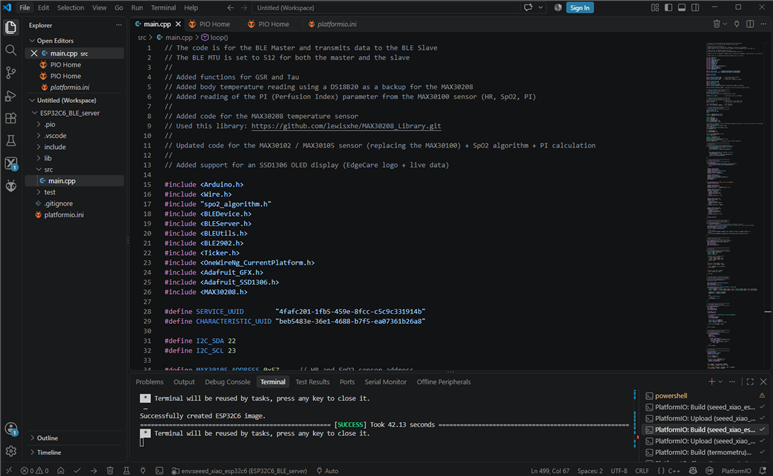
Presented below are the data transmission by the ESP32C6 Master and the corresponding reception by the EST32C6 Client via BLE:
- In PlatformIP, the data are sent to the BLE and serial port (COM3):
- In a serial tool, the client ESP32C6 is connected also via serial (COM4):
Final demo:
6. Code uned for this project
The code used in this project contain two archive: one for ESP32C6 master and other for ESP32C6 slave:
ESP32C6_BLE_server.zip ESP32C6_BLE-client.zip
OBS: during the development phases, I created few small projects, to help me with the implementation: I2C scanner and max30208 termometer
I2c scanner.zip termometru.zip
For Smart Home i used an older project of mine, posted here: https://www.hackster.io/popa-mihai/smart-home-with-mixtile-edge-2-kit-bee1b3
This is created using an mixtile Edge 2 Kit PC and NodeRed;
Code used for Smart Home with NodeRed:EdgeCare flow.zip
7. Discussion
The obtained results demonstrate that low-cost embedded platforms can support advanced physiological monitoring applications.
The strongest contribution of the proposed system is the combination of conventional biomedical measurements with dielectric skin characterization.
While heart rate, SpO2 and temperature are widely available in commercial devices, hydration estimation through RC dielectric modeling remains a relatively unexplored area in low-cost wearable systems.
Several limitations remain:
- lack of clinical validation against medical hydration standards;
- limited number of test subjects;
- sensitivity of dry electrodes to placement pressure;
- absence of long-term clinical datasets.
Therefore, the hydration index should currently be considered an experimental marker rather than a clinical diagnostic parameter.
8. Future Work
The next development stages include:
- Dedicated PCB design.
- LiPo battery integration.
- Miniaturized wearable enclosure.
- Advanced processing of PPG signals with a specialized chip.
- Machine-learning based pattern analysis.
- Clinical comparison against professional hydration assessment methods.
- Cloud storage and remote monitoring.
- Integration with Home Assistant and MQTT infrastructure.
OBS: To design the PCB for this project, I need to know the power consumption of each component during various operating states—for instance, the MCU when transmitting data via BLE or reading sensors, and the power draw of each individual sensor during active communication versus standby mode. For this, I require a specialized device for creating power profiles, such as the Nordic Power Profiler Kit 2 or something similar.
9. Conclusion
EdgeCare demonstrates the feasibility of a multi-sensor wearable capable of combining cardiovascular monitoring, temperature measurement, dielectric skin characterization and Smart Home integration in a unified platform.
The project successfully validates:
- ESP32-C6 BLE communication architecture;
- LabVIEW-based biomedical processing;
- real-time physiological monitoring;
- experimental hydration assessment using dry electrodes;
- Smart Home interoperability through Node-RED.
The results suggest that low-cost wearable platforms can serve as valuable research tools for studying metabolic and autonomic physiological trends, while offering a foundation for future clinical and consumer healthcare applications.
- Geddes, L. A., & Baker, L. E. (1989). Principles of Applied Biomedical Instrumentation (3rd ed.). John Wiley & Sons.
- Martinsen, O. G., & Grimnes, S. (2011). Bioimpedance and Bioelectricity Basics (3rd ed.). Academic Press.
- Wenig, P. B., & Martinsen, O. G. (2000). Thermal influence on skin bioimpedance measurements. Annals of Biomedical Engineering, 28(5), 582–588.
- Boucsein, W. (2012). Electrodermal Activity (2nd ed.). Springer Science & Business Media.
- J. Allen, „Photoplethysmography and its application in clinical physiological measurement”, Physiological Measurement, vol. 28, no. 3, pp. R1–R39, 2007.
- MAXIM Integrated, „MAX30100: Pulse Oximeter and Heart-Rate Sensor IC”, Datasheet & Application Notes, Rev. 0, 2014.
- T. Penzel, et al., „The apnea-hypopnea index: history, clinical use, and future potential”, Journal of Clinical Sleep Medicine, 2012.
- EdgeCare: phase 1 - setup IDE, MCU and BLE - element14 Community
- EdgeCare: phase 2 - setup I2C, read MAX30100 and create VI in LabView - element14 Community
- EdgeCare: phase 4 - save data and smart home connection - element14 Community
- EdgeCare: phase 5 - integration of MAX30208 and MAX30105 sensors; final stage - element14 Community
