element14 Community
element14 Community
    Register Log In
  • Site
  • Search
  • Log In Register
  • Community Hub
    Community Hub
    • What's New on element14
    • Feedback and Support
    • Benefits of Membership
    • Personal Blogs
    • Members Area
    • Achievement Levels
  • Learn
    Learn
    • Ask an Expert
    • eBooks
    • element14 presents
    • Learning Center
    • Tech Spotlight
    • STEM Academy
    • Webinars, Training and Events
    • Learning Groups
  • Technologies
    Technologies
    • 3D Printing
    • FPGA
    • Industrial Automation
    • Internet of Things
    • Power & Energy
    • Sensors
    • Technology Groups
  • Challenges & Projects
    Challenges & Projects
    • Design Challenges
    • element14 presents Projects
    • Project14
    • Arduino Projects
    • Raspberry Pi Projects
    • Project Groups
  • Products
    Products
    • Arduino
    • Avnet & Tria Boards Community
    • Dev Tools
    • Manufacturers
    • Multicomp Pro
    • Product Groups
    • Raspberry Pi
    • RoadTests & Reviews
  • About Us
    About the element14 Community
  • Store
    Store
    • Visit Your Store
    • Choose another store...
      • Europe
      •  Austria (German)
      •  Belgium (Dutch, French)
      •  Bulgaria (Bulgarian)
      •  Czech Republic (Czech)
      •  Denmark (Danish)
      •  Estonia (Estonian)
      •  Finland (Finnish)
      •  France (French)
      •  Germany (German)
      •  Hungary (Hungarian)
      •  Ireland
      •  Israel
      •  Italy (Italian)
      •  Latvia (Latvian)
      •  
      •  Lithuania (Lithuanian)
      •  Netherlands (Dutch)
      •  Norway (Norwegian)
      •  Poland (Polish)
      •  Portugal (Portuguese)
      •  Romania (Romanian)
      •  Russia (Russian)
      •  Slovakia (Slovak)
      •  Slovenia (Slovenian)
      •  Spain (Spanish)
      •  Sweden (Swedish)
      •  Switzerland(German, French)
      •  Turkey (Turkish)
      •  United Kingdom
      • Asia Pacific
      •  Australia
      •  China
      •  Hong Kong
      •  India
      •  Japan
      •  Korea (Korean)
      •  Malaysia
      •  New Zealand
      •  Philippines
      •  Singapore
      •  Taiwan
      •  Thailand (Thai)
      •  Vietnam
      • Americas
      •  Brazil (Portuguese)
      •  Canada
      •  Mexico (Spanish)
      •  United States
      Can't find the country/region you're looking for? Visit our export site or find a local distributor.
  • Translate
  • Profile
  • Settings
Personal Blogs
  • Community Hub
  • More
Personal Blogs
Frank Milburn's Blog Programmable DC Electronic Load - First Look
  • Blog
  • Documents
  • Mentions
  • Sub-Groups
  • Tags
  • More
  • Cancel
  • New
  • Share
  • More
  • Cancel
Group Actions
  • Group RSS
  • More
  • Cancel
Engagement
  • Author Author: fmilburn
  • Date Created: 14 Jun 2019 6:56 AM Date Created
  • Views 4666 views
  • Likes 16 likes
  • Comments 20 comments
  • programmable load
  • arduino
  • dc_load
Related
Recommended

Programmable DC Electronic Load - First Look

fmilburn
fmilburn
14 Jun 2019

9 August 19 Update: 

8 July 19 Update:  A protoboard was populated for further testing and described at the bottom of the post


I have wanted to build a programmable DC load for some time and have followed both this one by Jan Cumps et. al. and also this one by John Wiltrout.  After lots of thought and no action I decided yesterday to just build something with what was on hand. 


Specifications


  • Max 15V input and 2.5 Amps
  • Min 1.8V and 0 Amps
  • Resolution 1 mA
  • Deliver 10 mA +/- 1 mA
  • 5V or USB to power
  • User interface:  encoder, buttons, and LCD
  • Simple to build, probably will not have a PCB made
  • Arduino IDE to make it accessible to others


Concept Demonstration


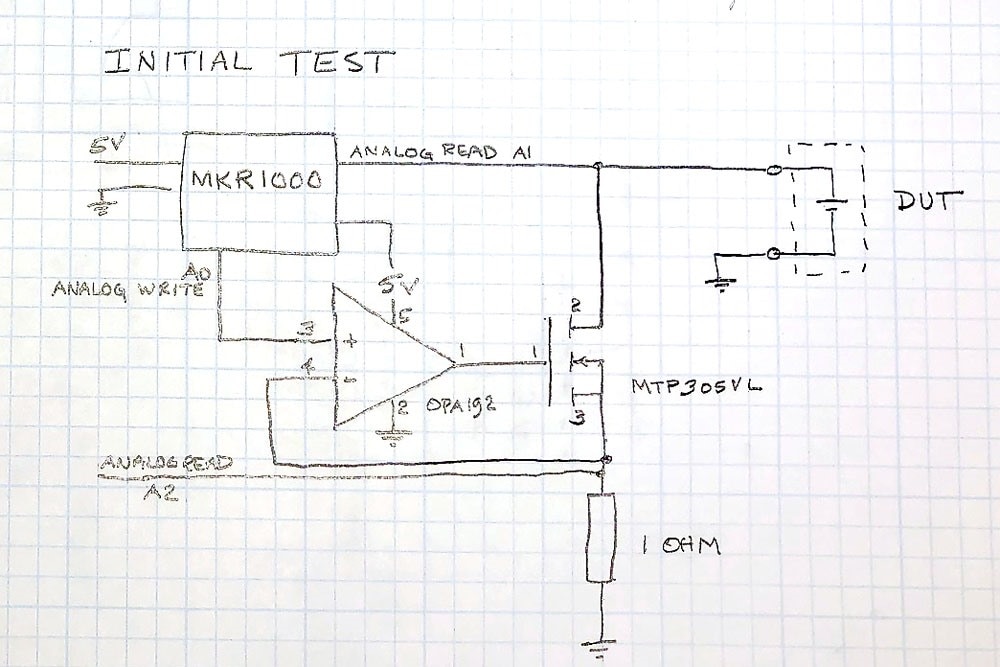
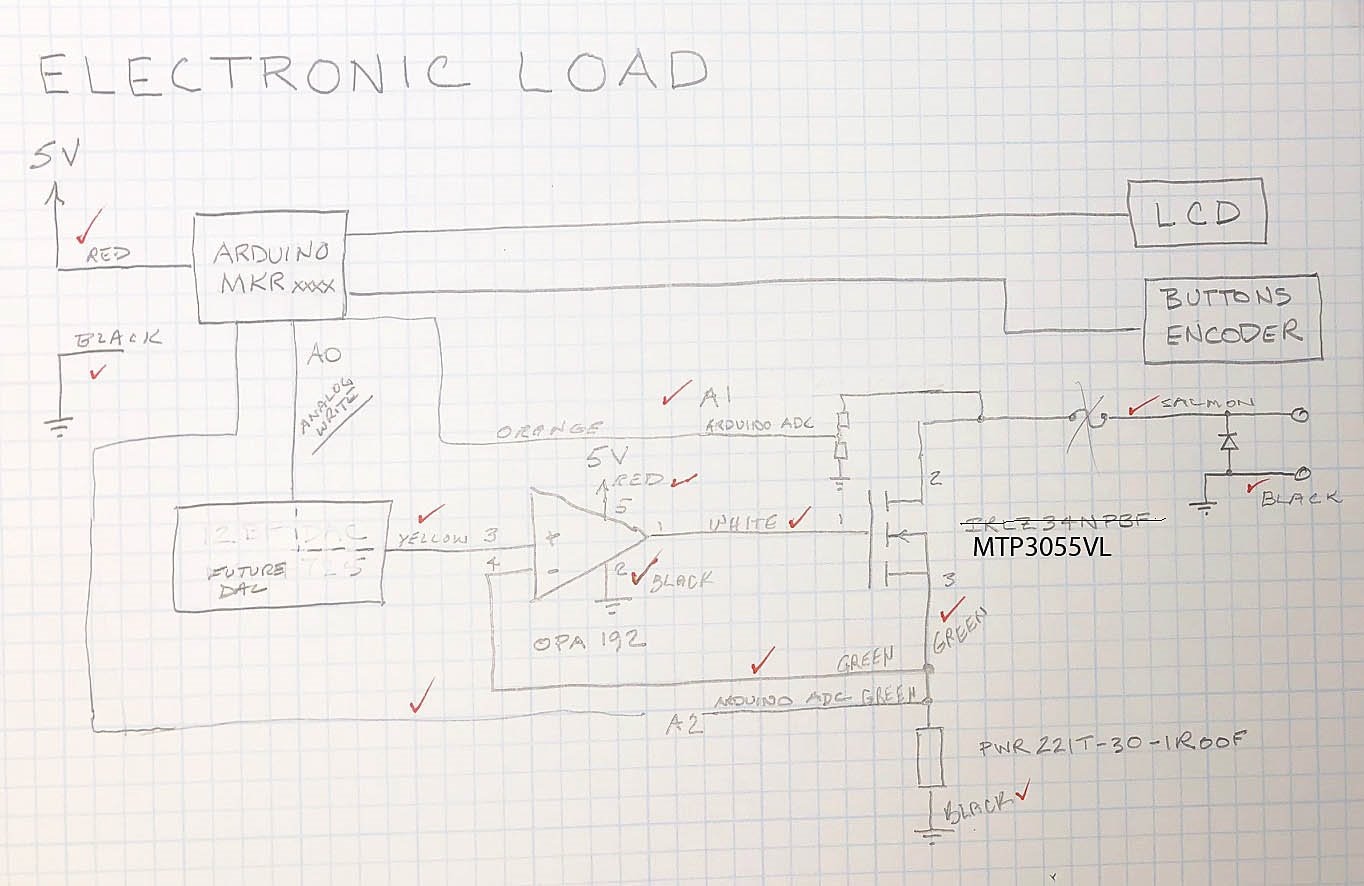
What was on hand is shown in the following schematic:
image

An Arduino MKR1000 output a voltage using the built-in 10 bit DAC which through an OPA192 op amp and MTP305VL MOSFET control the voltage above the 1 ohm resistor.  One volt output from the MKR1000 equals one amp to the device under test.  In this case the DUT is a 18650 battery hooked up to a boost converter to give roughly 3 Volts.


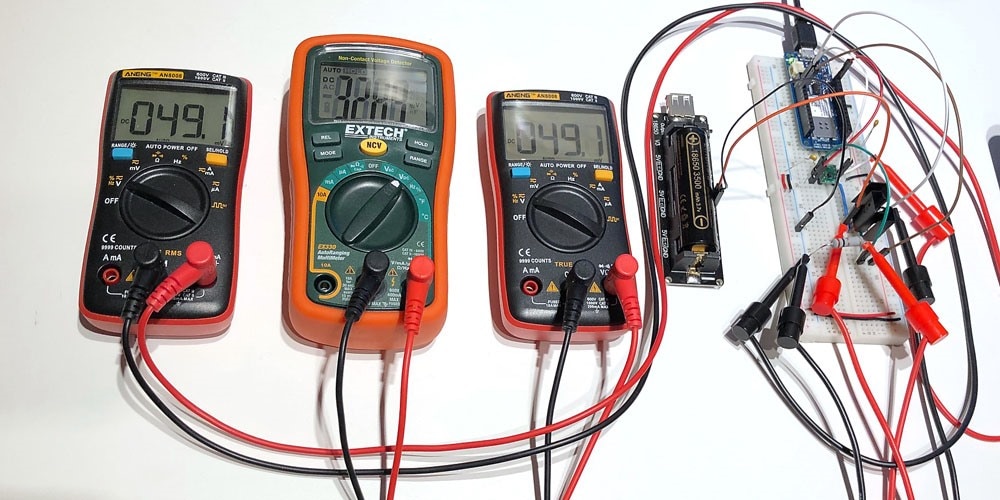
I was surprised at how good the DAC was on the MKR1000.  The MKR1000 ADC had an offset of around 18 mV.  Not shown on the schematic above are digital multimeters measuring the input voltage from the DUT, the output voltage from the DAC, and the voltage across the 1 ohm resistor.  Tests were run at 10 mA, 50 mA, 100 mA, and 1000 mA where it was discovered that the voltage output of the DUT was dropping quickly.


Arduino Code


[code]
/*
 * Fixed Value Test of DC Electronic Load
 * Tested on MKR1000
 * Frank Milburn
 * June 2019
 * 
 * Released into Public Domain
 * 
*/
const int DAC_PIN = DAC0;     // output to opamp
const int VOLT_PIN = A1;      // input from DUT
const int CURRENT_PIN = A2;   // input from current setting resistor
const int CURRENT = 1000;       // current in mV   WARNING!!! do not set above 3300!!!
void setup() {
  Serial.begin(115200);
  analogWriteResolution(10);
  analogReadResolution(12);
  pinMode(VOLT_PIN, INPUT);
  pinMode(CURRENT_PIN, INPUT);
}
void loop() {
  
  unsigned int dacValue = 0;
  dacValue = map(CURRENT, 0, 3267, 0, 1023);
  analogWrite(DAC_PIN, dacValue);
  Serial.print("Current setting = ");
  Serial.print(CURRENT);
  Serial.println(" mA");
  
  unsigned int inputVoltage;
  inputVoltage = map(analogRead(VOLT_PIN), 0, 4095, 0, 3267);
  Serial.print("Voltage input =   ");
  Serial.print(inputVoltage);
  Serial.println(" mV");
  
  unsigned int currentReading;
  currentReading = map(analogRead(CURRENT_PIN), 0, 4095, 0, 3267);
  Serial.print("Raw = ");
  Serial.print(analogRead(CURRENT_PIN));
  Serial.print("  Current reading =   ");
  Serial.print(currentReading);
  Serial.println(" mV (mA)")
;
  delay(5000);
}
[/code]


Results


10 mA

image

DAC output: 10.9 mA

DUT voltage: 3.295 V

Current: 11 mA

Error: 1 mA


50 mA
image

DAC output: 49.1 mV

DUT voltage: 3.289 V

Current: 49.1 mA

Error: 0.9 mA


100 mA
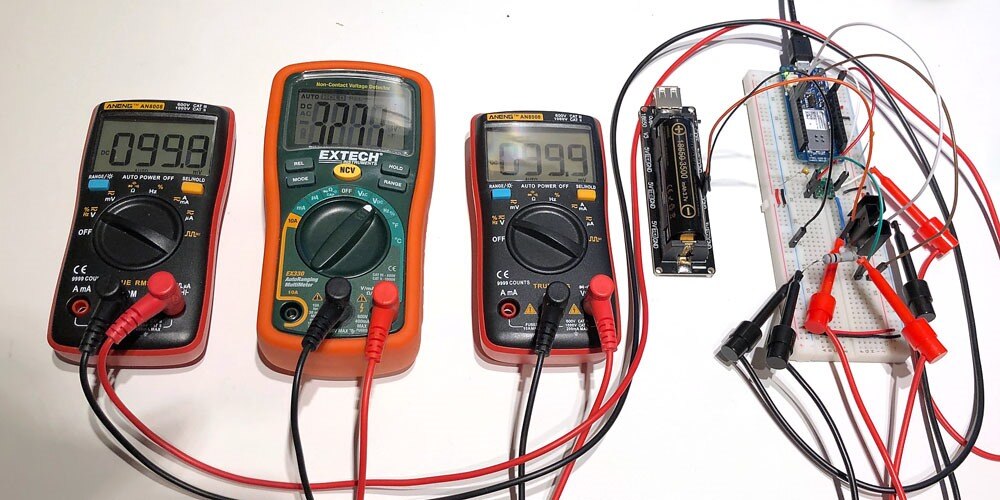
image

DAC output: 99.8 mV

DUT voltage: 3.271 V

Current: 99.1 mA

Error: 0.9 mA


1000 mA
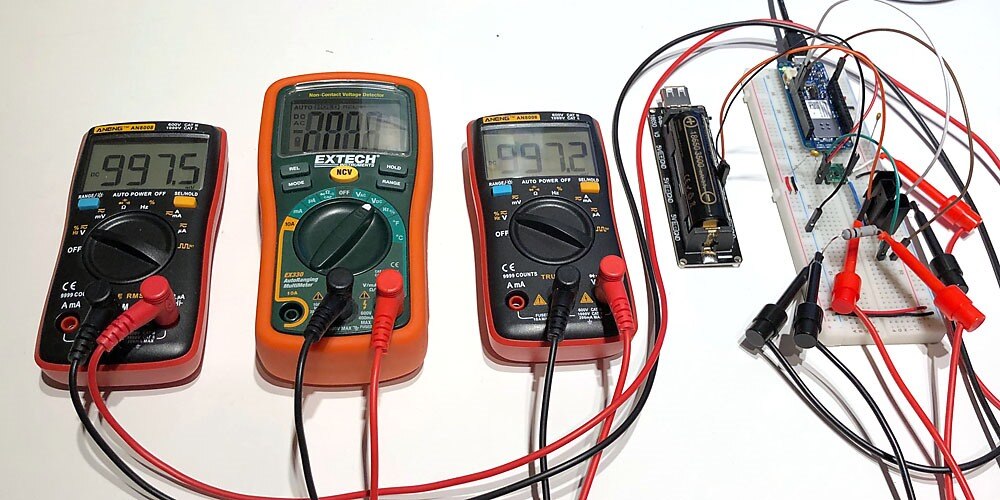
image

DAC output: 997.5 mV

DUT voltage: 2.89 V

Current: 997.2 mA

Error: 2.8 mA


Next Revision


Although the full range was not tested, this was a promising beginning especially since there was no tuning.  Here are a couple of areas to work on for the next iteration:

  • 12 bit or more DAC (this one gives ~ 3 mA resolution)
  • move ADC off board
  • Precision resistor (0.98 ohm 3 watt of unknown tempco was used)
  • Replace MTP3055VLMTP3055VL with a more modern part
  • Add overcurrent and reverse polarity protection
  • Add user interface
  • Add heat sinks / cooling fan


image


8 July 19 Update


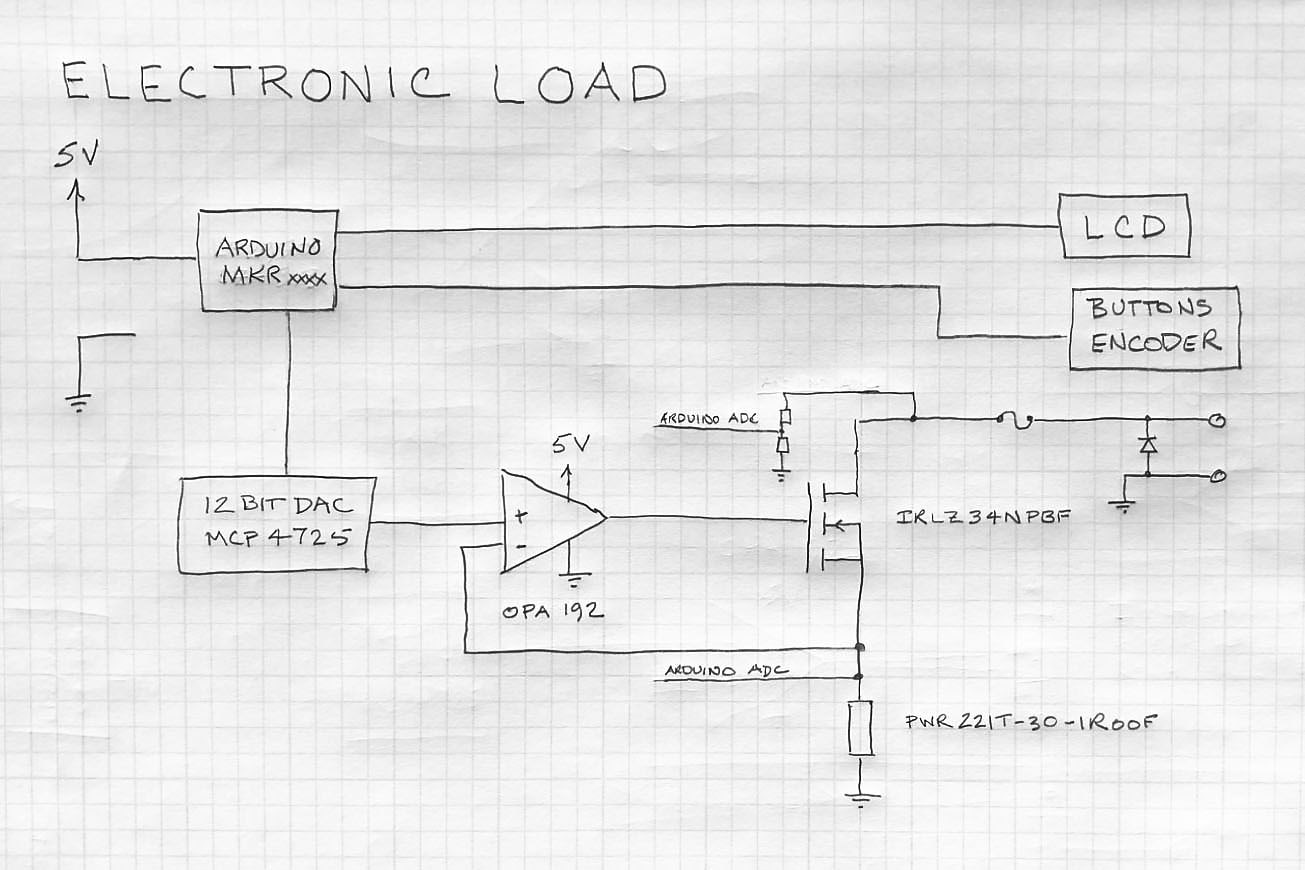
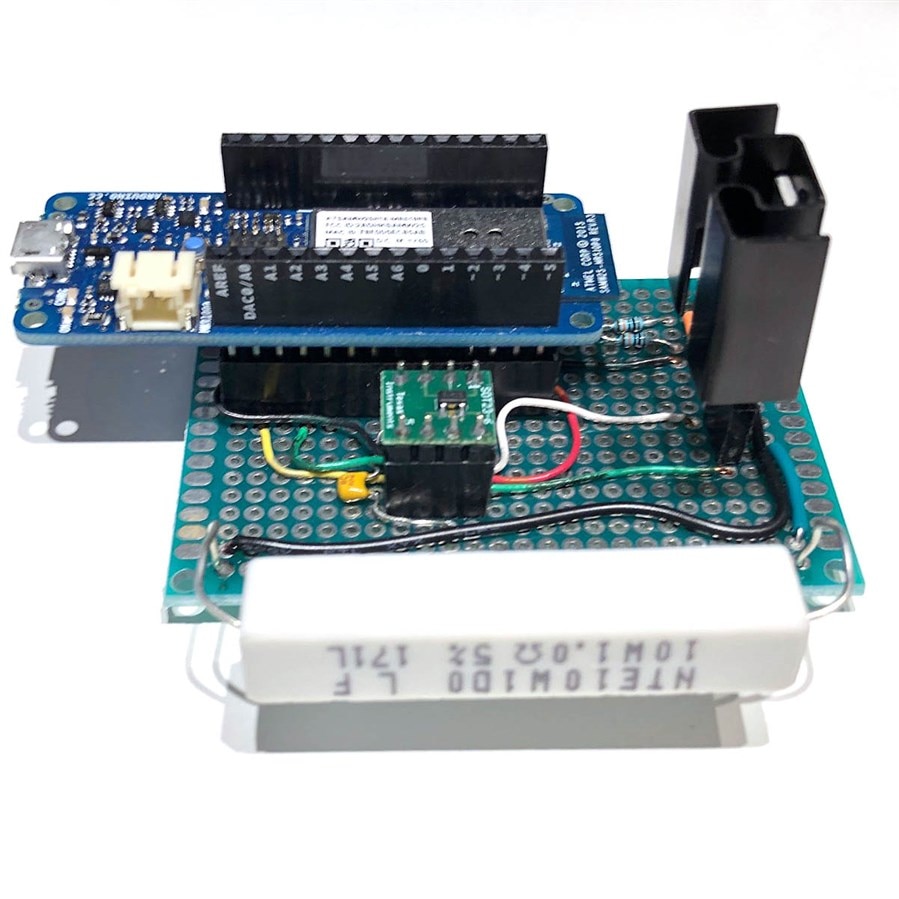
I soldered a little protoboard to play with before deciding what to do next.  The idea was to make something more reliable mechanically and allow some thermal testing and firmware development.  The design still uses the DAC on the Arduino MKR1000 , OPA192 op amp and the MTP3055VLMTP3055VL MOSFET.  The one ohm resistor was picked up cheap locally and measures 1.003 ohms using the milliohm meter.
image

Female headers were soldered in so that the parts can be easily removed and reused in future.
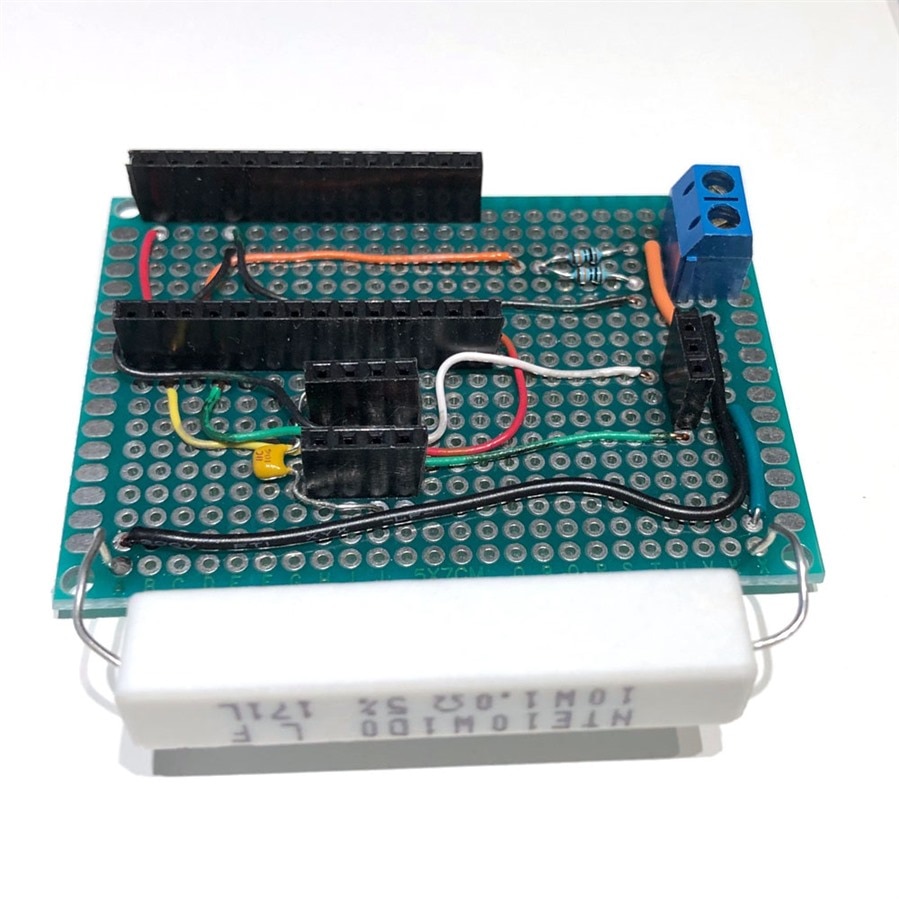
image

Here it is populated.

image

If you have a 3D printer, then you have to print stuff.  Here it is in a little tray.
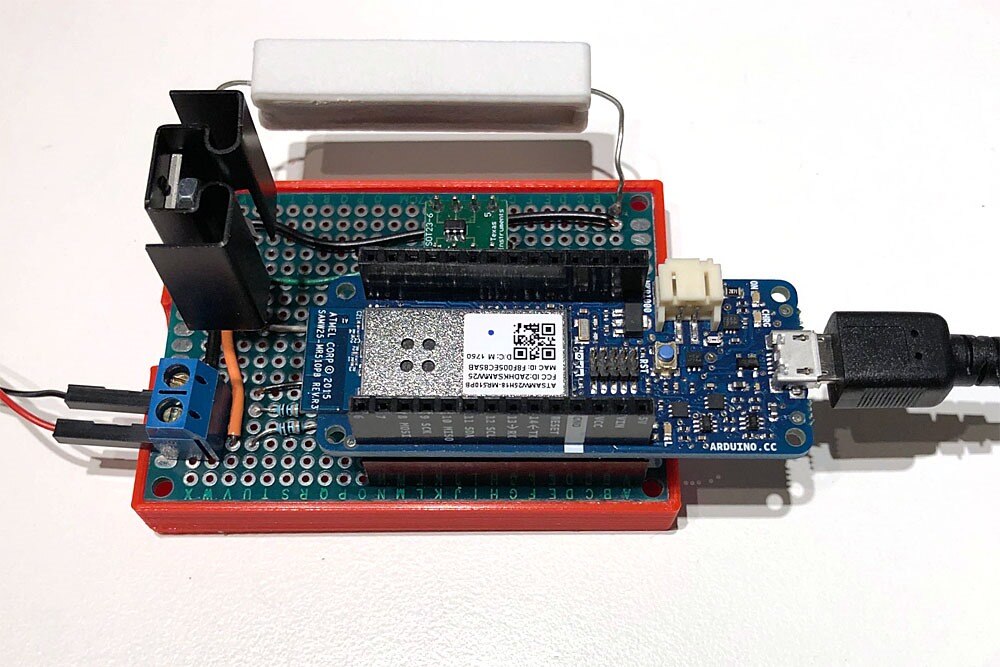
image

After fixing a wiring mistake where I confused pin 5 on the op amp with pin 5 on the carrier board (pin 5 on the op amp leads to pin 6 on the carrier) everything was working.  There seems to be an intermittent bad connection between 5V on the MKR1000 and the op amp - one of the main reasons the board was constructed was to avoid this!.  The DAC is accurate in the range tested so far as is A1 which measures the input voltage.  A2 which measures the voltage (and thus current) just above the resistor has about 17 mV offset which seems high but I should consult the datasheet to see if it is in spec.  It can be corrected in firmware.


Next Revision


It may be a while before I get back to this which is why this interim step is being documented.  Thoughts for the next revision...


  • Design a PCB to improve mechanical connections, provide a ground plane, and reduce unwanted capacitance
  • 12 bit or more DAC (MKR1000 has ~ 3 mA resolution with 3A design)
  • move ADC off board (more accuracy, less offset)
  • Precision resistor or at least experiment with tempco of resistor on prototype.
  • Replace MTP3055VLMTP3055VL with a more modern part
  • Add overcurrent and reverse polarity protection
  • Add user interface
  • Add heat sinks / cooling fan
  • Use new Keysight scope with signal generator to investigate issues outlined by Michael Kellett in comments


8 Jul 2019:  update progress

9 Jul 2019:  corrected some typos


Links

Programmable DC Electronic Load - Follow-up  A follow-up to this post

https://www.element14.com/community/docs/DOC-83867/l/programmable-electronic-load

https://www.element14.com/community/people/jw0752/blog/2018/10/08/a-simple-dc-electronic-load-episode-ii

  • Sign in to reply

Top Comments

  • michaelkellett
    michaelkellett over 6 years ago +9
    I expect that with some settings and loads your current sink will oscillate. You'll be able to mitigate this with the following changes: about 47R between op amp output and MOSFET gate 4k7 MOSFET source…
  • Andrew J
    Andrew J over 6 years ago +6
    I shall follow this with interest. A DC Load is going to be my next project.
  • fmilburn
    fmilburn over 6 years ago in reply to michaelkellett +4
    Thanks Michael, It sounds like the issues and approach to resolution will be similar to the milliamp meter. I have not constructed a spice model yet but plan to do so. Frank
  • michaelkellett
    michaelkellett over 6 years ago in reply to fmilburn

    I need to think about this one.

    The amazing thing is that the noise is way lower with the input at 3V than when at 100mV.

    If the ADC noise were constant that would give you either the same std dev at both or possibly higher at 3v due to reference noise.

    The other difference is that you are driving the input from the batteries (nice low source impedance) or the divider (2k2 source impedance.)

    Well worth repeating the low voltage experiment but with a 10uF low esr cap// 100nF ceramic across the input as well.

    Unfortunately the Arduino code hides most of the ADC set up.

    Trying a low noise power supply and the ADC internal reference might be interesting as well.


    MK

    • Cancel
    • Vote Up +1 Vote Down
    • Sign in to reply
    • More
    • Cancel
  • fmilburn
    fmilburn over 6 years ago in reply to michaelkellett

    The screenshot above was taken when the Feather was powered from a USB slot on an Ikea power strip.  If powered from my laptop (which supplied power during all the measurements above) we get the following which is cleaner than the Ikea supply:

    image

    Powered by battery over Feather LiPo battery port, same settings as above

    image

    Crummy Ikea USB Source:  175 mV Pk-Pk

    Laptop USB Source:  69 mV Pk-Pk

    LiPo Battery Power: 38 mV Pk-Pk


    I still don't know if this is the cause though....

    • Cancel
    • Vote Up +3 Vote Down
    • Sign in to reply
    • More
    • Cancel
  • fmilburn
    fmilburn over 6 years ago in reply to michaelkellett

    Hello Michael,


    Great insight and suggestions and I set up experiments as you suggested.  Power is from two alkaline batteries with a voltage divider of ~ 100k and 2.2k resistor for the lower voltage (66 mV) and batteries in series for the higher voltage (3.08 V).

    image

    I ran 1000 tests on both the higher and lower voltages with the following Arduino code.

    /*
     * Test ADC on Adafruit Feather M4 Express
     * Reads raw analog input on ADC_PIN, calculates voltage, and outputs results numTests times...
     */
    const int DAC_RES = 12;                    // Set resolution
    const int ADC_RES = 12;                    // Set resolution
    const int MAX_DAC = pow(2,DAC_RES);
    const int MAX_ADC = pow(2,ADC_RES);
    const float V3 = 3.309;                    // 3V Feather Reference Voltage per DMM
    const float VIN = 3.07;                    // Measured input voltage per DMM
    const int ADC_PIN = A2;
    const int numTests = 1000;
    void setup() {
      Serial.begin(115200);
      Serial.setTimeout(8000);
      while (!Serial) {
        ;                                     // wait for serial to start
      }
      
      Serial.println("i,RAW_ADC,ADC_V,V_ERR");      // Output labels
      analogReference(AR_DEFAULT);            // use V3 (3V3) Reference Voltage
      analogReadResolution(ADC_RES);          // ADC input resolution
      analogWriteResolution(DAC_RES);         // DAC output resolutio
      int i = 0;
      for (i=0; i< numTests; i++){
        unsigned int rawAnalogInput = analogRead(ADC_PIN);
        float voltInput = V3 * (float)rawAnalogInput / MAX_ADC;
        float voltErr = voltInput - VIN;
        Serial.print(i);              Serial.print(",");
        Serial.print(rawAnalogInput); Serial.print(",");
        Serial.print(voltInput,4);    Serial.print(",");
        Serial.println(voltErr,4);
      }
    }
    void loop() {
      // do nothing
    }   

    Below is the summary output run through an Excel spreadsheet for the 66 mV test.  The raw analog input readings have been plotted.  Shown in the table below it are the raw readings, the calculated voltage, and the error when calculated voltage is subtracted from the voltage as read by a DMM.

    image

    Below is the same data for a 3.08 V test.

    image

    So we might interpret this as meaning there is high ADC noise?  The readings at 3.08 V are quite tight.


    A friend pointed out that the Adafruit Feather M4 Express does not have a ferrite bead to prevent digital VDD noise interfering with VDDANA on the SAM D5 as recommended in the datasheet.  I hooked up the oscilloscope and found the following on the 3V3 pin which appears to also be feeding VDDANA.


    EDIT:  The following screenshot was taken while the Feather was powered from an Ikea USB on a power strip.  The data above was all taken while the Feather was powered from the USB on a laptop.

    image

    Regarding the way the ADC been set up in terms of acquisition time, sampling speed, averaging etc. I would have to dig into the way Adafruit has implemented the Arduino functions and have not done that yet.  In my first trials above I did average 5 samples.  Based on what is seen above I could take more samples and maybe throw out fliers.

    • Cancel
    • Vote Up +3 Vote Down
    • Sign in to reply
    • More
    • Cancel
  • michaelkellett
    michaelkellett over 6 years ago in reply to fmilburn

    Hello Frank,


    Your ADC seems to be very noisy.

    Could you try two experiments:

    1) 1000 samples with maybe 50mV input (the 50mV must be low noise - ideally source from a battery and divider with a big low esr cap across it.

    2) 1000 samples close to full scale


    The first measurement will tell you about the ADC noise, the second will tell you if the ADC reference voltage is noisy

    From your results so far it looks as if you have both problems.


    How has the ADC been set up. (in terms of acqusition time, sampling speed averaging etc) ?


    If you don't need to sample very fast you should be able to get a decent noise performance out of this chip by oversampling.


    MK

    • Cancel
    • Vote Up +3 Vote Down
    • Sign in to reply
    • More
    • Cancel
  • three-phase
    three-phase over 6 years ago

    Some good progress being made, thanks for keeping us updated.


    Kind regards.

    • Cancel
    • Vote Up +3 Vote Down
    • Sign in to reply
    • More
    • Cancel
<>
element14 Community

element14 is the first online community specifically for engineers. Connect with your peers and get expert answers to your questions.

  • Members
  • Learn
  • Technologies
  • Challenges & Projects
  • Products
  • Store
  • About Us
  • Feedback & Support
  • FAQs
  • Terms of Use
  • Privacy Policy
  • Legal and Copyright Notices
  • Sitemap
  • Cookies

An Avnet Company © 2026 Premier Farnell Limited. All Rights Reserved.

Premier Farnell Ltd, registered in England and Wales (no 00876412), registered office: Farnell House, Forge Lane, Leeds LS12 2NE.

ICP 备案号 10220084.

Follow element14

  • X
  • Facebook
  • linkedin
  • YouTube