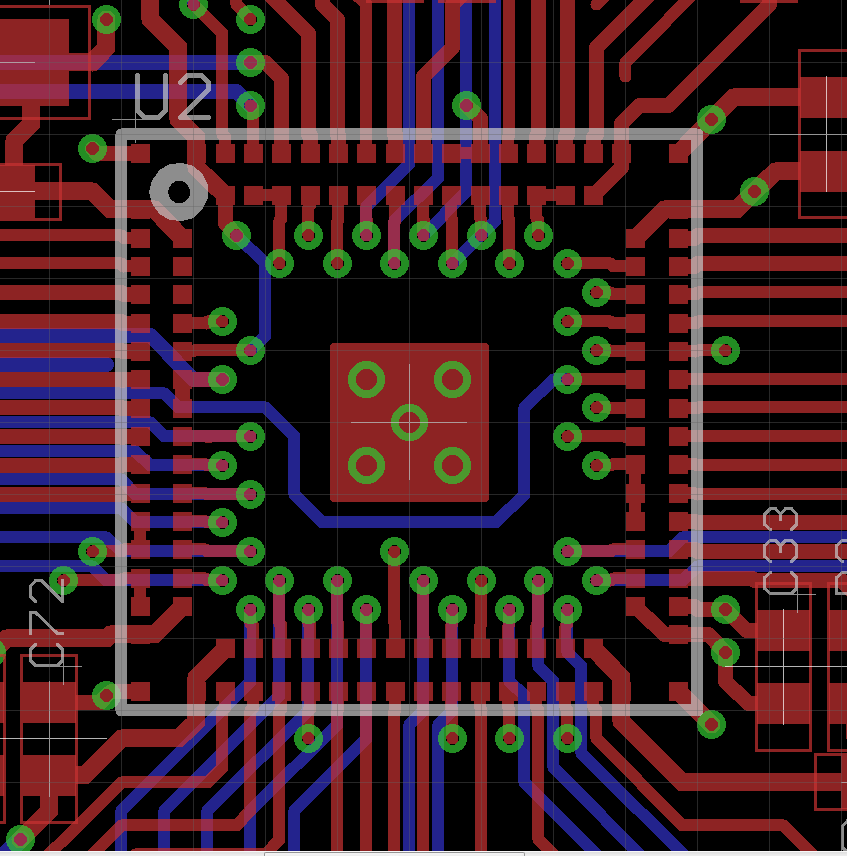
The one thing I expected to be fixed in v7 was vias in land patterns. Nope, still AWOL, in spite of a glaring need for thermal transfer to ground via the center pad on some parts. What gives? When is this coming?
On 9/18/2014 10:58 PM, Ryan Pettigrew wrote:
The one thing I expected to be fixed in v7 was vias in land patterns.
Nope, still AWOL, in spite of a glaring need for thermal transfer to
ground via the center pad on some parts. What gives? When is this
coming?
--
To view any images and attachments in this post, visit:
http://www.element14.com/community/message/126808
Hi Ryan,
This is already possible. Here's what you would do:
In the package:
1. Place the thermal transfer through-hole pads(pads and vias are
physically the same thing, the distinction we make in EAGLE is that pads
are always associated with components and go through the hole board,
vias are on the board and generally associated with transitions between
layers).
2. Draw polygons enclosing these pads on the Top, Bottom, tStop, bStop,
tCream, and bCream layers. My assumption here is that the thermal pad
shows up on both sides of the board, this isn't always the case but for
the sake of generality I've included them here.
3. In the device editor, assign all of those pads to the same pin of
your symbol, because they're within the boundaries of the polygon the
polygon is considered an extension of those pads.
That's pretty much all you have to do, and EAGLE will handle it without
errors. Section 8.14 of the EAGLE manual covers this in greater
detail.The Help pages for PAD and SMD provide more details
hth,
Jorge Garcia
CadSoft Guest wrote:
That's pretty much all you have to do, and EAGLE will handle it without
errors. Section 8.14 of the EAGLE manual covers this in greater
detail.The Help pages for PAD and SMD provide more details
Jorge, the problem is, you can't then assign it to the via layer, with all the other vias, where it belongs, and where it is convenient for the board assembler to find it, and know what it is, and what its purpose is supposed to be.
I reiterate; I am NOT interested in ways of working around this problem; I am interested in this problem being fixed, so no workaround is required. If I wanted help getting around this limitation in the software, I would have posted in the help forum, not here in the suggestion forum.
"Ryan Pettigrew" skrev i nyhetsmeldingen:
841402075.181411429316209.JavaMail.jive@flmspu-csapp-02.premierfarnell.com
...
Jorge, the problem is, you can't then assign it to the via layer, with
all the other vias, where it belongs, and where it is convenient for the
board assembler to find it, and know what it is, and what its purpose is
supposed to be.
I do not see the need to differ those vias/pads from other vias/pads. Maybe
you can explain why they need to know? Full through vias and pads are
generally manufactured in the same process afaik.
The only valid argument I can see is that sometimes, when working with
blind/buried/micro-vias, you may want the heat transfer between controlled
layers, but doing this in a library editor is not straight forward. It could
be done with some "vitrual via" placement that needs to be placed manually
in the board design, and would cause a DRC error if not present.
On 9/22/2014 7:41 PM, Ryan Pettigrew wrote:
Jorge, the problem is, you can't then assign it to the via layer, with
all the other vias, where it belongs, and where it is convenient for the
board assembler to find it, and know what it is, and what its purpose is
supposed to be.
Hi Ryan,
I'm afraid I disagree, thermal vias within a package don't need to be on
the vias layer. The distinction between pads and vias is something
internal to EAGLE. When we generate gerber output, through-hole pads and
vias are always included together, so they're indistinguishable to the
board house. Even visually within EAGLE they're indistinguishable
because the pads and vias layers use the same color.
Has the assembler given any special instruction or complaint?
hth,
Jorge Garcia
On 24/09/2014 4:11 a.m., Jorge Garcia wrote:
A few 'not trues' here
I'm afraid I disagree, thermal vias within a package don't need to be on
the vias layer.
They do if you don't want drills all the way through the PCB
The distinction between pads and vias is something
internal to EAGLE. When we generate gerber output, through-hole pads and
vias are always included together, so they're indistinguishable to the
board house.
True when talking of the copper for a layer but un-true when talking
drills for a multi layer board.
There should be additional drill files for the holes that go between
particular layers.
Even visually within EAGLE they're indistinguishable
because the pads and vias layers use the same color.
Not when you specify the colour as the background colour. Then the
layers they go between makes them visually different
Has the assembler given any special instruction or complaint?
Eagle's age is becoming an issue. I'm not talking of GUI's or WOW tools
like 3D but rather not having keep up with the demands placed on the
designer by reducing geometries of components and board size. There are
a few basics that have been suggested repeatedly. I feel it will be the
failure to deliver these that will reduce the Eagle market share. Sure
add new features the marketing people can use but this should be
balanced by correcting some basic short comings so the product remains
solid and not let down by these deficiencies.
hth,
Jorge Garcia
HTH
Warren
On 24/09/2014 4:11 a.m., Jorge Garcia wrote:
A few 'not trues' here
I'm afraid I disagree, thermal vias within a package don't need to be on
the vias layer.
They do if you don't want drills all the way through the PCB
The distinction between pads and vias is something
internal to EAGLE. When we generate gerber output, through-hole pads and
vias are always included together, so they're indistinguishable to the
board house.
True when talking of the copper for a layer but un-true when talking
drills for a multi layer board.
There should be additional drill files for the holes that go between
particular layers.
Even visually within EAGLE they're indistinguishable
because the pads and vias layers use the same color.
Not when you specify the colour as the background colour. Then the
layers they go between makes them visually different
Has the assembler given any special instruction or complaint?
Eagle's age is becoming an issue. I'm not talking of GUI's or WOW tools
like 3D but rather not having keep up with the demands placed on the
designer by reducing geometries of components and board size. There are
a few basics that have been suggested repeatedly. I feel it will be the
failure to deliver these that will reduce the Eagle market share. Sure
add new features the marketing people can use but this should be
balanced by correcting some basic short comings so the product remains
solid and not let down by these deficiencies.
hth,
Jorge Garcia
HTH
Warren
On 9/23/2014 3:47 PM, warrenbrayshaw wrote:
On 24/09/2014 4:11 a.m., Jorge Garcia wrote:
A few 'not trues' here
I'm afraid I disagree, thermal vias within a package don't need to be on
the vias layer.
They do if you don't want drills all the way through the PCB
Hi Warren,
How often does this come up? Is that what the user is doing here?
Sometimes it can be beneficial to simplify a discussion by only focusing
on key aspects of an issue not all general cases. Heat dissipation on
internal layers is nowhere near as good as on the outer layers. In high
power situations you want to devote as much copper on the surface layers
to aid in heat transfer.
With that said, I should blanket my responses with statements
indicating the simplifications or assumptions I'm making so thanks for
keeping me honest.
The distinction between pads and vias is something
internal to EAGLE. When we generate gerber output, through-hole pads and
vias are always included together, so they're indistinguishable to the
board house.
True when talking of the copper for a layer but un-true when talking
drills for a multi layer board.
There should be additional drill files for the holes that go between
particular layers.
See first comment
Even visually within EAGLE they're indistinguishable
because the pads and vias layers use the same color.
Not when you specify the colour as the background colour. Then the
layers they go between makes them visually different
See first comment. Very few users are even aware that you can do this.
Generally only users that make frequent use of blind and buried vias use
it. I don't believe that's the case here.
Has the assembler given any special instruction or complaint?
Eagle's age is becoming an issue. I'm not talking of GUI's or WOW tools
like 3D but rather not having keep up with the demands placed on the
designer by reducing geometries of components and board size. There are
a few basics that have been suggested repeatedly. I feel it will be the
failure to deliver these that will reduce the Eagle market share. Sure
add new features the marketing people can use but this should be
balanced by correcting some basic short comings so the product remains
solid and not let down by these deficiencies.
I agree with this statement, there are a lot of little things that have
added up and need to be corrected. They are reported and documented, not
just in our forums but internally as well. I'm hoping for the best.
Jorge Garcia
hth,
Jorge Garcia
HTH
Warren
Thermal vias in center pads is standard practice. In general, if the manufacturer doesn't specify HOW MANY center pad thermal vias a part needs, and you can't get a decent answer out of the part manufacturer, you should assume it needs at least one, to be safe. We should easily be able to specify a via, fill, over-plating on either or both sides, and tenting on either or both sides, for a via in a Land Pattern. How many examples do you want, to justify implementing the feature?
An extreme DQFN example, featuring thermal as well as regular vias, here: http://i.stack.imgur.com/itCYK.png
Note that this is different from people putting wide thru-holes in a center pad so the center pad can be reached by a soldering iron through the board itself, to enable hand-soldering of the QFN. I don't want manufacturers confusing a hack like this with the Class 3 IPC Type VII vias I need.
Please take the necessary steps to support this badly needed feature.
Thank you, Warren. This is what I posted for. Hopefully, a few more like you will poke their heads in to emphasize the point.
CadSoft Guest wrote:
Eagle's age is becoming an issue. I'm not talking of GUI's or WOW tools
like 3D but rather not having keep up with the demands placed on the
designer by reducing geometries of components and board size. There are
a few basics that have been suggested repeatedly. I feel it will be the
failure to deliver these that will reduce the Eagle market share. Sure
add new features the marketing people can use but this should be
balanced by correcting some basic short comings so the product remains
solid and not let down by these deficiencies.
HTH
Warren
"Ryan Pettigrew" skrev i nyhetsmeldingen:
1344087928.211411515235482.JavaMail.jive@flmspu-csapp-02.premierfarnell.com
...
An extreme DQFN example, featuring thermal as well as regular vias,
To me that example does not look extreme at all. I have done this several
times with different packages, and have some bad and good experience with
it.
Sometimes I have just left out the themal pads, but put a note on doc layer
that I need to add via's manually, and sometimes I put PADs in the library
and added fill manually. Now, after v7, I can even add the fill and not
think about it. If you are pressured to put components on the opposite side
of the themal (hence use a microvia heat transfer), you can always get
around it by making a special package for it, with a "add thermal via" self
notification on a doc layer. In the picture you linked, you will get a DRC
warning if you forget all of them. (In other cases where the top cooling pad
connects to gnd via wire on top, you won't)
The thermal via recommendation is not so easy to follow anyway. Most of the
times you dont have copperplugged vias, so you need to manually make cream
mask to keep solder from going down the via holes when "cooked". If possible
you can plug them with solder stop, but only if paste thinckness is
significantly taller than solder stop. Also the amount of solder (solder
mask openings) need to be matched to the thickness of the paste thats going
to be used. My manufacturer usually insist manually editing these areas.
The feature you request would be nice, but I think you just overfocus on one
of the less important issues to be aware of when doing thermal vias.
Besides, Eagle has a lot more important issues to fix first.
CadSoft Guest wrote:
The thermal via recommendation is not so easy to follow anyway. Most of the
times you dont have copperplugged vias, so you need to manually make cream
mask to keep solder from going down the via holes when "cooked". If possible
you can plug them with solder stop, but only if paste thinckness is
significantly taller than solder stop. Also the amount of solder (solder
mask openings) need to be matched to the thickness of the paste thats going
to be used. My manufacturer usually insist manually editing these areas.
The feature you request would be nice, but I think you just overfocus on one
of the less important issues to be aware of when doing thermal vias.
No, I focus on the one thing that is out of the user's control, and thus, solely the responsibility of the software, which is the availability of vias in Land Pattern design. Tenting of vias is already available via the tstop and bstop layers, and a convenient checkbox if you want it on both layers (although separate checkboxes for each of the two layers would be better). And yes, while they're fixing vias, they should include fill and over-plating checkboxes. But I'm much more comfortable with the idea of the manufacturer seeing a via and checking notes for fill and over-plating, than seeing a through-hole, and hoping he'll figure out that it's supposed to be a via, and then do the additional checks.
I think what you're really complaining about here, is that "Land Pattern design is too hard!". Get over it. Fixing that is not Cadsoft's job. Changes to industry trends in properties of thermal vias and shapes of the solder stencil layers are ongoing, and what may be standard practice today may be out the window tomorrow, due to one manufacturing reliability study or another. See page 19 of the following for what might (or might not) be the latest trend in high reliability thermal pad stencil design: http://www.smta.org/chapters/files/Capital_Nelson_Scott_Presentation.pdf Note how the stencil design places paste over the edge of the annular ring, but not into the via hole. Also note the use of diagonal stripes of paste, and the discouragement of rectangular windows of paste. Radical; may be good, may be bad, and there's no telling without a few years of data. Ultimately, how the solder mask and solder stencil are shaped necessarily MUST be left to the user. Meaningful automation of it just isn't in the cards. But allowing vias in Land Patterns is solely the responsibility of the software, can be changed, and should be changed; because vias in Land Patterns aren't going away, and are only getting worse! There's no trend on the horizon for the foreseeable future where vias in Land Patterns are going to completely go away; so Cadsoft should adapt Eagle to the problem, and probably should have done it a generation ago, if not for this generation.
CadSoft Guest wrote:
Besides, Eagle has a lot more important issues to fix first.
The importance of an issue to be fixed is a matter of opinion, not of fact, and is no justification for an issue to not be fixed. Until Cadsoft decides to have a vote on which feature to fix next, opinions like this are better kept to yourself.
Regarding tenting/via plugging, there are several methods to do that. It
could be copper fill and stop mask fill in different ways. Both are
manufacturer specific, and not something you can expect from a general pcb
manufacturer. Only some manufacturers can do it reliable for the type of
heat transfer we talk about. Eagle should not behave as this was an obvious
thing to do. As with other packages, you need to define a package that suits
your pcb manufacturer and pick and place manufacturing process.
And I was not complaning about anything. I have learnt the lessons from real
life and I see its up to the designer, not Eagle, to do this right. I can
not see a general via placement in the package could solve all the
manufacturing methods I know, so why bother Cadsoft with it. So far, Eagle
allows me to manually change paste and stop masks as I need to.
The diagonal fill you link to is fine, but thats not the method I use. The
most important issue you need to think about is that solder doesnt get
sucked into unplugged vias, and that your paste doesnt trap pockets of air
that will pop during soldering. I used all kinds of openings myself. The
favorite is the "+" shaped between vias, but diagonals may be good too. (I
favor the "+" because that allows stencil detail stiffness, because the
details doesnt get too long and thin and reduce its lifetime, wich I would
question in the diagonal type.) Then you need to make sure there is not too
much or too little solder stuck under it. Too much will lift it and in worst
case end up with pads in the air, or too little gives bad heat transfer.
To summarize, Eagle already offers what you need to do thermal vias. Imo,
what you ask is not a general improvement, but a manufacturer spesific.
CadSoft Guest wrote:
To summarize, Eagle already offers what you need to do thermal vias. Imo,
what you ask is not a general improvement, but a manufacturer spesific.
Nonsense. All I am asking for is for actual vias to be available on the actual via layer in a Land Pattern. There's NOTHING manufacturer specific about that. It's a needless omission to the software, and should be fixed.
"Ryan Pettigrew" skrev i nyhetsmeldingen:
1860534984.341411648578570.JavaMail.jive@flmspu-csapp-02.premierfarnell.com
...
CadSoft Guest wrote:
To summarize, Eagle already offers what you need to do thermal vias.
Imo,
what you ask is not a general improvement, but a manufacturer
spesific.
Nonsense. All I am asking for is for actual vias to be available on the
actual via layer in a Land Pattern. There's NOTHING manufacturer
specific about that. It's a needless software specific omission, and
should be fixed.
OK, lets just agree to disagree then. I've never seen a manufacturer care if
its a via or pin through hole in my life, and I still don't get why they
should.
I give them a drill layer and a drill tool set, and they can filter drill
diameter if they want to. One time I accidentially left 0.6mm microvias on a
board, and they of course wanted to change them into 0.1mm, so they do check
for their DFM rules.
CadSoft Guest wrote:
OK, lets just agree to disagree then.
I'll agree to that so long as you agree to do your disagreeing in some other thread. Just because a manufacturer is willing to work around the flawed output, that doesn't mean it doesn't need to be fixed; nor does having a board successfully made with the existing files justify the status quo as not needing to be changed. I shouldn't have to depend on human intervention to get my board made correctly, and failing that, only as little intervention as possible should be required. Eliminating the misidentification of vias as through holes is an important step in keeping the mistakes of humans at bay. The ideal to strive for is NOT a successfully made board! The ideal to strive for is a successfully made board manufactured WITHOUT human intervention! This requires that as much of the construction details as possible be both present and correct in the board design file, including whether something is a via, or a through hole. If my manufacturer wants a separate file for vias that indicates which are to be filled, which are to be over-plated, and which are to be left empty, the software should accommodate them! It shouldn't be up to the manufacturer to adapt to the software! That's how support for software gets dropped; manufacturers calling it quits with a design file that refuses to keep up!