element14 Community
element14 Community
    Register Log In
  • Site
  • Search
  • Log In Register
  • Community Hub
    Community Hub
    • What's New on element14
    • Feedback and Support
    • Benefits of Membership
    • Personal Blogs
    • Members Area
    • Achievement Levels
  • Learn
    Learn
    • Ask an Expert
    • eBooks
    • element14 presents
    • Learning Center
    • Tech Spotlight
    • STEM Academy
    • Webinars, Training and Events
    • Learning Groups
  • Technologies
    Technologies
    • 3D Printing
    • FPGA
    • Industrial Automation
    • Internet of Things
    • Power & Energy
    • Sensors
    • Technology Groups
  • Challenges & Projects
    Challenges & Projects
    • Design Challenges
    • element14 presents Projects
    • Project14
    • Arduino Projects
    • Raspberry Pi Projects
    • Project Groups
  • Products
    Products
    • Arduino
    • Avnet & Tria Boards Community
    • Dev Tools
    • Manufacturers
    • Multicomp Pro
    • Product Groups
    • Raspberry Pi
    • RoadTests & Reviews
  • About Us
  • Store
    Store
    • Visit Your Store
    • Choose another store...
      • Europe
      •  Austria (German)
      •  Belgium (Dutch, French)
      •  Bulgaria (Bulgarian)
      •  Czech Republic (Czech)
      •  Denmark (Danish)
      •  Estonia (Estonian)
      •  Finland (Finnish)
      •  France (French)
      •  Germany (German)
      •  Hungary (Hungarian)
      •  Ireland
      •  Israel
      •  Italy (Italian)
      •  Latvia (Latvian)
      •  
      •  Lithuania (Lithuanian)
      •  Netherlands (Dutch)
      •  Norway (Norwegian)
      •  Poland (Polish)
      •  Portugal (Portuguese)
      •  Romania (Romanian)
      •  Russia (Russian)
      •  Slovakia (Slovak)
      •  Slovenia (Slovenian)
      •  Spain (Spanish)
      •  Sweden (Swedish)
      •  Switzerland(German, French)
      •  Turkey (Turkish)
      •  United Kingdom
      • Asia Pacific
      •  Australia
      •  China
      •  Hong Kong
      •  India
      • Japan
      •  Korea (Korean)
      •  Malaysia
      •  New Zealand
      •  Philippines
      •  Singapore
      •  Taiwan
      •  Thailand (Thai)
      • Vietnam
      • Americas
      •  Brazil (Portuguese)
      •  Canada
      •  Mexico (Spanish)
      •  United States
      Can't find the country/region you're looking for? Visit our export site or find a local distributor.
  • Translate
  • Profile
  • Settings
Autodesk EAGLE
  • Products
  • More
Autodesk EAGLE
EAGLE User Support (English) AC mains on a PCB ?
  • Blog
  • Forum
  • Documents
  • Events
  • Polls
  • Files
  • Members
  • Mentions
  • Sub-Groups
  • Tags
  • More
  • Cancel
  • New
Join Autodesk EAGLE to participate - click to join for free!
Actions
  • Share
  • More
  • Cancel
Forum Thread Details
  • State Verified Answer
  • Replies 107 replies
  • Answers 10 answers
  • Subscribers 184 subscribers
  • Views 16774 views
  • Users 0 members are here
Related

AC mains on a PCB ?

anishkgt
anishkgt over 9 years ago

A total newbie to eagle design and PCB fab. So plase bear with on my silly questions, trying to learn.


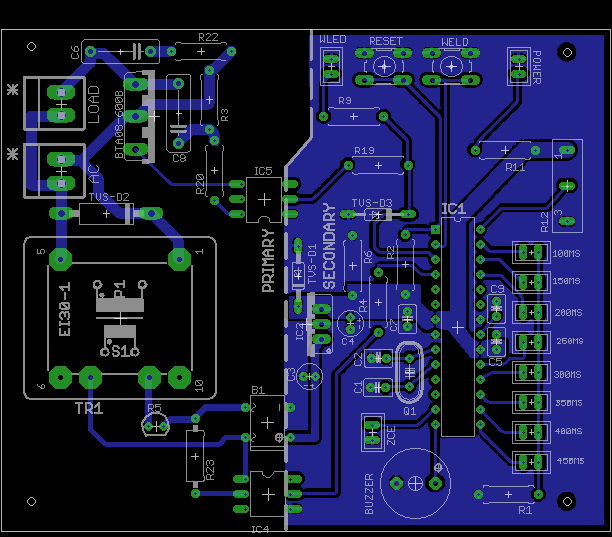
I have pcb that is schematically completed with the layout. Before i start the fabrication process i need some expert advise if the components placed and the wires routed are ok for the ac mains and the others. The load here will be a transformer. The ac mains are 240VAC and all works well as designed in the schematic on a bread broad except for the load for which MOC3023 is yet to arrive from where i've ordered.


Thanks in advance.


image


image

  • Sign in to reply
  • Cancel

Top Replies

  • rachaelp
    rachaelp over 9 years ago in reply to anishkgt +2
    Hi George, It looks like you're really learning a lot with this design and you've had lots of good advice from people on this thread already and the difference between the initial version you posted and…
  • michaelkellett
    michaelkellett over 9 years ago in reply to rachaelp +1 suggested
    For mains input spike suppression I think you are much better off with this kind of device: http://uk.farnell.com/epcos/b72214s0231k101/varistor-60-0j-230vac/dp/1004389 Farnell 1004389 This one is rated…
  • autodeskguest
    autodeskguest over 9 years ago in reply to anishkgt +1 suggested
    On 11/09/16 12:02, George Thomas wrote: Why two thrustirs to control the load and am trouble witching on yhe Triac. Triacs can suffer commutation problems with certain types of load - highly inductive…
  • D_Hersey
    0 D_Hersey over 9 years ago

    I'm in a hurry, late for Shoe Fest.  You might want to throw a (sb) fuse in.  You seem to be using a chassis ground symbol for signal ground.

    • Cancel
    • Vote Up 0 Vote Down
    • Sign in to reply
    • Verify Answer
    • Reject Answer
    • Cancel
  • anishkgt
    0 anishkgt over 9 years ago in reply to D_Hersey

    Thanks Mate. New to schematic design as well image . Will change that.


    So guys what about the ac routing and the how thick should the copper be on the board.

    • Cancel
    • Vote Up 0 Vote Down
    • Sign in to reply
    • Verify Answer
    • Cancel
  • autodeskguest
    0 autodeskguest over 9 years ago

    Ooops - looks like I accidentally hit the wrong reply button before...


    On 03/09/16 14:57, George Thomas wrote:

    A total newbie to eagle design and PCB fab. So plase bear with on my

    silly questions, trying to learn.


    I have pcb that is schematically completed with the layout. Before i

    start the fabrication process i need some expert advise if the

    components placed and the wires routed are ok for the ac mains and the

    others. The load here will be a transformer. The ac mains are 240VAC and

    all works well as designed in the schematic on a bread broad except for

    the load for which MOC3023 is yet to arrive from where i've ordered.


    You have a lot of traces running unnecessarily close to each other and

    to pads. That's fine to low voltage stuff but undesirable when high

    voltages are present.


    Your placement of parts results in quite a few traces being quite long.

    That's undesirable in all domains. I particularly note that the trace

    from C7 to R20/21 goes all around the houses, when a simple rotation of

    C7 could reduce it to nothing.


    I don't know how much current that BTA08 is expected to drive, but the

    text describing the board as a "spot welder microcontroller" hints that

    you might be looking at several amps. If so, your traces look rather

    thin to me, especially given how long they are.


    • Cancel
    • Vote Up 0 Vote Down
    • Sign in to reply
    • Verify Answer
    • Reject Answer
    • Cancel
  • anishkgt
    0 anishkgt over 9 years ago in reply to autodeskguest

    Thanks a lot to take the effort to correct me.


    I've removed C7 and R21 which are actually used to protect the optocoupler but i don't see they being necessary here and i have rearranged the the remaining too.

    image

    • Cancel
    • Vote Up 0 Vote Down
    • Sign in to reply
    • Verify Answer
    • Cancel
  • autodeskguest
    0 autodeskguest over 9 years ago in reply to anishkgt

    On 04/09/16 00:19, George Thomas wrote:

    Thanks a lot to take the effort to correct me.


    I've removed C7 and R21 which are actually used to protect the optocoupler but i don't see they being necessary here and i have rearranged the the remaining too.


    Definitely better... but I still think you want more "meat" on the

    important tracks.


    So, thinking about your design, it seems to me that the crucial part -

    the bit you need to worry about - is the path through the triac and

    between the connectors. That's where ALL the current is flowing - the

    rest is negligible. So, if it were my design, I'd start by placing

    those three components close together for optimal (i.e. very short)

    tracks. Then I'd make those tracks as wide as I could reasonably

    achieve. The rest can then fit around that.


    Also, the track from IC5 to R20 may be a low current track but it's at

    mains voltage. I'd rotate R20 to keep that track away from the low

    voltage ground plane.


    Would I be right in thinking you're using the triac as a pure switch?

    That is, you're either triggering it as early in the cycle as possible

    or not at all? I only mention it because I have some experience of

    driving a transformer in "light dimmer" mode (PWM of the mains cycle)

    and it's... tricky.


    • Cancel
    • Vote Up 0 Vote Down
    • Sign in to reply
    • Verify Answer
    • Reject Answer
    • Cancel
  • anishkgt
    0 anishkgt over 9 years ago in reply to autodeskguest

    Thanks a lot mate ! Appreciate it.


    Yes your correct on assuming that the TRIAC is just a basic switch. It switches on at for predefined time set by the pot (R12). The time ranges from 100ms to 450ms. The load is a Microwave oven transformer - rewound the secondary to 3 turns 3AWG wire. The current is quite high at open circuit but with 222Ohm 100W resistor in series with the MOT, it delivers about 300 - 600A. Now at 100ms or 450ms the amps would be far too low (assumption).


    Now about placing the components, will keep the AC components as close as possible with the widest copper. The space between the pins is short so that would limit the copper size there would that be a problem ? I mean the route to the TRIAC would be. I've rearranged the AC components closer. how are the track size for the other components looking ?


    image

    • Cancel
    • Vote Up 0 Vote Down
    • Sign in to reply
    • Verify Answer
    • Cancel
  • autodeskguest
    0 autodeskguest over 9 years ago in reply to anishkgt

    On 04/09/16 19:23, George Thomas wrote:


    Now about placing the components, will keep the AC components as close as possible with the widest copper. The space between the pins is short so that would limit the copper size there would that be a problem ? I mean the route to the TRIAC would be. I've rearranged the AC components closer. how are the track size for the other components looking ?


    The shorter those tracks are, the less it matters if they're not as wide

    as you'd like. Basically, the copper track acts as a (low value)

    resistor, where R = k.l/w (give or take). Short and fat is the lowest

    resistance and hence gets least hot.


    It looks like you've changed to a different triac in a wider (TO3-P)

    package, which will help with wide tracks! If it were my design, I would

    move the small transformer to the right a fraction and put the triac

    between it and the connectors. That would, I think, allow the shortest

    track from the "AC" connector to the middle pin of the triac. Well,

    other than placing the triac between the connectors and swapping the

    connectors so that AC is towards the top.


    • Cancel
    • Vote Up 0 Vote Down
    • Sign in to reply
    • Verify Answer
    • Reject Answer
    • Cancel
  • anishkgt
    0 anishkgt over 9 years ago in reply to autodeskguest

    Thanks for your help Robert.


    Yes I did change them, the earlier pin spacing was a close. I've changed the locations of the Transformer and reduced the track size of the other components (would that be ideal here as there is not current flowing through them). I've also removed the set of resistors and replaced it with just one and connected to ground such that all the LEDs are grounded via this resistor. No two LEDs would light up simultaneously, tested on the breadboard and that worked well. Hoping this would be a better layout.

    image

    • Cancel
    • Vote Up 0 Vote Down
    • Sign in to reply
    • Verify Answer
    • Cancel
  • autodeskguest
    0 autodeskguest over 9 years ago in reply to anishkgt

    On 05/09/16 11:56, George Thomas wrote:

    Thanks for your help Robert.


    Yes I did change them, the earlier pin spacing was a close. I've changed the locations of the Transformer and reduced the track size of the other components (would that be ideal here as there is not current flowing through them). I've also removed the set of resistors and replaced it with just one and connected to ground such that all the LEDs are grounded via this resistor. No two LEDs would light up simultaneously, tested on the breadboard and that worked well. Hoping this would be a better layout.


    Looks good from the mains side. I can see quite a few opportunities for

    improving the low voltage routing and I would probably put all

    components at a multiple of 90 degrees rotation (i.e. not like R23 and

    IC4) but those are not critical matters. You might want to position IC5

    and R20 for maximal clearance between tracks, particularly the T1 gate

    track and the one from R19.


    • Cancel
    • Vote Up 0 Vote Down
    • Sign in to reply
    • Verify Answer
    • Cancel
  • anishkgt
    0 anishkgt over 9 years ago in reply to autodeskguest

    Well, after a while, i've managed to move IC5 away from R20, i've also changed the angle for the R23 and IC5 making them more routable during Auto tracking

    .image

    • Cancel
    • Vote Up 0 Vote Down
    • Sign in to reply
    • Verify Answer
    • Cancel
>
element14 Community

element14 is the first online community specifically for engineers. Connect with your peers and get expert answers to your questions.

  • Members
  • Learn
  • Technologies
  • Challenges & Projects
  • Products
  • Store
  • About Us
  • Feedback & Support
  • FAQs
  • Terms of Use
  • Privacy Policy
  • Legal and Copyright Notices
  • Sitemap
  • Cookies

An Avnet Company © 2025 Premier Farnell Limited. All Rights Reserved.

Premier Farnell Ltd, registered in England and Wales (no 00876412), registered office: Farnell House, Forge Lane, Leeds LS12 2NE.

ICP 备案号 10220084.

Follow element14

  • X
  • Facebook
  • linkedin
  • YouTube