element14 Community
element14 Community
    Register Log In
  • Site
  • Search
  • Log In Register
  • Community Hub
    Community Hub
    • What's New on element14
    • Feedback and Support
    • Benefits of Membership
    • Personal Blogs
    • Members Area
    • Achievement Levels
  • Learn
    Learn
    • Ask an Expert
    • eBooks
    • element14 presents
    • Learning Center
    • Tech Spotlight
    • STEM Academy
    • Webinars, Training and Events
    • Learning Groups
  • Technologies
    Technologies
    • 3D Printing
    • FPGA
    • Industrial Automation
    • Internet of Things
    • Power & Energy
    • Sensors
    • Technology Groups
  • Challenges & Projects
    Challenges & Projects
    • Design Challenges
    • element14 presents Projects
    • Project14
    • Arduino Projects
    • Raspberry Pi Projects
    • Project Groups
  • Products
    Products
    • Arduino
    • Avnet & Tria Boards Community
    • Dev Tools
    • Manufacturers
    • Multicomp Pro
    • Product Groups
    • Raspberry Pi
    • RoadTests & Reviews
  • About Us
    About the element14 Community
  • Store
    Store
    • Visit Your Store
    • Choose another store...
      • Europe
      •  Austria (German)
      •  Belgium (Dutch, French)
      •  Bulgaria (Bulgarian)
      •  Czech Republic (Czech)
      •  Denmark (Danish)
      •  Estonia (Estonian)
      •  Finland (Finnish)
      •  France (French)
      •  Germany (German)
      •  Hungary (Hungarian)
      •  Ireland
      •  Israel
      •  Italy (Italian)
      •  Latvia (Latvian)
      •  
      •  Lithuania (Lithuanian)
      •  Netherlands (Dutch)
      •  Norway (Norwegian)
      •  Poland (Polish)
      •  Portugal (Portuguese)
      •  Romania (Romanian)
      •  Russia (Russian)
      •  Slovakia (Slovak)
      •  Slovenia (Slovenian)
      •  Spain (Spanish)
      •  Sweden (Swedish)
      •  Switzerland(German, French)
      •  Turkey (Turkish)
      •  United Kingdom
      • Asia Pacific
      •  Australia
      •  China
      •  Hong Kong
      •  India
      •  Japan
      •  Korea (Korean)
      •  Malaysia
      •  New Zealand
      •  Philippines
      •  Singapore
      •  Taiwan
      •  Thailand (Thai)
      •  Vietnam
      • Americas
      •  Brazil (Portuguese)
      •  Canada
      •  Mexico (Spanish)
      •  United States
      Can't find the country/region you're looking for? Visit our export site or find a local distributor.
  • Translate
  • Profile
  • Settings
Autodesk EAGLE
  • Products
  • More
Autodesk EAGLE
EAGLE User Support (English) Add holes for through hole components
  • Blog
  • Forum
  • Documents
  • Events
  • Polls
  • Files
  • Members
  • Mentions
  • Sub-Groups
  • Tags
  • More
  • Cancel
  • New
Join Autodesk EAGLE to participate - click to join for free!
Actions
  • Share
  • More
  • Cancel
Forum Thread Details
  • State Suggested Answer
  • Replies 13 replies
  • Answers 7 answers
  • Subscribers 190 subscribers
  • Views 8088 views
  • Users 0 members are here
Related

Add holes for through hole components

ardenne
ardenne over 9 years ago

Hi, I am new in the Eagle world and I am making a 2 layers custom board with Eagle. 

I am trying to do a simple custom size board full of holes for through hole components ( a simple prototyping board) and I am not sure about which is the best way to make the holes.

I have found many resources with totally different answers. For example on this video: https://www.youtube.com/watch?v=s4-Ugi4y9lk (min: 24.00) this guy use the simple command VIA for doing this, but a VIA should be just a connection between layers.  On this discussion How to add connection points for soldered wires , another guy suggest instead the library wirepad.lbr.

This is a working project. not for fun, so I need to be quite sure that I am making the righ hole. Could you someone help me? It will be really appreciate.

  • Sign in to reply
  • Cancel
  • autodeskguest
    0 autodeskguest over 9 years ago in reply to rachaelp

    Rachael wrote:


    Lorenz wrote on Thu, 02 March 2017 06:59

    But for the pads without connections, use plain vias.

    They are inserted/placed in the board only.

    You can still connect this vias with the connect command (in the board

    editor - to form a GND rail for instance)


    Are you sure? I thought the connect command was used in the library editor

    to connect pads to pins in a part?


    you are right, it's the 'signal' command you use to create connections

    (airwires not tracks) in the board editor, but ...


    the 'signal' command only works with parts, not on vias.


    For vias you either need to use the 'name' command or give the 'via'

    command the signal name:


         via 'signal-name'


    sorry for the confusion (no more posting before coffee in the morning)

    --


    Lorenz


    • Cancel
    • Vote Up 0 Vote Down
    • Sign in to reply
    • Verify Answer
    • Cancel
  • COMPACT
    0 COMPACT over 9 years ago in reply to ardenne

    Firstly to create a components in a new library by:

    a. defining a package (which just consists of the pads of the size you want),

    b. defining a symbol to associate with the package,

    c. creating a device that correlates the pads of the package with the schematic symbol.


    From that create a Project and within that project create a schematic file.

    Place your newly defined device onto your schematic (for a proto board with no connections you won't have to define any nets),

    (I.e. Your schematic will just be a bunch of non-interconnected components)

    Then click the SCH/PCB button and allow EAGLE to create a PCB for you.


    Now you can move the device into the position you want on the PCB.


    The Schematic and PCB are closely linked allowing you to switch back to the schematic to make changes and by clicking the SCH/PCB button it'll place any new components on the PCB file.


    Mechanical holes don't necessarily need to be included on the Schematic and can be placed directly on the PCB.

    • Cancel
    • Vote Up +2 Vote Down
    • Sign in to reply
    • Verify Answer
    • Reject Answer
    • Cancel
  • ardenne
    0 ardenne over 9 years ago

    Ok, so if I have understood well, you suggest me to start with a schematic creating the component "board" and then go into the board page in Eagle.

    I will try to do this. Thank you very much.

    • Cancel
    • Vote Up 0 Vote Down
    • Sign in to reply
    • Verify Answer
    • Cancel
  • COMPACT
    0 COMPACT over 9 years ago in reply to COMPACT

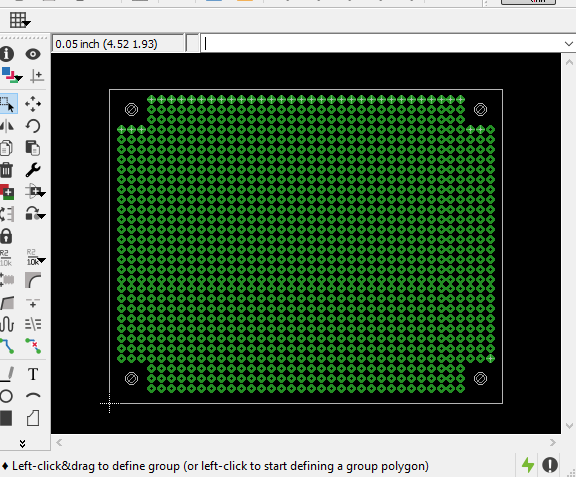
    If you look very closely you'll also see the two pads with the enlarged holes as per your photo.

    • Cancel
    • Vote Up +1 Vote Down
    • Sign in to reply
    • Verify Answer
    • Cancel
  • COMPACT
    0 COMPACT over 9 years ago in reply to COMPACT

    It also makes for a good familiarisation practice session with EAGLE for Library, Schematic and PCB editing.

    • Cancel
    • Vote Up +1 Vote Down
    • Sign in to reply
    • Verify Answer
    • Cancel
  • COMPACT
    0 COMPACT over 9 years ago in reply to ardenne

    It is always best to schematic capture a PCB because it allows revisions and additions to it to be easily accomplished.

    For example - your Proto board - There will most likely be a stage where you want to add power rails or planes to it.

    Facilitating this is done easily using a schematic.

    There's no reason why you can't capture the prototyping area as components and have them placed on your PCB.

    If fact EAGLE works best in this mode because it switches between its schematic and PCB for its Design Rule Checking.


    I just kluged this up in moments to illustrate the point. Complete with mounting holes.

    The size of this board is at the maximum freeware limit.

    image

    • Cancel
    • Vote Up +4 Vote Down
    • Sign in to reply
    • Verify Answer
    • Reject Answer
    • Cancel
  • geralds
    0 geralds over 9 years ago in reply to ardenne

    Hi,

    ok,,, in this way you can create your board as a component in the library.

    Because if you place the pads in the schematic then you can have a lot of work to sorting that on the pcb.

    But as a component you'll place it all directly on your defined place and they will stay it on there.

    Then you can draw the logo in the symbol of this pcb.

    Just make a defined number of pads and place it as group where ever you like.


    Gerald

    ---

    • Cancel
    • Vote Up +1 Vote Down
    • Sign in to reply
    • Verify Answer
    • Reject Answer
    • Cancel
  • shabaz
    0 shabaz over 9 years ago in reply to ardenne

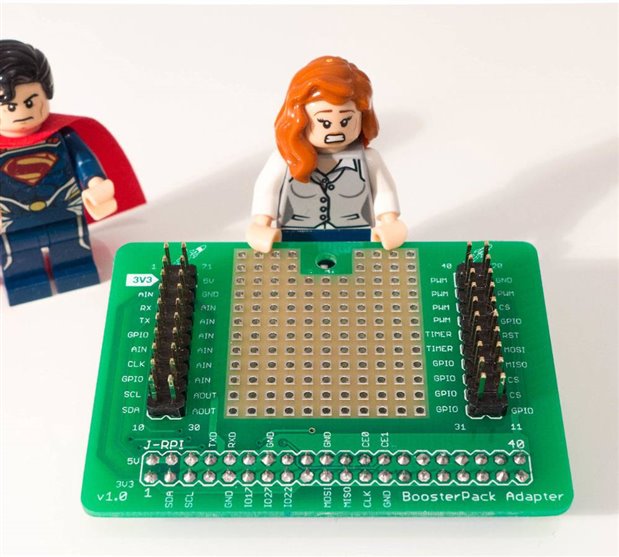
    There are many ways to do it. The one in this photo was created by making a component for the pads. To simplify further I created a component that was a block of pads (e.g. 4x4 or whatever).


    image

    • Cancel
    • Vote Up +3 Vote Down
    • Sign in to reply
    • Verify Answer
    • Reject Answer
    • Cancel
  • ardenne
    0 ardenne over 9 years ago

    Thank you all.

    I am not importing nothing from the schematic page because I don't have other components on the board, just holes and a brand logo, so I am making directly the board in the board page of Eagle.

    For a bettere understanding, I am making this simple type of board (see figure below) but with a custom size and a logo.

    Image result for prototyping board

    • Cancel
    • Vote Up 0 Vote Down
    • Sign in to reply
    • Verify Answer
    • Cancel
  • COMPACT
    0 COMPACT over 9 years ago

    If the pads are going to be isolated for a prototyping board, try placing test points with the desired pads on your schematic and then placing them on your PCB.

    If needed make your own test point component.

    • Cancel
    • Vote Up 0 Vote Down
    • Sign in to reply
    • Verify Answer
    • Cancel
>
element14 Community

element14 is the first online community specifically for engineers. Connect with your peers and get expert answers to your questions.

  • Members
  • Learn
  • Technologies
  • Challenges & Projects
  • Products
  • Store
  • About Us
  • Feedback & Support
  • FAQs
  • Terms of Use
  • Privacy Policy
  • Legal and Copyright Notices
  • Sitemap
  • Cookies

An Avnet Company © 2026 Premier Farnell Limited. All Rights Reserved.

Premier Farnell Ltd, registered in England and Wales (no 00876412), registered office: Farnell House, Forge Lane, Leeds LS12 2NE.

Follow element14

  • X
  • Facebook
  • linkedin
  • YouTube