



element14 Community
element14 Community
    Register Log In
  • Site
  • Search
  • Log In Register
  • Community Hub
    Community Hub
    • What's New on element14
    • Feedback and Support
    • Benefits of Membership
    • Personal Blogs
    • Members Area
    • Achievement Levels
  • Learn
    Learn
    • Ask an Expert
    • eBooks
    • element14 presents
    • Learning Center
    • Tech Spotlight
    • STEM Academy
    • Webinars, Training and Events
    • Learning Groups
  • Technologies
    Technologies
    • 3D Printing
    • FPGA
    • Industrial Automation
    • Internet of Things
    • Power & Energy
    • Sensors
    • Technology Groups
  • Challenges & Projects
    Challenges & Projects
    • Design Challenges
    • element14 presents Projects
    • Project14
    • Arduino Projects
    • Raspberry Pi Projects
    • Project Groups
  • Products
    Products
    • Arduino
    • Avnet & Tria Boards Community
    • Dev Tools
    • Manufacturers
    • Multicomp Pro
    • Product Groups
    • Raspberry Pi
    • RoadTests & Reviews
  • About Us
    About the element14 Community
  • Store
    Store
    • Visit Your Store
    • Choose another store...
      • Europe
      •  Austria (German)
      •  Belgium (Dutch, French)
      •  Bulgaria (Bulgarian)
      •  Czech Republic (Czech)
      •  Denmark (Danish)
      •  Estonia (Estonian)
      •  Finland (Finnish)
      •  France (French)
      •  Germany (German)
      •  Hungary (Hungarian)
      •  Ireland
      •  Israel
      •  Italy (Italian)
      •  Latvia (Latvian)
      •  
      •  Lithuania (Lithuanian)
      •  Netherlands (Dutch)
      •  Norway (Norwegian)
      •  Poland (Polish)
      •  Portugal (Portuguese)
      •  Romania (Romanian)
      •  Russia (Russian)
      •  Slovakia (Slovak)
      •  Slovenia (Slovenian)
      •  Spain (Spanish)
      •  Sweden (Swedish)
      •  Switzerland(German, French)
      •  Turkey (Turkish)
      •  United Kingdom
      • Asia Pacific
      •  Australia
      •  China
      •  Hong Kong
      •  India
      •  Japan
      •  Korea (Korean)
      •  Malaysia
      •  New Zealand
      •  Philippines
      •  Singapore
      •  Taiwan
      •  Thailand (Thai)
      •  Vietnam
      • Americas
      •  Brazil (Portuguese)
      •  Canada
      •  Mexico (Spanish)
      •  United States
      Can't find the country/region you're looking for? Visit our export site or find a local distributor.
  • Translate
  • Profile
  • Settings
Raspberry Pi
  • Products
  • More
Raspberry Pi
Blog External Antenna for Raspberry Pi 4
  • Blog
  • Forum
  • Documents
  • Quiz
  • Events
  • Polls
  • Files
  • Members
  • Mentions
  • Sub-Groups
  • Tags
  • More
  • Cancel
  • New
Join Raspberry Pi to participate - click to join for free!
Featured Articles
Announcing Pi
Technical Specifications
Raspberry Pi FAQs
Win a Pi
GPIO Pinout
Raspberry Pi Wishlist
Comparison Chart
Quiz
  • Share
  • More
  • Cancel
Group Actions
  • Group RSS
  • More
  • Cancel
Engagement
  • Author Author: aswinvenu
  • Date Created: 22 Sep 2024 2:56 PM Date Created
  • Views 23924 views
  • Likes 10 likes
  • Comments 13 comments
Related
Recommended
  • raspberry pi 4

External Antenna for Raspberry Pi 4

aswinvenu
aswinvenu
22 Sep 2024

Introduction

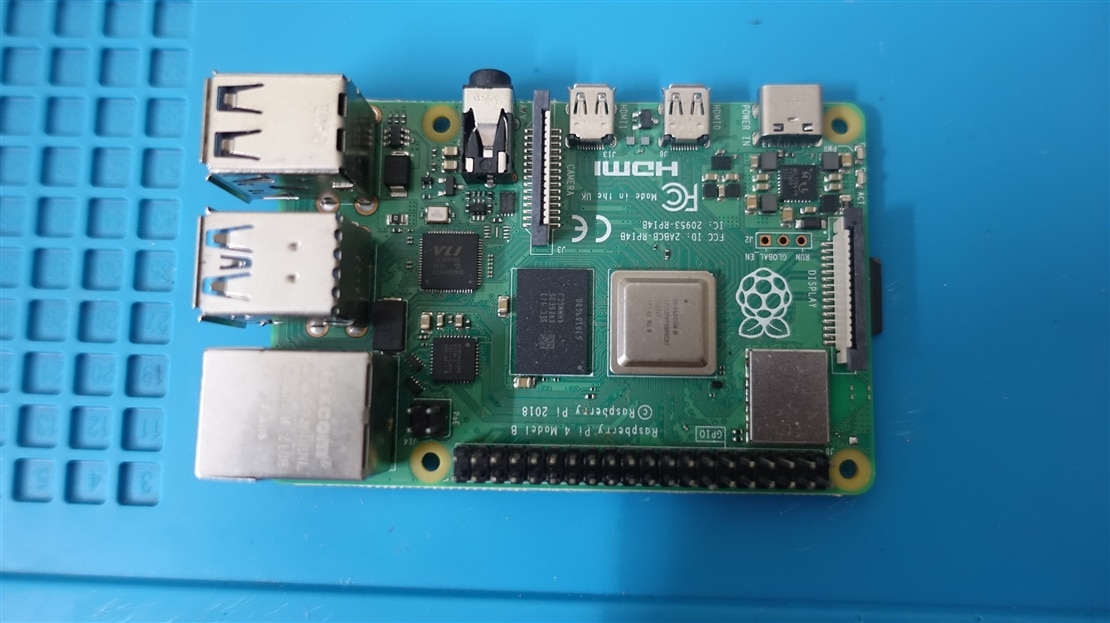
     For one of the Raspberry Pi projects I have been working on had this specific requirement for an external antenna. The entire Raspberry Pi 4 needs to be placed inside a metal box. So external antenna was the only option left for me to make the Bluetooth and WiFi to work. I had two choices, One to use the compute module 4 and use the IO board or use a regular RPi and somehow add a UFL/IPEX Connector to the PCB. Considering the cost and availability I preferred to try the second option.
image

    On a closer inspection of the WiFi/BLE Module area, We can see a small provision where a UFL/IPEX Connector can fit. Ofcourse there are no expose pads for an UFL/IPEX connector. We need to create one ( Atleast the ground pads ).

imageimage

Step 1

  Remove the solder mask and prepare a nice and clean exposed copper pad for soldering the UFL/IPEX connector.

image

Step 2

    Cut the trace which goes to the on PCB Antenna and solder a 0201 0E resistor like shown below. 

image

Step 3

   Remove the capacitors used in the PCB Antenna.

image

image

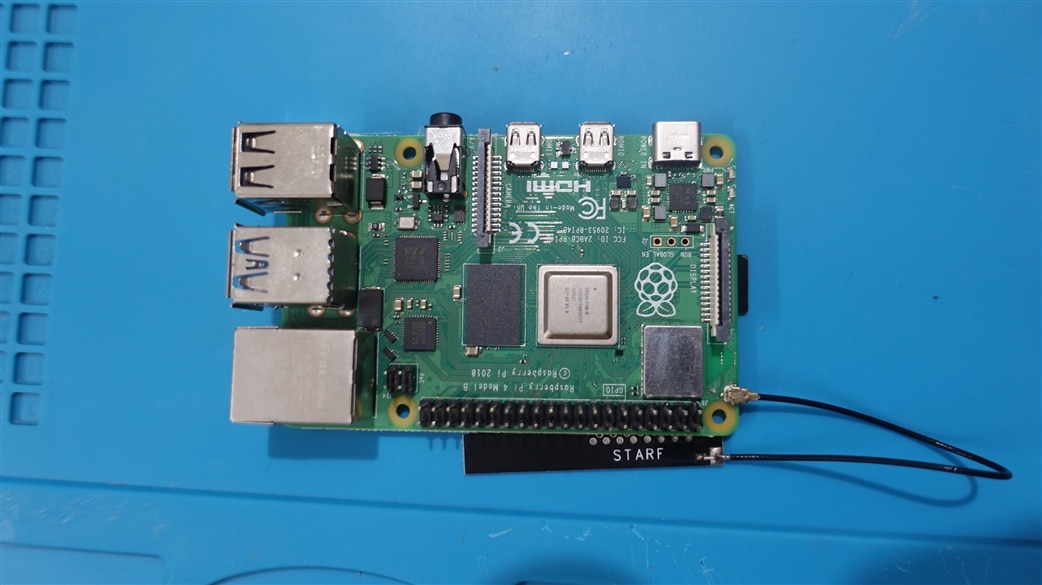
Done! I connected an IPEX 4dB antenna to the my RPi 4 for a quick test.
image

Result

Everything works fine and I am getting roughly 4- 5dB difference compared to the stock PCB antenna.

image

My router was atleast 5-6 meters away from the RPi and there was a wall separation.

  • Sign in to reply

Top Comments

  • shabaz
    shabaz over 1 year ago in reply to aswinvenu +2
    That's slightly different, that's unwanted emissions (but also relevant for products for sure). Every country has a regulatory body for wireless, e.g. in the USA it is FCC, and in the UK it is Ofcom (those…
  • aswinvenu
    aswinvenu over 1 year ago in reply to wolfgangfriedrich

    Indeed! That's the fun part :)

    • Cancel
    • Vote Up 0 Vote Down
    • Sign in to reply
    • More
    • Cancel
  • aswinvenu
    aswinvenu over 1 year ago in reply to shabaz

    Thank you! Very informative shabaz 

    • Cancel
    • Vote Up 0 Vote Down
    • Sign in to reply
    • More
    • Cancel
  • wolfgangfriedrich
    wolfgangfriedrich over 1 year ago

    Ha, I did the same some time ago, but only to test an antenna kit, not for a product.

     Molex Antenna Adventures starring a RPi4 

    Similar results. And soldering tiny stuff is fun.

    • Cancel
    • Vote Up 0 Vote Down
    • Sign in to reply
    • More
    • Cancel
  • shabaz
    shabaz over 1 year ago in reply to aswinvenu

    That's slightly different, that's unwanted emissions (but also relevant for products for sure). Every country has a regulatory body for wireless, e.g. in the USA it is FCC, and in the UK it is Ofcom (those are the only ones I know), so their websites will have the information, but it can be hard to find.

    For instance on the ofcom site, there's a PDF doc which mentions the amount of radiated power allowed (and there will be other restrictions too). So for instance, with 5 GHz WLAN, there would be the particular restriction below (but it would need an expert at navigating through their sites to be sure; not me!). 

    image

    In that doc, they list it as EIRP, meaning that they expect the antenna to be taken into account. There are online calculators to experiment with (e.g. https://m0ukd.com/calculators/erp-eirp-calculator/ ); for instance, if you had a transmitter of 100 mW, and no other loss and (say) connected to an antenna labeled 6 dBi, then the radiated power (there are several ways to measure it; they are using EIRP in the PDF document, so that is the box to look at in the screenshot below) would be almost 400 mW, so that would exceed the allowed limit in that example. If the user wished to stay within the 200 mW allowed limit in that case, they would need to either reduce the transmitter power to 50 mW, or instead, change the antenna to one that is 3 dBi max.

    image

    • Cancel
    • Vote Up +2 Vote Down
    • Sign in to reply
    • More
    • Cancel
  • aswinvenu
    aswinvenu over 1 year ago in reply to shabaz

    Okay got it! You meant Radiated emissions under IEC 61326-1 and CE/FCC conformity right?

    • Cancel
    • Vote Up 0 Vote Down
    • Sign in to reply
    • More
    • Cancel
<>
element14 Community

element14 is the first online community specifically for engineers. Connect with your peers and get expert answers to your questions.

  • Members
  • Learn
  • Technologies
  • Challenges & Projects
  • Products
  • Store
  • About Us
  • Feedback & Support
  • FAQs
  • Terms of Use
  • Privacy Policy
  • Legal and Copyright Notices
  • Sitemap
  • Cookies

An Avnet Company © 2026 Premier Farnell Limited. All Rights Reserved.

Premier Farnell Ltd, registered in England and Wales (no 00876412), registered office: Farnell House, Forge Lane, Leeds LS12 2NE.

Follow element14

  • X
  • Facebook
  • linkedin
  • YouTube