



element14 Community
element14 Community
    Register Log In
  • Site
  • Search
  • Log In Register
  • Community Hub
    Community Hub
    • What's New on element14
    • Feedback and Support
    • Benefits of Membership
    • Personal Blogs
    • Members Area
    • Achievement Levels
  • Learn
    Learn
    • Ask an Expert
    • eBooks
    • element14 presents
    • Learning Center
    • Tech Spotlight
    • STEM Academy
    • Webinars, Training and Events
    • Learning Groups
  • Technologies
    Technologies
    • 3D Printing
    • FPGA
    • Industrial Automation
    • Internet of Things
    • Power & Energy
    • Sensors
    • Technology Groups
  • Challenges & Projects
    Challenges & Projects
    • Design Challenges
    • element14 presents Projects
    • Project14
    • Arduino Projects
    • Raspberry Pi Projects
    • Project Groups
  • Products
    Products
    • Arduino
    • Avnet & Tria Boards Community
    • Dev Tools
    • Manufacturers
    • Multicomp Pro
    • Product Groups
    • Raspberry Pi
    • RoadTests & Reviews
  • About Us
    About the element14 Community
  • Store
    Store
    • Visit Your Store
    • Choose another store...
      • Europe
      •  Austria (German)
      •  Belgium (Dutch, French)
      •  Bulgaria (Bulgarian)
      •  Czech Republic (Czech)
      •  Denmark (Danish)
      •  Estonia (Estonian)
      •  Finland (Finnish)
      •  France (French)
      •  Germany (German)
      •  Hungary (Hungarian)
      •  Ireland
      •  Israel
      •  Italy (Italian)
      •  Latvia (Latvian)
      •  
      •  Lithuania (Lithuanian)
      •  Netherlands (Dutch)
      •  Norway (Norwegian)
      •  Poland (Polish)
      •  Portugal (Portuguese)
      •  Romania (Romanian)
      •  Russia (Russian)
      •  Slovakia (Slovak)
      •  Slovenia (Slovenian)
      •  Spain (Spanish)
      •  Sweden (Swedish)
      •  Switzerland(German, French)
      •  Turkey (Turkish)
      •  United Kingdom
      • Asia Pacific
      •  Australia
      •  China
      •  Hong Kong
      •  India
      •  Japan
      •  Korea (Korean)
      •  Malaysia
      •  New Zealand
      •  Philippines
      •  Singapore
      •  Taiwan
      •  Thailand (Thai)
      •  Vietnam
      • Americas
      •  Brazil (Portuguese)
      •  Canada
      •  Mexico (Spanish)
      •  United States
      Can't find the country/region you're looking for? Visit our export site or find a local distributor.
  • Translate
  • Profile
  • Settings
Raspberry Pi
  • Products
  • More
Raspberry Pi
Blog Why Should the RP2040 MCU be Specified in Your Next Design? The Heart of the Raspberry Pi Pico
  • Blog
  • Forum
  • Documents
  • Quiz
  • Events
  • Polls
  • Files
  • Members
  • Mentions
  • Sub-Groups
  • Tags
  • More
  • Cancel
  • New
Join Raspberry Pi to participate - click to join for free!
Featured Articles
Announcing Pi
Technical Specifications
Raspberry Pi FAQs
Win a Pi
GPIO Pinout
Raspberry Pi Wishlist
Comparison Chart
Quiz
  • Share
  • More
  • Cancel
Group Actions
  • Group RSS
  • More
  • Cancel
Engagement
  • Author Author: cstanton
  • Date Created: 11 Jan 2023 12:39 PM Date Created
  • Views 5453 views
  • Likes 13 likes
  • Comments 24 comments
Related
Recommended
  • Rapid development and deployment
  • raspberry pi pico
  • Microcontroller-based applications
  • Arm Cortex-M0+
  • rp2040
  • mcu
  • Programmable I/O

Why Should the RP2040 MCU be Specified in Your Next Design? The Heart of the Raspberry Pi Pico

cstanton
cstanton
11 Jan 2023
RP2040 Chip Close-Up

It is a challenge to design low-cost microcontroller-based applications. The designer must balance power and performance with price. It is difficult to decide which instruction set architecture is the best fit for the application. Design and manufacturing concerns also come into play: who will design the system, and who will fabricate it? The answers determine the value and cost-effectiveness of the end product. In this context, the price-to-performance ratio of the RP 2040 microcontroller makes it an obvious choice for the Raspberry Pi Pico. 

What are the specifications of the RP2040 and the Pi Pico?

The RP2040  SoC is a powerful, low-cost microcontroller packing a dual-core Arm® Cortex-M0+ processor that clocks in at a decent 133MHz. It is one of the most energy-saving Arm® processors available. The microcontroller has six banks crammed with 264 kB of embedded SRAM. The RP2040 SoC consumes a low amount of power but yields high performance with minimum leakage.

The Raspberry Pi Pico  board operates over a wide ~1.8 to 5.5V input voltage range and comes with different low-power modes that support battery-powered operation for extended durations. The RP2040 has 30 GPIO pins (four for analogue input), two SPI and I2C controllers, two UART and 16 PWM channels, one USB 1.1 controller, and eight Programmable I/O (PIO). You can set pins opposite the Micro-USB port and connect another Raspberry Pi to program the board directly. The uploaded program automatically runs when turned on.
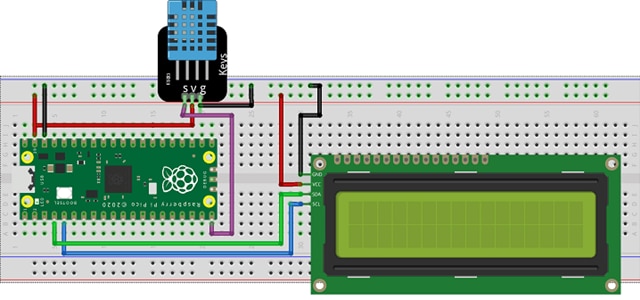
Raspberry Pi Pico on a breadboard

Fig. 1: Temperature and humidity monitoring using Raspberry Pi PICO (Source)

Figure 1 represents a room temperature monitoring system based on the Raspberry Pi Pico board. This application uses Pico’s internal storage to store the data. The data is given a time stamp and stored in a new line format, thus saving the cost of an external SD card module and memory card. Pico gives you the freedom to select the file type, allowing you to store the data in a user-friendly format. It also eliminates the need for proprietary libraries or drivers.

The RP2040 allows rapid code generation in MicroPython or C/C++ with your preferred IDE. The result is a unique platform that supports the rapid development and deployment of endpoint Artificial Intelligence (AI) based applications. You can use TinyML to implement machine learning (ML) models such as voice or image recognition and accelerometer-based gesture recognition or gearbox fault prediction.


Arduino versus the Raspberry Pi Pico - Which to Go For?

Arduino, a microcontroller, is an open-source prototype platform that enables users to create interactive electronic projects. The arrival of the new RP2040 SoC and the Raspberry Pi Pico microcontroller has blurred the line between the Raspberry Pi (a mini-computer) and Arduino ecosystems.

Raspberry Pi Pico uses the improved RP2040 microcontroller RP2040 microcontroller RP2040 microcontroller RP2040 microcontroller RP2040 microcontroller RP2040 microcontroller RP2040 microcontroller RP2040 microcontroller RP2040 microcontroller RP2040 microcontroller RP2040 microcontroller RP2040 microcontroller RP2040 microcontroller RP2040 microcontroller RP2040 microcontroller RP2040 microcontroller RP2040 microcontroller RP2040 microcontroller RP2040 microcontroller RP2040 microcontroller RP2040 microcontroller RP2040 microcontroller RP2040 microcontroller RP2040 microcontroller RP2040 microcontroller RP2040 microcontroller RP2040 microcontroller RP2040 microcontroller RP2040 microcontroller RP2040 microcontroller RP2040 microcontroller RP2040 microcontroller RP2040 microcontroller RP2040 microcontroller RP2040 microcontroller RP2040 microcontroller RP2040 microcontroller RP2040 microcontroller RP2040 microcontroller RP2040 microcontroller RP2040 microcontroller RP2040 microcontroller RP2040 microcontroller RP2040 microcontroller RP2040 microcontroller RP2040 microcontroller RP2040 microcontroller RP2040 microcontroller RP2040 microcontroller RP2040 microcontroller . The Arm® Cortex M0+ in the RP2040 runs at a much faster speed than the Arduino UNO's 16 MHz Atmega328P. The RP2040’s 264 kB SRAM and 2 MB of flash storage are much greater than the Arduino Uno’s 2 kB SRAM and 32 kB flash memory.

Both the Pico and Uno can interact with sensors, motors, display devices, and other physical devices. The Uno operates at 5 V, with six analogue input pins and 14 digital pins for general-purpose input/output (GPIO). Out of 14 pins, six provide PWM output. The Pico operates at 3.3 V, with 26 GPIO pins. The analogue inputs use four pins, and the PWM outputs 16 out of 26 pins. The Pico has an edge on analogue-to-digital conversion (ADC), a faster sampling rate (500 kHz vs. 125 kHz), and a greater resolution (12-bit vs. 10-bit).

The use of serial communication is on the rise in peripheral devices. For example, the Uno has one channel for each UART, I2C, and SPI functionality, while the Pico has twice this number. Pico's programmable IO (PIO) feature supports user-programmable high-speed IO to do tasks such as video output implementation. PIO enables the SD card to interface with software at the hardware level efficiently.

You can code the Arduino Uno in C++ "sketches." The Arduino IDE processes and then compiles and loads the machine code onto the board. In contrast, the RP2040 uses MicroPython, a version of the Python language for small devices. Beginners can use MicroPython for easier and faster coding, while more advanced users have their preference for MicroPython or C/C++.

Have you made your Decision?

The powerful processor and rich functionality of the RP2040 make it a compelling entry into the MCU market. Combined with MicroPython programming, the RP2040 offers an easily accessible gateway for people who want to explore physical computing and microcontrollers at a low cost. The technology, with high-quality documentation and development tools, enables a new generation of hardware and software developers to fill the skills gap in a rapidly growing market.

  • Sign in to reply

Top Comments

  • michaelkellett
    michaelkellett over 3 years ago +1
    I think I should correct a matter of detail on current consumption of the RP2040. One of the key differences between it and most other "low power" ARM M0 based microcontrollers is that it has no on chip…
  • misaz
    misaz over 3 years ago +1
    For me it is mainly cost, in-stock availability at distributors and PIO, but there are several disadvantages when using this MCU like need for external Flash.
  • cstanton
    cstanton over 3 years ago in reply to shabaz

    " I'd like to modify the I/O voltage to 1.8V instead of 3.3V"

    Oooh yes, it's pretty useful at 1.8v - having needed to find a tool to re/flash the SPI bios chip of Valve's Steam Deck a Pi Pico did the job in a pinch with a modification.

    • Cancel
    • Vote Up 0 Vote Down
    • Sign in to reply
    • More
    • Cancel
  • Fred27
    Fred27 over 3 years ago in reply to baldengineer

    I feel that Python is just not the right language for a microcontroller. Sure it's possible, but that doesn't mean it's a good choice. C/C++ is a far more natural fit for embedded development where you'll often want fast deterministic code. I've also played around using Rust on the Pico too. I seems good, but I must admit I've not used it in anger yet.

    • Cancel
    • Vote Up 0 Vote Down
    • Sign in to reply
    • More
    • Cancel
  • shabaz
    shabaz over 3 years ago in reply to shabaz

    Plus a larger footprint could be handy if they ever decide to put Flash onto the same package (e.g. the RP2040 chip plus memory chip, so they would need the space, wired up in the same package; I don't know if the 9x9 lends itself to that or not though.. just speculating).

    • Cancel
    • Vote Up 0 Vote Down
    • Sign in to reply
    • More
    • Cancel
  • shabaz
    shabaz over 3 years ago in reply to dougw

    It could have been a lot friendlier to solder if instead of the current 0.4 mm pitch 7x7 mm footprint, it were a standard 9x9 mm footprint with 0.5 mm pitch and 64 pins. A relatively small increase in component size. It won't be popular in miniaturized wearable devices anyway, due to the current consumption, so the slight size increase would not have affected many use-cases perhaps.

    There may be other reasons (e.g. production machinery availablity or costs etc) of course.

    • Cancel
    • Vote Up 0 Vote Down
    • Sign in to reply
    • More
    • Cancel
  • beacon_dave
    beacon_dave over 3 years ago

    "...The Pico has an edge on analogue-to-digital conversion (ADC), a faster sampling rate (500 kHz vs. 125 kHz), and a greater resolution (12-bit vs. 10-bit)..."

    Has anyone looked closely at the 12-bit resolution vs 10-bit thing yet?

    "12bit ADC effective number of bits of 8.7"
    https://www.youtube.com/watch?v=CAMTBzPd-WI&t=888s

    "beyond 8 or 9 bits it's mostly just noise"
    https://www.youtube.com/watch?v=TGjUHChO1kM&t=355s

    • Cancel
    • Vote Up 0 Vote Down
    • Sign in to reply
    • More
    • Cancel
<>
element14 Community

element14 is the first online community specifically for engineers. Connect with your peers and get expert answers to your questions.

  • Members
  • Learn
  • Technologies
  • Challenges & Projects
  • Products
  • Store
  • About Us
  • Feedback & Support
  • FAQs
  • Terms of Use
  • Privacy Policy
  • Legal and Copyright Notices
  • Sitemap
  • Cookies

An Avnet Company © 2026 Premier Farnell Limited. All Rights Reserved.

Premier Farnell Ltd, registered in England and Wales (no 00876412), registered office: Farnell House, Forge Lane, Leeds LS12 2NE.

ICP 备案号 10220084.

Follow element14

  • X
  • Facebook
  • linkedin
  • YouTube