



element14 Community
element14 Community
    Register Log In
  • Site
  • Search
  • Log In Register
  • Community Hub
    Community Hub
    • What's New on element14
    • Feedback and Support
    • Benefits of Membership
    • Personal Blogs
    • Members Area
    • Achievement Levels
  • Learn
    Learn
    • Ask an Expert
    • eBooks
    • element14 presents
    • Learning Center
    • Tech Spotlight
    • STEM Academy
    • Webinars, Training and Events
    • Learning Groups
  • Technologies
    Technologies
    • 3D Printing
    • FPGA
    • Industrial Automation
    • Internet of Things
    • Power & Energy
    • Sensors
    • Technology Groups
  • Challenges & Projects
    Challenges & Projects
    • Design Challenges
    • element14 presents Projects
    • Project14
    • Arduino Projects
    • Raspberry Pi Projects
    • Project Groups
  • Products
    Products
    • Arduino
    • Avnet & Tria Boards Community
    • Dev Tools
    • Manufacturers
    • Multicomp Pro
    • Product Groups
    • Raspberry Pi
    • RoadTests & Reviews
  • About Us
    About the element14 Community
  • Store
    Store
    • Visit Your Store
    • Choose another store...
      • Europe
      •  Austria (German)
      •  Belgium (Dutch, French)
      •  Bulgaria (Bulgarian)
      •  Czech Republic (Czech)
      •  Denmark (Danish)
      •  Estonia (Estonian)
      •  Finland (Finnish)
      •  France (French)
      •  Germany (German)
      •  Hungary (Hungarian)
      •  Ireland
      •  Israel
      •  Italy (Italian)
      •  Latvia (Latvian)
      •  
      •  Lithuania (Lithuanian)
      •  Netherlands (Dutch)
      •  Norway (Norwegian)
      •  Poland (Polish)
      •  Portugal (Portuguese)
      •  Romania (Romanian)
      •  Russia (Russian)
      •  Slovakia (Slovak)
      •  Slovenia (Slovenian)
      •  Spain (Spanish)
      •  Sweden (Swedish)
      •  Switzerland(German, French)
      •  Turkey (Turkish)
      •  United Kingdom
      • Asia Pacific
      •  Australia
      •  China
      •  Hong Kong
      •  India
      •  Japan
      •  Korea (Korean)
      •  Malaysia
      •  New Zealand
      •  Philippines
      •  Singapore
      •  Taiwan
      •  Thailand (Thai)
      •  Vietnam
      • Americas
      •  Brazil (Portuguese)
      •  Canada
      •  Mexico (Spanish)
      •  United States
      Can't find the country/region you're looking for? Visit our export site or find a local distributor.
  • Translate
  • Profile
  • Settings
Raspberry Pi
  • Products
  • More
Raspberry Pi
Blog Why Should the RP2040 MCU be Specified in Your Next Design? The Heart of the Raspberry Pi Pico
  • Blog
  • Forum
  • Documents
  • Quiz
  • Events
  • Polls
  • Files
  • Members
  • Mentions
  • Sub-Groups
  • Tags
  • More
  • Cancel
  • New
Join Raspberry Pi to participate - click to join for free!
Featured Articles
Announcing Pi
Technical Specifications
Raspberry Pi FAQs
Win a Pi
GPIO Pinout
Raspberry Pi Wishlist
Comparison Chart
Quiz
  • Share
  • More
  • Cancel
Group Actions
  • Group RSS
  • More
  • Cancel
Engagement
  • Author Author: cstanton
  • Date Created: 11 Jan 2023 12:39 PM Date Created
  • Views 6074 views
  • Likes 13 likes
  • Comments 24 comments
Related
Recommended
  • Rapid development and deployment
  • raspberry pi pico
  • Microcontroller-based applications
  • Arm Cortex-M0+
  • rp2040
  • mcu
  • Programmable I/O

Why Should the RP2040 MCU be Specified in Your Next Design? The Heart of the Raspberry Pi Pico

cstanton
cstanton
11 Jan 2023
RP2040 Chip Close-Up

It is a challenge to design low-cost microcontroller-based applications. The designer must balance power and performance with price. It is difficult to decide which instruction set architecture is the best fit for the application. Design and manufacturing concerns also come into play: who will design the system, and who will fabricate it? The answers determine the value and cost-effectiveness of the end product. In this context, the price-to-performance ratio of the RP 2040 microcontroller makes it an obvious choice for the Raspberry Pi Pico. 

What are the specifications of the RP2040 and the Pi Pico?

The RP2040  SoC is a powerful, low-cost microcontroller packing a dual-core Arm® Cortex-M0+ processor that clocks in at a decent 133MHz. It is one of the most energy-saving Arm® processors available. The microcontroller has six banks crammed with 264 kB of embedded SRAM. The RP2040 SoC consumes a low amount of power but yields high performance with minimum leakage.

The Raspberry Pi Pico  board operates over a wide ~1.8 to 5.5V input voltage range and comes with different low-power modes that support battery-powered operation for extended durations. The RP2040 has 30 GPIO pins (four for analogue input), two SPI and I2C controllers, two UART and 16 PWM channels, one USB 1.1 controller, and eight Programmable I/O (PIO). You can set pins opposite the Micro-USB port and connect another Raspberry Pi to program the board directly. The uploaded program automatically runs when turned on.
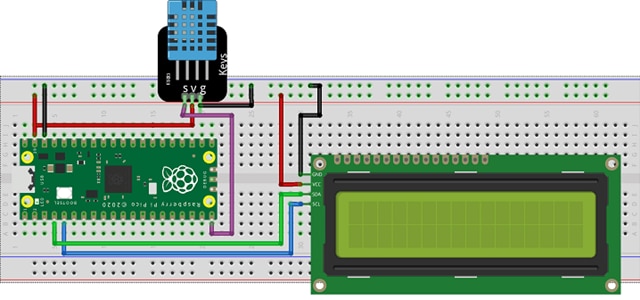
Raspberry Pi Pico on a breadboard

Fig. 1: Temperature and humidity monitoring using Raspberry Pi PICO (Source)

Figure 1 represents a room temperature monitoring system based on the Raspberry Pi Pico board. This application uses Pico’s internal storage to store the data. The data is given a time stamp and stored in a new line format, thus saving the cost of an external SD card module and memory card. Pico gives you the freedom to select the file type, allowing you to store the data in a user-friendly format. It also eliminates the need for proprietary libraries or drivers.

The RP2040 allows rapid code generation in MicroPython or C/C++ with your preferred IDE. The result is a unique platform that supports the rapid development and deployment of endpoint Artificial Intelligence (AI) based applications. You can use TinyML to implement machine learning (ML) models such as voice or image recognition and accelerometer-based gesture recognition or gearbox fault prediction.


Arduino versus the Raspberry Pi Pico - Which to Go For?

Arduino, a microcontroller, is an open-source prototype platform that enables users to create interactive electronic projects. The arrival of the new RP2040 SoC and the Raspberry Pi Pico microcontroller has blurred the line between the Raspberry Pi (a mini-computer) and Arduino ecosystems.

Raspberry Pi Pico uses the improved RP2040 microcontroller RP2040 microcontroller RP2040 microcontroller RP2040 microcontroller RP2040 microcontroller RP2040 microcontroller RP2040 microcontroller RP2040 microcontroller RP2040 microcontroller RP2040 microcontroller RP2040 microcontroller RP2040 microcontroller RP2040 microcontroller RP2040 microcontroller RP2040 microcontroller RP2040 microcontroller RP2040 microcontroller RP2040 microcontroller RP2040 microcontroller RP2040 microcontroller RP2040 microcontroller RP2040 microcontroller RP2040 microcontroller RP2040 microcontroller RP2040 microcontroller RP2040 microcontroller RP2040 microcontroller RP2040 microcontroller RP2040 microcontroller RP2040 microcontroller RP2040 microcontroller RP2040 microcontroller RP2040 microcontroller RP2040 microcontroller RP2040 microcontroller RP2040 microcontroller RP2040 microcontroller RP2040 microcontroller RP2040 microcontroller RP2040 microcontroller RP2040 microcontroller RP2040 microcontroller RP2040 microcontroller RP2040 microcontroller RP2040 microcontroller RP2040 microcontroller RP2040 microcontroller RP2040 microcontroller RP2040 microcontroller RP2040 microcontroller . The Arm® Cortex M0+ in the RP2040 runs at a much faster speed than the Arduino UNO's 16 MHz Atmega328P. The RP2040’s 264 kB SRAM and 2 MB of flash storage are much greater than the Arduino Uno’s 2 kB SRAM and 32 kB flash memory.

Both the Pico and Uno can interact with sensors, motors, display devices, and other physical devices. The Uno operates at 5 V, with six analogue input pins and 14 digital pins for general-purpose input/output (GPIO). Out of 14 pins, six provide PWM output. The Pico operates at 3.3 V, with 26 GPIO pins. The analogue inputs use four pins, and the PWM outputs 16 out of 26 pins. The Pico has an edge on analogue-to-digital conversion (ADC), a faster sampling rate (500 kHz vs. 125 kHz), and a greater resolution (12-bit vs. 10-bit).

The use of serial communication is on the rise in peripheral devices. For example, the Uno has one channel for each UART, I2C, and SPI functionality, while the Pico has twice this number. Pico's programmable IO (PIO) feature supports user-programmable high-speed IO to do tasks such as video output implementation. PIO enables the SD card to interface with software at the hardware level efficiently.

You can code the Arduino Uno in C++ "sketches." The Arduino IDE processes and then compiles and loads the machine code onto the board. In contrast, the RP2040 uses MicroPython, a version of the Python language for small devices. Beginners can use MicroPython for easier and faster coding, while more advanced users have their preference for MicroPython or C/C++.

Have you made your Decision?

The powerful processor and rich functionality of the RP2040 make it a compelling entry into the MCU market. Combined with MicroPython programming, the RP2040 offers an easily accessible gateway for people who want to explore physical computing and microcontrollers at a low cost. The technology, with high-quality documentation and development tools, enables a new generation of hardware and software developers to fill the skills gap in a rapidly growing market.

  • Sign in to reply

Top Comments

  • michaelkellett
    michaelkellett over 3 years ago +1
    I think I should correct a matter of detail on current consumption of the RP2040. One of the key differences between it and most other "low power" ARM M0 based microcontrollers is that it has no on chip…
  • misaz
    misaz over 3 years ago +1
    For me it is mainly cost, in-stock availability at distributors and PIO, but there are several disadvantages when using this MCU like need for external Flash.
  • shabaz
    shabaz over 3 years ago in reply to beacon_dave

    Hehe not going to go down there : ) It's a sub-optimal board shape, the antenna is in the wrong position. 

    There are not many products that require 0201-sized parts, but Raspberrypi.org decide to stick them on their (effectively) development board for the RP2040, makes it near-impossible to modify it. Case in point: I'd like to modify the I/O voltage to 1.8V instead of 3.3V. That's near-impossible without (literally) microscopic-level surgery, I'd rather just build my own RP2040 dev-board from scratch.

    • Cancel
    • Vote Up 0 Vote Down
    • Sign in to reply
    • More
    • Cancel
  • beacon_dave
    beacon_dave over 3 years ago in reply to shabaz

    "...The RP2040 feels like a test chip for incorporating into future Pi's."

    GPIO co-processor perhaps...?

    "...I don't get why raspberrypi.org feel the need to use the tiniest components on the Pico board either..."

    To make room for future add-ons without increasing the overall board footprint? Similar to what they already did with the Wi-Fi module?

    • Cancel
    • Vote Up 0 Vote Down
    • Sign in to reply
    • More
    • Cancel
  • dougw
    dougw over 3 years ago

    I like the Pi Pico feature set for some applications and its price/performance relative to Arduino modules, but the Pico occupies a similar application space to Arduino modules.

    As far as the chip goes, every MCU has applications where it excels and the RP2040 does too. I like that it is not a BGA component. There are definitely applications where more comprehensive documentation, characterization and development tools are required, and when that is available, the range of applications will increase. Good documentation is crucial when launching a new MCU - it is the primary way for designers to determine its suitability.  For now the chip will find some commercial applications, for example designs that are transitioning from a Pi Pico prototype to a commercial product, and as Raspberry understands the market better, support is bound to improve. I think the RP2040 is off to a good (but unorthodox) start and it will be fascinating to see how it proliferates into mainstream products.

    • Cancel
    • Vote Up 0 Vote Down
    • Sign in to reply
    • More
    • Cancel
  • BigG
    BigG over 3 years ago

    The RP2040 has certainly made it's mark. Despite there being many other ARM M0/M0+ boards on the market, I feel they have set themselves apart by creating a dual core processor with a rather generous 264 kB SRAM and the PIO functionality. I think this chip is here to stay. I have already found that I've been able to create a good few applications that would not have been possible with other M0 MCU's.

    The only negative I have, and no it's not the external flash, is the fact that it only comes in a LQFN-56 package. Not exactly hand soldering friendly... although there are plenty on YouTube/Twitter who have demonstrated it is possible. I'm just not brave enough.

    Regarding the external flash, I think this must be open to exploiting. Thinking out loud... how about, for example, an ESP8266 or maybe an ESP32 and a RP2040 sharing the same flash by defining different flash start and end points etc. and some sort of synchronised start-up routines etc.

    • Cancel
    • Vote Up 0 Vote Down
    • Sign in to reply
    • More
    • Cancel
  • cstanton
    cstanton over 3 years ago in reply to michaelkellett

    "but the lack of solid industrial experience of the supplier"

    I suspect in this case by supplier you're meaning Raspberry Pi Trading - and I think there's a lack of marketing and advertising on just how much the Raspberry Pi is actually used in the industry, and that's partly what spurs on these products and the compute modules - because the demand, and sometimes direct demand, to the company is actually there.

    There are a lot of embedded products out there that use Raspberry Pi and similar, and it has been around for about 10 years now.

    "and the quality of the documentation"

    Even companies such as atmel/microchip can improve their documentation, that's always an ask - is there a company that gets it right? ST Microelectronics I think you're suggesting there?

    • Cancel
    • Vote Up 0 Vote Down
    • Sign in to reply
    • More
    • Cancel
<>
element14 Community

element14 is the first online community specifically for engineers. Connect with your peers and get expert answers to your questions.

  • Members
  • Learn
  • Technologies
  • Challenges & Projects
  • Products
  • Store
  • About Us
  • Feedback & Support
  • FAQs
  • Terms of Use
  • Privacy Policy
  • Legal and Copyright Notices
  • Sitemap
  • Cookies

An Avnet Company © 2026 Premier Farnell Limited. All Rights Reserved.

Premier Farnell Ltd, registered in England and Wales (no 00876412), registered office: Farnell House, Forge Lane, Leeds LS12 2NE.

Follow element14

  • X
  • Facebook
  • linkedin
  • YouTube