element14 Community
element14 Community
    Register Log In
  • Site
  • Search
  • Log In Register
  • Community Hub
    Community Hub
    • What's New on element14
    • Feedback and Support
    • Benefits of Membership
    • Personal Blogs
    • Members Area
    • Achievement Levels
  • Learn
    Learn
    • Ask an Expert
    • eBooks
    • element14 presents
    • Learning Center
    • Tech Spotlight
    • STEM Academy
    • Webinars, Training and Events
    • Learning Groups
  • Technologies
    Technologies
    • 3D Printing
    • FPGA
    • Industrial Automation
    • Internet of Things
    • Power & Energy
    • Sensors
    • Technology Groups
  • Challenges & Projects
    Challenges & Projects
    • Design Challenges
    • element14 presents Projects
    • Project14
    • Arduino Projects
    • Raspberry Pi Projects
    • Project Groups
  • Products
    Products
    • Arduino
    • Avnet & Tria Boards Community
    • Dev Tools
    • Manufacturers
    • Multicomp Pro
    • Product Groups
    • Raspberry Pi
    • RoadTests & Reviews
  • About Us
  • Store
    Store
    • Visit Your Store
    • Choose another store...
      • Europe
      •  Austria (German)
      •  Belgium (Dutch, French)
      •  Bulgaria (Bulgarian)
      •  Czech Republic (Czech)
      •  Denmark (Danish)
      •  Estonia (Estonian)
      •  Finland (Finnish)
      •  France (French)
      •  Germany (German)
      •  Hungary (Hungarian)
      •  Ireland
      •  Israel
      •  Italy (Italian)
      •  Latvia (Latvian)
      •  
      •  Lithuania (Lithuanian)
      •  Netherlands (Dutch)
      •  Norway (Norwegian)
      •  Poland (Polish)
      •  Portugal (Portuguese)
      •  Romania (Romanian)
      •  Russia (Russian)
      •  Slovakia (Slovak)
      •  Slovenia (Slovenian)
      •  Spain (Spanish)
      •  Sweden (Swedish)
      •  Switzerland(German, French)
      •  Turkey (Turkish)
      •  United Kingdom
      • Asia Pacific
      •  Australia
      •  China
      •  Hong Kong
      •  India
      • Japan
      •  Korea (Korean)
      •  Malaysia
      •  New Zealand
      •  Philippines
      •  Singapore
      •  Taiwan
      •  Thailand (Thai)
      • Vietnam
      • Americas
      •  Brazil (Portuguese)
      •  Canada
      •  Mexico (Spanish)
      •  United States
      Can't find the country/region you're looking for? Visit our export site or find a local distributor.
  • Translate
  • Profile
  • Settings
Raspberry Pi
  • Products
  • More
Raspberry Pi
Raspberry Pi Forum GPIO:  HD44780 chip from old Fax Machine.
  • Blog
  • Forum
  • Documents
  • Quiz
  • Events
  • Polls
  • Files
  • Members
  • Mentions
  • Sub-Groups
  • Tags
  • More
  • Cancel
  • New
Join Raspberry Pi to participate - click to join for free!
Featured Articles
Announcing Pi
Technical Specifications
Raspberry Pi FAQs
Win a Pi
Raspberry Pi Wishlist
Actions
  • Share
  • More
  • Cancel
Forum Thread Details
  • Replies 32 replies
  • Subscribers 679 subscribers
  • Views 5020 views
  • Users 0 members are here
  • others
  • seen
  • it.;
  • never
  • to
  • from
  • this
  • gpio?
  • have
  • chip
  • etc;
  • fax
  • but
  • through
  • raspberry_pi
  • before
  • messages
  • old
  • hd44780
  • machine.;
  • display
  • how
  • they
  • it
  • do
  • get
  • state
  • tell
  • gpio:
  • i
  • or
  • text
Related

GPIO:  HD44780 chip from old Fax Machine.

wallarug
wallarug over 13 years ago

How do I get this to display messages, text, etc; through GPIO?  I have seen others do it before but they never state or tell how they do it.


I want to know if this is possible to do and how difficult it is to get the software for it.


This is my screen:
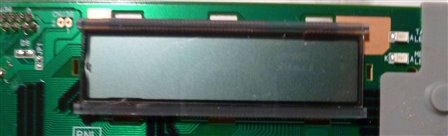
image

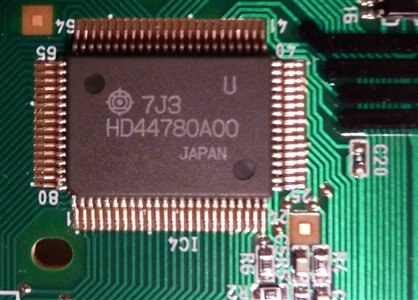
This is the chip:

image


How do I wire them togther (they are already on PCB togther)?  How do I wire them to GPIO?


I can work off schematics and can follow very basic instructions (but can not compile software).

  • Sign in to reply
  • Cancel
Parents
  • fustini
    fustini over 13 years ago

    Check out this tutorial from Adafruit:


    http://learn.adafruit.com/drive-a-16x2-lcd-directly-with-a-raspberry-pi

    Adding a LCD to any project immediately kicks it up a notch. This tutorial explains how to connect a inexpensive HDD44780 compatible LCD to the raspberry pi using 6 GPIOs. While there are other ways to connect using I2C or the UART this is the most direct method that get right down to the bare metal.

    • Cancel
    • Vote Up 0 Vote Down
    • Sign in to reply
    • Cancel
  • wallarug
    wallarug over 13 years ago in reply to fustini

    Hey Drew,


    The problem I am having is that the Screen is already mounted on a PCB.  I don't know which pins to send to Raspberry Pi.  See the image above.


    Also, it connected to the rest of the fax machine via a 16 pin flat ribbon cable (which the socket is acessable from the rear - not pictured). 


    Can I use any of these pins to acess the display?  And is the power for the display the same as what it was connected to on the fax machine (the two pins on the top left)?

    • Cancel
    • Vote Up 0 Vote Down
    • Sign in to reply
    • Cancel
  • bodgy
    bodgy over 13 years ago in reply to GreenYamo

    Steve,


    That is correct, the job of flux in soldering is to help the solder flow (flux is based on the Latin word 'to flow'), transfer heat between the molten solder and a non melted metal object.  Solder for electronics (apart from solder paste, where it is most often added at time of use and is specific to the type of solder being used and the end purpose of the assembled product) contain flux to help aid the flow of solder and to transfer the heat from the iron tip efficiently. 


    As the solder joint ages it is subjected to heat from the environment including heat that might be transferred by the component it is attached to, this causes the flux to dry out among other things. After a period of time if a soldering iron is applied straight to the joint, it will be noticed that the solder either doesn't melt around the joint or it takes a very long time or a much higher temperature is required to get to the melting point. Some of this is due to oxidisation and a film that gets layed down on the outside of the solder 'blob'. Application of flux to this joint will help burn away any oxidisation and also work as a heat transfer mechanism that enables the old solder to be able to flow again.


    For electronic purposes there are flux pens, gel flux and of course the flux in solder itself.  Using solder to reinvigorate an aged solder joint often works better than just the application of flux alone on through hole components as often the solder in between the two sides of the board has become closer to concrete in texture plus there will be a metal copper sleeve inside the hole connecting the two or more layers of a PCB, this copper sleeve also has to heat to allow the solder to flow freely enough to be removed and allow the pin to become free.


    So always refresh a joint with solder before attempting to desolder, it will be much easier.


    A solder joint that has just been made should in most case be able to be desoldered with no additional solder naturally.  Cleaning the board thoroughly beforehand can also help, as that can remove the oxidisation layer across the board.


    Colin

    • Cancel
    • Vote Up 0 Vote Down
    • Sign in to reply
    • Cancel
  • GreenYamo
    GreenYamo over 13 years ago in reply to bodgy

    Hello Colin, Thank you for that, it makes perfect sense now you have explained it, but have never thought of it that way before.

    I was trying to repair a Netbook power connector at the weekend and I could not get the original one off - I think another try soon using this method may prove a lot more productive.

    Thanks


    Steve

    • Cancel
    • Vote Up 0 Vote Down
    • Sign in to reply
    • Cancel
  • Former Member
    Former Member over 13 years ago in reply to GreenYamo

    Don't use one of those manual desoldering pumps. When the plunger shoots back, as a reaction , the tip will move as well. You will just wipe small tracks of the pcb with it. They are good for larger solderings with wide tracks. (4 - 5 mm wide.) I use desoldering wick for the fine work. They have the disadvantage that the cupper of the desoldering also takes heat away from the solder point and the tip of your iron. So, don't use one of those small 15W irons. You will notice they have problems to melt the solder when the desoldering wick is attached to it.

    Also note that some multi layer pcb's have large cupper areas in their inner layers that are used as power supply layers. If a component is attached to such a layer, you need a real powerfull soldering iron to desolder it, as the cupper layer inside the pcb takes the heat away. This often is a problem when you replace electrolitic capacitors on pc boards, as those are connected to the supply and ground layers to suppress the ripple on those. I sometimes even use a 150W plumber soldering iron for such a job. Only problem is they don't come with a fine tip to do precision work. If the heat transfer isn't good, and the solder isn't melting, don't keep trying. Stop your activity and give everything time to cool down. Add some extra fresh solder and try again afterwards.

    So far my 5 cent on 27 year of desoldering experience.

    • Cancel
    • Vote Up 0 Vote Down
    • Sign in to reply
    • Cancel
  • wallarug
    wallarug over 13 years ago in reply to Former Member

    Could I make my own interface off the HD44800U Chip?  Say: Desolder the certain pins of the chip that I know and run a wire straight into the chip? from the Raspberry Pi?


    Is that possible?  I have scene it all over the internet but is there a special techque required?


    This is what I know:

      Diagram is upside-down.image

    image


    I will be using http://learn.adafruit.com/drive-a-16x2-lcd-directly-with-a-raspberry-pi/wiring as the instuctions to set-up the screen.  See if a direct wire will work with the set-up in the link.


    Thanks in advanced.

    • Cancel
    • Vote Up 0 Vote Down
    • Sign in to reply
    • Cancel
  • bodgy
    bodgy over 13 years ago in reply to wallarug

    This is not a route I would take, but is possible, bear in mind not only is there a likelihood of breaking the pins, overheating the chip, plus trying to solder wires to the pins won't be easy if you are not experienced wit soldering nor have a fine tip and the correct size solder 0.6mm or less would be ideal.


    Did you not get anywhere in tracing the pins to your connector?


    The easiest thing by far would be to purchase a surplus 2 * 16 display if you cannot afford a new one.  Rockby or Oately Electronics  in Victoria and NSW respectively woul be a place to look for surplus.


    If you live in SE Qld, I might be able to personally help you with your problem.  If you are at school or university, why not see if someone there could help you trace the pins?


    Colin

    • Cancel
    • Vote Up 0 Vote Down
    • Sign in to reply
    • Cancel
  • wallarug
    wallarug over 13 years ago in reply to bodgy

    I tried tracing but the pins on the connector don't seem to be in the correct order.  I don't know If you will be able to view the images but here a link:

    https://www.dropbox.com/sh/6hj5g7gove4gj1v/KNWwcrS9Ns?m


    i have uploaded my tracing progress here ^.

    • Cancel
    • Vote Up 0 Vote Down
    • Sign in to reply
    • Cancel
  • bodgy
    bodgy over 13 years ago in reply to wallarug

    The pins on the connector may well not be in the same order as the pins on either the 44870 chip orthe LCD itself.


    It is possible that the connector doesn't have direct connections with the LCD chips, is there another chip on the board that looks like it might be a microcontroller?


    Have you searched te internet to see if there are any schematics for the fax machine posted anywhere?


    As an example, I've attached a schematic of a Xerox printer graphic display board that I traced out, you'll see that on the connector there are more than just the connections to the graphics chips (not shown on this schematic).


    image

    Attachments:
    image
    • Cancel
    • Vote Up 0 Vote Down
    • Sign in to reply
    • Cancel
  • wallarug
    wallarug over 13 years ago in reply to bodgy

    There is a chip that one of the connectors goes to that is called: HC138.  Otherwise, the pins seem to go into the HD44780.


    I will look for a schematic later. (or if you can find one - Panasonic Panafax UF-S2)

    • Cancel
    • Vote Up 0 Vote Down
    • Sign in to reply
    • Cancel
  • wallarug
    wallarug over 13 years ago in reply to bodgy

    bodgy wrote:


    This is not a route I would take, but is possible, bear in mind not only is there a likelihood of breaking the pins, overheating the chip, plus trying to solder wires to the pins won't be easy if you are not experienced wit soldering nor have a fine tip and the correct size solder 0.6mm or less would be ideal.


    Did you not get anywhere in tracing the pins to your connector?


    The easiest thing by far would be to purchase a surplus 2 * 16 display if you cannot afford a new one.  Rockby or Oately Electronics  in Victoria and NSW respectively woul be a place to look for surplus.


    If you live in SE Qld, I might be able to personally help you with your problem.  If you are at school or university, why not see if someone there could help you trace the pins?


    Colin

    I thought of another idea, what if I desolder the ribbon connector off the board and replace with headers.  That way, I am not limited by the ribbon connector and can then plug-in the certain pins that need to be traced.


    Also, on the personal help request: I live in NSW so that might be a bit of a strech.  That's for the offer anyway.

    • Cancel
    • Vote Up 0 Vote Down
    • Sign in to reply
    • Cancel
  • wallarug
    wallarug over 13 years ago in reply to bodgy

    Here is the tracing so far:

    Attachments:
    image
    image
    • Cancel
    • Vote Up 0 Vote Down
    • Sign in to reply
    • Cancel
Reply
  • wallarug
    wallarug over 13 years ago in reply to bodgy

    Here is the tracing so far:

    Attachments:
    image
    image
    • Cancel
    • Vote Up 0 Vote Down
    • Sign in to reply
    • Cancel
Children
No Data
element14 Community

element14 is the first online community specifically for engineers. Connect with your peers and get expert answers to your questions.

  • Members
  • Learn
  • Technologies
  • Challenges & Projects
  • Products
  • Store
  • About Us
  • Feedback & Support
  • FAQs
  • Terms of Use
  • Privacy Policy
  • Legal and Copyright Notices
  • Sitemap
  • Cookies

An Avnet Company © 2026 Premier Farnell Limited. All Rights Reserved.

Premier Farnell Ltd, registered in England and Wales (no 00876412), registered office: Farnell House, Forge Lane, Leeds LS12 2NE.

ICP 备案号 10220084.

Follow element14

  • X
  • Facebook
  • linkedin
  • YouTube