



element14 Community
element14 Community
    Register Log In
  • Site
  • Search
  • Log In Register
  • Community Hub
    Community Hub
    • What's New on element14
    • Feedback and Support
    • Benefits of Membership
    • Personal Blogs
    • Members Area
    • Achievement Levels
  • Learn
    Learn
    • Ask an Expert
    • eBooks
    • element14 presents
    • Learning Center
    • Tech Spotlight
    • STEM Academy
    • Webinars, Training and Events
    • Learning Groups
  • Technologies
    Technologies
    • 3D Printing
    • FPGA
    • Industrial Automation
    • Internet of Things
    • Power & Energy
    • Sensors
    • Technology Groups
  • Challenges & Projects
    Challenges & Projects
    • Design Challenges
    • element14 presents Projects
    • Project14
    • Arduino Projects
    • Raspberry Pi Projects
    • Project Groups
  • Products
    Products
    • Arduino
    • Avnet & Tria Boards Community
    • Dev Tools
    • Manufacturers
    • Multicomp Pro
    • Product Groups
    • Raspberry Pi
    • RoadTests & Reviews
  • About Us
  • Store
    Store
    • Visit Your Store
    • Choose another store...
      • Europe
      •  Austria (German)
      •  Belgium (Dutch, French)
      •  Bulgaria (Bulgarian)
      •  Czech Republic (Czech)
      •  Denmark (Danish)
      •  Estonia (Estonian)
      •  Finland (Finnish)
      •  France (French)
      •  Germany (German)
      •  Hungary (Hungarian)
      •  Ireland
      •  Israel
      •  Italy (Italian)
      •  Latvia (Latvian)
      •  
      •  Lithuania (Lithuanian)
      •  Netherlands (Dutch)
      •  Norway (Norwegian)
      •  Poland (Polish)
      •  Portugal (Portuguese)
      •  Romania (Romanian)
      •  Russia (Russian)
      •  Slovakia (Slovak)
      •  Slovenia (Slovenian)
      •  Spain (Spanish)
      •  Sweden (Swedish)
      •  Switzerland(German, French)
      •  Turkey (Turkish)
      •  United Kingdom
      • Asia Pacific
      •  Australia
      •  China
      •  Hong Kong
      •  India
      • Japan
      •  Korea (Korean)
      •  Malaysia
      •  New Zealand
      •  Philippines
      •  Singapore
      •  Taiwan
      •  Thailand (Thai)
      • Vietnam
      • Americas
      •  Brazil (Portuguese)
      •  Canada
      •  Mexico (Spanish)
      •  United States
      Can't find the country/region you're looking for? Visit our export site or find a local distributor.
  • Translate
  • Profile
  • Settings
Raspberry Pi
  • Products
  • More
Raspberry Pi
Raspberry Pi Forum GPIO:  HD44780 chip from old Fax Machine.
  • Blog
  • Forum
  • Documents
  • Quiz
  • Events
  • Polls
  • Files
  • Members
  • Mentions
  • Sub-Groups
  • Tags
  • More
  • Cancel
  • New
Join Raspberry Pi to participate - click to join for free!
Featured Articles
Announcing Pi
Technical Specifications
Raspberry Pi FAQs
Win a Pi
Raspberry Pi Wishlist
Actions
  • Share
  • More
  • Cancel
Forum Thread Details
  • Replies 32 replies
  • Subscribers 679 subscribers
  • Views 5016 views
  • Users 0 members are here
  • others
  • seen
  • it.;
  • never
  • to
  • from
  • this
  • gpio?
  • have
  • chip
  • etc;
  • fax
  • but
  • through
  • raspberry_pi
  • before
  • messages
  • old
  • hd44780
  • machine.;
  • display
  • how
  • they
  • it
  • do
  • get
  • state
  • tell
  • gpio:
  • i
  • or
  • text
Related

GPIO:  HD44780 chip from old Fax Machine.

wallarug
wallarug over 13 years ago

How do I get this to display messages, text, etc; through GPIO?  I have seen others do it before but they never state or tell how they do it.


I want to know if this is possible to do and how difficult it is to get the software for it.


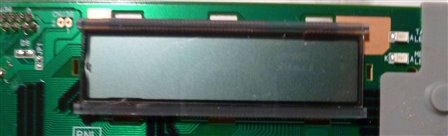
This is my screen:
image

This is the chip:

image


How do I wire them togther (they are already on PCB togther)?  How do I wire them to GPIO?


I can work off schematics and can follow very basic instructions (but can not compile software).

  • Sign in to reply
  • Cancel
Parents
  • fustini
    fustini over 13 years ago

    Check out this tutorial from Adafruit:


    http://learn.adafruit.com/drive-a-16x2-lcd-directly-with-a-raspberry-pi

    Adding a LCD to any project immediately kicks it up a notch. This tutorial explains how to connect a inexpensive HDD44780 compatible LCD to the raspberry pi using 6 GPIOs. While there are other ways to connect using I2C or the UART this is the most direct method that get right down to the bare metal.

    • Cancel
    • Vote Up 0 Vote Down
    • Sign in to reply
    • Cancel
  • wallarug
    wallarug over 13 years ago in reply to fustini

    Hey Drew,


    The problem I am having is that the Screen is already mounted on a PCB.  I don't know which pins to send to Raspberry Pi.  See the image above.


    Also, it connected to the rest of the fax machine via a 16 pin flat ribbon cable (which the socket is acessable from the rear - not pictured). 


    Can I use any of these pins to acess the display?  And is the power for the display the same as what it was connected to on the fax machine (the two pins on the top left)?

    • Cancel
    • Vote Up 0 Vote Down
    • Sign in to reply
    • Cancel
  • bodgy
    bodgy over 13 years ago in reply to wallarug

    The pins on the connector may well not be in the same order as the pins on either the 44870 chip orthe LCD itself.


    It is possible that the connector doesn't have direct connections with the LCD chips, is there another chip on the board that looks like it might be a microcontroller?


    Have you searched te internet to see if there are any schematics for the fax machine posted anywhere?


    As an example, I've attached a schematic of a Xerox printer graphic display board that I traced out, you'll see that on the connector there are more than just the connections to the graphics chips (not shown on this schematic).


    image

    Attachments:
    image
    • Cancel
    • Vote Up 0 Vote Down
    • Sign in to reply
    • Cancel
  • wallarug
    wallarug over 13 years ago in reply to bodgy

    There is a chip that one of the connectors goes to that is called: HC138.  Otherwise, the pins seem to go into the HD44780.


    I will look for a schematic later. (or if you can find one - Panasonic Panafax UF-S2)

    • Cancel
    • Vote Up 0 Vote Down
    • Sign in to reply
    • Cancel
  • wallarug
    wallarug over 13 years ago in reply to bodgy

    bodgy wrote:


    This is not a route I would take, but is possible, bear in mind not only is there a likelihood of breaking the pins, overheating the chip, plus trying to solder wires to the pins won't be easy if you are not experienced wit soldering nor have a fine tip and the correct size solder 0.6mm or less would be ideal.


    Did you not get anywhere in tracing the pins to your connector?


    The easiest thing by far would be to purchase a surplus 2 * 16 display if you cannot afford a new one.  Rockby or Oately Electronics  in Victoria and NSW respectively woul be a place to look for surplus.


    If you live in SE Qld, I might be able to personally help you with your problem.  If you are at school or university, why not see if someone there could help you trace the pins?


    Colin

    I thought of another idea, what if I desolder the ribbon connector off the board and replace with headers.  That way, I am not limited by the ribbon connector and can then plug-in the certain pins that need to be traced.


    Also, on the personal help request: I live in NSW so that might be a bit of a strech.  That's for the offer anyway.

    • Cancel
    • Vote Up 0 Vote Down
    • Sign in to reply
    • Cancel
  • wallarug
    wallarug over 13 years ago in reply to bodgy

    Here is the tracing so far:

    Attachments:
    image
    image
    • Cancel
    • Vote Up 0 Vote Down
    • Sign in to reply
    • Cancel
  • bodgy
    bodgy over 13 years ago in reply to wallarug

    That is certainly an option.

    • Cancel
    • Vote Up 0 Vote Down
    • Sign in to reply
    • Cancel
  • bodgy
    bodgy over 13 years ago in reply to wallarug

    If the HC138 has 16 pins it is a 3 -> 8 line demultiplexor. In other words it has three binary data lines as input and eight data lines out.  These are used when the designer has perhaps run out of IOs from a specific chip or to save space and components.


    As the 3 input pins are brought high (to the +v rail) in sequence they switch on an output. You can see that a high on an input actually takes an output low.


    input       output


    CBA   76543210


    000 = 11111110

    001 = 11111101

    010 = 11111011

    011 = 11110111

    100 = 11101111

    101 = 11011111

    111 = 01111111


    Assuming the 3 enable pins G1 /G2A /G2B =  100 (/x = pin works in an inverted fashion, so these two pins are taken low for an internal high or high for an internal low)

    • Cancel
    • Vote Up 0 Vote Down
    • Sign in to reply
    • Cancel
  • wallarug
    wallarug over 13 years ago in reply to bodgy

    What does this mean for me and the conector?

    • Cancel
    • Vote Up 0 Vote Down
    • Sign in to reply
    • Cancel
  • bodgy
    bodgy over 13 years ago in reply to wallarug

    It means that some of your pins may come from that chip.


    I'll look at the two images you uploaded more closely and see if there is anything of note.


    I take it as well as the images you've noted own on abit of paper the pin numbers of the connector and  what they connect to and those pin numbers.

    • Cancel
    • Vote Up 0 Vote Down
    • Sign in to reply
    • Cancel
  • wallarug
    wallarug over 13 years ago in reply to bodgy

    The only one that I have noted was: DB 7 (pin 46 on chip) goes to Pin 12.

    • Cancel
    • Vote Up 0 Vote Down
    • Sign in to reply
    • Cancel
  • rew
    rew over 13 years ago in reply to wallarug

    I hope you know that for under $10 you can get an 44780 display, "clean" in that it has the pins labeled, and you don't have to reverse engineer what does what.


    The 44780 needs 5V to operate. The raspberry pi doesn't handle that: Max 3.3V. So it's going to be a bit tricky to operate....

    • Cancel
    • Vote Up 0 Vote Down
    • Sign in to reply
    • Cancel
Reply
  • rew
    rew over 13 years ago in reply to wallarug

    I hope you know that for under $10 you can get an 44780 display, "clean" in that it has the pins labeled, and you don't have to reverse engineer what does what.


    The 44780 needs 5V to operate. The raspberry pi doesn't handle that: Max 3.3V. So it's going to be a bit tricky to operate....

    • Cancel
    • Vote Up 0 Vote Down
    • Sign in to reply
    • Cancel
Children
  • wallarug
    wallarug over 13 years ago in reply to rew

    Roger Wolff wrote:


    I hope you know that for under $10 you can get an 44780 display, "clean" in that it has the pins labeled, and you don't have to reverse engineer what does what.


    The 44780 needs 5V to operate. The raspberry pi doesn't handle that: Max 3.3V. So it's going to be a bit tricky to operate....

    I know that you can buy them...but I don't know where.  On some of the websites I have visited, they don't tell you that it is a 44780.  On others it has the Audrunio name tag attached making it more expensive.


    Apparently, the Raspberry Pi can take a 5v screen.  See:  http://learn.adafruit.com/drive-a-16x2-lcd-directly-with-a-raspberry-pi

    Where they use a Raspberry Pi and power the screen through the Raspberry Pi.

    • Cancel
    • Vote Up 0 Vote Down
    • Sign in to reply
    • Cancel
  • rew
    rew over 13 years ago in reply to wallarug

    Since you're asking: We sell them. http://www.bitwizard.nl/catalog/index.php?cPath=36

    That's a 20x4, which is more expensive than a 16x2. The 16x2 should also be in there, but I don't know where it's gone. Maybe they ran out of stock while I was on vacation.


    We're not the cheapest for the bare LCDs, but we have fancy addons that make it even easier to connect the display to the 'pi. (consider rpi_serial + spi_LCD (with LCD) + cable)

    • Cancel
    • Vote Up 0 Vote Down
    • Sign in to reply
    • Cancel
  • wallarug
    wallarug over 13 years ago in reply to rew

    I just looked at http://adafruit.com/products/181 which only costs $9.95.  I will look into this as there is an instruction guide to setting it up as well.

    http://learn.adafruit.com/drive-a-16x2-lcd-directly-with-a-raspberry-pi

    • Cancel
    • Vote Up 0 Vote Down
    • Sign in to reply
    • Cancel
  • wallarug
    wallarug over 13 years ago in reply to rew

    I just looked at http://adafruit.com/products/181 which only costs $9.95. I will look into this as there is an instruction guide to setting it up as well.

    http://learn.adafruit.com/drive-a-16x2-lcd-directly-with-a-raspberry-pi

    I just bought one of these and I am going to have a play with it when it arrives.

    • Cancel
    • Vote Up 0 Vote Down
    • Sign in to reply
    • Cancel
element14 Community

element14 is the first online community specifically for engineers. Connect with your peers and get expert answers to your questions.

  • Members
  • Learn
  • Technologies
  • Challenges & Projects
  • Products
  • Store
  • About Us
  • Feedback & Support
  • FAQs
  • Terms of Use
  • Privacy Policy
  • Legal and Copyright Notices
  • Sitemap
  • Cookies

An Avnet Company © 2026 Premier Farnell Limited. All Rights Reserved.

Premier Farnell Ltd, registered in England and Wales (no 00876412), registered office: Farnell House, Forge Lane, Leeds LS12 2NE.

ICP 备案号 10220084.

Follow element14

  • X
  • Facebook
  • linkedin
  • YouTube