element14 Community
element14 Community
    Register Log In
  • Site
  • Search
  • Log In Register
  • Community Hub
    Community Hub
    • What's New on element14
    • Feedback and Support
    • Benefits of Membership
    • Personal Blogs
    • Members Area
    • Achievement Levels
  • Learn
    Learn
    • Ask an Expert
    • eBooks
    • element14 presents
    • Learning Center
    • Tech Spotlight
    • STEM Academy
    • Webinars, Training and Events
    • Learning Groups
  • Technologies
    Technologies
    • 3D Printing
    • FPGA
    • Industrial Automation
    • Internet of Things
    • Power & Energy
    • Sensors
    • Technology Groups
  • Challenges & Projects
    Challenges & Projects
    • Design Challenges
    • element14 presents Projects
    • Project14
    • Arduino Projects
    • Raspberry Pi Projects
    • Project Groups
  • Products
    Products
    • Arduino
    • Avnet & Tria Boards Community
    • Dev Tools
    • Manufacturers
    • Multicomp Pro
    • Product Groups
    • Raspberry Pi
    • RoadTests & Reviews
  • About Us
  • Store
    Store
    • Visit Your Store
    • Choose another store...
      • Europe
      •  Austria (German)
      •  Belgium (Dutch, French)
      •  Bulgaria (Bulgarian)
      •  Czech Republic (Czech)
      •  Denmark (Danish)
      •  Estonia (Estonian)
      •  Finland (Finnish)
      •  France (French)
      •  Germany (German)
      •  Hungary (Hungarian)
      •  Ireland
      •  Israel
      •  Italy (Italian)
      •  Latvia (Latvian)
      •  
      •  Lithuania (Lithuanian)
      •  Netherlands (Dutch)
      •  Norway (Norwegian)
      •  Poland (Polish)
      •  Portugal (Portuguese)
      •  Romania (Romanian)
      •  Russia (Russian)
      •  Slovakia (Slovak)
      •  Slovenia (Slovenian)
      •  Spain (Spanish)
      •  Sweden (Swedish)
      •  Switzerland(German, French)
      •  Turkey (Turkish)
      •  United Kingdom
      • Asia Pacific
      •  Australia
      •  China
      •  Hong Kong
      •  India
      • Japan
      •  Korea (Korean)
      •  Malaysia
      •  New Zealand
      •  Philippines
      •  Singapore
      •  Taiwan
      •  Thailand (Thai)
      • Vietnam
      • Americas
      •  Brazil (Portuguese)
      •  Canada
      •  Mexico (Spanish)
      •  United States
      Can't find the country/region you're looking for? Visit our export site or find a local distributor.
  • Translate
  • Profile
  • Settings
Raspberry Pi
  • Products
  • More
Raspberry Pi
Raspberry Pi Forum How to control an RC car's remote with Raspberry Pi
  • Blog
  • Forum
  • Documents
  • Quiz
  • Events
  • Polls
  • Files
  • Members
  • Mentions
  • Sub-Groups
  • Tags
  • More
  • Cancel
  • New
Join Raspberry Pi to participate - click to join for free!
Featured Articles
Announcing Pi
Technical Specifications
Raspberry Pi FAQs
Win a Pi
Raspberry Pi Wishlist
Actions
  • Share
  • More
  • Cancel
Forum Thread Details
  • Replies 5 replies
  • Subscribers 675 subscribers
  • Views 2007 views
  • Users 0 members are here
  • raspberry
  • pi
  • raspberry_pi
  • raspberrypi
  • rpi
Related

How to control an RC car's remote with Raspberry Pi

Former Member
Former Member over 13 years ago

I was wondering if anyone could help with direction on making my idea a reality. I would like to wire the remote control of an RC car to the GPIO pins of the Raspberry Pi. I just do not know how to "make the connection" between the GPIOs on the Raspberry Pi and the remote's switches that drive the car. Ultimately, I was thinking that I could easily drive the Raspberry Pi around on this RC car, if I could activate it's switches.


image


To start, I only want to send one signal from one of the GPIO pins, and make one track go one direction (to make things easy). To help understand I've snapped some pictures and took a reading.  The remote, after taking it apart looks like this on the top:


image


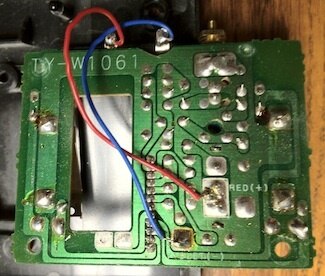
And this on the bottom:


image


When I have it on, and place the voltmeter on it, I get a reading of 4.36 volts:


image


So my thought is that I should have something between the GPIO pins on the Raspberry Pi, and the J1-J4 headers on the remote's board. The remote control itself uses a 9V battery. Should I use transistors to convert the 3.3V signals from the Raspberry Pi to try and match the 4.36V that is running across the remote's switches?


For what it's worth, it seems like more fun to control the remote of the unit, rather than the RC car itself. Also could be done with items like wall outlet remote controls: http://www.newegg.com/Product/Product.aspx?Item=N82E16812820011.


Thanks in advance for anyone's thoughts or help. You can see my previous work with the Raspberry Pi here to get an understanding of where I'm at with this type of stuff... its nothing ground breaking, but I've been enjoying it: http://karlherrick.com/dev/category/raspberry-pi/

  • Sign in to reply
  • Cancel
Parents
  • johnbeetem
    johnbeetem over 13 years ago

    First, you might get more replies to this question if you post it in the Raspberry Pi group, or move it there: http://www.element14.com/community/groups/raspberry-pi.


    When I'm trying to do something like this, I generally try to extract a schematic of the circuit board I'm trying to adapt.  It looks to me like your remote has four switches, where pressing a switch connects J1-J4 to a common signal, which is probably ground or the negative terminal of the 9V battery.  If that's the case, RasPi can drive NPN or NMOS transistors which act as surrogates for the switches.  If the common signal is ground, you only need to pull down to ground and you don't need to worry about generating 4.36V.  Use the multimeter to measure the current between the common signal and J1-J4 to see how big a transistor you need.


    There's a good description of RasPi GPIOs at the RasPi Hardware Wiki: http://elinux.org/RPi_Low-level_peripherals.

    • Cancel
    • Vote Up 0 Vote Down
    • Sign in to reply
    • Cancel
Reply
  • johnbeetem
    johnbeetem over 13 years ago

    First, you might get more replies to this question if you post it in the Raspberry Pi group, or move it there: http://www.element14.com/community/groups/raspberry-pi.


    When I'm trying to do something like this, I generally try to extract a schematic of the circuit board I'm trying to adapt.  It looks to me like your remote has four switches, where pressing a switch connects J1-J4 to a common signal, which is probably ground or the negative terminal of the 9V battery.  If that's the case, RasPi can drive NPN or NMOS transistors which act as surrogates for the switches.  If the common signal is ground, you only need to pull down to ground and you don't need to worry about generating 4.36V.  Use the multimeter to measure the current between the common signal and J1-J4 to see how big a transistor you need.


    There's a good description of RasPi GPIOs at the RasPi Hardware Wiki: http://elinux.org/RPi_Low-level_peripherals.

    • Cancel
    • Vote Up 0 Vote Down
    • Sign in to reply
    • Cancel
Children
  • Former Member
    Former Member over 13 years ago in reply to johnbeetem

    Thanks John, I appreciate the lead, and have also moved the question to the Raspberry Pi group.


    Use the multimeter to measure the current between the common signal and J1-J4 to see how big a transistor you need.


    Do you know the best way for me to figure out what the common signal is, whether it is ground or the negative terminal of the 9V battery?


    If the common signal is ground, you only need to pull down to ground and you don't need to worry about generating 4.36V.  Use the multimeter to measure the current between the common signal and J1-J4 to see how big a transistor you need.


    If the common signal is the negative terminal of the battery... based on what you  said previously then, I think I would need to generate 4.36V for it to work properly. Does that sound right? I'd like to complete the next step as you suggested. Maybe its easier than I am making it out to be? :-|


    Thanks again for your help.

    • Cancel
    • Vote Up 0 Vote Down
    • Sign in to reply
    • Cancel
  • johnbeetem
    johnbeetem over 13 years ago in reply to Former Member

    Looking at your photos, it looks like the blue wire is the common ground and goes to the negative battery terminal.  It looks like the red wire is +V (it's labeled "RED(+)" on the PC board) and probably goes to the positive battery terminal.  You can verify this by looking at how the 9V battery snaps in.  The battery's terminals are labeled + and -, so you can see which wire corresponds to + and -.


    To check how things are connected together on a PC board, put your multimeter on its most sensitive Ohmmeter setting (usually 200 Ohms) and make sure your PC board power is OFF -- take out the battery.  Then press the probes onto two points you think might be connected.  If there is a conduction path between them, the Ohmmeter shows the resistance.  For a wire or PCB trace, the resistance should be near 0 Ohms.  There is some resistance in the probe leads, so touch the probe tips to each other and see what that reads.  Usually it's between 0.3 Ohms and 0.5 Ohms.  You need to subtract that when you measure resistances on the PC board.  Also, you may need to scratch flux off a PCB location to make good contact.


    So put one probe at the blue wire terminal where it would connect to the battery.  See if it's really connected S-shape springs that are used as switches.  If they connect, you're in great shape because you can just use NPN or NMOS transistors to act as surrogate switches.


    I did a search at the front page of www.raspberrypi.org by entering "drive the base of NPN" in the Google search box.  Here are two useful forum threads that relate to your situation:


    http://www.raspberrypi.org/phpBB3/viewtopic.php?f=42&t=10105


    http://www.raspberrypi.org/phpBB3/viewtopic.php?f=37&t=14624


    One of these threads has a link to this page: http://www.susa.net/wordpress/2012/06/raspberry-pi-relay-using-gpio/


    It shows how to use RasPi to drive a small relay.  There is a schematic diagram that shows using a 1K resistor R1 and an NPN transistor Q1 along with other components.  In your case, you should only need R1 and Q1 for each of your four switches.  The flyback diode D1 is only needed for an inductive load like a motor or speaker.  Also, you won't be using RasPi's 5V or 3.3V.  You only need the transistors to pull down -- the pull-up circuit is on the remote control's PC board.


    But first check that the common ground is indeed the negative battery terminal so you can use NPN transistors.  Then, with the power on, activate one of your switches by using your multimeter as an ammeter.  This will tell you how much current has to go through the transistor.  If it's less than 30 mA (and the ground is the battery negative terminal) you should be able to use the R1 + Q1 circuit.

    • Cancel
    • Vote Up 0 Vote Down
    • Sign in to reply
    • Cancel
  • johnbeetem
    johnbeetem over 13 years ago in reply to johnbeetem

    Addendum -- one thing you need to check is RasPi's start-up behavior.  I suspect that all GPIOs except for UART are configured as inputs -- that's pretty standard since it's safest.  But I don't know if any of the GPIO internal pull-ups are enabled.  I've read that these are about 60K Ohms.  If they are enabled, you could get a small current into the NPN transistor's base which might be enough to switch it on if it's a sensitive transistor.  One way to prevent this is to add a 4.7K Ohm pull-down at the input of R1 so that the pull-up can't pull R1 high enough to switch on the NPN transistor.  Such a resistor is also a good idea if you're using an NMOS FET in place of NPN transistor Q1.

    • Cancel
    • Vote Up 0 Vote Down
    • Sign in to reply
    • Cancel
element14 Community

element14 is the first online community specifically for engineers. Connect with your peers and get expert answers to your questions.

  • Members
  • Learn
  • Technologies
  • Challenges & Projects
  • Products
  • Store
  • About Us
  • Feedback & Support
  • FAQs
  • Terms of Use
  • Privacy Policy
  • Legal and Copyright Notices
  • Sitemap
  • Cookies

An Avnet Company © 2025 Premier Farnell Limited. All Rights Reserved.

Premier Farnell Ltd, registered in England and Wales (no 00876412), registered office: Farnell House, Forge Lane, Leeds LS12 2NE.

ICP 备案号 10220084.

Follow element14

  • X
  • Facebook
  • linkedin
  • YouTube