element14 Community
element14 Community
    Register Log In
  • Site
  • Search
  • Log In Register
  • Community Hub
    Community Hub
    • What's New on element14
    • Feedback and Support
    • Benefits of Membership
    • Personal Blogs
    • Members Area
    • Achievement Levels
  • Learn
    Learn
    • Ask an Expert
    • eBooks
    • element14 presents
    • Learning Center
    • Tech Spotlight
    • STEM Academy
    • Webinars, Training and Events
    • Learning Groups
  • Technologies
    Technologies
    • 3D Printing
    • FPGA
    • Industrial Automation
    • Internet of Things
    • Power & Energy
    • Sensors
    • Technology Groups
  • Challenges & Projects
    Challenges & Projects
    • Design Challenges
    • element14 presents Projects
    • Project14
    • Arduino Projects
    • Raspberry Pi Projects
    • Project Groups
  • Products
    Products
    • Arduino
    • Avnet & Tria Boards Community
    • Dev Tools
    • Manufacturers
    • Multicomp Pro
    • Product Groups
    • Raspberry Pi
    • RoadTests & Reviews
  • About Us
  • Store
    Store
    • Visit Your Store
    • Choose another store...
      • Europe
      •  Austria (German)
      •  Belgium (Dutch, French)
      •  Bulgaria (Bulgarian)
      •  Czech Republic (Czech)
      •  Denmark (Danish)
      •  Estonia (Estonian)
      •  Finland (Finnish)
      •  France (French)
      •  Germany (German)
      •  Hungary (Hungarian)
      •  Ireland
      •  Israel
      •  Italy (Italian)
      •  Latvia (Latvian)
      •  
      •  Lithuania (Lithuanian)
      •  Netherlands (Dutch)
      •  Norway (Norwegian)
      •  Poland (Polish)
      •  Portugal (Portuguese)
      •  Romania (Romanian)
      •  Russia (Russian)
      •  Slovakia (Slovak)
      •  Slovenia (Slovenian)
      •  Spain (Spanish)
      •  Sweden (Swedish)
      •  Switzerland(German, French)
      •  Turkey (Turkish)
      •  United Kingdom
      • Asia Pacific
      •  Australia
      •  China
      •  Hong Kong
      •  India
      • Japan
      •  Korea (Korean)
      •  Malaysia
      •  New Zealand
      •  Philippines
      •  Singapore
      •  Taiwan
      •  Thailand (Thai)
      • Vietnam
      • Americas
      •  Brazil (Portuguese)
      •  Canada
      •  Mexico (Spanish)
      •  United States
      Can't find the country/region you're looking for? Visit our export site or find a local distributor.
  • Translate
  • Profile
  • Settings
Raspberry Pi
  • Products
  • More
Raspberry Pi
Raspberry Pi Forum Cirrus Logic - RPI 2 FFT on streaming audio
  • Blog
  • Forum
  • Documents
  • Quiz
  • Events
  • Polls
  • Files
  • Members
  • Mentions
  • Sub-Groups
  • Tags
  • More
  • Cancel
  • New
Join Raspberry Pi to participate - click to join for free!
Featured Articles
Announcing Pi
Technical Specifications
Raspberry Pi FAQs
Win a Pi
Raspberry Pi Wishlist
Actions
  • Share
  • More
  • Cancel
Forum Thread Details
  • State Suggested Answer
  • Replies 14 replies
  • Answers 2 answers
  • Subscribers 676 subscribers
  • Views 1723 views
  • Users 0 members are here
  • wolfson
  • logic
  • raspberry
  • python
  • audio
  • pi
  • cirrus
  • 2
  • raspberry_pi
  • fft
  • raspeberry_pi_accessories
  • card
Related

Cirrus Logic - RPI 2 FFT on streaming audio

Former Member
Former Member over 10 years ago

Hi everyone,

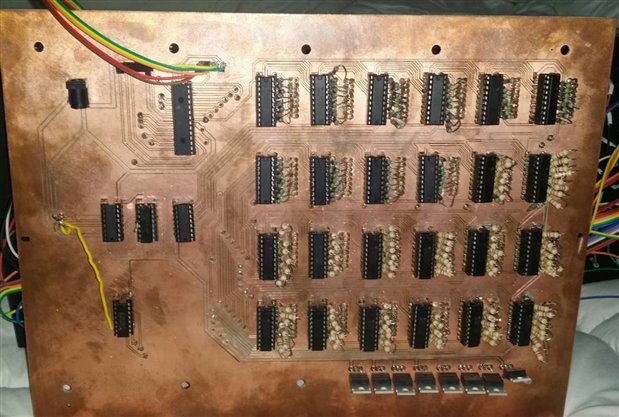
My current project is to run constant FFT on an audio stream and output the data to a 3D LED Array. Google 3D LED cubes if you don't know what they are. My cube is more of a rectangular prism, 24x8x8=1536 LED's. I am new to the world of PI and have found the support for the cirrus logic card to be vague, if it wasn't for ppl like ragnar.jensen I'd probably still be stuck (thanks for all the information you've shared).


Anyway, currently I am recording 1 second of audio after a 1 second delay. So it takes 2 seconds to get the data / audio.


I then perform the FFT on 16384 samples. But this is only 1/3 of the 44000 raw audio samples recorded in the 1 second interval. I then group the frequencies into bands and then scale the amplitudes of those bands into a single byte which represents the bands power. The result of each FFT is 24 bytes, one byte for each band. All this takes 0.1 second.@@@@@


It then takes 0.004 seconds to send that data to my PIC, which I had to bit bang through the GPIO's since I couldn't get I2C or UART working.


The LED array takes the data and displays the 24x8 bits on the front row, when it receives the next group of data the front row shifts back one row. The LED array displays 3 dimensions, time (each group of data), frequencies and amplitude.


Question:

In the arecord command, I would like to erase the delay or change it to 0 seconds and change the minimum record length so I can stream the data at a faster rate to the LED array. Does anybody know how????


Answering this would result in a real time graphics equalizer on live audio and a more fluent transition between groups of data (more like a wave travelling away from you).


If anybody has an idea on how to achieve this please reply, or share your thoughts.

  • Sign in to reply
  • Cancel
Parents
  • Former Member
    0 Former Member over 10 years ago

    import numpy as np

    import wave

    import struct

    import os

    from struct import unpack

    import time

    import RPi.GPIO as GPIO

    GPIO.setmode(GPIO.BCM)

    GPIO.setwarnings(False)

    import smbus

    import time


    bus = smbus.SMBus(1)

    address = 0x40

    mode = 0x00


    def sendbyte(txbyte):

        CLK = 5

        OUT = 6

        NEXT = 25

        GPIO.setup(CLK,GPIO.OUT)

        GPIO.setup(OUT,GPIO.OUT)

        GPIO.setup(NEXT,GPIO.IN)


        number = 1

        for i in range (1,9):                   #for bits 1 to 8, send bit values


            if txbyte &number != 0:             #if txbyte bit = 1, data line = 1

                GPIO.output(OUT, 1)

                #print "1 %s" %(number)

            else:                               #else data line = 0

                GPIO.output(OUT, 0)

                #print "0 %s" %(number)


            while GPIO.input(NEXT) == 0:        #wait for pic to say its ready for data

                time.sleep(0.0000005)                #sleep for 0.5 microsecond


            GPIO.output(CLK, 1)                #raise the clk edge indicating data is valid


            while GPIO.input(NEXT) == 1:        #wait for pic to say it is not ready

                time.sleep(0.0000005)                #sleep for 0.5 usec

            GPIO.output(CLK, 0)

            number = number*2                   #change to the next bit


        GPIO.output(OUT, 0)                     #lower the data line as byte tx has ended


    os.system("bash /home/pi/Desktop/Code/Reset_paths.sh")

    #os.system("bash /home/pi/Desktop/Code/Record_from_DMIC.sh")

    os.system("bash /home/pi/Desktop/Code/Record_from_lineIn.sh")

    audiolr = []

    index = 0

    #frequency bandwidths for display                               

    bw = [7,9,13,19,27,37,51,69,99,139,189,249,319,419,519,699,899,1099,1399,1899,2499,3199,4099,3200]

    #number of values in each band - divisible factor

    band = [7,3,3,6,6,11,14,20,26,37,52,70,193,119,156,193,261,334,409,520,705,929,1186,1528]

    #frequency center of bandwidths

    freq = [10,24,32,45,62,85,118,163,224,310,430,595,815,1100,1470,1940,2550,3350,4350,5600,7250,9500,12300,15950]


    subindex = 0


    for i in range(0,16384):

        audiolr.append(0)


    freqoutput = []

    for i in range(0,24):

        freqoutput.append(0)


    while True:

        startt = time.time()

        os.system("aplay -vv /home/pi/Desktop/Code/Song.wav")

        os.system("arecord -f cd -c2 -D hw:sndrpiwsp -d 1 Song.wav")


        wavfile = wave.open("/home/pi/Desktop/Code/Song.wav",'r')

        paramet = wavfile.getparams()


        wavfile.setpos(27100)

        wavedata = wavfile.readframes(16384)

        audio = struct.unpack("<32768h",wavedata)

        i = 0

        index = 0

        for i in range(0,32768,2):

            audiolr[index] = audio[i] +audio[i+1]

            index += 1


        complexfreq = np.fft.fft(audiolr[0:16384])


        print len(audiolr)

        f = [0,0,0,0,0,0,0,0,0,0,0,0,0,0,0,0,0,0,0,0,0,0,0,0]


        start = 1

        stop = 8


        for index in range(0,24):

            for subindex in range(start,stop):

                f[index] = f[index] + abs(complexfreq[subindex])

            f[index] = (f[index]/32768)/band[index]

            #print "%s, Fc=%sHz,    BW-%sHz,     power %s" %(index+1, freq[index], bw[index], f[index])

            start = stop+1

            stop = stop + band[index]


        for index in range(0,24):

            if f[index]>32:

                freqoutput[index]=255

            elif f[index]>16:

                freqoutput[index]=127

            elif f[index]>8:

                freqoutput[index]=63

            elif f[index]>4:

                freqoutput[index]=31

            elif f[index]>2:

                freqoutput[index]=15

            elif f[index]>1:

                freqoutput[index]=7

            elif f[index]>0.5:

                freqoutput[index]=3

            elif f[index]>0.25:

                freqoutput[index]=1

            else:

                freqoutput[index]=0

            sendbyte(freqoutput[index])

        for index in range(0,24):

            print "%s, Fc=%sHz has a power of %s, Equalizer Level = %s     BW=%sHz" %(index+1, freq[index], f[index],freqoutput[index], bw[index])

        print (time.time()-startt)

    • Cancel
    • Vote Up 0 Vote Down
    • Sign in to reply
    • Verify Answer
    • Cancel
  • Former Member
    0 Former Member over 10 years ago in reply to Former Member

    image

    • Cancel
    • Vote Up 0 Vote Down
    • Sign in to reply
    • Verify Answer
    • Cancel
Reply
  • Former Member
    0 Former Member over 10 years ago in reply to Former Member

    image

    • Cancel
    • Vote Up 0 Vote Down
    • Sign in to reply
    • Verify Answer
    • Cancel
Children
No Data
element14 Community

element14 is the first online community specifically for engineers. Connect with your peers and get expert answers to your questions.

  • Members
  • Learn
  • Technologies
  • Challenges & Projects
  • Products
  • Store
  • About Us
  • Feedback & Support
  • FAQs
  • Terms of Use
  • Privacy Policy
  • Legal and Copyright Notices
  • Sitemap
  • Cookies

An Avnet Company © 2025 Premier Farnell Limited. All Rights Reserved.

Premier Farnell Ltd, registered in England and Wales (no 00876412), registered office: Farnell House, Forge Lane, Leeds LS12 2NE.

ICP 备案号 10220084.

Follow element14

  • X
  • Facebook
  • linkedin
  • YouTube