element14 Community
element14 Community
    Register Log In
  • Site
  • Search
  • Log In Register
  • Community Hub
    Community Hub
    • What's New on element14
    • Feedback and Support
    • Benefits of Membership
    • Personal Blogs
    • Members Area
    • Achievement Levels
  • Learn
    Learn
    • Ask an Expert
    • eBooks
    • element14 presents
    • Learning Center
    • Tech Spotlight
    • STEM Academy
    • Webinars, Training and Events
    • Learning Groups
  • Technologies
    Technologies
    • 3D Printing
    • FPGA
    • Industrial Automation
    • Internet of Things
    • Power & Energy
    • Sensors
    • Technology Groups
  • Challenges & Projects
    Challenges & Projects
    • Design Challenges
    • element14 presents Projects
    • Project14
    • Arduino Projects
    • Raspberry Pi Projects
    • Project Groups
  • Products
    Products
    • Arduino
    • Avnet & Tria Boards Community
    • Dev Tools
    • Manufacturers
    • Multicomp Pro
    • Product Groups
    • Raspberry Pi
    • RoadTests & Reviews
  • About Us
  • Store
    Store
    • Visit Your Store
    • Choose another store...
      • Europe
      •  Austria (German)
      •  Belgium (Dutch, French)
      •  Bulgaria (Bulgarian)
      •  Czech Republic (Czech)
      •  Denmark (Danish)
      •  Estonia (Estonian)
      •  Finland (Finnish)
      •  France (French)
      •  Germany (German)
      •  Hungary (Hungarian)
      •  Ireland
      •  Israel
      •  Italy (Italian)
      •  Latvia (Latvian)
      •  
      •  Lithuania (Lithuanian)
      •  Netherlands (Dutch)
      •  Norway (Norwegian)
      •  Poland (Polish)
      •  Portugal (Portuguese)
      •  Romania (Romanian)
      •  Russia (Russian)
      •  Slovakia (Slovak)
      •  Slovenia (Slovenian)
      •  Spain (Spanish)
      •  Sweden (Swedish)
      •  Switzerland(German, French)
      •  Turkey (Turkish)
      •  United Kingdom
      • Asia Pacific
      •  Australia
      •  China
      •  Hong Kong
      •  India
      • Japan
      •  Korea (Korean)
      •  Malaysia
      •  New Zealand
      •  Philippines
      •  Singapore
      •  Taiwan
      •  Thailand (Thai)
      • Vietnam
      • Americas
      •  Brazil (Portuguese)
      •  Canada
      •  Mexico (Spanish)
      •  United States
      Can't find the country/region you're looking for? Visit our export site or find a local distributor.
  • Translate
  • Profile
  • Settings
Raspberry Pi
  • Products
  • More
Raspberry Pi
Raspberry Pi Forum Strange screen artifact
  • Blog
  • Forum
  • Documents
  • Quiz
  • Events
  • Polls
  • Files
  • Members
  • Mentions
  • Sub-Groups
  • Tags
  • More
  • Cancel
  • New
Join Raspberry Pi to participate - click to join for free!
Featured Articles
Announcing Pi
Technical Specifications
Raspberry Pi FAQs
Win a Pi
Raspberry Pi Wishlist
Actions
  • Share
  • More
  • Cancel
Forum Thread Details
  • State Verified Answer
  • Replies 22 replies
  • Subscribers 680 subscribers
  • Views 2905 views
  • Users 0 members are here
  • raspberrypi
Related

Strange screen artifact

Former Member
Former Member over 10 years ago

Hi,

I have 3 Pies

#1  1x Model B with 2 USB ports

#2  1x Model B+ with 4 USB ports

#4  1x Pi2  (there is only one model, right?)


I have used all 3 to run Openelec.

#1 works perfectly

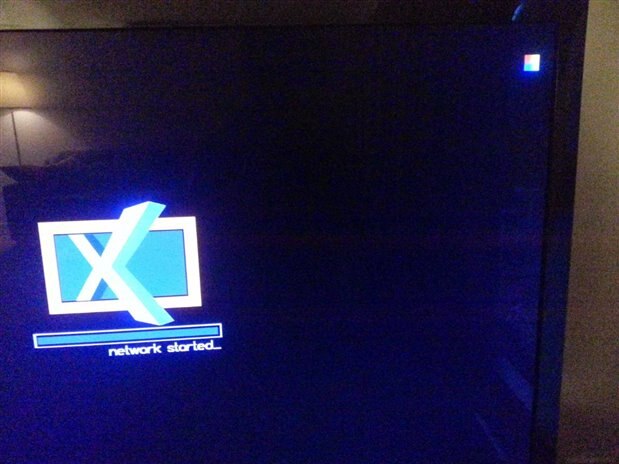
#2 and #3 also run openelec but they both show an artifact on the top right-hand corner. It seems to be a miniature version of the colour screen that is shown right after the Pi wakes up but before it runs an OS.


Has anyone else seen this????


Cheers,

Nick

image


image


image

  • Sign in to reply
  • Cancel
Parents
  • Former Member
    0 Former Member over 10 years ago

    It's a low-power warning. It shows up when the 5V supply goes below 4.65 if I remember correctly.

    http://www.raspberrypi.org/forums/viewtopic.php?f=29&t=82373


    --

    Ragnar

    • Cancel
    • Vote Up +2 Vote Down
    • Sign in to reply
    • Reject Answer
    • Cancel
  • Former Member
    0 Former Member over 10 years ago in reply to Former Member

    Thank you very much Ragnar!!!!!

    That's exactly what was happening.


    I've had issues many years ago with crappy USB leads, so I started buying one at a time from different ebay vendors until I found one that had cables that could carry 2,000 mA and then I bought a dozen or more from him, tested them each and gave most of them to my friends who were complaining about slow charging times.

    (I also bought a bunch for myself)


    So, when I saw your message, I collected a few of my 5V, 2,000mA power packs and tested them (as well as 2 different cables) with the Pi2.

    Voila!!!


    One substandard cable in the bin later and the Pi is happy.


    Thanks again,

    Nick

    • Cancel
    • Vote Up +1 Vote Down
    • Sign in to reply
    • Verify Answer
    • Cancel
  • Former Member
    0 Former Member over 10 years ago in reply to Former Member

    Glad you got it sorted! image

    --

    Ragnar

    • Cancel
    • Vote Up 0 Vote Down
    • Sign in to reply
    • Verify Answer
    • Cancel
  • royleith
    0 royleith over 10 years ago in reply to Former Member

    @ Nick


    I don't think it is as simple as low capacity power supplies or poor USB leads. In fact, I think the leads either work or don't work. I don't think they have much chance of going high enough resistance at the sorts of current taken by the Pi to stop it working correctly.


    Anyway, here's my practical experience. I was getting freezes and a loss of USB with my Pi2 and found that transferring the mouse/keyboard and wifi dongles to a hub powered from the same dual USB PSU as the Pi, solved the problem. I had noticed the rainbow square at times, but not related it to power.


    Recently, I decided to try the dongles plugged straight into the Pi and it was fine. The reason was that the (cheapo)  hub supplied power over its USB ports as long as the power was connected and that fed back to the Pi and supplemented the 5V rail. It also lights the red LED even if the Pi is not powered up.


    I unplugged the hub from the Pi and rebooted. It worked well, but every time it communicated over the wifi dongle (a very cheap, very short device that probably has to work at full power) the warning rainbow square faded in and out.


    The key points are,


         1) The hub and the Pi are getting power from the same PSU and so it is not a problem with the power supply lowering the 5V rail under load.

         2) It is unlikely to be a high resistance power lead. I just don't accept that two leads in parallel solve the problem.


    The most likely problem is that the internal power arrangements for the Pi are not able to supply the peaks of load from the cheap wifi dongle. It's well known that Wifi is a significant drain of mobile device power, but it will take a bit of pfaffing about with USB PCB sockets and soldered wiring to find out how much this particular dongle is drawing. I may try with an up-market, slightly longer dongle to see if it draws less power, but that needs the IP blacklist on my router to be modified so I am in no rush.

    • Cancel
    • Vote Up 0 Vote Down
    • Sign in to reply
    • Verify Answer
    • Cancel
  • Former Member
    0 Former Member over 10 years ago in reply to royleith

    Hi Roy,

    Thanks for the information!


    Alas, in my case, I have actually found USB leads in the past that vary a lot, as far as how much current they can carry. (This was done as part of a phone-charging issue....)

    It took me a while to find ones that could carry (very close to ) 2A.


    In the case of my Pi, replacing the lead and 5V supply helped fix the rainbow problem. I noticed that just changing the cable made the rainbow appear for a while, fade away, come back and so on....indicating brief outages, as opposed to consistent low-voltage. Once I also changed the PS fixed, it all went away.


    I am using a wired-LAN connection, instead of WiFi, so that is not causing me any issues.


    If this Pi was used in a critical application, I'd have looked for a nice, regulated 5V supply but, since it is only used as a media center and it works reliably, I'll keep using the little powerpack I have,

    I've got a lot on at the moment, developing software for paying clients, so my hardware itch of getting the multimeter out and measuring resistance in various USB cables, as well as output voltages from the various powerpacks, has been put on hold!


    Thanks again,

    Nick

    • Cancel
    • Vote Up 0 Vote Down
    • Sign in to reply
    • Verify Answer
    • Cancel
Reply
  • Former Member
    0 Former Member over 10 years ago in reply to royleith

    Hi Roy,

    Thanks for the information!


    Alas, in my case, I have actually found USB leads in the past that vary a lot, as far as how much current they can carry. (This was done as part of a phone-charging issue....)

    It took me a while to find ones that could carry (very close to ) 2A.


    In the case of my Pi, replacing the lead and 5V supply helped fix the rainbow problem. I noticed that just changing the cable made the rainbow appear for a while, fade away, come back and so on....indicating brief outages, as opposed to consistent low-voltage. Once I also changed the PS fixed, it all went away.


    I am using a wired-LAN connection, instead of WiFi, so that is not causing me any issues.


    If this Pi was used in a critical application, I'd have looked for a nice, regulated 5V supply but, since it is only used as a media center and it works reliably, I'll keep using the little powerpack I have,

    I've got a lot on at the moment, developing software for paying clients, so my hardware itch of getting the multimeter out and measuring resistance in various USB cables, as well as output voltages from the various powerpacks, has been put on hold!


    Thanks again,

    Nick

    • Cancel
    • Vote Up 0 Vote Down
    • Sign in to reply
    • Verify Answer
    • Cancel
Children
  • gdstew
    0 gdstew over 10 years ago in reply to Former Member

    If you look carefully at USB cables you will find that they are marked with the gauge of wire they use. Although they vary slightly it is usually in the form of something like: 28AWGx1P+26AWGx2C.

    This means they are using 28 AWG wire for the data connections ( 1 pair) and 26 AWG wire for the power pins. One thing I have noticed, and it seems to be fairly consistent is that longer cables (2 m)

    tend to use smaller gauge wire (30AWGx1P+28AWGx2C is typical) than shorter (0.5 m) ones. This means that shorter cables have two obvious advantages when they are used for providing power, they

    use larger wire which can handle more current, and they have less resistance because they are shorter.

    • Cancel
    • Vote Up +1 Vote Down
    • Sign in to reply
    • Verify Answer
    • Cancel
  • Robert Peter Oakes
    0 Robert Peter Oakes over 10 years ago in reply to gdstew

    I have found in my investigation and as published in my post that most cables don’t even bother to mention what the wire gauge is, these ones tend to be the under rated ones


    I found the best way to get a good cable is to use a USB “A” type connector and replace the end with the micro connector of choice, these older cables have proven so far to consistently have better gauge wiring in them


    A point of interest is the typical resistance and current rating of the popular gauges


    This is from the American Wire Gauge Standards + some math of my own


    1Amp Load


    Current


    1ft USB Cable


    1M USB Cable


    6ft USB Cable


    AWG


    Ohm/M


    Ohm/Ft


    Chassis


    Transmission


    V Drop


    LOAD Volts


    V Drop


    LOAD Volts


    V Drop


    LOAD Volts


    22


    0.05296


    0.01614


    7


    0.92


    0.03228


    4.96772


    0.10592


    4.89408


    0.19368


    4.80632


    24


    0.08422


    0.02567


    3.5


    0.577


    0.05134


    4.94866


    0.16844


    4.83156


    0.30804


    4.69196


    26


    0.1339


    0.04081


    2.2


    0.361


    0.08162


    4.91838


    0.2678


    4.7322


    0.48972


    4.51028


    28


    0.2129


    0.0649


    1.4


    0.226


    0.1298


    4.8702


    0.4258


    4.5742


    0.7788


    4.2212


    32


    0.5383


    0.1641


    0.53


    0.091


    0.3282


    4.6718


    1.0766


    3.9234


    1.9692


    3.0308


    For a 2A Load there are no 6 foot cables that are suitable


    Current


    1ft USB Cable


    1M USB Cable


    6ft USB Cable


    AWG


    Ohm/M


    Ohm/Ft


    Chassis


    Transmission


    V Drop


    LOAD Volts


    V Drop


    LOAD Volts


    V Drop


    LOAD Volts


    22


    0.05296


    0.01614


    7


    0.92


    0.06456


    4.93544


    0.21184


    4.78816


    0.38736


    4.61264


    24


    0.08422


    0.02567


    3.5


    0.577


    0.10268


    4.89732


    0.33688


    4.66312


    0.61608


    4.38392


    26


    0.1339


    0.04081


    2.2


    0.361


    0.16324


    4.83676


    0.5356


    4.4644


    0.97944


    4.02056


    28


    0.2129


    0.0649


    1.4


    0.226


    0.2596


    4.7404


    0.8516


    4.1484


    1.5576


    3.4424


    32


    0.5383


    0.1641


    0.53


    0.091


    0.6564


    4.3436


    2.1532


    2.8468


    3.9384


    1.0616


    And this assumes the cable is truly as advertised and of good quality, some I have inspected have shown severe corrosion on the wires inside, sometimes not tined or thinner that advertised


    One other point to note too is that if your run the wire close or above its rating it WILL become warm and its resistance WILL increase further


    ONE REALLY INTERESTING POINT IS THAT NON OF THESE ARE RATED ABOVE AN AMP FOR TRANSMISSION LINE WHICH IS WHAT A USB CABLE IS.


    Hope this helps clarify the situation for everyone


    Btw, the math is correct, if our thinking the volts drop is too much, you probably forgot that there are two wires involved, one out and one back so the drop is doubled for the USB values.

    • Cancel
    • Vote Up 0 Vote Down
    • Sign in to reply
    • Verify Answer
    • Cancel
  • gdstew
    0 gdstew over 10 years ago in reply to Robert Peter Oakes

    Twenty eight USB cables I have are marked. There were two clear insulation/shielded cables which were supplied with USB peripherals I bought that are not

    marked. I believe in the US at least that the wire gauge and voltage ratings (this is on all of the marked cables also) must be on the cables for regulatory approval.


    All of the cables I purchased were bought on the Internet from reputable companies in the US although most (all?) were made in China.

    • Cancel
    • Vote Up 0 Vote Down
    • Sign in to reply
    • Verify Answer
    • Cancel
  • Problemchild
    0 Problemchild over 10 years ago in reply to Robert Peter Oakes

    Only thing I could say here Peter is any one who had the parts and to some extent the skills to solder that horrid micro USB connector  probably wont be  asking the question.

    You are right though that a bit of decent copper sorts out many problems on the RPI especially the older ones!

    • Cancel
    • Vote Up 0 Vote Down
    • Sign in to reply
    • Verify Answer
    • Cancel
  • Robert Peter Oakes
    0 Robert Peter Oakes over 10 years ago in reply to Problemchild

    While that is true, what I have done on occasion it cut the last inch from the crappy cable (Including the connector) and soldering it to the end of the good cable replacing the big connector. (I did not have any wire able connectors to use)


    1” of crappy wire on 6’ of excellent wire is way better than 6’ of crappy wire.


    I scanned many of the cables on the E14 sire and many of the ones there do not advertise their AWG so there is no way of knowing before you buy. This does not mean their crappy, just you have no way of knowing


    Peter

    • Cancel
    • Vote Up 0 Vote Down
    • Sign in to reply
    • Verify Answer
    • Cancel
  • Problemchild
    0 Problemchild over 10 years ago in reply to Robert Peter Oakes

    I was figuring that was what you were intending since wireable  micro USBs are just about as rare as unicorns for general high street use. Even so you need to do a reasonable job not to end up with 3 crap bits of wire image

    • Cancel
    • Vote Up 0 Vote Down
    • Sign in to reply
    • Verify Answer
    • Cancel
  • Robert Peter Oakes
    0 Robert Peter Oakes over 10 years ago in reply to Problemchild

    True but I am able to do that (Most of the time image )

    • Cancel
    • Vote Up 0 Vote Down
    • Sign in to reply
    • Verify Answer
    • Cancel
  • johnbeetem
    0 johnbeetem over 10 years ago in reply to Problemchild

    John Alexander wrote:


    Only thing I could say here Peter is any one who had the parts and to some extent the skills to solder that horrid micro USB connector  probably wont be  asking the question.

    Adafruit has a nice DIY Micro USB plug: http://www.adafruit.com/product/1390

    I haven't tried it yet, but it looks a lot easier to solder than normal Micro USB plugs.

    • Cancel
    • Vote Up 0 Vote Down
    • Sign in to reply
    • Verify Answer
    • Cancel
  • mcb1
    0 mcb1 over 10 years ago in reply to johnbeetem

    johnbeetem

    John

    Nice find, I'll have to add some to my next order.


    Mark

    • Cancel
    • Vote Up 0 Vote Down
    • Sign in to reply
    • Verify Answer
    • Cancel
element14 Community

element14 is the first online community specifically for engineers. Connect with your peers and get expert answers to your questions.

  • Members
  • Learn
  • Technologies
  • Challenges & Projects
  • Products
  • Store
  • About Us
  • Feedback & Support
  • FAQs
  • Terms of Use
  • Privacy Policy
  • Legal and Copyright Notices
  • Sitemap
  • Cookies

An Avnet Company © 2025 Premier Farnell Limited. All Rights Reserved.

Premier Farnell Ltd, registered in England and Wales (no 00876412), registered office: Farnell House, Forge Lane, Leeds LS12 2NE.

ICP 备案号 10220084.

Follow element14

  • X
  • Facebook
  • linkedin
  • YouTube