element14 Community
element14 Community
    Register Log In
  • Site
  • Search
  • Log In Register
  • Community Hub
    Community Hub
    • What's New on element14
    • Feedback and Support
    • Benefits of Membership
    • Personal Blogs
    • Members Area
    • Achievement Levels
  • Learn
    Learn
    • Ask an Expert
    • eBooks
    • element14 presents
    • Learning Center
    • Tech Spotlight
    • STEM Academy
    • Webinars, Training and Events
    • Learning Groups
  • Technologies
    Technologies
    • 3D Printing
    • FPGA
    • Industrial Automation
    • Internet of Things
    • Power & Energy
    • Sensors
    • Technology Groups
  • Challenges & Projects
    Challenges & Projects
    • Design Challenges
    • element14 presents Projects
    • Project14
    • Arduino Projects
    • Raspberry Pi Projects
    • Project Groups
  • Products
    Products
    • Arduino
    • Avnet & Tria Boards Community
    • Dev Tools
    • Manufacturers
    • Multicomp Pro
    • Product Groups
    • Raspberry Pi
    • RoadTests & Reviews
  • About Us
    About the element14 Community
  • Store
    Store
    • Visit Your Store
    • Choose another store...
      • Europe
      •  Austria (German)
      •  Belgium (Dutch, French)
      •  Bulgaria (Bulgarian)
      •  Czech Republic (Czech)
      •  Denmark (Danish)
      •  Estonia (Estonian)
      •  Finland (Finnish)
      •  France (French)
      •  Germany (German)
      •  Hungary (Hungarian)
      •  Ireland
      •  Israel
      •  Italy (Italian)
      •  Latvia (Latvian)
      •  
      •  Lithuania (Lithuanian)
      •  Netherlands (Dutch)
      •  Norway (Norwegian)
      •  Poland (Polish)
      •  Portugal (Portuguese)
      •  Romania (Romanian)
      •  Russia (Russian)
      •  Slovakia (Slovak)
      •  Slovenia (Slovenian)
      •  Spain (Spanish)
      •  Sweden (Swedish)
      •  Switzerland(German, French)
      •  Turkey (Turkish)
      •  United Kingdom
      • Asia Pacific
      •  Australia
      •  China
      •  Hong Kong
      •  India
      •  Japan
      •  Korea (Korean)
      •  Malaysia
      •  New Zealand
      •  Philippines
      •  Singapore
      •  Taiwan
      •  Thailand (Thai)
      •  Vietnam
      • Americas
      •  Brazil (Portuguese)
      •  Canada
      •  Mexico (Spanish)
      •  United States
      Can't find the country/region you're looking for? Visit our export site or find a local distributor.
  • Translate
  • Profile
  • Settings
Raspberry Pi
  • Products
  • More
Raspberry Pi
Raspberry Pi Forum LCD
  • Blog
  • Forum
  • Documents
  • Quiz
  • Events
  • Polls
  • Files
  • Members
  • Mentions
  • Sub-Groups
  • Tags
  • More
  • Cancel
  • New
Join Raspberry Pi to participate - click to join for free!
Featured Articles
Announcing Pi
Technical Specifications
Raspberry Pi FAQs
Win a Pi
Raspberry Pi Wishlist
Actions
  • Share
  • More
  • Cancel
Forum Thread Details
  • Replies 28 replies
  • Subscribers 708 subscribers
  • Views 5282 views
  • Users 0 members are here
  • raspberry_pi
Related

LCD

Workshopshed
Workshopshed over 9 years ago

I got myself a 7inch LCD cheap on Ebay thinking that it had a HDMI connector on it but it actually only has a ribbon connector which is described as a "LCD Interface 24-bit parallel".


7" Capacitive Touch 800*480 TFT TTL LCD Screen Display Module For HDMI | eBay


LCD Interface Definition


PIN NO. SYMBOL DESCRIPTION Type FUNCTION


1 VLED- Backlight negative input Backlight negative, connects to GND or PWM control

2 VLED+ Backlight Positive input Backlight Positive, 5V typical

3 GND Ground input Ground

4 VCC Power supply input Power supply, 3.3V

5 R0 Data lines input Red layer data lines

6 R1

7 R2

8 R3

9 R4

10 R5

11 R6


I was wondering if there was some kind of module I could get that would convert the HDMI signal back to the LCD signal. Any suggestions what to search for?

image

  • Sign in to reply
  • Cancel
  • the-dubster
    the-dubster over 9 years ago in reply to Workshopshed

    Spotted that one (and others) too with my eBay wanderings, < £15 GBP isn't bad either.


    And the board has some startling similarities to my link . . . .


    Also, by the time it arrives we'll have all forgotten about this conversation too!! imageimageimage

    • Cancel
    • Vote Up +1 Vote Down
    • Sign in to reply
    • Cancel
  • uscdadnyc
    uscdadnyc over 9 years ago in reply to the-dubster

    If all these comment(ers) are using this situation as a Teachable-Moment, then go right ahead. BUT if the object is to get a working 7" touchscreen for a RaspPi 3 B, then I would CUT my losses ($16.12 pounds = $15.42 USD). Get the Official RaspPi 7" Touch Screen (`$70.00 USD). I read the specs at that URL for the eBay entry for this $16.12 pounds, and it seems incomplete at Best. My knowledge dates back to my 73' BSEE (Syracuse Univ. NY USA), so maybe I am not up to speed. It maybe worth your trouble, It won't be worth my time and money. It is up to you. Like people say: "You can pay me Now or you can Pay me Later".

    USCDADNYC

    • Cancel
    • Vote Up 0 Vote Down
    • Sign in to reply
    • Cancel
  • the-dubster
    the-dubster over 9 years ago in reply to uscdadnyc

    I have an old HP laptop screen and will be doing the same, if I can get it up and running for under £17 then I will.


    I sure as heck can't afford to splash out £65 GBP for the smaller official screen, of a far lower resolution than the FREE item I have - (15.4-inch wide-screen display; 1,280x800).


    I don't like the word 'can't' - it needs changing to 'haven't figured out how to yet'!


    (except for striking a match on jelly - you really can't strike a match on jelly)!!

    • Cancel
    • Vote Up 0 Vote Down
    • Sign in to reply
    • Cancel
  • Workshopshed
    Workshopshed over 9 years ago in reply to uscdadnyc

    Hi Edward, yes cutting my losses was definitely an option. I've seen Makibes 7in screens with a proper HDMI connector for around £40 and that definitely seems a better option that buying separate boards that might not work together. Key lesson learnt is to re-read those EBay listing as you might not be getting what you thought.

    • Cancel
    • Vote Up 0 Vote Down
    • Sign in to reply
    • Cancel
  • uscdadnyc
    uscdadnyc over 9 years ago in reply to Workshopshed

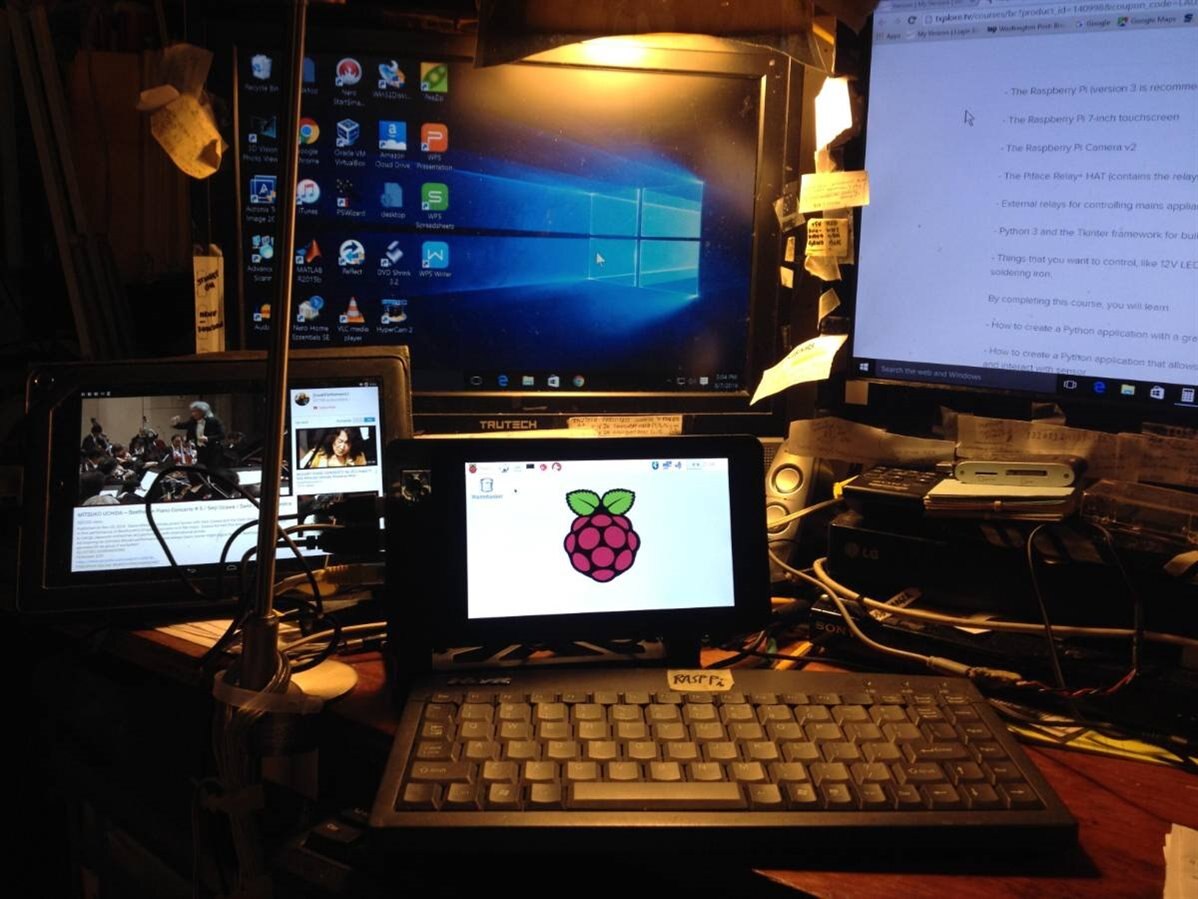
    Here is what I did. Combined RaspPi 3 B, Smartpi Touch Case and the official 7" touch screen in one package w/ Options. image

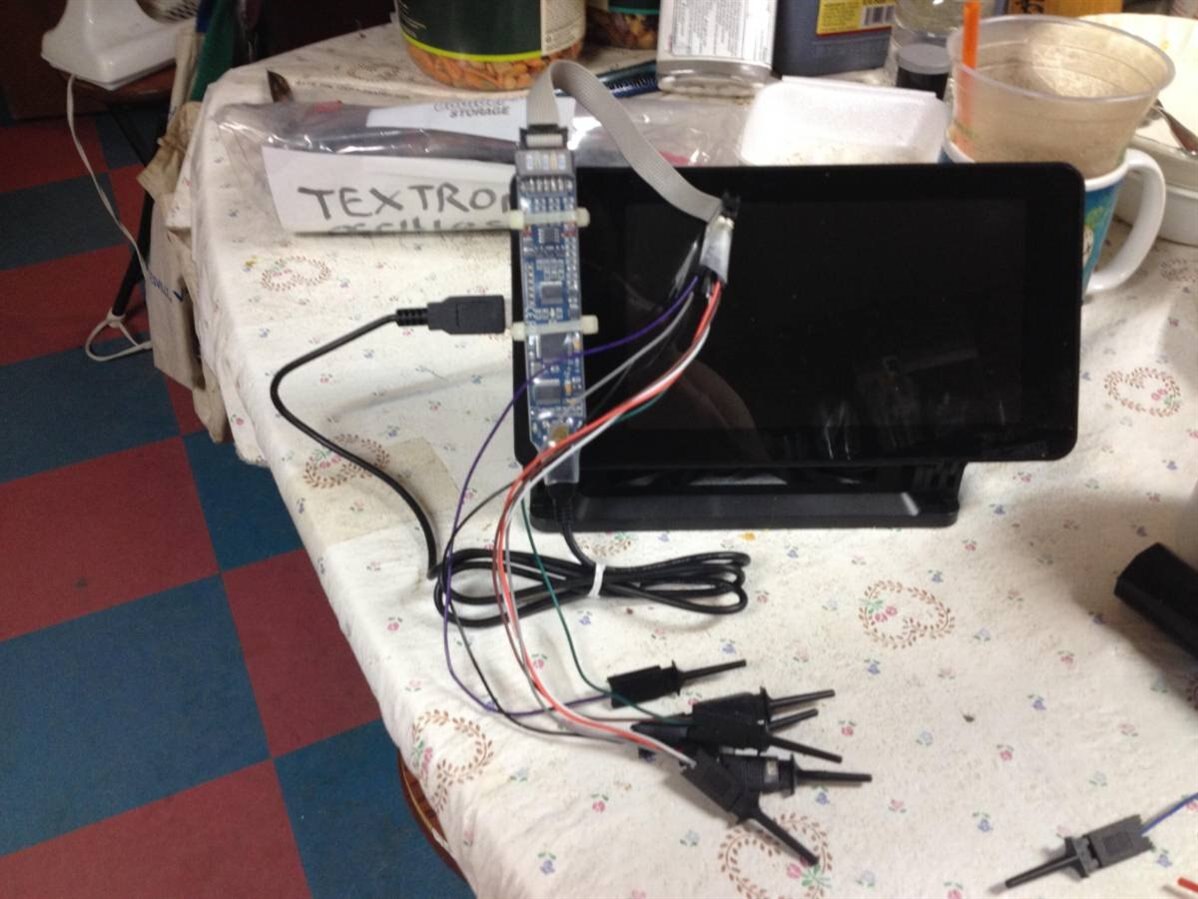
    Option One: Attached a Bitscope onto the Lego Nobs that are on the SmartPi Touch Case:

    image

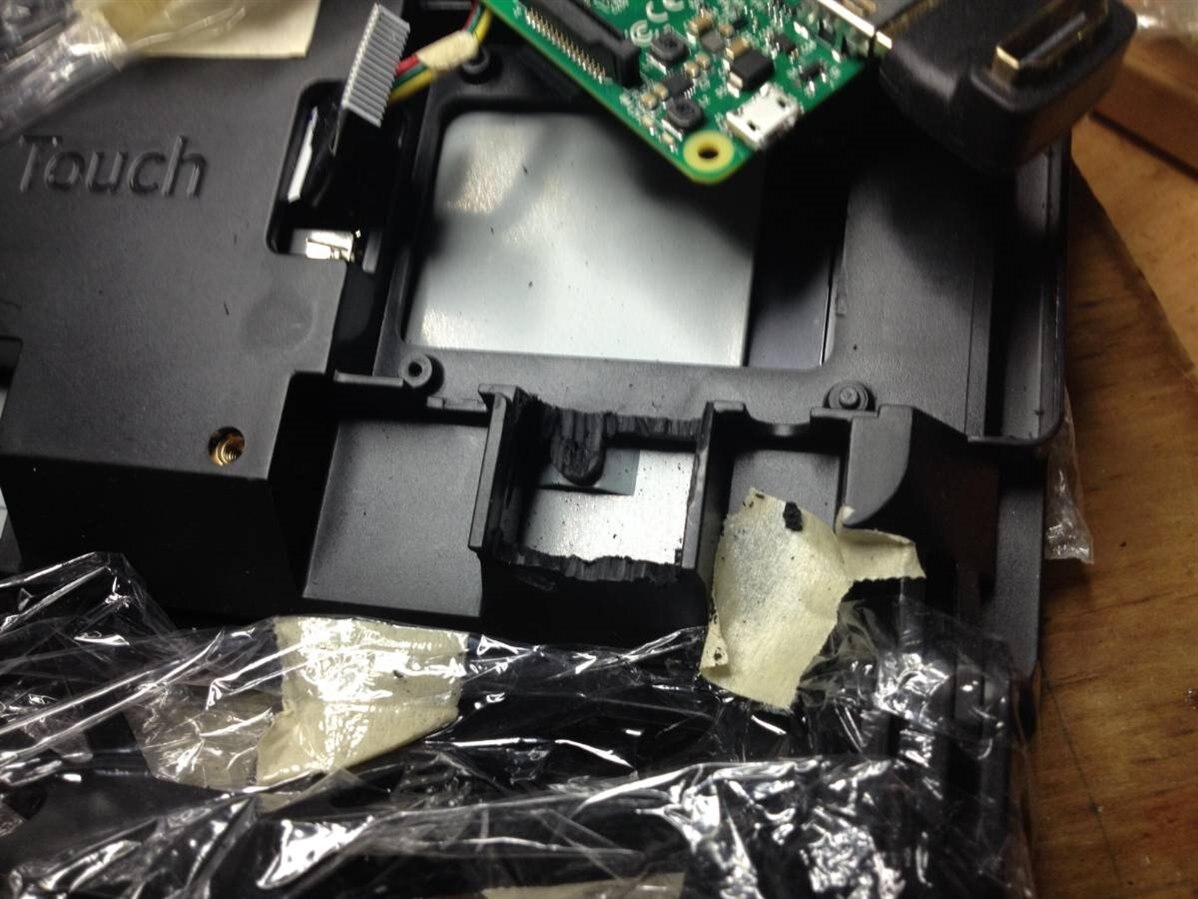
    Option Two: You will need a "Dremel Tool" to cut the Plastic Backside of the SmartPi Case to EXPOSE the HDMI Connector

    image

    ALL Parts (when in the U.S.A.) are available thru either/or MCM Electronics or element14.

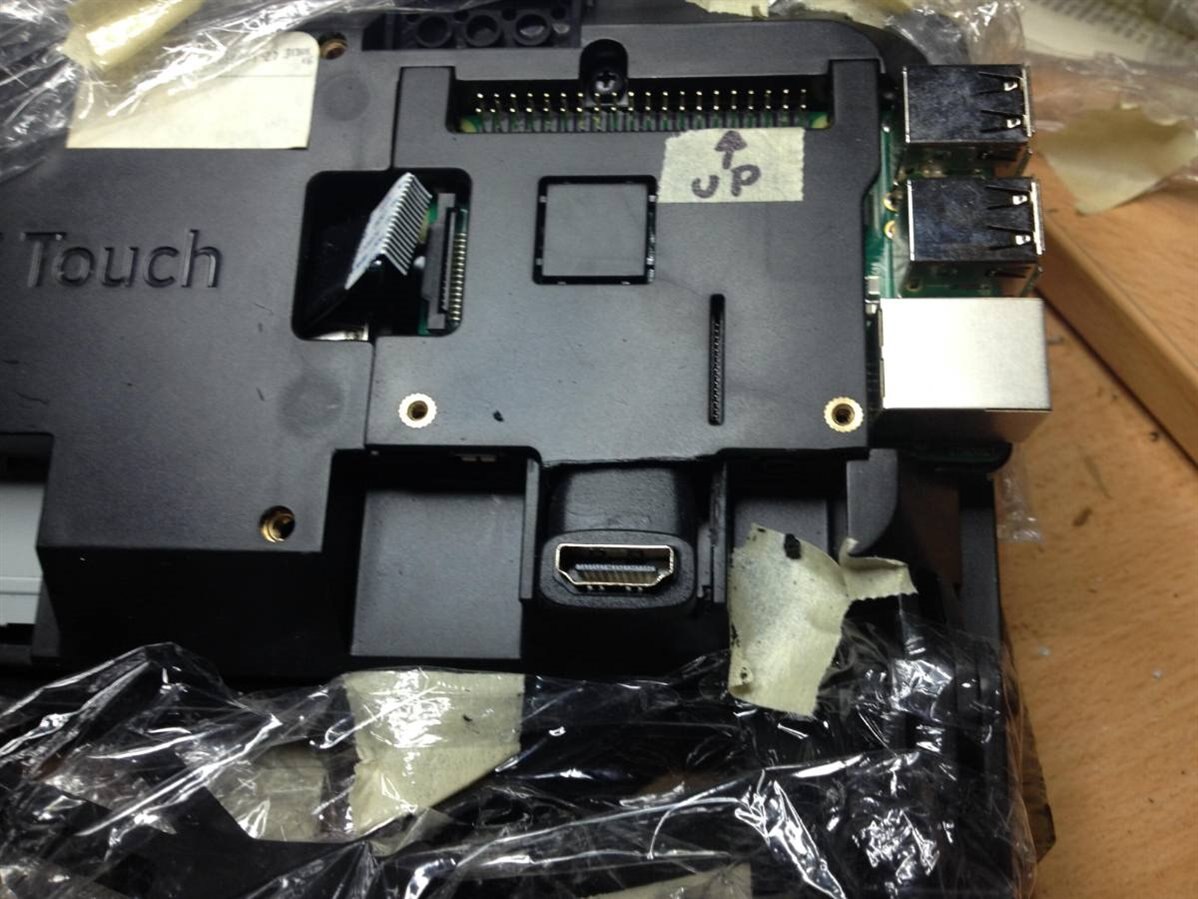
    To complete the above Picture, you will need a "Dremel" Tool to cutaway at the Plastic. AND buy a "TOP"

    Right-Angle HDMI Adapter.

    image

    Works Great. Now if only my RaspPi Zero would work.

    USCDADNYC (NY NY USA)

    • Cancel
    • Vote Up +1 Vote Down
    • Sign in to reply
    • Cancel
  • the-dubster
    the-dubster over 9 years ago

    For what it's worth (probably nothing).


    Key Parameters

    LCD Type TFT

    LCD Interface 24-bit parallel

    Touch Screen Interface 4 wires, capacitive

    Touch Controller FT5206GE1

    Backlight LED

    Display Size (mm) 154.08 (W) 85.92 (H)

    Dot Pitch (mm) 0.0642 (W) 0.1790 (H)

    Aspect Ratio 8 : 5

    Resolution 800 * 480 (Pixel)

    Power Consumption TBD

    Backlight Current TBD

    Operating Temp.  TBD


    Capacitive Touch Screen Interface Definition

    PIN NO. SYMBOL DESCRIPTION Type FUNCTION

    1 CAP_INT Interrupt input External touch interrupt control input

    2 CAP_WAKE WAKEUP input Used to awake the external TP controller

    3 I2C_SDA I2C data pin output/input Read/Write I2C data

    4 I2C_SCL I2C clock pin input Control I2C clock


    LCD Interface Definition

    PIN NO. SYMBOL DESCRIPTION Type FUNCTION

    1 VLED- Backlight negative input Backlight negative, connects to GND or PWM control

    2 VLED+ Backlight Positive input Backlight Positive, 5V typical

    3 GND Ground input Ground

    4 VCC Power supply input Power supply, 3.3V

    5 R0 Data pin input Red data

    6 R1

    7 R2

    8 R3

    9 R4

    10 R5

    11 R6

    12 R7

    13 G0 Data pin input Green data

    14 G1

    15 G2

    16 G3

    17 G4

    18 G5

    19 G6

    20 G7

    21 B0 Data pin input Blue data

    22 B1

    23 B2

    24 B3

    25 B4

    26 B5

    27 B6

    28 B7

    29 GND Ground input GND

    30 DCLK LCD clock input LCD clock signal

    31 DISP Enable backlight control input Typically connects to VCC

    32 HSYNC Horizontal Synchronization input Horizontal synchronous signal input

    33 VSYNC Vertical Synchronization input Vertical synchronous signal input

    34 DE Control mode selection input DE = 0 : SYNC mode

    DE = 1 : DE mode

    35 NC

    36 GND Ground input GND

    37 X+ - - NC

    38 Y- - - NC

    39 X- - - NC

    40 Y+ - - NC

    • Cancel
    • Vote Up +3 Vote Down
    • Sign in to reply
    • Cancel
  • Workshopshed
    Workshopshed over 9 years ago

    The driver board arrived yesterday, I'll likely blog about my results.

    • Cancel
    • Vote Up +1 Vote Down
    • Sign in to reply
    • Cancel
  • Workshopshed
    Workshopshed over 9 years ago

    Ok, all of those who said "get your self a ready made board" can now say "I told you so"....


    The board came with no instructions and a "bodge" connector (now held together with tape, so I don't loose the bits) that allowed you to connect the ribbon connector to the sockets on the board. It all fitted together ok so I powered it up.


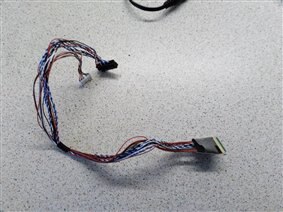
    The connector did not clamp the ribbon very well at all and although it did managed to get a white image on the screen a couple of times, it eventually slipped and shorted the pins on the ribbon cable, frying the end of the cable.

    image

    So conclusion is.... it might work but I'd need a better way of connecting up the cables.


    Plan is to put these into the "round tuit" box and buy a ready made board with all the correct connectors, USB and HDMI.

    • Cancel
    • Vote Up 0 Vote Down
    • Sign in to reply
    • Cancel
  • clem57
    clem57 over 9 years ago in reply to Workshopshed

    Thanks Workshopshed for showing "The proof is in the pudding".

    • Cancel
    • Vote Up 0 Vote Down
    • Sign in to reply
    • Cancel
  • uscdadnyc
    uscdadnyc over 9 years ago in reply to clem57

    AED wrote>>...For what it's worth (probably nothing)...

    USCDADNYC Reply>> Actually I got a bit of info from your Data Dump. That being (Forgive my Probability & Statistics ineptitude)

    w/ 8 R-bits, 8 G-bits, 8 B-bits (Red Green Blue), NO Wonder Manufacturers "tout" over 16 million Colors. Isn't it something like 3 Colors (R,G,B) each having 8bits. Some formula involving 8! (factorial) OR/AND 8**2 maybe involved? AAR a pretty Big #. Thx for the info.

    BTW what country are you guys/gals resident in?

    NOTE: This reply to AED was LOST in element14 (i wrote it maybe two weeks? ago) AAR I present it now. That element14 recovered it for me.

    USCDADNYC (NY NY USA)

    • Cancel
    • Vote Up 0 Vote Down
    • Sign in to reply
    • Cancel
<>
element14 Community

element14 is the first online community specifically for engineers. Connect with your peers and get expert answers to your questions.

  • Members
  • Learn
  • Technologies
  • Challenges & Projects
  • Products
  • Store
  • About Us
  • Feedback & Support
  • FAQs
  • Terms of Use
  • Privacy Policy
  • Legal and Copyright Notices
  • Sitemap
  • Cookies

An Avnet Company © 2026 Premier Farnell Limited. All Rights Reserved.

Premier Farnell Ltd, registered in England and Wales (no 00876412), registered office: Farnell House, Forge Lane, Leeds LS12 2NE.

Follow element14

  • X
  • Facebook
  • linkedin
  • YouTube