element14 Community
element14 Community
    Register Log In
  • Site
  • Search
  • Log In Register
  • Community Hub
    Community Hub
    • What's New on element14
    • Feedback and Support
    • Benefits of Membership
    • Personal Blogs
    • Members Area
    • Achievement Levels
  • Learn
    Learn
    • Ask an Expert
    • eBooks
    • element14 presents
    • Learning Center
    • Tech Spotlight
    • STEM Academy
    • Webinars, Training and Events
    • Learning Groups
  • Technologies
    Technologies
    • 3D Printing
    • FPGA
    • Industrial Automation
    • Internet of Things
    • Power & Energy
    • Sensors
    • Technology Groups
  • Challenges & Projects
    Challenges & Projects
    • Design Challenges
    • element14 presents Projects
    • Project14
    • Arduino Projects
    • Raspberry Pi Projects
    • Project Groups
  • Products
    Products
    • Arduino
    • Avnet & Tria Boards Community
    • Dev Tools
    • Manufacturers
    • Multicomp Pro
    • Product Groups
    • Raspberry Pi
    • RoadTests & Reviews
  • About Us
    About the element14 Community
  • Store
    Store
    • Visit Your Store
    • Choose another store...
      • Europe
      •  Austria (German)
      •  Belgium (Dutch, French)
      •  Bulgaria (Bulgarian)
      •  Czech Republic (Czech)
      •  Denmark (Danish)
      •  Estonia (Estonian)
      •  Finland (Finnish)
      •  France (French)
      •  Germany (German)
      •  Hungary (Hungarian)
      •  Ireland
      •  Israel
      •  Italy (Italian)
      •  Latvia (Latvian)
      •  
      •  Lithuania (Lithuanian)
      •  Netherlands (Dutch)
      •  Norway (Norwegian)
      •  Poland (Polish)
      •  Portugal (Portuguese)
      •  Romania (Romanian)
      •  Russia (Russian)
      •  Slovakia (Slovak)
      •  Slovenia (Slovenian)
      •  Spain (Spanish)
      •  Sweden (Swedish)
      •  Switzerland(German, French)
      •  Turkey (Turkish)
      •  United Kingdom
      • Asia Pacific
      •  Australia
      •  China
      •  Hong Kong
      •  India
      •  Japan
      •  Korea (Korean)
      •  Malaysia
      •  New Zealand
      •  Philippines
      •  Singapore
      •  Taiwan
      •  Thailand (Thai)
      •  Vietnam
      • Americas
      •  Brazil (Portuguese)
      •  Canada
      •  Mexico (Spanish)
      •  United States
      Can't find the country/region you're looking for? Visit our export site or find a local distributor.
  • Translate
  • Profile
  • Settings
Embedded and Microcontrollers
  • Technologies
  • More
Embedded and Microcontrollers
Blog MSPM0 project with VS Code, CMake and GCC - part 5: Open .syscfg file in SysConfig GUI
  • Blog
  • Forum
  • Documents
  • Quiz
  • Polls
  • Files
  • Members
  • Mentions
  • Sub-Groups
  • Tags
  • More
  • Cancel
  • New
Join Embedded and Microcontrollers to participate - click to join for free!
  • Share
  • More
  • Cancel
Group Actions
  • Group RSS
  • More
  • Cancel
Engagement
  • Author Author: Jan Cumps
  • Date Created: 10 Sep 2026 1:42 PM Date Created
  • Views 27 views
  • Likes 2 likes
  • Comments 1 comment
  • MSPM0L1105
  • ccs
  • MSPM0
  • easyL1105
  • VS Code
  • cmake
  • MSPM0L1306
Related
Recommended

MSPM0 project with VS Code, CMake and GCC - part 5: Open .syscfg file in SysConfig GUI

Jan Cumps
Jan Cumps
10 Sep 2026

In this blog series, I build a Texas Instruments MSPM0 example with VS Code as IDE, and CMake as build infrastructure.
In posts 1 - 4, I created an end to end flow, from install over build to debug, tested on LaunchPad and EasyL1105 kit.
In post 5: call TI's SysConfig GUI to modify a configuration

image

To let VS Code open a config file in SysConfig, there are two items to solve:

  • TI hasn't released a VS Code extension for SysConfig, but they have a standalone install.
  • VS Code can't call external editors by default, but the Open in External App extension can.

I installed both, and configured Open in External App: Open the extension, click the cog-wheel and select Settings.

I entered this:

"openInExternalApp.openMapper": [
        {
            "extensionName": "syscfg",
            "apps": [
                {
                    "title": "SysCfg Tool",
                    "shellCommand": "C:\\ti\\sysconfig_1.28.1\\nw\\nw.exe C:\\ti\\sysconfig_1.28.1\\app ${file}"
                }
            ]
        }
    ]

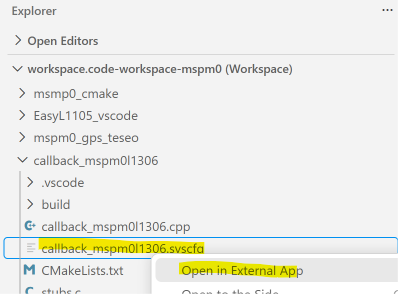
Then, when I right-click on a .syscfg file, I select the menu option Open in External App:
image

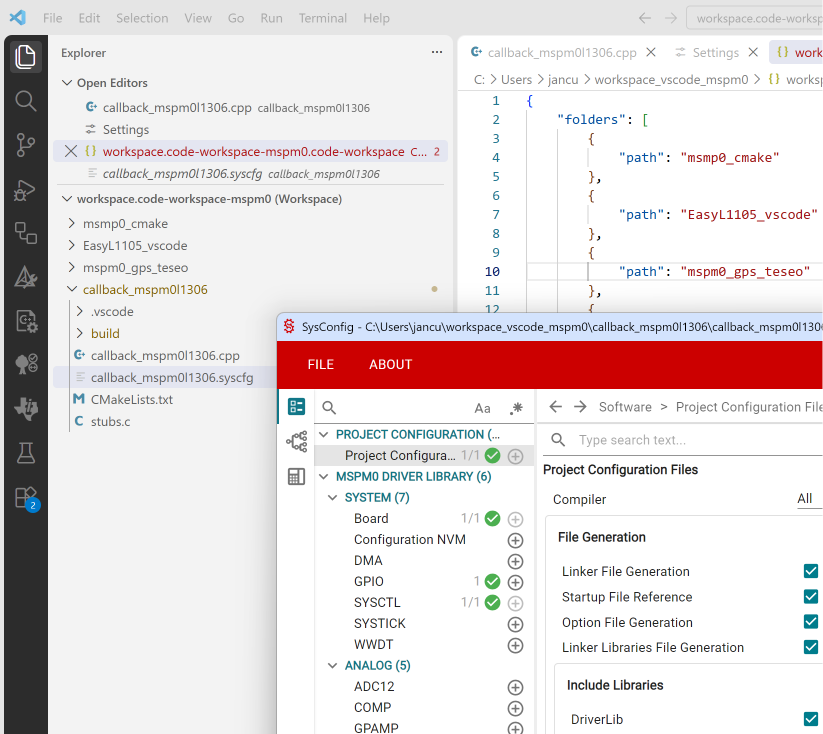
... and the file opens in the GUI. You can then change settings and save it.
image

No need to generate the files from the GUI. Our CMake script does that for us (if you followed blog 1 - 4 Slight smile)

post 4:  MSPM0 project with VS Code, CMake and GCC - part 4: EasyL1105 example 

part of the EasyL1105 series. all posts

  • Sign in to reply
  • Jan Cumps
    Jan Cumps 1 hour ago

    I hadn't seen this LaunchPad view before:

    image

    • Cancel
    • Vote Up 0 Vote Down
    • Sign in to reply
    • More
    • Cancel
element14 Community

element14 is the first online community specifically for engineers. Connect with your peers and get expert answers to your questions.

  • Members
  • Learn
  • Technologies
  • Challenges & Projects
  • Products
  • Store
  • About Us
  • Feedback & Support
  • FAQs
  • Terms of Use
  • Privacy Policy
  • Legal and Copyright Notices
  • Sitemap
  • Cookies

An Avnet Company © 2026 Premier Farnell Limited. All Rights Reserved.

Premier Farnell Ltd, registered in England and Wales (no 00876412), registered office: Farnell House, Forge Lane, Leeds LS12 2NE.

Follow element14

  • X
  • Facebook
  • linkedin
  • YouTube