


In this blog series, I build a Texas Instruments MSPM0 example with VS Code as IDE, and CMake as build infrastructure.
In posts 1 - 4, I created an end to end flow, from install over build to debug, tested on LaunchPad and EasyL1105 kit.
In post 5: call TI's SysConfig GUI to modify a configuration

To let VS Code open a config file in SysConfig, there are two items to solve:
- TI hasn't released a VS Code extension for SysConfig, but they have a standalone install.
- VS Code can't call external editors by default, but the Open in External App extension can.
I installed both, and configured Open in External App: Open the extension, click the cog-wheel and select Settings.
I entered this:
"openInExternalApp.openMapper": [
        {
            "extensionName": "syscfg",
            "apps": [
                {
                    "title": "SysCfg Tool",
                    "shellCommand": "C:\\ti\\sysconfig_1.28.1\\nw\\nw.exe C:\\ti\\sysconfig_1.28.1\\app -s C:/ti/mspm0_sdk_2_11_00_07/.metadata/product.json ${file}"
                }
            ]
        }
    ]
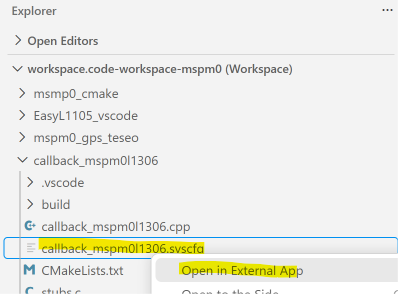
Then, when I right-click on a .syscfg file, I select the menu option Open in External App:
... and the file opens in the GUI. You can then change settings and save it.
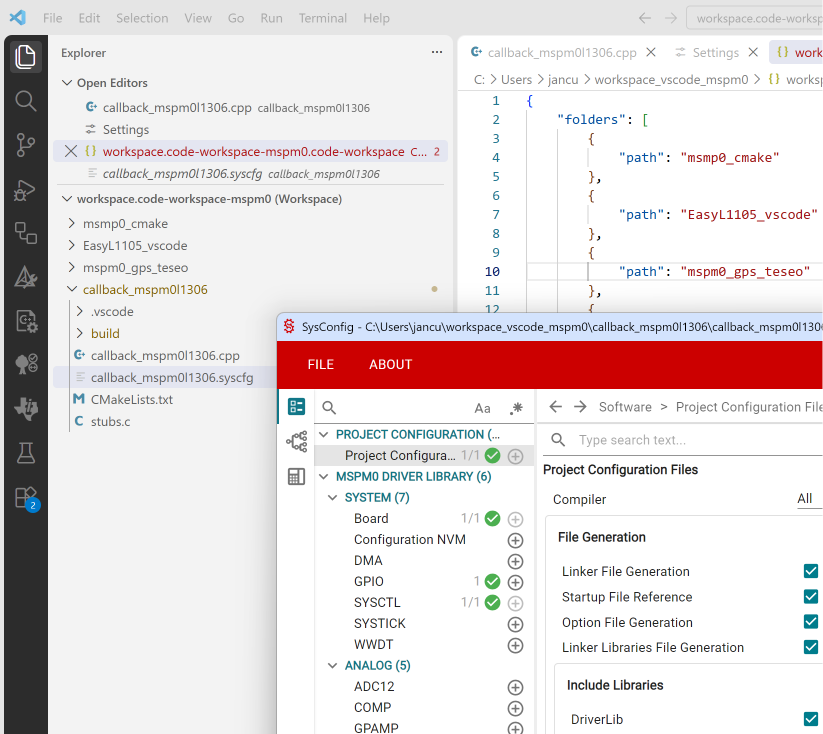
No need to generate the files from the GUI. Our CMake script does that for us (if you followed blog 1 - 4  )
)
post 4: MSPM0 project with VS Code, CMake and GCC - part 4: EasyL1105 example
post 6: MSPM0 project with VS Code, CMake and GCC - part 6: empty "template" project
part of the EasyL1105 series. all posts
-

Jan Cumps
-
Cancel
-
Vote Up
0
Vote Down
-
-
Sign in to reply
-
More
-
Cancel
Comment-

Jan Cumps
-
Cancel
-
Vote Up
0
Vote Down
-
-
Sign in to reply
-
More
-
Cancel
Children