element14 Community
element14 Community
    Register Log In
  • Site
  • Search
  • Log In Register
  • Community Hub
    Community Hub
    • What's New on element14
    • Feedback and Support
    • Benefits of Membership
    • Personal Blogs
    • Members Area
    • Achievement Levels
  • Learn
    Learn
    • Ask an Expert
    • eBooks
    • element14 presents
    • Learning Center
    • Tech Spotlight
    • STEM Academy
    • Webinars, Training and Events
    • Learning Groups
  • Technologies
    Technologies
    • 3D Printing
    • FPGA
    • Industrial Automation
    • Internet of Things
    • Power & Energy
    • Sensors
    • Technology Groups
  • Challenges & Projects
    Challenges & Projects
    • Design Challenges
    • element14 presents Projects
    • Project14
    • Arduino Projects
    • Raspberry Pi Projects
    • Project Groups
  • Products
    Products
    • Arduino
    • Avnet & Tria Boards Community
    • Dev Tools
    • Manufacturers
    • Multicomp Pro
    • Product Groups
    • Raspberry Pi
    • RoadTests & Reviews
  • About Us
    About the element14 Community
  • Store
    Store
    • Visit Your Store
    • Choose another store...
      • Europe
      •  Austria (German)
      •  Belgium (Dutch, French)
      •  Bulgaria (Bulgarian)
      •  Czech Republic (Czech)
      •  Denmark (Danish)
      •  Estonia (Estonian)
      •  Finland (Finnish)
      •  France (French)
      •  Germany (German)
      •  Hungary (Hungarian)
      •  Ireland
      •  Israel
      •  Italy (Italian)
      •  Latvia (Latvian)
      •  
      •  Lithuania (Lithuanian)
      •  Netherlands (Dutch)
      •  Norway (Norwegian)
      •  Poland (Polish)
      •  Portugal (Portuguese)
      •  Romania (Romanian)
      •  Russia (Russian)
      •  Slovakia (Slovak)
      •  Slovenia (Slovenian)
      •  Spain (Spanish)
      •  Sweden (Swedish)
      •  Switzerland(German, French)
      •  Turkey (Turkish)
      •  United Kingdom
      • Asia Pacific
      •  Australia
      •  China
      •  Hong Kong
      •  India
      •  Japan
      •  Korea (Korean)
      •  Malaysia
      •  New Zealand
      •  Philippines
      •  Singapore
      •  Taiwan
      •  Thailand (Thai)
      •  Vietnam
      • Americas
      •  Brazil (Portuguese)
      •  Canada
      •  Mexico (Spanish)
      •  United States
      Can't find the country/region you're looking for? Visit our export site or find a local distributor.
  • Translate
  • Profile
  • Settings
Embedded and Microcontrollers
  • Technologies
  • More
Embedded and Microcontrollers
Blog MSPM0 project with VS Code, CMake and GCC - part 7a: middleware example stepper motor control
  • Blog
  • Forum
  • Documents
  • Quiz
  • Polls
  • Files
  • Members
  • Mentions
  • Sub-Groups
  • Tags
  • More
  • Cancel
  • New
Join Embedded and Microcontrollers to participate - click to join for free!
  • Share
  • More
  • Cancel
Group Actions
  • Group RSS
  • More
  • Cancel
Engagement
  • Author Author: Jan Cumps
  • Date Created: 19 Sep 2026 9:12 AM Date Created
  • Views 52 views
  • Likes 4 likes
  • Comments 3 comments
  • MSPM0
  • easyL1105
  • MSPM0L1306
Related
Recommended

MSPM0 project with VS Code, CMake and GCC - part 7a: middleware example stepper motor control

Jan Cumps
Jan Cumps
19 Sep 2026

In this blog series, I build a Texas Instruments MSPM0 example with VS Code as IDE, and CMake as build infrastructure. In the next series of posts, I try to create a stepper motor project. It will be based on TI's stepper motor middleware.

TI has examples for several stepper motor drivers that I don't have. Those examples have firmware for the MSPM0, and a GUI to configure and test motors. They are a good starting point that I can adapt for the stepper drivers that I own.

The first attempt is to get that existing stepper middleware project going: drv8889-q1evm-gui-firmware. I will try to complete these 3 activities:

  • run the example from TI's GUI Composer.
  • compile MSPM0 firmware on CCS
  • port the project to VS Code, where I'll do the development 

GUI Composer example

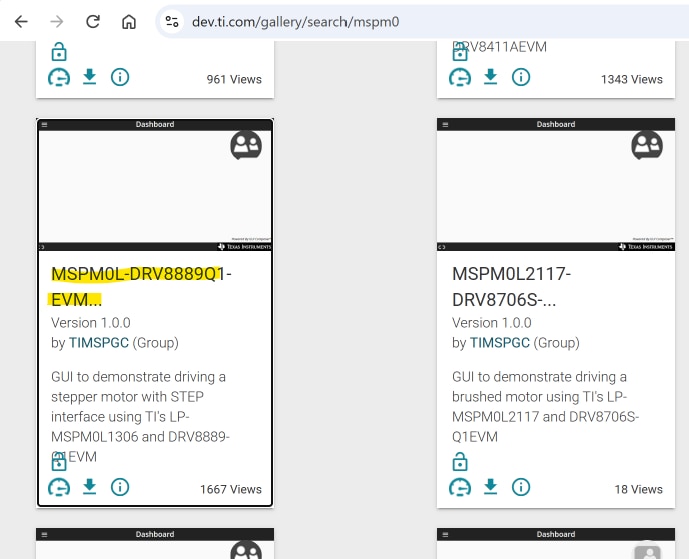
TI's Gallery has the example that I want to start from: MSPM0L-DRV8889Q1-EVM-GUI. 
image

When you click the tile, it will open GUI Composer. From there you can run the GUI. First, plug in the the MSPM0L1306 LaunchPad.
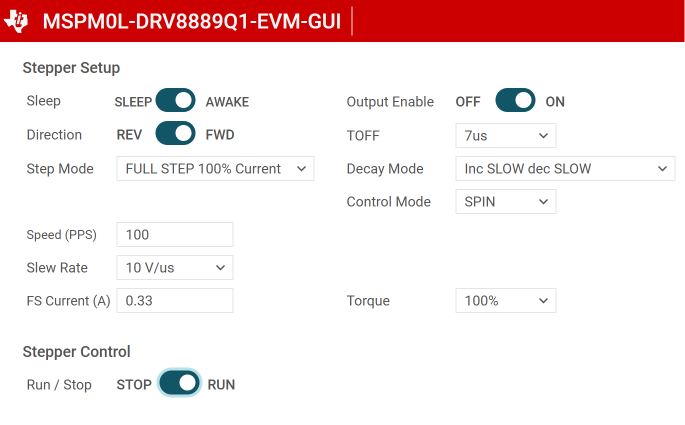
Then run the GUI. It will connect to the LaunchPad, and load the firmware.
image

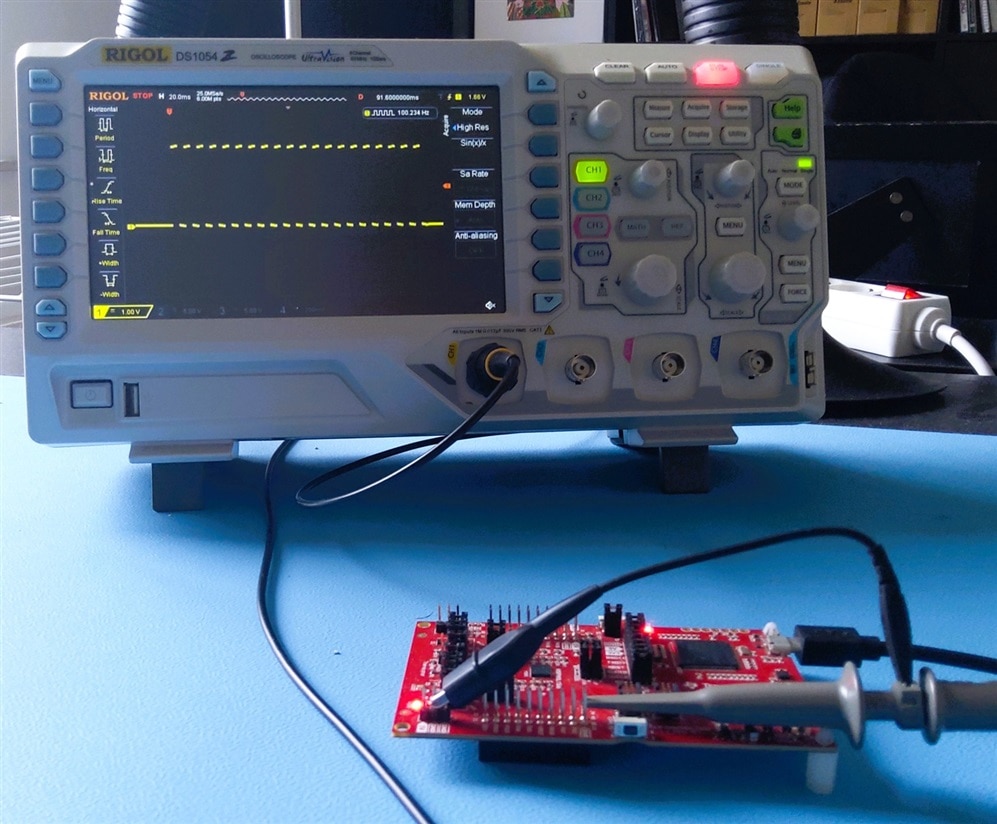
You can then configure the driver, and make the motor spin or step. Because I don't have the right hardware for this example, I tested it by probing the step pin output with an oscilloscope.
image

It works.

Compile example firmware with CCS

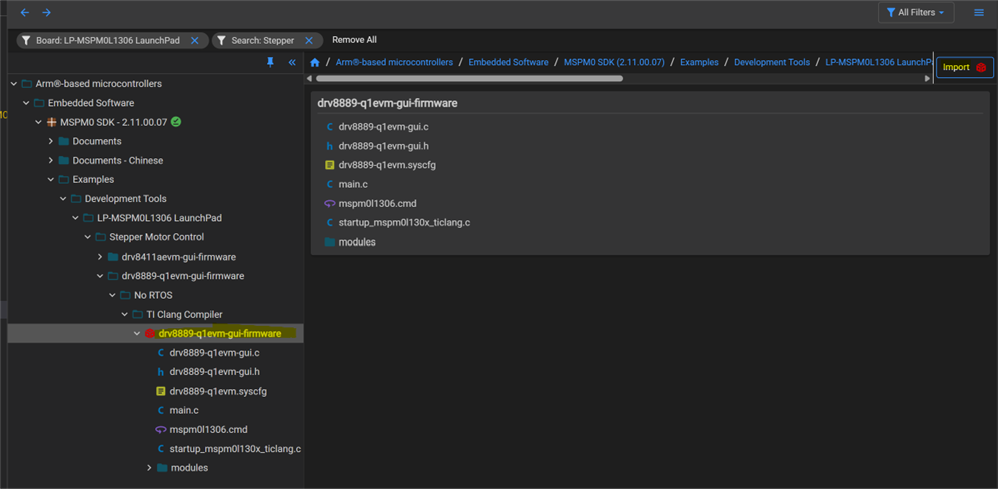
I used Code Composer Studio to download and inspect TI's firmware project. The project is available in Resource Explorer. You can import it from there.
image

I first compiled and loaded the project. That worked perfectly. Then I inspected sources and project settings, to understand how the project is set up:

  • most peripheral config is done via SysConfig
  • it uses the middleware HAL and stepper driver drv8889-q1. They are copied from the MSPM0 SDK.
  • the main function runs a GUI style loop.
  • custom GUI code reacts on messages coming from the GUI Composer application, over UART using JTAG and direct variable binding between GUI and firmware.
  • driverlib and IQMath libraries are used

Port to  VS Code

I started from  MSPM0 project with VS Code, CMake and GCC - part 6: empty "template" project , and reused these files from the CCS project:

  • main
  • GUI code
  • sysconfig

I didn't copy over the module files. I adapted the CMake script, to find and include them in their SDK location during build.

In the original sysconfig file, project generation was disabled. TI does that in several of their examples, because they use other tools to prepare example projects.
I re-enabled that. Then I changed the setup, so that sysconfig generates the instructions to include the correct two libraries.
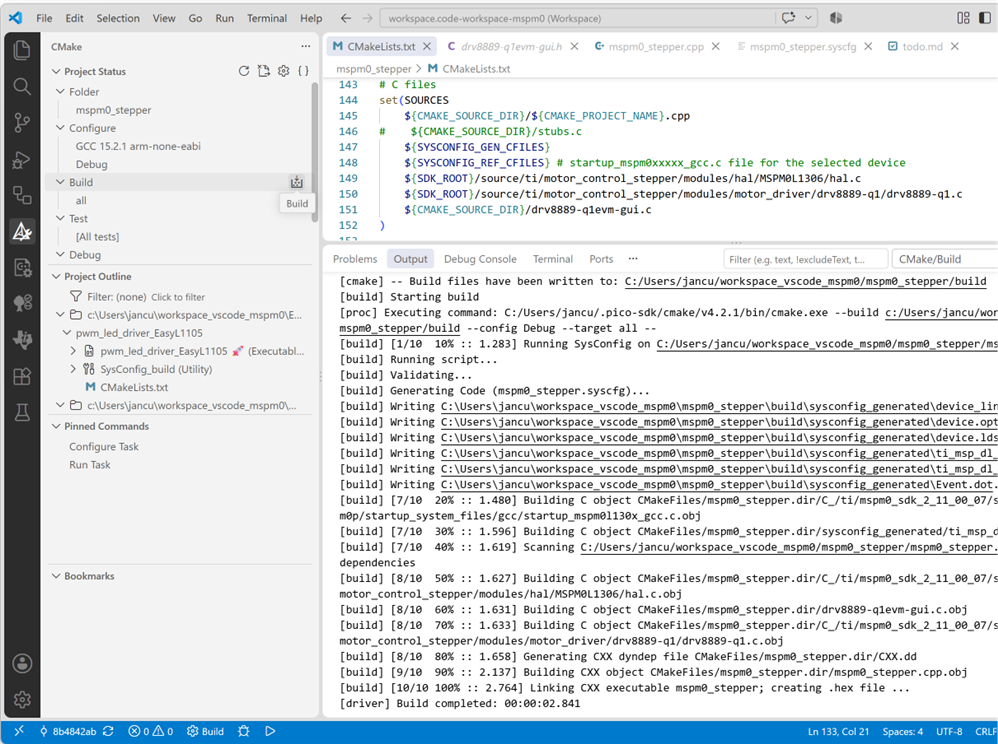
image

All worked fine. The VS Code project is attached.

In a next step, I'll try to make a testbed that sends commands to the UART, just like the GUI does.
Then test if I can make it generate the STEP and DIR signals. The ideal starting point for adaption to a different stepper motor IC.

VS Code project: mspm0_stepper_20260919.zip
(check this post for the expected VS Code workspace settings: MSPM0 project with VS Code, CMake and GCC - part 6: empty "template" project 
)

part of the EasyL1105 series. all posts

  • Sign in to reply
Parents
  • DAB
    DAB 17 hours ago

    Another nice update Jan.

    It is too bad they do not have these tools for the older MSP430.

    • Cancel
    • Vote Up 0 Vote Down
    • Sign in to reply
    • More
    • Cancel
Comment
  • DAB
    DAB 17 hours ago

    Another nice update Jan.

    It is too bad they do not have these tools for the older MSP430.

    • Cancel
    • Vote Up 0 Vote Down
    • Sign in to reply
    • More
    • Cancel
Children
No Data
element14 Community

element14 is the first online community specifically for engineers. Connect with your peers and get expert answers to your questions.

  • Members
  • Learn
  • Technologies
  • Challenges & Projects
  • Products
  • Store
  • About Us
  • Feedback & Support
  • FAQs
  • Terms of Use
  • Privacy Policy
  • Legal and Copyright Notices
  • Sitemap
  • Cookies

An Avnet Company © 2026 Premier Farnell Limited. All Rights Reserved.

Premier Farnell Ltd, registered in England and Wales (no 00876412), registered office: Farnell House, Forge Lane, Leeds LS12 2NE.

Follow element14

  • X
  • Facebook
  • linkedin
  • YouTube