


In this blog series, I build a Texas Instruments MSPM0 example with VS Code as IDE, and CMake as build infrastructure. In the next series of posts, I try to create a stepper motor project. It will be based on TI's stepper motor middleware.
In the previous post, I got constant step speed working, with an Allegro A4988 stepper motor IC. In this post, a nice s-shaped ramp-up and ramp-down curve
|
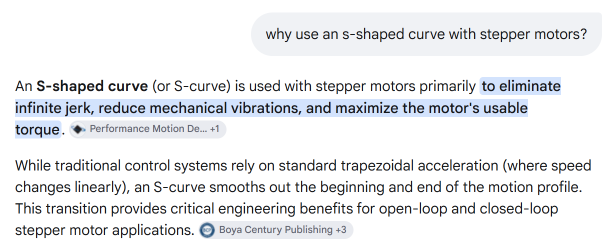
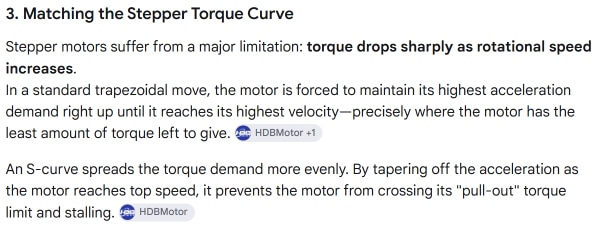
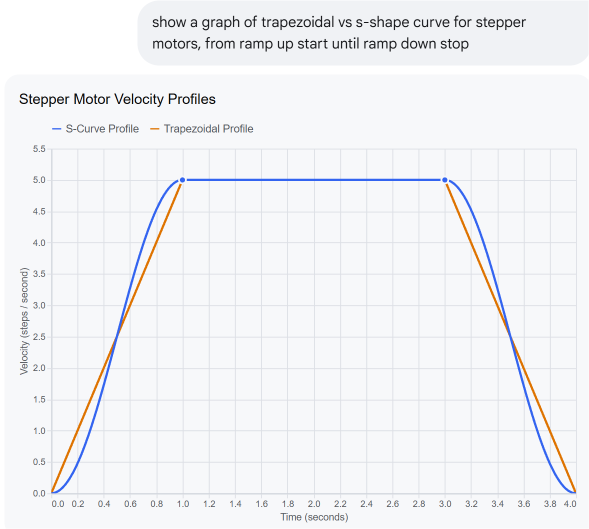
this table contains AI generated content I asked AI:
[...]
[...]
|
Object Oriented approach
I created a class for the constant stepper (see previous post). This class can manage the motor while it's performing the requested number of steps:
- (in this case constant) speed
- direction
- start
- step until done (count and stop)
I based a new s-curve capable class based on that one. It adds this functionality:
- accept a ramp profile ( set of speeds)
- decide when to ramp up or down
- handle the ramp speeds
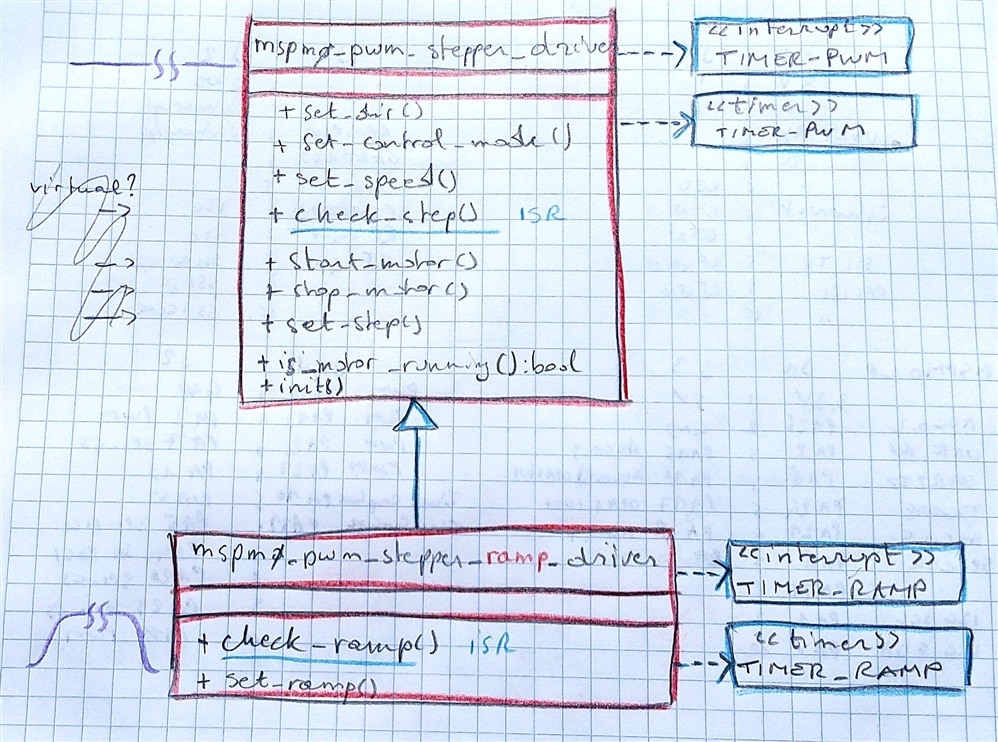
additional controller resources needed
The logic needs an additional timer. A traditional one this time, not a PWM one like the one that generates the pulses. The firmware will have to provide a handler for that timer, that calls the classes check_ramp() method:
    void TIMER_RAMP_INST_IRQHandler(void) {
        if (DL_Timer_getPendingInterrupt(TIMER_RAMP_INST) == DL_TIMER_IIDX_ZERO) {
            pwm_stepper_driver1.check_ramp();
        }
    }
I've set up the timer to tick each 10 ms. The ISR then asks the class to "manage the ramp".
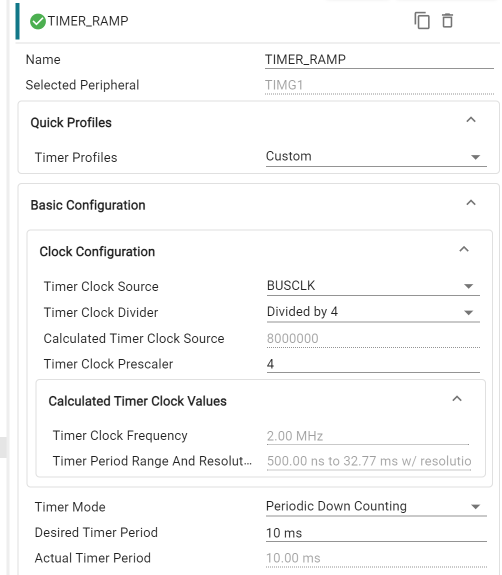
Based on the state (ramping up / ramping down / cruise), it either ramps up, ramps down, or does nothing.
    void check_ramp() {
        switch (profile_state) {
            case motor_profile::motor_accel:
                // Move forward through the S-curve array
                if (current_lut_index < (s_curve_lut.size() - 1)) {
                    current_lut_index++;
                    set_speed(s_curve_lut[current_lut_index]); // Double the speed for acceleration to maintain smoothness
                } else {
                    profile_state = motor_profile::motor_cruise;
                }
                break;

            case motor_profile::motor_decel:
                // Walk backward through the S-curve array for smooth braking
                if (current_lut_index > 0) {
                    current_lut_index--;
                    set_speed(s_curve_lut[current_lut_index]); // Double the speed for deceleration to maintain smoothness
                }
                break;

            default:
                break;
        }
    }
A override version of the base classes check_step() (that just counts steps and stops when done) , validates if we need to ramp up, stay steady (cruise) or ramp down.
It doesn't do anything else based on that info. It just computes it, so that the ramp handling method check_ramp() (see above) can act upon it.
    void check_step() {
        if(control_mode_ == control_mode::step) {
            uint32_t this_step = step_count + 1;
            uint32_t steps_remaining = set_step_ - this_step;

            switch (profile_state) {
                case motor_profile::motor_accel:
                    accel_steps_taken++;
                    // Handle Short Moves: If half the steps are spent, start braking immediately
                    if (steps_remaining <= accel_steps_taken) {
                        profile_state = motor_profile::motor_decel;
                    }
                    break;

                case motor_profile::motor_cruise:
                    // Start deceleration when remaining space perfectly matches acceleration footprints
                    if (steps_remaining <= accel_steps_taken) {
                        profile_state = motor_profile::motor_decel;
                    }
                    break;

                case motor_profile::motor_decel:
                    if (steps_remaining == 0) {
                        // // TODO: Turn off PWM generation cleanly at the final step boundary
                        profile_state = motor_profile::motor_idle;
                    }
                    break;

                case motor_profile::motor_idle:
                    // No action needed; motor is idle
                    break;
                default:
                    break;
            }
            mspm0_pwm_stepper_driver::check_step(); // Call base class check_step() to handle step counting
        }
    }
|
I used embedded friendly (read: very little overhead) C++ constructs.
|
Guarantee that the correct number of steps are taken
The ramp up and down steps have to be part of the total number of steps. When you ask for 5000 steps, that's what the motor should exactly do. So the logic has to deal with situations where the number of steps are smaller than the amount of steps both ramps require.
For that scenario, the logic always checks is we are halfway the requested number of steps. If yes, then directly over to the related point of the down ramp. In this post, I use an identical ramp for start and stop. Just inversed. The related point in the down-ramp will be at similar speed as the up-ramp, so that 'll be acceptable. Nothing stops yopu to write a class that uses different profiles for the start and end, and to write custom logic for smooth transition between up-and down-ramp when needed.
Bring it all together
main code is still simple. Very comparable to the previous blog.
The main changes:
- a ramp profile is defined, in an array of steps per second
- instead of calling set_speed(), the method set_ramp() is called.
using pwm_stepper_driver_t = mspm0_pwm_stepper_driver::mspm0_pwm_stepper_ramp_driver;
pwm_stepper_driver_t pwm_stepper_driver1(dir, GPIO_GRP_DRIVER_PORT, max_step_freq);

const unsigned int RAMP_STEPS = 100;
// S-curve pre-calculated profile (Speed values in Pulses Per Second / Hz)
// TODO: translate to raw Hardware Timer Ticks (Highly Recommended for Performance)

inline static const std::array<uint32_t, RAMP_STEPS> s_curve_lut = {
    150,  150,  151,  154,  160,  169,  181,  197,  217,  242,
    272,  308,  349,  397,  451,  512,  581,  656,  739,  830,
    928,  1033, 1146, 1266, 1393, 1526, 1666, 1812, 1963, 2119,
    2279, 2443, 2610, 2779, 2949, 3120, 3290, 3459, 3625, 3788,
    3946, 4000, 4000, 4000, 4000, 4000, 4000, 4000, 4000, 4000,
    4000, 4000, 4000, 4000, 4000, 4000, 4000, 4000, 4000, 4000,
    4000, 4000, 4000, 4000, 4000, 4000, 4000, 4000, 4000, 4000,
    4000, 4000, 4000, 4000, 4000, 4000, 4000, 4000, 4000, 4000,
    4000, 4000, 4000, 4000, 4000, 4000, 4000, 4000, 4000, 4000,
    4000, 4000, 4000, 4000, 4000, 4000, 4000, 4000, 4000, 4000
};

int main() {

    // ...

    pwm_stepper_driver1.init();
    pwm_stepper_driver1.stop_motor();
    // pwm_stepper_driver1.set_speed(1); // CURVE determines speed for ramp style motion, so set_speed() is not used in this example
    pwm_stepper_driver1.set_control_mode(mspm0_pwm_stepper_driver::control_mode::step);
    pwm_stepper_driver1.set_ramp(s_curve_lut); // the vector has to stay alive for the duration of the motor run, so it is stored in a static variable in this example

    /* Set the priority for interrupts */
    NVIC_SetPriority(GENERIC_PWM_CHANNEL_0_INST_INT_IRQN, 1);
    NVIC_SetPriority(TIMER_RAMP_INST_INT_IRQN, 2);

    while (1) {
        driver1.enable(true);

        pwm_stepper_driver1.set_dir(true);
        pwm_stepper_driver1.set_step(5000);
        pwm_stepper_driver1.start_motor();

        while (pwm_stepper_driver1.is_motor_running()) {
            __WFI(); // Enter low-power sleep mode; wake on timer interrupts
        }

        pwm_stepper_driver1.set_dir(false);
        pwm_stepper_driver1.set_step(5000);
        pwm_stepper_driver1.start_motor();

        while (pwm_stepper_driver1.is_motor_running()) {
            __WFI(); // Enter low-power sleep mode; wake on timer interrupts
        }

        driver1.enable(false);
    }
}
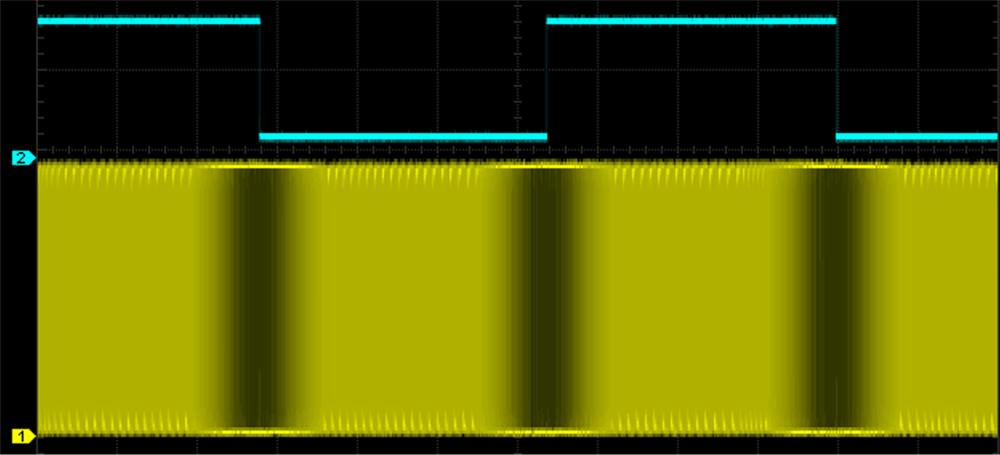
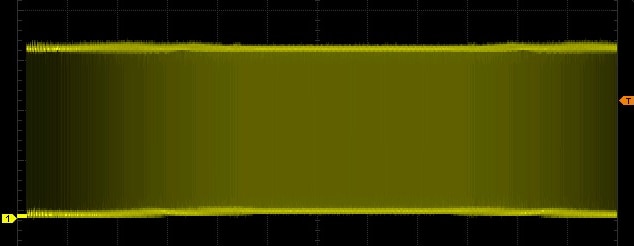
The image below shows a scope trace of a 5000 steps command, with ramps. The more intense the yellow, the more steps per second.
Thank you for reading.
VS Code project: mspm0_stepper_ramp_20261008.zip
(check this post for the expected VS Code workspace settings: MSPM0 project with VS Code, CMake and GCC - part 6: empty "template" project )
previous post: MSPM0 project with VS Code, CMake and GCC - part 7b: middleware stepper motor control with A4988 stepper driver
part of the EasyL1105 series. all posts
-

Jan Cumps
-
Cancel
-
Vote Up
0
Vote Down
-
-
Sign in to reply
-
More
-
Cancel
Comment-

Jan Cumps
-
Cancel
-
Vote Up
0
Vote Down
-
-
Sign in to reply
-
More
-
Cancel
Children