element14 Community
element14 Community
    Register Log In
  • Site
  • Search
  • Log In Register
  • Community Hub
    Community Hub
    • What's New on element14
    • Feedback and Support
    • Benefits of Membership
    • Personal Blogs
    • Members Area
    • Achievement Levels
  • Learn
    Learn
    • Ask an Expert
    • eBooks
    • element14 presents
    • Learning Center
    • Tech Spotlight
    • STEM Academy
    • Webinars, Training and Events
    • Learning Groups
  • Technologies
    Technologies
    • 3D Printing
    • FPGA
    • Industrial Automation
    • Internet of Things
    • Power & Energy
    • Sensors
    • Technology Groups
  • Challenges & Projects
    Challenges & Projects
    • Design Challenges
    • element14 presents Projects
    • Project14
    • Arduino Projects
    • Raspberry Pi Projects
    • Project Groups
  • Products
    Products
    • Arduino
    • Avnet & Tria Boards Community
    • Dev Tools
    • Manufacturers
    • Multicomp Pro
    • Product Groups
    • Raspberry Pi
    • RoadTests & Reviews
  • About Us
  • Store
    Store
    • Visit Your Store
    • Choose another store...
      • Europe
      •  Austria (German)
      •  Belgium (Dutch, French)
      •  Bulgaria (Bulgarian)
      •  Czech Republic (Czech)
      •  Denmark (Danish)
      •  Estonia (Estonian)
      •  Finland (Finnish)
      •  France (French)
      •  Germany (German)
      •  Hungary (Hungarian)
      •  Ireland
      •  Israel
      •  Italy (Italian)
      •  Latvia (Latvian)
      •  
      •  Lithuania (Lithuanian)
      •  Netherlands (Dutch)
      •  Norway (Norwegian)
      •  Poland (Polish)
      •  Portugal (Portuguese)
      •  Romania (Romanian)
      •  Russia (Russian)
      •  Slovakia (Slovak)
      •  Slovenia (Slovenian)
      •  Spain (Spanish)
      •  Sweden (Swedish)
      •  Switzerland(German, French)
      •  Turkey (Turkish)
      •  United Kingdom
      • Asia Pacific
      •  Australia
      •  China
      •  Hong Kong
      •  India
      • Japan
      •  Korea (Korean)
      •  Malaysia
      •  New Zealand
      •  Philippines
      •  Singapore
      •  Taiwan
      •  Thailand (Thai)
      • Vietnam
      • Americas
      •  Brazil (Portuguese)
      •  Canada
      •  Mexico (Spanish)
      •  United States
      Can't find the country/region you're looking for? Visit our export site or find a local distributor.
  • Translate
  • Profile
  • Settings
FPGA
  • Technologies
  • More
FPGA
Forum Some FPGA Beginner Questions
  • Blog
  • Forum
  • Documents
  • Quiz
  • Events
  • Polls
  • Files
  • Members
  • Mentions
  • Sub-Groups
  • Tags
  • More
  • Cancel
  • New
Join FPGA to participate - click to join for free!
Actions
  • Share
  • More
  • Cancel
Forum Thread Details
  • State Suggested Answer
  • Replies 78 replies
  • Answers 19 answers
  • Subscribers 559 subscribers
  • Views 11159 views
  • Users 0 members are here
Related

Some FPGA Beginner Questions

Former Member
Former Member over 13 years ago

Hi element14!


Some time ago I've watched a talk of the nand2tetris course/project. If you've never heard of it you can check it out here: http://www.nand2tetris.org/ Basically it is a course designed to build a computer from the very ground up. It starts with logic gates and goes all the way up to programming a small game project (hence the name nand2tetris). There is also a video available from someone who has been doing the course on FPGA hardware ( http://www.youtube.com/watch?v=UHty1KKjaZw ).

[At one point in the above linked youtube video you can see the designation "ep2c8q208", which should mean the project is running on Altera Cyclone II hardware.]


I've always been curious about doing something with FPGA hardware, but never had any idea of a feasible, yet interesting-result-yielding project. Well, as you can probably guess, up until now that is image


During my university days I attended an FPGA workshop and I've read some stuff about the hardware components and the available course material, so I think I kind of have an idea about the difficulty of the project. But since everything I've been reading just made me more excited, I decided I absolutely want to give this a shot. Now there's a lot of FPGA information out there, so I'm surely still missing a lot of important information, but I would like to get started and think the best way to learn is to actually experiment with a real FPGA instead of wasting too much time with HDL simulations only to become used to functions that aren't going to synthesize on the board anyway.


So I now would like to ask you about some things I'm still unsure about and would like to have clarified before buying an expensive development kit. I've read several articles about Altera and Xilinx and right now my choice would be a Spartan 3E Starter Board - this one to be exact: http://shop.embedded-projects.net/index.php?module=artikel&action=artikel&id=549


The main questions I'm having right now:

- Is there a general reason that would argue against getting the Spartan E3 board?

- I actually have no idea how powerful an FPGA really is.. but assuming it's running on Cyclone II hardware, it probably should run on a Spartan 3 as well? Or is that in itself already a stupid question, as FPGA comparison doesn't work so easily?

- As you can see, the price for the above board is about 150 Euro, which translates to something just short of $200. Yet I continue to find offers (on ebay or other websites) where boards are being sold for under $150 but even include small screens(!)*  What am I missing here? Did I pick an especially expensive outlet, or is there something shady about these cheap deals..?

- In general, who is more newbie-friendly, Altera or Xilinx? (I've worked with VHDL before, which I think is Xilinx, right? Altera's Quartus is probably very similar?)

- From how I understand the FPGA toolchain, in the above linked offer there should be everything included to get me going.. right? o_O


I also have this second candidate: http://www.digilentinc.com/Products/Detail.cfm?NavPath=2,400,836&Prod=ATLYS

- Maybe I'm an idiot, but as I read the offer, *only* the board is sold? I.e., in contrast to the first offer, I would need additional stuff to get something running on the board?

- It also strikes me as a mayor drawback that there is not really an output option besides a few LEDs.. which for me would be very annoying; I'm already unhappy about the board linked before *only* having a small display (which in itself, however, is awesome to have of course).

- This might also be a stupid question: I remember from back in the FPGA workshop I mentioned that getting a number-display to run is not that hard at all. How much more effort is it to get something displayed on a screen (either an attached one or a PC screen accessed via one of the available ports)?


And as a final question: I've also seen some very much smaller boards than the ones linked here, that are also much cheaper.. are the boards I'm looking it overkill for what I'd like to do with them? Or does actually the contrary hold, and such a project wouldn't even run on one of the smaller boards available?


Thanks for your help!


Cheers,

pan


________________________

* Here for example:

http://www.sainsmart.com/evaluation-board/fpga-cpld-board/new-ep2c8q208c8n-development-board-kit-fpga-altera-cyclone-nios-ii-with-2-4-lcd.html

  • Sign in to reply
  • Cancel

Top Replies

  • johnbeetem
    johnbeetem over 13 years ago +2 suggested
    Hi Christian, I just saw your discussion today. I don't check the element14 FPGA page much since activity is rare. There's some good FPGA discussion in this thread at the Raspberry Pi group, including…
  • michaelkellett
    michaelkellett over 10 years ago in reply to Former Member +2 suggested
    I'm going to offer some advice which has worked well for me over the last 10 years. Forget Xilinx and Altera and download the Lattice toolset - not as capable as the full Xilinx kit but good enough to…
  • michaelkellett
    michaelkellett over 10 years ago in reply to michaelkellett +2 suggested
    A simple counter example for LED twinkles ! There must be a way to add a text file - someone please tell how ! MK
Parents
  • Former Member
    0 Former Member over 10 years ago

    hey dear...Greeting of the Day!!!!!

    I am beginner of FPGA and VHDLl coding,I'm using spartan6(lx9,tqg144) development board i want to display text and images on monitor display by VGA connector is is possible with spartan6???!! IS, IS POSSIBLE to dispay any text ?? any image?? on monitor.

    Small help also would be great helpful

    thanks!!

    • Cancel
    • Vote Up 0 Vote Down
    • Sign in to reply
    • Verify Answer
    • Cancel
Reply
  • Former Member
    0 Former Member over 10 years ago

    hey dear...Greeting of the Day!!!!!

    I am beginner of FPGA and VHDLl coding,I'm using spartan6(lx9,tqg144) development board i want to display text and images on monitor display by VGA connector is is possible with spartan6???!! IS, IS POSSIBLE to dispay any text ?? any image?? on monitor.

    Small help also would be great helpful

    thanks!!

    • Cancel
    • Vote Up 0 Vote Down
    • Sign in to reply
    • Verify Answer
    • Cancel
Children
  • michaelkellett
    0 michaelkellett over 10 years ago in reply to Former Member

    It's possible and even quite easy if you are prepared to put up with limited colour resolution.


    The key problem is that for VGA you need three analogue signals (Red, Green and Blue) and the obvious way to make them is with three DACs. You can buy chips made for the purpose but if you only want to use the basic kit you have you can make a restricted display without.


    Here's a link:


    https://www.pantechsolutions.net/cpld-fpga-boards/vga-interfacing-with-spartan-3-primer


    You'll get loads of information if you Google "fpga vga". Take the time to get the VGA spec form somewhere and find out how the signals work. You can learn a lot from reading the data sheets and app notes a bout early video controllers like MC6845.


    MK

    • Cancel
    • Vote Up 0 Vote Down
    • Sign in to reply
    • Verify Answer
    • Cancel
  • johnbeetem
    0 johnbeetem over 10 years ago in reply to Former Member

    Here are some VGA 'blogs at Gadget Factory, the maker of the Papilio Spartan-3E and Spartan-6 FPGA boards: http://www.gadgetfactory.net/tag/vga/

    • Cancel
    • Vote Up 0 Vote Down
    • Sign in to reply
    • Verify Answer
    • Cancel
  • Former Member
    0 Former Member over 10 years ago in reply to johnbeetem

    hey john Thanks allot !

    Thanks for your warm welcome and support ..

    since 11days i have been reading different tutorials and materials but

    i am not satisfied how to display text and how to display image but up

    to now i think i will be possible...

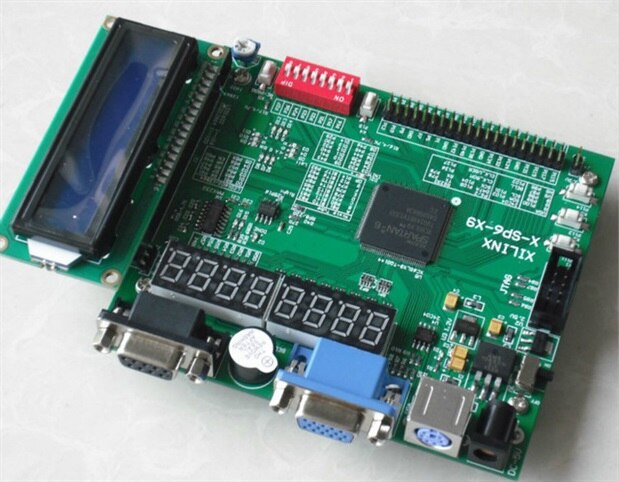
    last question i am using spartan 6(XC6SLX9-TQG144) (xilinx X-SP6-X9)

    board (it is not micro board) and i cant find its proper

    configurations as well as all functions i have google it hundrads of

    times but i got all information about micro board so how can i get

    proper configuration..

    thank you very much for your reply..

    • Cancel
    • Vote Up 0 Vote Down
    • Sign in to reply
    • Verify Answer
    • Cancel
  • Former Member
    0 Former Member over 10 years ago in reply to michaelkellett

    hey thanks allot ,it feels good to see your response ..i am just

    beginner, i  just have done simple projects on xilinx ise 13.1 with

    xilinx spartan6(xc6slx9-tqg144) board i want to enhance and improve my

    knowledge in this field so how can i start honestly i take a project

    of displaying text "hello world" and image on vga monitor so how can i

    interrface keyboard and mouce in ps2 port and vga configuration how

    can i go ahead....thanks..!!

    • Cancel
    • Vote Up 0 Vote Down
    • Sign in to reply
    • Verify Answer
    • Cancel
  • johnbeetem
    0 johnbeetem over 10 years ago in reply to Former Member

    narendra rathod wrote:


    last question i am using spartan 6(XC6SLX9-TQG144) (xilinx X-SP6-X9)

    board (it is not micro board) and i cant find its proper

    configurations as well as all functions i have google it hundrads of

    times but i got all information about micro board so how can i get

    proper configuration..

    Can you tell who manufactures the board and get a part number?  I couldn't find "X-SP6-X9" either.  You might want to post an image to see if someone here recognizes it.

    • Cancel
    • Vote Up 0 Vote Down
    • Sign in to reply
    • Verify Answer
    • Cancel
  • Former Member
    0 Former Member over 10 years ago in reply to johnbeetem

    image

    This is the board i am using..and the below link contain it's sellers detail

    http://artofcircuits.com/product/spartan-6-fpga-development-board-xc6slx9-tqg144

    • Cancel
    • Vote Up +1 Vote Down
    • Sign in to reply
    • Verify Answer
    • Cancel
  • johnbeetem
    0 johnbeetem over 10 years ago in reply to Former Member

    So I guess it didn't come with a user manual or a schematic?  That's pretty annoying.  You might ask the vendor if either of those is available -- maybe they forgot to include a link with the board.


    The board does seem to be "self-documenting" to a certain extent.  (I followed the artofcircuits.com link to get higher resolution photo.) There's a bunch of tables on the silkscreen showing which functions are attached to which FPGA pins.  For example, diodes D3 - D14 are connected to FPGA pins P33, P34, P35, etc.  So you can use these pin numbers in a User Contraint File (.ucf) to assign your signal names to functions on the board.  You'll need to play around a little to see whether the diodes are active-high or active-low.


    Some of the tables are misleading.  For example, the LED digits are called "Nixie Tube", I guess out of nostalgia.  The LED segments are numbered A-G, plus DP for Decimal Point.  I would guess that BIT0-BIT7 really mean Digit 0 - Digit 7.  The BIT0-BIT7 FPGA pins probably drive transistors Q50-Q57 to turn on the digits.  I have a 'blog describing using a LOGI-Bone, LOGI-Pi, and LOGI-EDU to display a BCD counter using 7-segment displays that might be a useful reference: http://www.element14.com/community/groups/fpga-group/blog/2014/10/12/seven-segment-bcd-counter-using-the-valentfx-logi-edu


    It looks like the routing is mostly on the top layer, so you can see how FPGA pins route to other components.  The Xilinx Spartan-6 data sheet shows how the FPGA pins are numbered.


    It looks like you need a separate JTAG programmer with 10-pin cable to program the FPGA.  Xilinx brand programmers are pretty expensive, but there are low-cost FTDI FT2232H or FT232H modules that can do the job.  I don't know what would be available in Pakistan.

    • Cancel
    • Vote Up 0 Vote Down
    • Sign in to reply
    • Verify Answer
    • Cancel
  • Former Member
    0 Former Member over 10 years ago in reply to johnbeetem

    Thank you very much john..now i can understand this board some how ...there is no user guide or manual is included with this board ...i am doing the project you suggested ..but if any help about keyboard key press and display on VGA monitor it will be very helpful for my project thanks a lot..!!

    • Cancel
    • Vote Up 0 Vote Down
    • Sign in to reply
    • Verify Answer
    • Cancel
  • johnbeetem
    0 johnbeetem over 10 years ago in reply to Former Member

    For VGA, I'd start with Wikipedia which gives a good overview: https://en.wikipedia.org/wiki/Video_Graphics_Array

    Since you only have three FPGA outputs for Red, Green, and Blue, you'll only be able to do 8 colors without modifying the board.  Start with something really simple like vertical color bands, and then expand to something more interesting like checker board.  At some point you can use Xilinx Block RAMs to make a character generator.


    Your board should be able to interface with a PS/2 keyboard.  WIkipedia has a good overview https://en.wikipedia.org/wiki/PS/2_port and a link to a site with more details: http://www.computer-engineering.org/ps2protocol/


    According to the detailed site, PS/2 has open-collector (or open-drain) I/Os, which is good because Spartan-6 has 3.3V maximum I/Os.  They're not 5V tolerant and need to be protected from external 5V signals.  I expect a PS/2 keyboard will work with 3.3V pull-ups instead of 5V pull-ups, but I'd try checking it off line just be be sure before risking damage to the Spartan-6.  It's probably been done before, so see if there are already successful projects out there.

    • Cancel
    • Vote Up 0 Vote Down
    • Sign in to reply
    • Verify Answer
    • Cancel
  • Former Member
    0 Former Member over 10 years ago in reply to johnbeetem

    yes that's an important thing. i read it .. honestly i understand that keyboard ps/2 has one input(clock in) and one inout(i.e data)  and VGA has one input(clock 50mhz ) and  has  five outputs (i.e. red,green,blue,horizontal sync and vertical sync)  .i am using xilinx 13.1 ISE if i want to display keyboard on vga should i have to include files like vga_controller, vga_selector ,keyboard scancodes , keyboard interfacing program with project???? should  i attach ucf filse for individuals one(i.e for vga_controller,Vga selector,keyboard )??? i am confused..

    • Cancel
    • Vote Up 0 Vote Down
    • Sign in to reply
    • Verify Answer
    • Cancel
element14 Community

element14 is the first online community specifically for engineers. Connect with your peers and get expert answers to your questions.

  • Members
  • Learn
  • Technologies
  • Challenges & Projects
  • Products
  • Store
  • About Us
  • Feedback & Support
  • FAQs
  • Terms of Use
  • Privacy Policy
  • Legal and Copyright Notices
  • Sitemap
  • Cookies

An Avnet Company © 2025 Premier Farnell Limited. All Rights Reserved.

Premier Farnell Ltd, registered in England and Wales (no 00876412), registered office: Farnell House, Forge Lane, Leeds LS12 2NE.

ICP 备案号 10220084.

Follow element14

  • X
  • Facebook
  • linkedin
  • YouTube