element14 Community
element14 Community
    Register Log In
  • Site
  • Search
  • Log In Register
  • Community Hub
    Community Hub
    • What's New on element14
    • Feedback and Support
    • Benefits of Membership
    • Personal Blogs
    • Members Area
    • Achievement Levels
  • Learn
    Learn
    • Ask an Expert
    • eBooks
    • element14 presents
    • Learning Center
    • Tech Spotlight
    • STEM Academy
    • Webinars, Training and Events
    • Learning Groups
  • Technologies
    Technologies
    • 3D Printing
    • FPGA
    • Industrial Automation
    • Internet of Things
    • Power & Energy
    • Sensors
    • Technology Groups
  • Challenges & Projects
    Challenges & Projects
    • Design Challenges
    • element14 presents Projects
    • Project14
    • Arduino Projects
    • Raspberry Pi Projects
    • Project Groups
  • Products
    Products
    • Arduino
    • Avnet & Tria Boards Community
    • Dev Tools
    • Manufacturers
    • Multicomp Pro
    • Product Groups
    • Raspberry Pi
    • RoadTests & Reviews
  • About Us
  • Store
    Store
    • Visit Your Store
    • Choose another store...
      • Europe
      •  Austria (German)
      •  Belgium (Dutch, French)
      •  Bulgaria (Bulgarian)
      •  Czech Republic (Czech)
      •  Denmark (Danish)
      •  Estonia (Estonian)
      •  Finland (Finnish)
      •  France (French)
      •  Germany (German)
      •  Hungary (Hungarian)
      •  Ireland
      •  Israel
      •  Italy (Italian)
      •  Latvia (Latvian)
      •  
      •  Lithuania (Lithuanian)
      •  Netherlands (Dutch)
      •  Norway (Norwegian)
      •  Poland (Polish)
      •  Portugal (Portuguese)
      •  Romania (Romanian)
      •  Russia (Russian)
      •  Slovakia (Slovak)
      •  Slovenia (Slovenian)
      •  Spain (Spanish)
      •  Sweden (Swedish)
      •  Switzerland(German, French)
      •  Turkey (Turkish)
      •  United Kingdom
      • Asia Pacific
      •  Australia
      •  China
      •  Hong Kong
      •  India
      •  Korea (Korean)
      •  Malaysia
      •  New Zealand
      •  Philippines
      •  Singapore
      •  Taiwan
      •  Thailand (Thai)
      • Americas
      •  Brazil (Portuguese)
      •  Canada
      •  Mexico (Spanish)
      •  United States
      Can't find the country/region you're looking for? Visit our export site or find a local distributor.
  • Translate
  • Profile
  • Settings
FPGA
  • Technologies
  • More
FPGA
Forum Why a value assigned to a the "BASEADDR" memory location in BRAM getting assigned to its next memory location automatically?
  • Blog
  • Forum
  • Documents
  • Quiz
  • Events
  • Polls
  • Files
  • Members
  • Mentions
  • Sub-Groups
  • Tags
  • More
  • Cancel
  • New
Join FPGA to participate - click to join for free!
Actions
  • Share
  • More
  • Cancel
Forum Thread Details
  • State Not Answered
  • Replies 6 replies
  • Subscribers 558 subscribers
  • Views 1858 views
  • Users 0 members are here
  • 7 Ways to Leave Your Spartan-6 FPGA
  • spartan-7
  • Spartan_Migration
  • spartan-6
Related

Why a value assigned to a the "BASEADDR" memory location in BRAM getting assigned to its next memory location automatically?

cbohra00627
cbohra00627 over 3 years ago

Error

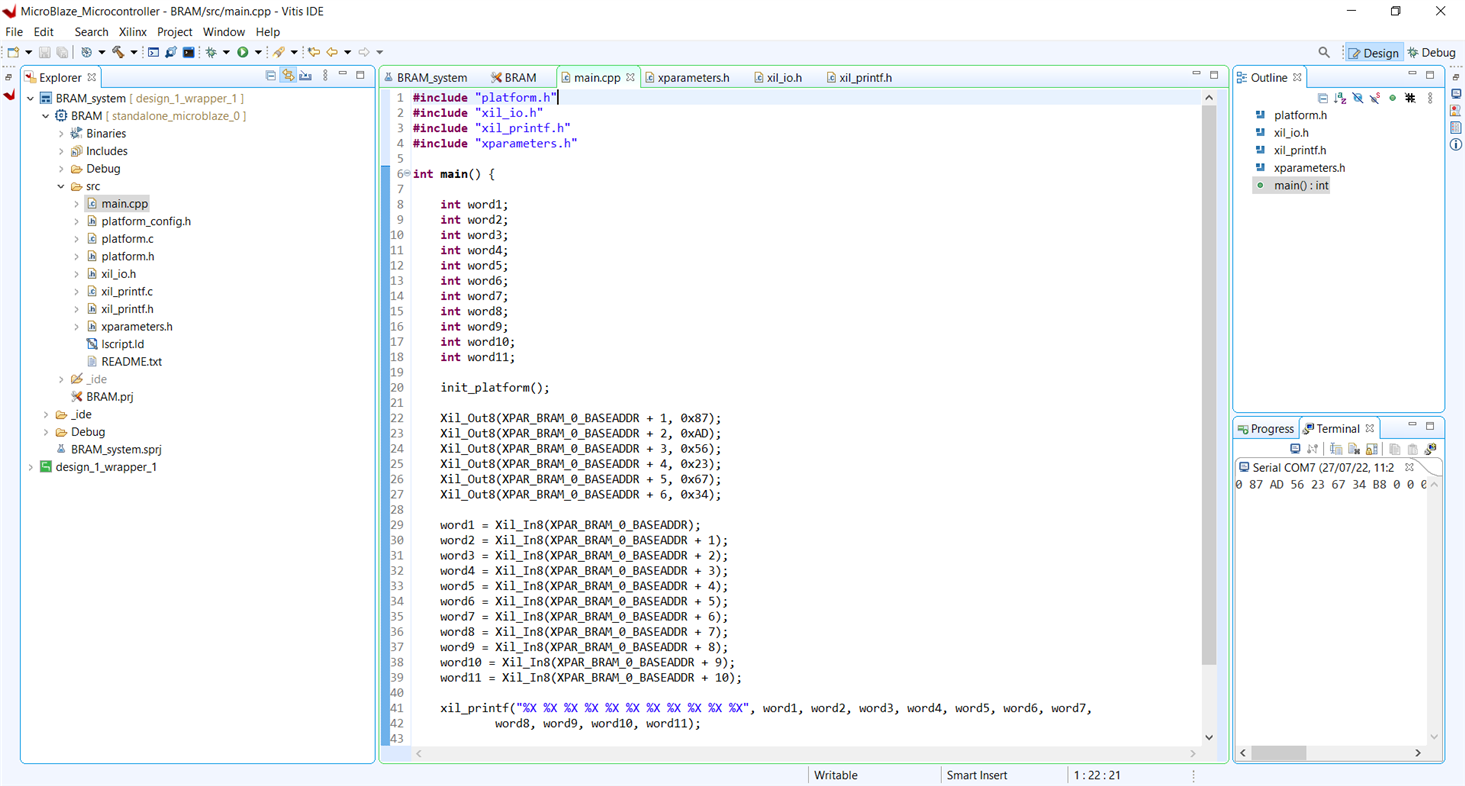
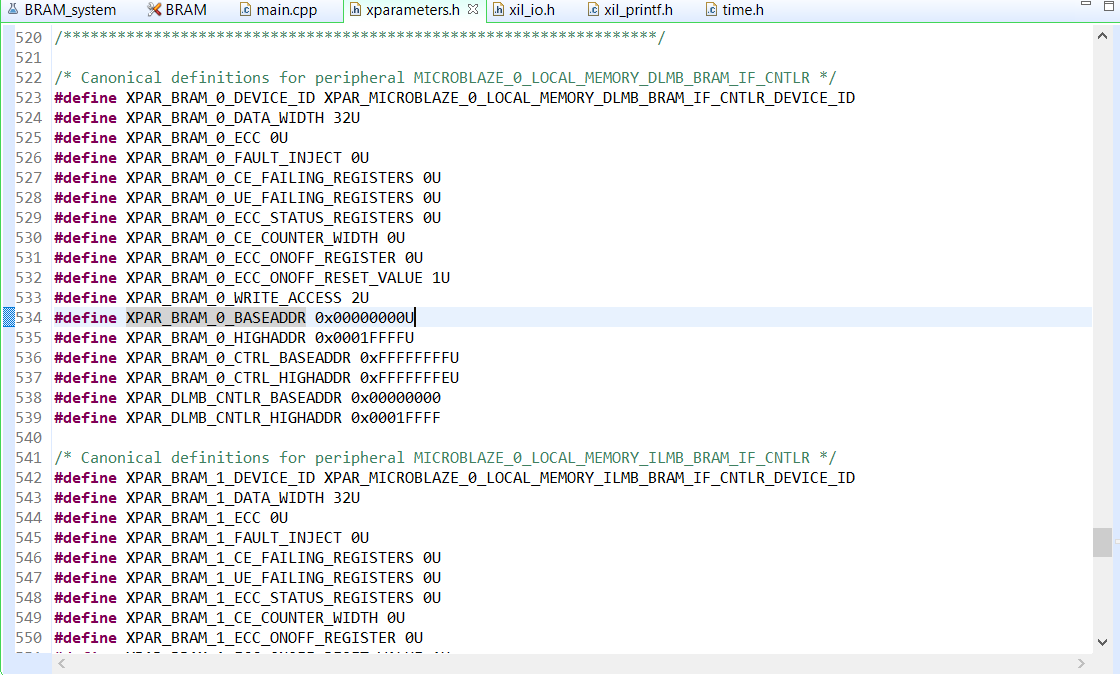
I am trying to assign values to local BRAM memory locations and reading it back. I am using the basic microcontroller preset given in Vivado. I assigned a value "0x758F" to the base address defined in the "xparameters.h". And then I tried to read back the content of the base memory and its giving the correct value. But I am not able to understand that when I check the content of the next memory location (i.e. BASEADDR + 1), it also shows the same value, but I didn't assign any value to this location. It can be seen in the terminal. Why is this happening? Does this mean that if I assign a value to a particular memory location, then the same value will get assigned to all the consecutive locations?
Base ADDR

When I tried to assign values to the (HIGHADDR - 1) address (value - 0xa894) and to (HIGHADDR) address (value - 0x8a46) and then tried to read these locations, it showed same value (i.e. 8A46) in both the locations. Again, I am not able to understand why is this happening?

If my approach to write to BRAM and read it is wrong then is there any better way to do so because the project I am trying to build requires writing to and reading from memory?

  • Sign in to reply
  • Cancel

Top Replies

  • javagoza
    javagoza over 3 years ago +1
    Do you have the memory cache feature enabled on the MicroBlaze block in your design? Check the Cache Line Size and the Data Width. You may be doing reads not aligned with the defined sizes. You can try…
  • javagoza
    javagoza over 3 years ago in reply to cbohra00627 +1
    Right click the block, you can use Block Properties or Customize Block Block Properties Or Customize Block...
  • Metaforest
    Metaforest over 3 years ago +1
    Another issue: When you create a block ram it's base address is set to a default that is shown in the address page of the Object editor. If you need to change the base address of the block it needs to…
Parents
  • javagoza
    0 javagoza over 3 years ago

    Do you have the memory cache feature enabled on the MicroBlaze block in your design? Check the Cache Line Size and  the Data Width. You may be doing reads not aligned with the defined sizes. You can try disabling caches if you need that kind of reads. Otherwise you will have to read in aligned address increments.

    I'm not an expert, it's my first contact with FPGAs, but I'd check that out. I don't know if what I've written makes any sense.

    • Cancel
    • Vote Up +1 Vote Down
    • Sign in to reply
    • Verify Answer
    • Cancel
Reply
  • javagoza
    0 javagoza over 3 years ago

    Do you have the memory cache feature enabled on the MicroBlaze block in your design? Check the Cache Line Size and  the Data Width. You may be doing reads not aligned with the defined sizes. You can try disabling caches if you need that kind of reads. Otherwise you will have to read in aligned address increments.

    I'm not an expert, it's my first contact with FPGAs, but I'd check that out. I don't know if what I've written makes any sense.

    • Cancel
    • Vote Up +1 Vote Down
    • Sign in to reply
    • Verify Answer
    • Cancel
Children
  • cbohra00627
    0 cbohra00627 over 3 years ago in reply to javagoza

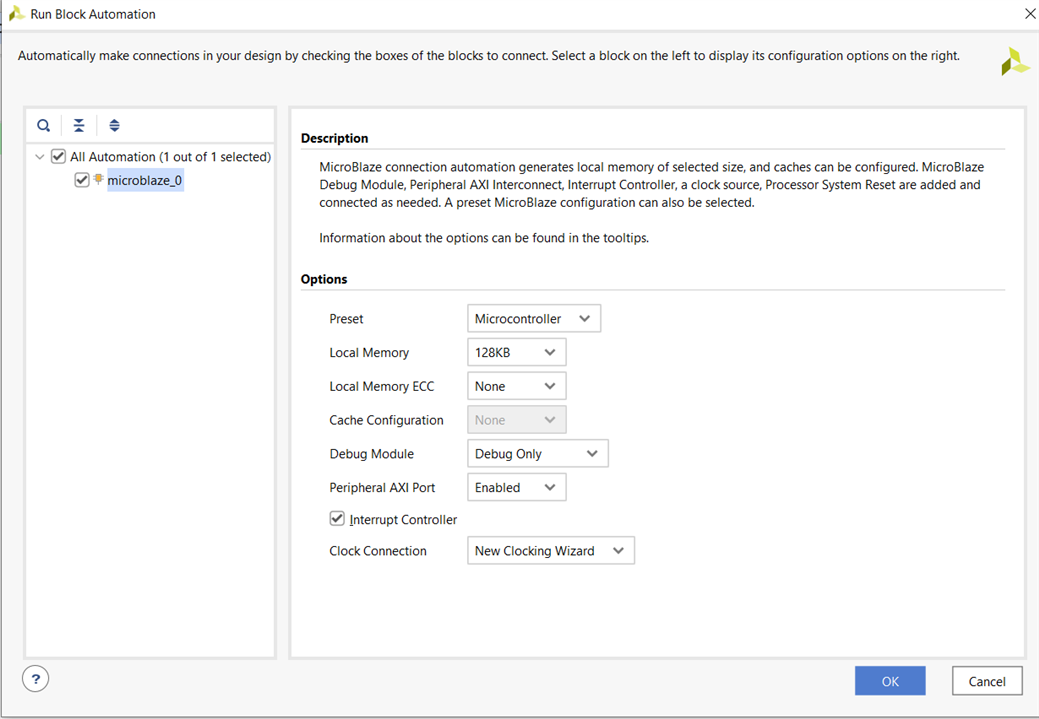
    These were the settings when I ran block automation for microcontroller preset. Cache was disabled I think. Can you please tell me where can I check the data width?

    image

    • Cancel
    • Vote Up 0 Vote Down
    • Sign in to reply
    • Verify Answer
    • Cancel
  • javagoza
    0 javagoza over 3 years ago in reply to cbohra00627

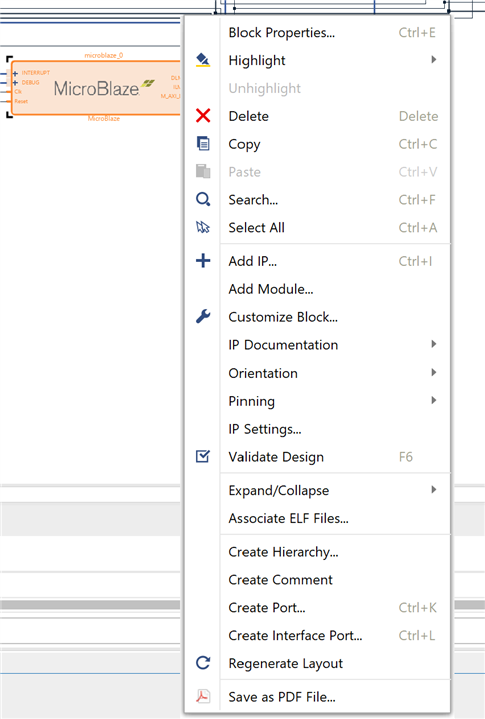
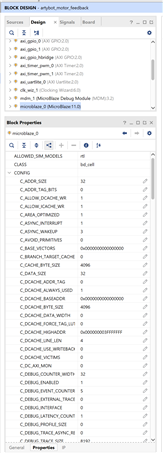
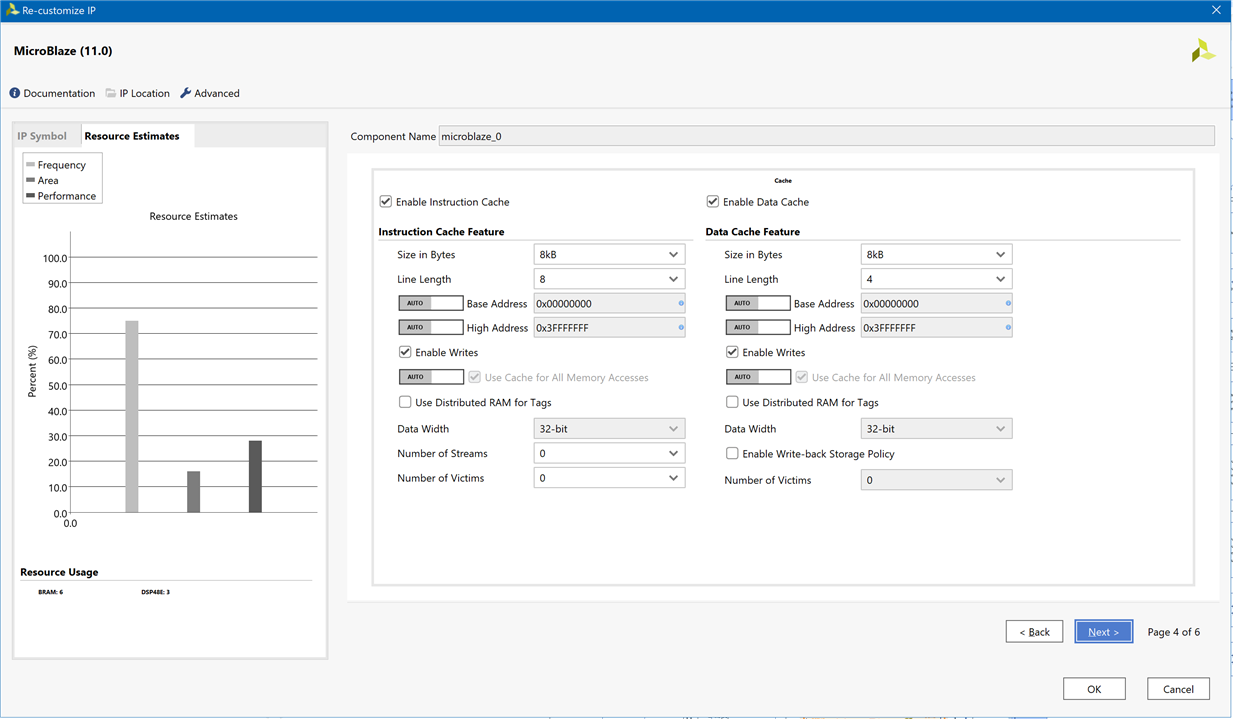
    Right click the block, you can use Block Properties or Customize Block

    image

    Block Properties

    image

    Or Customize Block...

    image

    • Cancel
    • Vote Up +1 Vote Down
    • Sign in to reply
    • Verify Answer
    • Cancel
  • cbohra00627
    0 cbohra00627 over 3 years ago in reply to javagoza

    I checked the customize block wizard but it doesn't show the cache settings as is shown in your wizard. I think that means the cache is disabled in my case. Moreover, I tried to assign values to consecutive memory locations and reading it back and its working fine. Only the memory location that comes after the last location that I assigned shows some garbage value.

    New Block

    • Cancel
    • Vote Up 0 Vote Down
    • Sign in to reply
    • Verify Answer
    • Cancel
element14 Community

element14 is the first online community specifically for engineers. Connect with your peers and get expert answers to your questions.

  • Members
  • Learn
  • Technologies
  • Challenges & Projects
  • Products
  • Store
  • About Us
  • Feedback & Support
  • FAQs
  • Terms of Use
  • Privacy Policy
  • Legal and Copyright Notices
  • Sitemap
  • Cookies

An Avnet Company © 2025 Premier Farnell Limited. All Rights Reserved.

Premier Farnell Ltd, registered in England and Wales (no 00876412), registered office: Farnell House, Forge Lane, Leeds LS12 2NE.

ICP 备案号 10220084.

Follow element14

  • X
  • Facebook
  • linkedin
  • YouTube