element14 Community
element14 Community
    Register Log In
  • Site
  • Search
  • Log In Register
  • Community Hub
    Community Hub
    • What's New on element14
    • Feedback and Support
    • Benefits of Membership
    • Personal Blogs
    • Members Area
    • Achievement Levels
  • Learn
    Learn
    • Ask an Expert
    • eBooks
    • element14 presents
    • Learning Center
    • Tech Spotlight
    • STEM Academy
    • Webinars, Training and Events
    • Learning Groups
  • Technologies
    Technologies
    • 3D Printing
    • FPGA
    • Industrial Automation
    • Internet of Things
    • Power & Energy
    • Sensors
    • Technology Groups
  • Challenges & Projects
    Challenges & Projects
    • Design Challenges
    • element14 presents Projects
    • Project14
    • Arduino Projects
    • Raspberry Pi Projects
    • Project Groups
  • Products
    Products
    • Arduino
    • Avnet & Tria Boards Community
    • Dev Tools
    • Manufacturers
    • Multicomp Pro
    • Product Groups
    • Raspberry Pi
    • RoadTests & Reviews
  • About Us
  • Store
    Store
    • Visit Your Store
    • Choose another store...
      • Europe
      •  Austria (German)
      •  Belgium (Dutch, French)
      •  Bulgaria (Bulgarian)
      •  Czech Republic (Czech)
      •  Denmark (Danish)
      •  Estonia (Estonian)
      •  Finland (Finnish)
      •  France (French)
      •  Germany (German)
      •  Hungary (Hungarian)
      •  Ireland
      •  Israel
      •  Italy (Italian)
      •  Latvia (Latvian)
      •  
      •  Lithuania (Lithuanian)
      •  Netherlands (Dutch)
      •  Norway (Norwegian)
      •  Poland (Polish)
      •  Portugal (Portuguese)
      •  Romania (Romanian)
      •  Russia (Russian)
      •  Slovakia (Slovak)
      •  Slovenia (Slovenian)
      •  Spain (Spanish)
      •  Sweden (Swedish)
      •  Switzerland(German, French)
      •  Turkey (Turkish)
      •  United Kingdom
      • Asia Pacific
      •  Australia
      •  China
      •  Hong Kong
      •  India
      • Japan
      •  Korea (Korean)
      •  Malaysia
      •  New Zealand
      •  Philippines
      •  Singapore
      •  Taiwan
      •  Thailand (Thai)
      • Vietnam
      • Americas
      •  Brazil (Portuguese)
      •  Canada
      •  Mexico (Spanish)
      •  United States
      Can't find the country/region you're looking for? Visit our export site or find a local distributor.
  • Translate
  • Profile
  • Settings
FPGA
  • Technologies
  • More
FPGA
Forum Nandland Go Board Kickstarter
  • Blog
  • Forum
  • Documents
  • Quiz
  • Events
  • Polls
  • Files
  • Members
  • Mentions
  • Sub-Groups
  • Tags
  • More
  • Cancel
  • New
Join FPGA to participate - click to join for free!
Actions
  • Share
  • More
  • Cancel
Forum Thread Details
  • Replies 22 replies
  • Subscribers 558 subscribers
  • Views 6780 views
  • Users 0 members are here
  • nandland
  • icestorm
  • fpga
  • ice40
Related

Nandland Go Board Kickstarter

johnbeetem
johnbeetem over 10 years ago

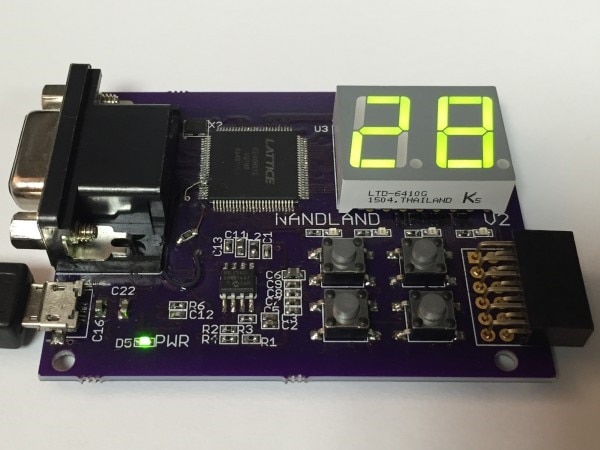
I just found out about the Nandland Go Board on KickStarter.  It’s a nice little FPGA board that looks very well suited to learning about FPGAs since it includes the I/O devices you need for basic FPGA projects.


The Go Board uses the Lattice iCE40 HX1K FPGA, the same one as the Lattice iCEstick.  While the HX1K is a rather small FPGA, iCE40 is the only available FPGA I know of that supports open-source FPGA design tools, specifically IceStorm and its partner tools arachne-pnr and yosys.  iCE40 is also a very simple architecture, which is nice for people just getting started with FPGAs.  Nandland wants to make it fun to learn about FPGAs and play with them -- iCE40 is a good way to avoid the complexity of more advanced FPGAs like Xilinx Spartan-6.


The big strength of the Go Board is its built-in I/O devices:
image

  • Four user-programmable LEDs.
  • Four push-button switches for user input.
  • Dual 7-Segment LED display.
  • VGA connector for video output.
  • Digilent PmodTm connector for external I/O.
  • 25 MHz oscillator.
  • 1 Mb Flash for booting the FPGA.
  • FTDI FT2232H serial USB chip for FPGA programming and UART communication to projects.


All you need to program a Go Board from a PC is a Micro USB cable.  The FT2232H is also used on the Lattice iCEstick, Papilio DUO, and other FPGA boards.  It has both GNU/Linux and Windows support, and the IceStorm programming tool knows how to talk to it so IceStorm should be able to work with the Go Board.


The Kickstarter video that demonstrates the board is quite impressive, with some nice LED, VGA, and UART communications examples.  It even has a Pong game image  The Nandland web site has some nice-looking tutorials as well, both VHDL and Verilog.


[I don’t have any relationship with Nandland, except as a backer.  As with all Kickstarters, there’s some risk.  However, the Go Board prototype works and the PC board isn’t pushing the state of the art.  February 2016 delivery is probably optimistic what with the holidays and all.]

  • Sign in to reply
  • Cancel

Top Replies

  • Former Member
    Former Member over 10 years ago in reply to johnbeetem +2
    Hi John and Michael, I'm Russell and I created the Nandland.com Go Board. Michael thanks for the complement about the webpage. My main goal is to create a website that teaches everyone how to use FPGAs…
  • shabaz
    shabaz over 10 years ago in reply to johnbeetem +2
    Hi John, I see. That explains it! It looked a bit bare so close up to the FPGA. I'm sure Russell knows what he's doing, I just watched his video. I have seen other kickstarters though where they totally…
  • Former Member
    Former Member over 9 years ago in reply to johnbeetem +2
    Happy New Year all, Russell from nandland.com here... A couple things: 1. I have got Pre-Orders set up on www.nandland.com. You can now place an order for the boards. The post-kickstarter price is $55…
  • michaelkellett
    michaelkellett over 10 years ago

    It looks OK but such a pity that they went for the 1k device. You can buy a 4k part in TQFP (for very little additional cost) which can do so much more, and has a PLL module which is lacking on the 1k part.


    (I couldn't find the VGA example on the web site, perhaps you could point me to it.)


    The basic example stuff and the VHDL/Verilog comparison are much better than many similar sites I've seen.


    MK

    • Cancel
    • Vote Up +1 Vote Down
    • Sign in to reply
    • Cancel
  • johnbeetem
    johnbeetem over 10 years ago in reply to michaelkellett

    Michael Kellett wrote:


    It looks OK but such a pity that they went for the 1k device. You can buy a 4k part in TQFP (for very little additional cost) which can do so much more, and has a PLL module which is lacking on the 1k part.


    (I couldn't find the VGA example on the web site, perhaps you could point me to it.)

    You can see VGA examples in action at the Kickstarter video (which starts up automatically -- I wish they wouldn't do that).  It has simple color bars, checkerboard, and Pong game.


    Yes, that is a pity about the 1K device.  While Go Board looks like a good starter board, I could see the FPGA running out of resources "just when it starts to get interesting" (to borrow from Prof. Jones).  Given the cost of the board due to its I/O, it would be nice to have the HX4K or even HX8K.  I believe the HX1K has a PLL on the TQ144 used by iCEstick, but not on Go Board's VQ100.  Currently, IceStorm only supports the HX1K and HX8K, but the latter is only available in BGA.


    I wonder how much trouble it would be for Nandland to switch to the TQ144 and (if possible) make the footprint compatible with both the HX1K and HX4K?  I don't know how much trouble it would be for IceStorm to support the HX4K, but there's no reason to do it unless there's a sizeable number of HX4K boards out there.  Maybe it would be better for Go Board or a successor to go with the HX8K 256-ball caBGA (0.8 mm ball pitch), but then you probably need a lot more layers on the PCB.


    This is why I'd "never" try to design and sell my own FPGA board.  There are so many trade-offs that you very quickly run out of hands ("but on the other hand...")  Better for me to try to support as many existing boards as I can with XXICC and Flavia, and supporting the HX1K Go Board should be trivial.

    • Cancel
    • Vote Up 0 Vote Down
    • Sign in to reply
    • Cancel
  • Former Member
    Former Member over 10 years ago in reply to johnbeetem

    Hi John and Michael,


    I'm Russell and I created the Nandland.com Go Board.  Michael thanks for the complement about the webpage.  My main goal is to create a website that teaches everyone how to use FPGAs as easily and quickly as possible.  I find FPGAs fascinating, but I am often frustrated about the lack of comprehensive resources out there on the internet.  Asic-World does a good job with Verilog, but I've never found a great resource for VHDL.  So that's my main focus.


    Regarding the decision of the 1K vs. 4K... it was a tough decision.  There were many of these decisions.  Should it be four 7-segment displays to allow for projects that use a full digital clock?  Should I put on an audio connector?  Should I put on an ADC?  DAC? etc etc.  Yes it is "just a few more dollars" but those add up quickly.  I suppose that if this project was wildly successful and there was a huge outcry for a 4K part I could swap that out.  That might be a possibility for a stretch goal.  At least the 1K part will teach people to be responsible with their FPGA resource utilization!  image


    Thanks for the feedback.

    • Cancel
    • Vote Up +2 Vote Down
    • Sign in to reply
    • Cancel
  • johnbeetem
    johnbeetem over 10 years ago

    The Kickstarter just made it up to 50 boards as of 30 November 2015 (in the USA).  It's already 250% funded, but more boards increases the educational impact and helps the open-source FPGA movement.  I'd like to see at least 100 boards.


    Update #1: 60 boards on 1 December 2015, over 300% funded.

    Update #2: 71 boards on 4 December 2015, over 370% funded.

    Update #3: 84 boards on 9 December 2015, almost 450% funded.

    Update #4: 97 boards on 11 December 2015, almost 525% funded.

    Update #5: 100 boards on 12 December 2015, over 540% funded.

    Update #6: 112 boards on 14 December 2015, over 610% funded.

    Update #7: end of campaign, 186+ boards on 25 December 2015, 1054% funded.

    • Cancel
    • Vote Up 0 Vote Down
    • Sign in to reply
    • Cancel
  • shabaz
    shabaz over 10 years ago in reply to Former Member

    Hi Russell,


    I've not used the Lattice part, but I'm guessing it has many Vss pins, and many Vdd pins for core or logic levels. The capacitors should be placed right up against those pins (but looks like they are in a row close to the switches), with the smallest one closest, and the largest ones (e.g. C6 from the photo maybe) next-closest.

    Currently they look close to an inch away from the FPGA, unless there are more on the underside?


    Also, I don't know how popular Pmod still is, but if you're open to evolving the design you might also want to check out mikroBUS to rule it in or out. There are around 180 different boards with mikroBUS, and for home projects is a bit more stripboard-friendly since it uses SIL headers spaced just under an inch apart. Some existing FPGA boards (maybe Xilinx, I can't recall) have Pmod interfaces too. I don't think anyone has jumped on the opportunity to have an FPGA board with mikroBUS interface though. Might be a nice differentiator. Or not, depending on if people already have a Pmod investment or a mikroBUS investment (I don't either way) - I just like that I could slightly more easily use stripboard/perfboard with it.


    • Cancel
    • Vote Up +1 Vote Down
    • Sign in to reply
    • Cancel
  • johnbeetem
    johnbeetem over 10 years ago in reply to shabaz

    shabaz wrote:


    I've not used the Lattice part, but I'm guessing it has many Vss pins, and many Vdd pins for core or logic levels. The capacitors should be placed right up against those pins (but looks like they are in a row close to the switches), with the smallest one closest, and the largest ones (e.g. C6 from the photo maybe) next-closest.  Currently they look close to an inch away from the FPGA, unless there are more on the underside?

    Go Board is definitely two-sided, so the Lattice caps are probably right under its VDD/VSS pins.  The discretes near the push-buttons are LEDs and their resistors.  There's a bunch of caps surrounding the 8-pin SOIC.  I'm pretty sure those are for the bottom-side FT2232H and the SOIC-8 is its configuration EEPROM.  An FT2232H needs extra bypass since it has a built-in 3.3V regulator and USB oscillator.

    • Cancel
    • Vote Up +1 Vote Down
    • Sign in to reply
    • Cancel
  • Former Member
    Former Member over 10 years ago in reply to johnbeetem

    John is correct, the caps are right under the FPGA on the bottom of the board.  I should get some photos of the bottom of the board too.


    Regarding the mikroBUS interface, that's interesting... I've never heard of that before.  Looks like a smaller version of the Arduino pinout.  I do like the fact that it provides a way to mechanically secure your external boards to the host FPGA/Micro board.  That's one thing that's missing from PMOD.  From what I've seen, PMOD is pretty common in the FPGA space, lots of dev boards have those connectors on them.  Digilent has an enormous collection of external PMOD modules, that's where I got the one that I used in the video.  I have no interest in designing, documenting, and shipping a bunch of tiny peripheral modules, so I definitely didn't want to reinvent the wheel.  Maybe an FPGA board that has PMOD, Arduino, and mikroBUS on it, just to give connectors for every possible application, would be good for a future project. 

    • Cancel
    • Vote Up +1 Vote Down
    • Sign in to reply
    • Cancel
  • shabaz
    shabaz over 10 years ago in reply to johnbeetem

    Hi John,


    I see. That explains it! It looked a bit bare so close up to the FPGA.

    I'm sure Russell knows what he's doing, I just watched his video. I have seen other kickstarters though where they totally neglected all decoupling : (

    • Cancel
    • Vote Up +2 Vote Down
    • Sign in to reply
    • Cancel
  • shabaz
    shabaz over 10 years ago in reply to Former Member

    Hi Russell,


    Excellent, thanks for the clarification!

    • Cancel
    • Vote Up 0 Vote Down
    • Sign in to reply
    • Cancel
  • peepo
    peepo over 9 years ago

    Where can I buy?


    I was away over Xmas period and missed the Kickstarter...

    • Cancel
    • Vote Up 0 Vote Down
    • Sign in to reply
    • Cancel
>
element14 Community

element14 is the first online community specifically for engineers. Connect with your peers and get expert answers to your questions.

  • Members
  • Learn
  • Technologies
  • Challenges & Projects
  • Products
  • Store
  • About Us
  • Feedback & Support
  • FAQs
  • Terms of Use
  • Privacy Policy
  • Legal and Copyright Notices
  • Sitemap
  • Cookies

An Avnet Company © 2025 Premier Farnell Limited. All Rights Reserved.

Premier Farnell Ltd, registered in England and Wales (no 00876412), registered office: Farnell House, Forge Lane, Leeds LS12 2NE.

ICP 备案号 10220084.

Follow element14

  • X
  • Facebook
  • linkedin
  • YouTube