element14 Community
element14 Community
    Register Log In
  • Site
  • Search
  • Log In Register
  • Community Hub
    Community Hub
    • What's New on element14
    • Feedback and Support
    • Benefits of Membership
    • Personal Blogs
    • Members Area
    • Achievement Levels
  • Learn
    Learn
    • Ask an Expert
    • eBooks
    • element14 presents
    • Learning Center
    • Tech Spotlight
    • STEM Academy
    • Webinars, Training and Events
    • Learning Groups
  • Technologies
    Technologies
    • 3D Printing
    • FPGA
    • Industrial Automation
    • Internet of Things
    • Power & Energy
    • Sensors
    • Technology Groups
  • Challenges & Projects
    Challenges & Projects
    • Design Challenges
    • element14 presents Projects
    • Project14
    • Arduino Projects
    • Raspberry Pi Projects
    • Project Groups
  • Products & Partners
    Products & Partners
    • Arduino
    • Avnet & Tria Boards Community
    • Dev Tools
    • Manufacturers
    • Multicomp Pro
    • Product Groups
    • Raspberry Pi
    • RoadTests & Reviews
  • About Us
    About the element14 Community
  • Store
    Store
    • Visit Your Store
    • Choose another store...
      • Europe
      •  Austria (German)
      •  Belgium (Dutch, French)
      •  Bulgaria (Bulgarian)
      •  Czech Republic (Czech)
      •  Denmark (Danish)
      •  Estonia (Estonian)
      •  Finland (Finnish)
      •  France (French)
      •  Germany (German)
      •  Hungary (Hungarian)
      •  Ireland
      •  Israel
      •  Italy (Italian)
      •  Latvia (Latvian)
      •  
      •  Lithuania (Lithuanian)
      •  Netherlands (Dutch)
      •  Norway (Norwegian)
      •  Poland (Polish)
      •  Portugal (Portuguese)
      •  Romania (Romanian)
      •  Russia (Russian)
      •  Slovakia (Slovak)
      •  Slovenia (Slovenian)
      •  Spain (Spanish)
      •  Sweden (Swedish)
      •  Switzerland(German, French)
      •  Turkey (Turkish)
      •  United Kingdom
      • Asia Pacific
      •  Australia
      •  China
      •  Hong Kong
      •  India
      •  Japan
      •  Korea (Korean)
      •  Malaysia
      •  New Zealand
      •  Philippines
      •  Singapore
      •  Taiwan
      •  Thailand (Thai)
      •  Vietnam
      • Americas
      •  Brazil (Portuguese)
      •  Canada
      •  Mexico (Spanish)
      •  United States
      Can't find the country/region you're looking for? Visit our export site or find a local distributor.
  • Translate
  • Profile
  • Settings
Internet of Things
  • Technologies
  • More
Internet of Things
Blog Set up Elecrow TTN LoRaWAN gateway on Raspberry Pi - Pt. 1: build and test
  • Blog
  • Forum
  • Documents
  • Quiz
  • Events
  • Polls
  • Members
  • Mentions
  • Sub-Groups
  • Tags
  • More
  • Cancel
  • New
Join Internet of Things to participate - click to join for free!
  • Share
  • More
  • Cancel
Group Actions
  • Group RSS
  • More
  • Cancel
Engagement
  • Author Author: Jan Cumps
  • Date Created: 28 Dec 2023 9:20 PM Date Created
  • Views 8068 views
  • Likes 8 likes
  • Comments 37 comments
  • raspberry
  • the things network
  • lorawan
  • ttn
  • gateway
  • iot
Related
Recommended

Set up Elecrow TTN LoRaWAN gateway on Raspberry Pi - Pt. 1: build and test

Jan Cumps
Jan Cumps
28 Dec 2023
Set up Elecrow TTN LoRaWAN gateway on Raspberry Pi - Pt. 1: build and test

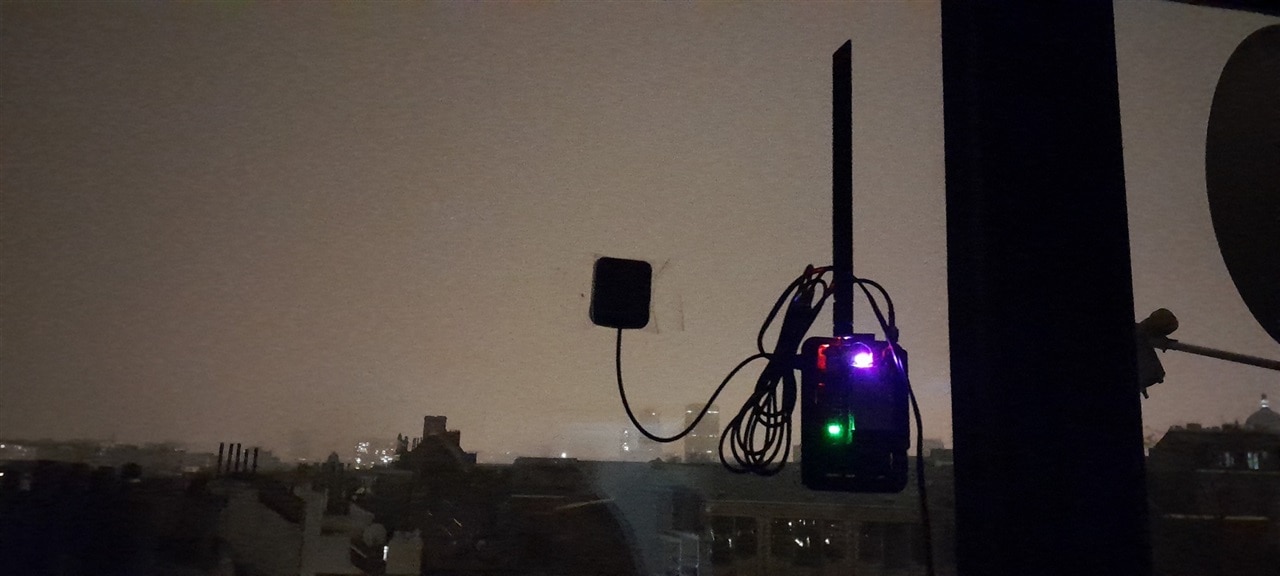
I installed the software for the Elecrow LoRaWAN gateway (see  Low-Cost LoRaWAN Gateways! ), and enabled the gateway on The Things Network (TTN). I used Raspberry OS bullseye 32-bit lite on a Raspberry Pi  A+. I tested this on a B+ with the same OS too.
epic

Instructions from Elecrow: https://www.elecrow.com/wiki/index.php?title=LR1302_LoRaWAN_Gateway_Module

Preparation

sudo apt-get update

sudo apt install -y git

cd ~

run sudo raspi-config to enable

  • i2c,
  • SPI and
  • Serial Port. For Serial Port, do not allow console (question 1: no), but allow enabling of the port (question 2: yes).

Build the software


The following section is different than the vendor's instructions:

clone https://github.com/Elecrow-RD/LR1302_loraWAN.git

cd LR1302_loraWAN

cd LR1302_HAL

cd sx1302_hal

back to the existing instruction

make

Create new TTN Gateway

If you don't have an account yet, create one. Select the suggested settings for your location. Once logged in, navigate to the console. Select Gateways

image

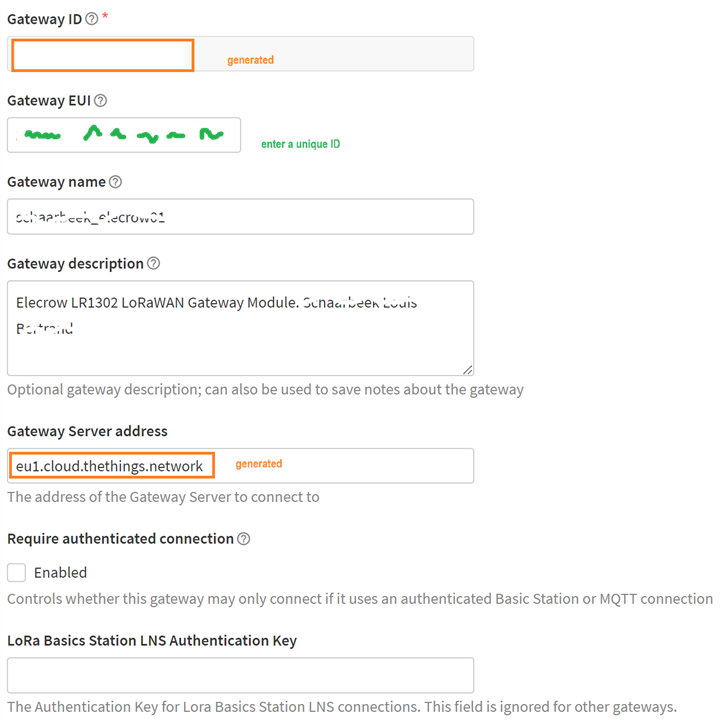
Register your new Gateway. Accept the suggested frequency and setup. I used https://descartes.co.uk/CreateEUIKey.html to generate an ID
image

Then download the json file that's created for you. It holds some of the settings you 'll need to update in the gateway's config file later.

Configure the packet_forwarder

The following section is different than the vendor's instructions:

cd packet_forwarder

nano global_conf.json.sx1250.EU868

I had to change this line extra, not in instructions:
"gps_tty_path": "/dev/ttyS0",

back to the existing instruction

change the EUI in the config file, and check the TTN server URL. Save

The following section is different than the vendor's instructions:

chmod +x reset_lgw.sh

Test

back to the existing instruction

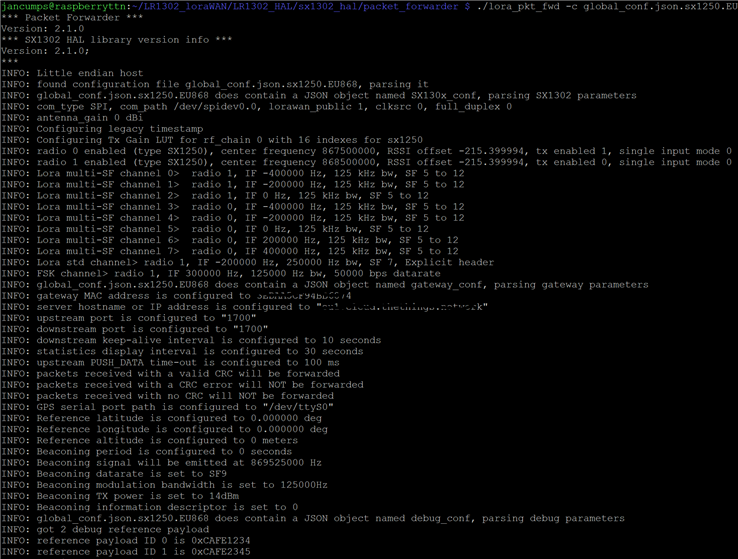
./lora_pkt_fwd -c global_conf.json.sx1250.EU868

You will get a log of what's happening:
image

The TTN console confirms it found you:

image

And after some time, you will appear on the maps: https://ttnmapper.org/heatmap/

image

I've tested with an Arduino MKR 1310, and all worked fine:

Proper install of all software (covered fully in the next blog)

There's more than this. To install all software in a location of your choice, check the instructions on git: https://github.com/Elecrow-RD/LR1302_loraWAN/blob/master/LR1302_HAL/sx1302_hal/readme.md

first edit target.cfg, and set your user name and location where to install (must exist)

Then 

make install

make install_conf

Full install post:  Set up Elecrow TTN LoRaWAN gateway on Raspberry Pi - Pt. 2: full install and run as service 

Enjoy

  • Sign in to reply

Top Comments

  • Jan Cumps
    Jan Cumps over 1 year ago in reply to DaniLecx +1
    In the github issue you are referring to, there is a replacement reset script attached ( here ). If you overwrite sx1302_hal/bin/reset_lgw.sh with those contents, it should work with a sysfs-less linux…
  • Jan Cumps
    Jan Cumps over 1 year ago in reply to Jan Cumps +1
    the USE_LIBGPIOD setting in docker does the same : (see start file ) if [[ ${USE_LIBGPIOD} -eq 0 ]]; then cp /app/reset.sh.legacy ${RESET_FILE} else cp /app/reset.sh.gpiod ${RESET_FILE} fi /app…
Parents
  • kpin404
    kpin404 over 2 years ago

    Hello Jan Cumps , 

    I have received an Elecrow LR1302 (868) LoRaWAN gateway module included with Pi HAT from Elecrow. After hardware assembling with Raspberry- Pi board I have tried to setup as per the vendor's instructions, but afraid to say that I am unable to make a setup configuration for this. Could you please help me to assist further with its complete step-by-step setup configuration instructions to make it work for me. Thanks.

    image

    • Cancel
    • Vote Up 0 Vote Down
    • Sign in to reply
    • More
    • Cancel
  • Jan Cumps
    Jan Cumps over 2 years ago in reply to kpin404

    This series of blog posts is my step by step document. I have nothing more detailed.

    • Cancel
    • Vote Up 0 Vote Down
    • Sign in to reply
    • More
    • Cancel
  • Jan Cumps
    Jan Cumps over 2 years ago in reply to kpin404

    are you using The Things Network? And if yes, do you have an account?

    At what point (in my blog or in the official instructions) are you stuck?

    • Cancel
    • Vote Up 0 Vote Down
    • Sign in to reply
    • More
    • Cancel
  • kpin404
    kpin404 over 2 years ago in reply to Jan Cumps

    Sorry not using Things Network. I am using Chirpstack LoRaWAN Network Server on locally hosted machine and it requires Gateway ID to be connected with the gateway. Thanks.

    • Cancel
    • Vote Up 0 Vote Down
    • Sign in to reply
    • More
    • Cancel
  • kpin404
    kpin404 over 2 years ago in reply to kpin404

    At what point (in my blog or in the official instructions) are you stuck?

    Everything works fine with testing successfully after following your and official instructions, but i am a bit stuck at how to get or know this gateway's ID to enter at my LoRaWAN Network Server.   

    • Cancel
    • Vote Up 0 Vote Down
    • Sign in to reply
    • More
    • Cancel
  • Jan Cumps
    Jan Cumps over 2 years ago in reply to kpin404

    I have no experience with it.

    • Cancel
    • Vote Up 0 Vote Down
    • Sign in to reply
    • More
    • Cancel
  • kpin404
    kpin404 over 2 years ago in reply to Jan Cumps

    Its okay! no problem at all. Thanks for your cooperation. Have a great time.

    • Cancel
    • Vote Up 0 Vote Down
    • Sign in to reply
    • More
    • Cancel
Comment
  • kpin404
    kpin404 over 2 years ago in reply to Jan Cumps

    Its okay! no problem at all. Thanks for your cooperation. Have a great time.

    • Cancel
    • Vote Up 0 Vote Down
    • Sign in to reply
    • More
    • Cancel
Children
No Data
element14 Community

element14 is the first online community specifically for engineers. Connect with your peers and get expert answers to your questions.

  • Members
  • Learn
  • Technologies
  • Challenges & Projects
  • Products
  • Store
  • About Us
  • Feedback & Support
  • FAQs
  • Terms of Use
  • Privacy Policy
  • Legal and Copyright Notices
  • Sitemap
  • Cookies

An Avnet Company © 2026 Premier Farnell Limited. All Rights Reserved.

Premier Farnell Ltd, registered in England and Wales (no 00876412), registered office: Farnell House, Forge Lane, Leeds LS12 2NE.

Follow element14

  • X
  • Facebook
  • linkedin
  • YouTube