


Introduction
USB-UART devices provide an interface between a host computer and a peripheral device, connecting between the USB port and a serial connection called a serial UART. Nearly all microcontrollers have a serial UART, and sometimes it can be used for programming or debugging purposes.
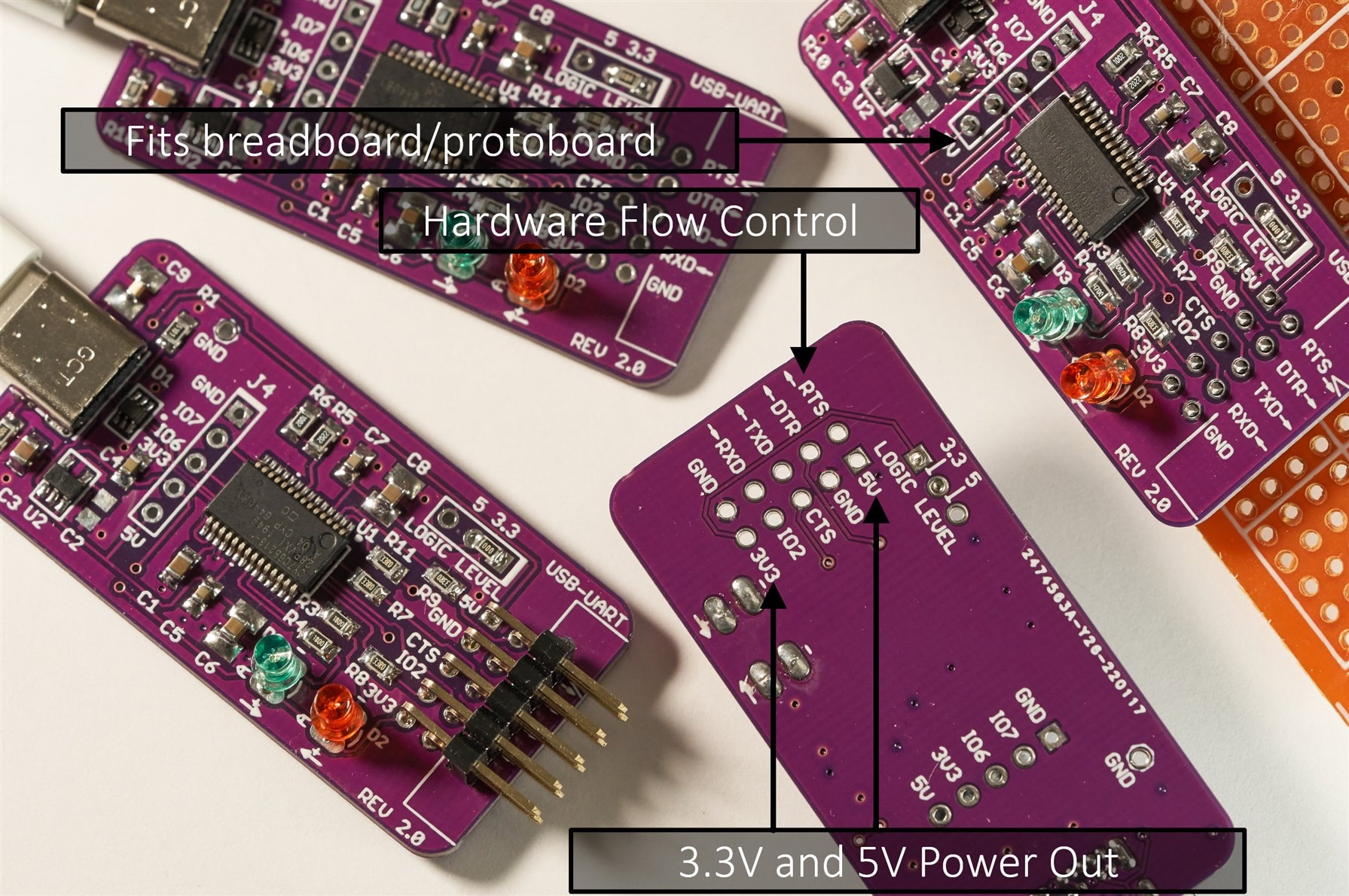
I recently needed a new USB-UART device, and I took the opportunity to try out a USB-C connector, as well as upgrade from the usual USB-UART chip that I use, to a better one. In the past I used a MCP2221 based USB-UART. It is still great (simple to use) but it is missing (amongst other features) the hardware flow control which I really wanted. This time around I used a Cypress chip (now Infineon), based on a USB-UART datasheet comparison I'd worked on a few years ago.
The main features of this project are:
* Modern USB-C connector
* High transmission (baud) rates are supported (up to 3 Mbaud)
* 5V and 3.3V outputs for powering circuits
* 5V and 3.3V UART logic levels (a jumper or a slide switch can be fitted)
* Hardware Flow Control pins, RTS and CTS, are available
* 0.1 inch headers, for easy piggy-back connections onto other circuit boards
* Battery charge negotiation (BCS 1.2) capability pins are exposed for plug-on boards. See this Silabs RoadTest for some detail about BCS 1.2.
* Some GPIO pins are exposed
* Two LEDs for easily seeing if data is being received or transmitted
Note: For a slightly simpler and more compact circuit, see CH340: Building Yet Another USB-C to UART Adapter Board
For an extremely simple circuit, see Building a USB UART Serial Adapter
Circuit Diagram and Components
The circuit diagram is shown here; there is a PDF attached to the blog post.
(Note: I built a version 2.0, but the circuit and board files here are for a version 2.1 which is very slightly tweaked for easier hand-soldering and corrects the direction arrows on the LEDs):

The core of the circuit is the CY7C65213-28PVXI chip from Cypress Semiconductor.
Since there is a component shortage worldwide, it may be necessary to swap out the 3.3V regulator IC U2, for a pin-compatible alternative. If you do that, then the C2, C3 and C4 values will likely need modifying. There may be pin-compatible alternatives for D1 too. All resistors and capacitors can be 0805 sized, but 0603 size can fit too. C6, C8 and C9 component positions can accommodate 1210 sized capacitors if that is what is available.
The USB C connector is part code USB4085-GF-A and is straightforward to hand-solder (needs a 1mm diameter, or smaller, soldering iron tip, and 0.38mm diameter solder (or use solder paste).
The 10-way right-angle connector can be T821110A1R100CEU or any generic DIL header should hopefully fit.
An ESD protection device, TPD4E1U06DCKR is used in the circuit, but it's hard to find due to the current shortage. Other SC70 sized ESD protection parts can be used.
Building It
The circuit board layout is shown below; the files are attached to the blog post, ready for sending to a PCB factory.

For my use-case, I directly soldered a zero-ohm link at the logic level selector J2, to permanently set the board for 3.3V logic levels.
To build the board, I used a soldering iron, thin solder, flux, and desoldering braid to correct stuff. It could be reflow-soldered of course, but it wasn't necessary.

The board isn't designed to fit any particular enclosure, but something could be 3D-printed if desired.

Popular Boards Reference
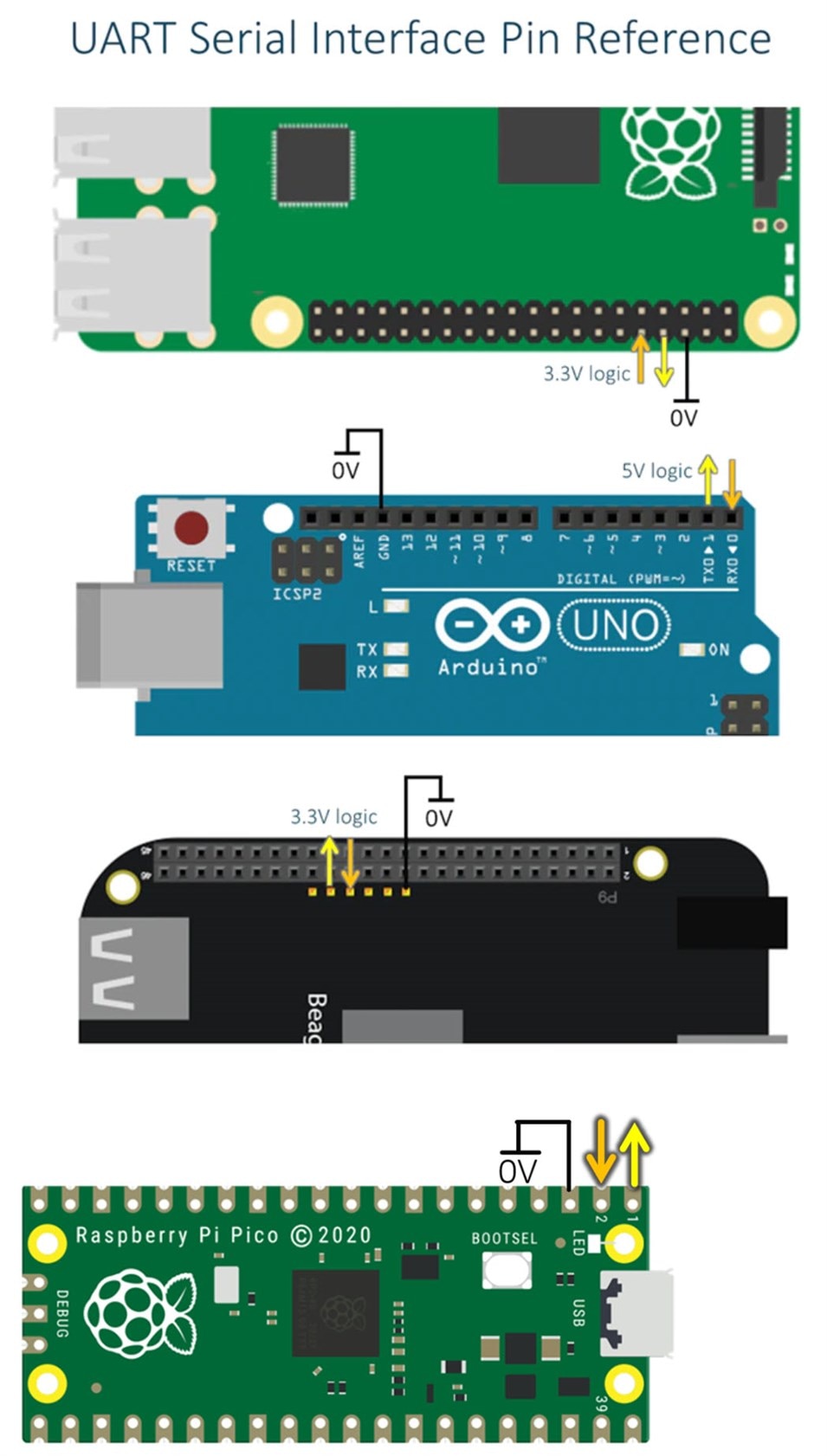
The diagrams below illustrate, using yellow and orange arrows, the board transmit and board receive directions respectively for some popular boards (Pi, Arduino, BeagleBone Black, and Pi Pico). See the photo further below to see where to connect the orange and yellow and black (ground) wires.
Using It
Currently I have only tested the RXD and TXD pins. I didn't need to install any driver on my Windows 11 PC, it just worked. It should work fine with Linux too. I also plugged it into two different Android phones, and successfully got a serial terminal app (from the Google Play Store) to function with it. Interestingly, the Samsung phone worked completely fine, whereas the Xiaomi phone had a popup appear which stated that the phone was not charging through the cable. I was able to clear the popup and use the USB-UART board fine, but I don't know why the popup appeared in the first place. The popup only appeared once, and didn't appear after unplugging and re-inserting the board.
The photo below shows how the basic RXD, TXD and Ground wires are connected.

It's nice finally being able to use the same USB-C cables that I use with the phone or PC, and I hope to use this board a lot. (Edit: six months on, and this is still the main USB UART board that I use).
The board files and schematic are attached. Thanks for reading!
-

embeddedguy
-
Cancel
-
Vote Up
0
Vote Down
-
-
Sign in to reply
-
More
-
Cancel
Comment-

embeddedguy
-
Cancel
-
Vote Up
0
Vote Down
-
-
Sign in to reply
-
More
-
Cancel
Children