


Recap: VitaRF is a wireless vitals node (heart rate, SpO₂, temperature) that reports over BLE into Home Assistant, so someone can keep an eye on a loved one. It's built in three phases: a development-kit bring-up, a custom nRF52832 PCB, and a Matter over Thread proof of concept.
Past Posts
- VitaRF - Part 1 - The Plan
- VitaRF - Part 2 - Interface MAX30102 on NRF52
- VitaRF - Part 3 - Interfacing MAX30208 on NRF52
- VitaRF - Part 4 - Sending Sensor Data to Home Assistant via BLE on NRF52
- VitaRF - Part 5 - Matter over Thread on nRF54L15 with Home Assistant
- VitaRF - Part 6 - An nRF52-Based Heart-Rate & Temperature Wearable PCB for Home Assistant
- VitaRF - Part 7 - Adding a Philips WiZ Smart Bulb to Home Assistant
- VitaRF - Part 8 - Assembling the PCB with Stencil, Paste and a Hot Plate
Heart rate, SpO₂ and temperature tell you about someone's body. The accelerometer tells you what they are doing. For someone living alone, two questions matter: did they fall, and are they sleeping normally? Both can be answered from the same 50 Hz stream of wrist acceleration.
This post covers the whole chain: the LIS2DE12 driver, the sleep scoring, the fall detector, how they run together on the node, and what has and hasn't been validated.

Part A — The LIS2DE12
Wiring
The LIS2DE12 is a 2 × 2 mm LGA-12 three-axis accelerometer that draws about 6 µA at 50 Hz. It is an 8-bit part. That's enough for both jobs, as the sleep section shows.
It sits on the shared I2C bus, which already carries the MAX30208, MAX30102, nPM1300 and DRV2605L. So it needs no extra pins, and 50 Hz × 3 bytes is a small load for 400 kHz I2C.
| Signal | Connection | Note |
|---|---|---|
| VDD / VDD_IO | +3V3 (nPM1300 BUCK2, always on) | Same rail as the I2C pull-ups, so it can't be back-powered through the bus |
| SDA / SCL | Shared I2C bus | Address 0x19 (SA0 tied high) |
| CS | Tied high | Selects I2C mode |
| INT1 | P0.12 | Free-fall engine, push-pull, active high |
| INT2 | P0.13 | Motion engine, push-pull, active high |
The chip has two independent interrupt engines, and the two jobs need different logic. Free-fall is an AND of all three axes being near 0 g. Motion, such as rolling over in bed, is an OR of any axis passing a threshold. Each engine gets its own pin.
TODO-PHOTO: close-up of U2 (LIS2DE12) on the assembled board
Driver init
The driver (firmware/lib/lis2de12.c, nRF5 SDK 17.1.0) checks WHO_AM_I and then writes every control register explicitly, rather than trusting reset values. A warm re-init always lands in the same state:
bool lis2de12_init(lis2de12_odr_t odr, lis2de12_fs_t fs)
{
    uint8_t id;
    if (rd(REG_WHO_AM_I, &id) != NRF_SUCCESS || id != WHO_AM_I_VALUE)   /* 0x33 */
    {
        return false;
    }
    ...
    if (wr(REG_CTRL1, CTRL1_LPEN | CTRL1_XYZ_EN) != NRF_SUCCESS || /* ODR = power-down */
        wr(REG_CTRL2, 0x00) != NRF_SUCCESS ||                       /* high-pass off everywhere */
        wr(REG_CTRL3, 0x00) != NRF_SUCCESS ||                       /* INT1 pin: nothing routed */
        wr(REG_CTRL4, (uint8_t)(CTRL4_BDU | ((uint8_t)fs << 4))) != NRF_SUCCESS ||
        wr(REG_CTRL5, CTRL5_LIR_INT1 | CTRL5_LIR_INT2) != NRF_SUCCESS || /* latched */
        wr(REG_CTRL6, 0x00) != NRF_SUCCESS ||                       /* INT2 pin: nothing routed, active-high */
        wr(REG_FIFO_CTRL, 0x00) != NRF_SUCCESS ||                   /* FIFO bypass */
        ...)
    {
        return false;
    }
    return lis2de12_set_odr(odr) == NRF_SUCCESS;
}
A few datasheet points the driver depends on:
CTRL_REG1.LPenmust be 1 for correct operation, even though this part has no low-power/high-resolution split.- The output steps (15.6 / 31.2 / 62.5 mg per LSB) and the interrupt threshold steps (16 / 32 / 62 / 186 mg) are different numbers, so the driver converts thresholds with its own table.
- Boot completes within 5 ms of power-up, so the BOOT bit isn't needed.
Reading samples
The data is 8-bit, but the register map keeps the 16-bit layout of the bigger parts. A six-byte burst from 0x28 returns X, Y and Z, with the value in the odd bytes (OUT_X_H, OUT_Y_H, OUT_Z_H):
ret_code_t lis2de12_read_raw(lis2de12_raw_t *out)
{
    uint8_t buf[6];
    TRY(i2c_bus_read_reg(s_dev, REG_FIFO_READ | AUTO_INC, buf, sizeof(buf)));
    out->x = (int8_t)buf[1];
    out->y = (int8_t)buf[3];
    out->z = (int8_t)buf[5];
    return NRF_SUCCESS;
}
The FIFO
Waking the CPU 50 times a second to read 3 bytes would waste power. The LIS2DE12 has a 32-sample FIFO. In stream mode it keeps the newest 32 samples, which at 50 Hz is 640 ms of history. The node reads it every 400 ms in one I2C burst of up to 192 bytes.
The FIFO_SRC count field is one less than the number of unread samples. So 31 means 32 are stored, and EMPTY clear with a count of 0 means one sample is waiting. The driver handles it like this:
/* FSS is one less than the number of unread sample sets (31 when full,
 * 32 stored; 0 with EMPTY clear when exactly one is waiting). EMPTY says
 * there is nothing at all. */
uint8_t n = (src & FIFO_SRC_EMPTY) ? 0 : (uint8_t)((src & FIFO_SRC_FSS_MASK) + 1);
...
uint8_t raw[FIFO_DEPTH * 6];
TRY(i2c_bus_read_reg(s_dev, REG_FIFO_READ | AUTO_INC, raw, (uint8_t)(n * 6)));
for (uint8_t i = 0; i < n; i++)
{
    buf[i].x = (int8_t)raw[i * 6 + 1];
    buf[i].y = (int8_t)raw[i * 6 + 3];
    buf[i].z = (int8_t)raw[i * 6 + 5];
}
On the board, the FIFO gives 15 samples after 300 ms, a full 32 with the overrun flag after one second, and no loss when read every 400 ms.
Interrupts
Both interrupt engines run in latched mode. The pin stays high until the matching INTx_SRC register is read, so an event can't be lost while the CPU is busy. The GPIOTE handler only sets a flag. All I2C traffic happens later, in normal context:'
static void gpiote_handler(nrfx_gpiote_pin_t pin, nrf_gpiote_polarity_t action)
{
    if (pin == s_pin1) __atomic_fetch_or(&s_flags, FLAG_INT1, __ATOMIC_ACQ_REL);
    if (pin == s_pin2) __atomic_fetch_or(&s_flags, FLAG_INT2, __ATOMIC_ACQ_REL);
}
A latched pin that is already high at start-up gives no further edge, so lis2de12_irq_init() also reads the pin level once when the driver starts.
Two details matter for the thresholds. The high-pass motion flag (ZH) compares the absolute value, so it catches movement in both directions. And INTx_SRC reports flags for every axis, whether or not that axis is enabled, so the driver masks them with INTx_CFG before acting.
The node's boot test uses the chip's built-in self-test, which applies a test force and checks the output shift against the datasheet window. The hardware free-fall interrupt (350 mg, 30 ms) is also configured.
For now the firmware drains the FIFO on a 400 ms timer and runs both algorithms in software. The interrupt pins are wired and supported by the driver. Using INT1 and INT2 to wake the MCU from deeper sleep is the next power optimisation.
Part B — Sleep quality
The approach
Sleep tracking from a wrist sensor is called actigraphy, and sleep researchers have used it since the 1990s. Commercial watches add heart rate and proprietary models to stage light, deep and REM sleep. I used the published and Open route:
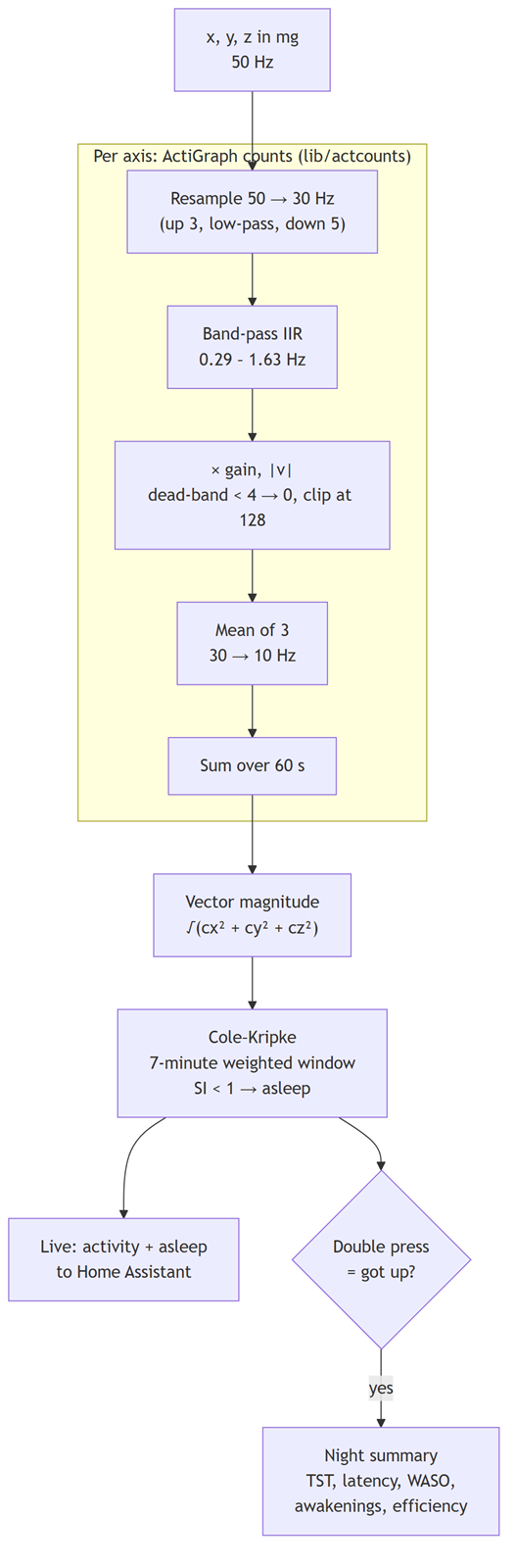
raw acceleration → activity counts → sleep/wake per minute → night summary
Every step has a published method and a reference implementation to test against. It tells sleep from wake, not sleep stages. For a caregiver, "slept about seven hours, woke up three times" is the useful part.
Step 1 — Activity counts
Sleep-scoring algorithms were designed on ActiGraph "activity counts", a per-minute number that ActiGraph devices have produced for decades. Their thresholds only mean something on those numbers. In 2022 ActiGraph published the counting algorithm (Neishabouri et al., Scientific Reports 12:11958). Per axis, the pipeline is:
- Resample to 30 Hz. The LIS2DE12 runs at 50 Hz, so the signal is upsampled by 3, low-pass filtered, and every fifth sample kept.
- A fixed 0.29–1.63 Hz IIR band-pass. This keeps human movement and removes gravity and vibration.
- Scale, then a dead-band (anything below 4 becomes 0) and a clip at 128.
- Average groups of three (30 Hz → 10 Hz) and sum over the minute.
The code is a streaming C library (firmware/lib/actcounts.c). It keeps only the filter state, so memory use stays fixed however long it runs. The core is the band-pass:
/* Band-pass filter, published constants (Neishabouri et al. 2022). The
 * filter is specified at 30 Hz; everything is resampled to 30 Hz first. */
static const actcounts_real_t k_b[8] = {
    -0.009341062898525, -0.025470289659360, -0.004235264826105,  0.044152415456420,
     0.036493718347760, -0.011893961934740, -0.022917390623150, -0.006788163862310,
};
/* Feedback taps a1..a7 (a0 = 1). */
static const actcounts_real_t k_a[7] = {
    -3.63367395910957, 5.03689812757486, -3.09612247819666, 0.50620507633883,
     0.32421701566682, -0.15685485875559, 0.01949130205890,
};
followed by the dead-band and clip:
actcounts_real_t v = fabs(bpf_step(ac, x) * GAIN);
if (v > CLIP)          v = CLIP;      /* 128 */
else if (v < DEADBAND) v = 0.0;       /* 4 */
else                   v = floor(v);
Checking against ActiGraph. ActiGraph's reference repository includes recordings with the counts its ActiLife software produced for them. I ran the C code on those recordings and compared it epoch by epoch:
| Check | Result |
|---|---|
| 30 Hz and 40 Hz recordings, 3 axes, 3000 epochs each | Exact, except one epoch per recording, off by 1 count |
| 50 Hz path (the node's rate; no reference data at 50 Hz) vs. a transcription of the reference | 299 of 300 epochs exact, one off by 1 |
The off-by-one cases come from floating-point summation order on a rounding boundary. The filter runs in double. In single precision about 40 % of epochs differed from ActiLife, by up to 5 counts, because IIR filters with poles this close to the unit circle are sensitive to precision. The nRF52832 FPU is single-precision, so double runs in software. At 50 samples per second per axis, the cost is estimated at about 0.2 % of CPU. That estimate isn't measured yet.
Why 8 bits is enough
ActiGraph devices use a 12-bit accelerometer. The LIS2DE12 has 31 mg per step at ±4 g. To check whether that coarseness matters, I fed a 1 Hz sine of different amplitudes through the counts algorithm at each resolution (counts per minute):
| Movement amplitude | Ideal sensor | ±2 g (15.6 mg/LSB) | ±4 g (31.2 mg/LSB) | ±8 g (62.5 mg/LSB) |
|---|---|---|---|---|
| 50 mg | 0 | 0 | 0 | 0 |
| 75 mg | 360 | 600 | 0 | 0 |
| 100 mg | 1200 | 1200 | 1140 | 1440 |
| 200 mg | 3720 | 3720 | 3600 | 3600 |
| 400 mg | 8160 | 8160 | 8160 | 7920 |
The counts algorithm already reports zero for movements below about 60–75 mg, even with a perfect sensor. The LIS2DE12's step size sits at that same floor, so the resolution costs little for sleep. One range, ±4 g, serves both sleep and falls. Falls need headroom above 2 g for the impact, and there's no need to switch ranges.
Step 2 — Sleep or wake, minute by minute
Scoring uses Cole–Kripke (Cole et al., Sleep 15(5), 1992). It looks at a 7-minute window around each minute and takes a weighted sum of the activity:
SI = 0.001 × (106·A₋₄ + 54·A₋₃ + 58·A₋₂ + 76·A₋₁ + 230·A₀ + 74·A₊₁ + 67·A₊₂)
Here A is the minute's count ÷ 100, capped at 300. A minute is **asleep if SI < 1**. The current minute carries the most weight, and the minutes before it count more than the ones after.
I chose Cole–Kripke over Sadeh for three reasons. It was developed on wrist actigraphy in adults, which is this use case. It's a fixed seven-tap filter that is cheap and easy to check by hand. And there's a clear open-source reference (the `actigraph.sleepr` R package) to compare against.
On the MCU the comparison needs no floating point. Multiply both sides by 100 000, and it becomes integer arithmetic:
/* Counts are divided by 100 and capped at 300, i.e. capped at 30000 before the
 * (exact) division. SI < 1  <=>  sum(w * min(c, 30000)) < 100000. */
static const uint16_t k_ck_weight[7] = { 106, 54, 58, 76, 230, 74, 67 };

bool sleepq_cole_kripke_asleep(const uint16_t *counts, uint16_t n, uint16_t i)
{
    uint32_t sum = 0;
    for (int8_t k = 0; k < 7; k++)
    {
        int32_t idx = (int32_t)i - 4 + k;
        if (idx < 0 || idx >= (int32_t)n)
        {
            continue; /* zero padding */
        }
        uint32_t c = counts[idx];
        if (c > 30000UL)
        {
            c = 30000UL;
        }
        sum += (uint32_t)k_ck_weight[k] * c;
    }
    return sum < 100000UL;
}
Against the published formula in floating point, on 15 000 random minutes, the integer version gives identical results.
Each minute needs the two minutes after it, so the live sleep/wake decision trails real time by two minutes. For sleep, that doesn't matter.
Which axis? ActiGraph scores the axis along the forearm. How the node sits on the wrist depends on the strap and the person, so the node uses the vector magnitude of the three per-axis counts. It doesn't depend on orientation, but it reads slightly higher than one axis, so it leans a little towards scoring wake.
Step 3 — The night summary
Per-minute sleep/wake is noisy on its own, so the night summary turns a bed-time window into the standard actigraphy numbers:
| Metric | Meaning |
|---|---|
| Time in bed | Bed mark → up mark |
| Sleep onset latency | Bed → the first run of 10 consecutive sleep minutes |
| Total sleep time | Sleep minutes between onset and the final awakening |
| WASO | "Wake after sleep onset": awake minutes between onset and final awakening |
| Awakenings | Wake runs of 5 minutes or longer after onset |
| Sleep efficiency | Total sleep ÷ time in bed |
The 10- and 5-minute run lengths are compile-time constants in sleepq.h.
How does the node know when you went to bed? It doesn't, and the algorithm can't reliably tell either. Lying on the sofa watching TV looks like sleep to an accelerometer. So the wearer marks it. A double press on the button marks bed time, and the LED flashes cyan. The next double press marks getting up. That press scores the remaining minutes, builds the summary, writes it to the flash log, and sends the sleep minutes to Home Assistant.
The pipeline runs all the time. Home Assistant also receives a live activity count and an asleep/awake flag every minute. The node keeps 12 hours of minutes: 720 × 2 bytes of counts, plus one bit per minute for the decision, about 1.5 KB. If the buffer fills during the day it starts over. At bed time it starts fresh if less than 10 hours of room is left, so a night never runs out of space.
Part C — Fall detection
The approach
A fall seen from an accelerometer has a typical shape, and most fall-detection work (Bourke et al. 2007, Kangas et al. 2008, the SisFall dataset by Sucerquia et al. 2017) uses a version of it:
- Free-fall: while the body drops, the sensor reads less than 1 g.
- Impact: a sharp spike when the body hits the floor.
- Aftermath: the person lies still.
Everything is measured on the signal vector magnitude, SVM = √(x² + y² + z²), which reads about 1000 mg at rest in any orientation. I used a threshold detector rather than a trained classifier. It fits in a few hundred bytes, every decision can be explained, and its failure modes are known. A classifier would need a labelled set of wrist falls, which doesn't exist yet.

| Parameter | Default | Why |
|---|---|---|
| Free-fall threshold | SVM < 400 mg for ≥ 60 ms | Set for the wrist (see below) |
| Impact | SVM ≥ 2000 mg within 1 s of the free-fall ending | Above what ordinary arm movement reaches without a free-fall before it |
| Settle | 1 s ignored after the impact | Bounces and rolling |
| Stillness | ≥ 90 % of the next 3 s within ±250 mg of 1 g | The person is lying down, not walking away |
| Orientation change | Off (optional, e.g. ≥ 30°) | Can reject jumps, at the cost of missing some falls |
| Cooldown | 10 s after a confirmed fall | One fall, one alert |
The detector is O(1) per sample and uses integer arithmetic (an integer square root for SVM). Every threshold lives in a fall_cfg_t struct, so it can be tuned without touching the logic. Free-fall is tracked in every state, so the record of the last free-fall is current when an impact arrives:
fall_event_t fall_detect_feed(fall_detect_t *fd, int16_t x_mg, int16_t y_mg, int16_t z_mg)
{
    const int32_t v[3] = { x_mg, y_mg, z_mg };
    const uint32_t sq  = (uint32_t)(v[0] * v[0]) + (uint32_t)(v[1] * v[1]) + (uint32_t)(v[2] * v[2]);
    const uint16_t svm = fall_detect_isqrt(sq);
    ...
    /* Free-fall tracking runs in every state, so the memory is fresh when an impact arrives. */
    if (svm < fd->cfg.freefall_mg)
    {
        ...
        fd->ff_run++;
    }
    else
    {
        if (fd->ff_run >= fd->ff_min_n)
        {
            fd->ff_last_len  = fd->ff_run;
            fd->since_ff_end = 0;
        }
        ...
        fd->ff_run = 0;
    }

    switch (fd->state)
    {
        case FD_IDLE:
            if (svm >= fd->cfg.impact_mg)
            {
                bool had_freefall = fd->ff_last_len != 0 && fd->since_ff_end <= fd->lookback_n;
                if (!fd->cfg.require_freefall || had_freefall)
                {
                    ...
                    fd->ff_last_len = 0; /* one free-fall can explain only one impact */
                    fd->state = FD_SETTLE;
                    return FALL_EVENT_CANDIDATE;
                }
            }
            break;
        ...
Why 400 mg on the wrist
Most published fall thresholds come from sensors worn on the waist or chest. On the wrist, arm swing alone pulls SVM down to about 0.4–0.6 g at the end of each swing. A 600 mg free-fall threshold fires on ordinary walking, so the threshold is set to 400 mg. The chip's hardware free-fall at 350 mg is a sensible gate for the same reason.
Test results
The host tests (firmware/tests/test_fall_detect.c) run synthetic 50 Hz traces through the detector on the PC:
| Scenario | Result |
|---|---|
| Fall: 400 ms free-fall, 3.3 g impact, lying still | Confirmed, 400 ms free-fall, 3.27 g peak |
| Same, with the orientation check on (≥ 30°) | Confirmed, 80° change |
| Fall, then vigorous movement | Rejected (the stillness check costs some real falls) |
| 60 s of walking with 2.3 g heel strikes | No candidate |
| Sitting down hard (2.6 g), then still | Ignored. Becomes a false alarm if free-fall isn't required, which is why it's on by default |
| Table slam with continued arm movement | Ignored |
| Jump on the spot, then standing still | False alarm with defaults; rejected with the orientation check on |
| 40 ms free-fall before a hard impact | Ignored (too short) |
| Two falls 5 s apart | Only the first reported |
The 72-hour run below also feeds every sample through the fall detector. It raised no candidates.
After a confirmed fall
A wrist-worn fall detector will produce some false alarms, so nothing goes to Home Assistant until the wearer has had a chance to cancel:

- 15 s countdown: the red LED blinks, the DRV2605L haptic motor buzzes and the piezo beeps.
- One press of SW1 cancels it. A "fall cancelled" record goes to the log.
- Otherwise the alert latches: the BTHome Problem binary sensor turns on, and adverts speed up to every 100 ms for 30 s so Home Assistant sees it quickly. A "fall" record goes to flash with the peak g, the free-fall length and the stillness percentage.
- Another press of SW1 clears it.
Home Assistant turns the alert into light. The automation below switches the bedroom WiZ bulb to full cool white when the Problem sensor turns on, and back to dim warm yellow when it clears:

Running both on the node
app_motion.c ties it together. Every 400 ms it drains the FIFO, converts the samples to mg, and feeds each one to both detectors:
void app_motion_service(void)
{
    lis2de12_raw_t raw[FIFO_MAX];
    uint8_t count = 0;
    bool overrun = false;
    if (lis2de12_fifo_read(raw, FIFO_MAX, &count, &overrun) != NRF_SUCCESS)
    {
        return;
    }
    for (uint8_t i = 0; i < count; i++)
    {
        lis2de12_mg_t mg;
        lis2de12_raw_to_mg(&raw[i], &mg);
        feed(&mg);
    }
}

static void feed(const lis2de12_mg_t *mg)
{
    fall_event_t fe = fall_detect_feed(&s_fall, mg->x, mg->y, mg->z);
    if (fe == FALL_EVENT_CONFIRMED && s_countdown_ticks == 0 && !g_app.fall_alert)
    {
        start_countdown();
    }

    if (!sleepq_feed(&s_sleep, mg->x, mg->y, mg->z))
    {
        return;
    }

    /* A minute closed. */
    uint16_t n = sleepq_epoch_count(&s_sleep);
    g_app.activity = sleepq_epoch_activity(&s_sleep, (uint16_t)(n - 1));
    uint16_t scored = sleepq_scored_count(&s_sleep);
    if (scored > s_reported)
    {
        g_app.asleep = sleepq_epoch_is_asleep(&s_sleep, (uint16_t)(scored - 1));
        s_reported   = scored;
    }
    app_ble_update();
}
The button goes through the nPM1300's SHPHLD pin. A single press cancels or clears a fall alert. A double press marks bed time or getting up.
In Home Assistant everything arrives over BTHome v2:
| BTHome object | Shows in HA as | Is |
|---|---|---|
| 0x26 Problem | Binary sensor | Fall alert |
| 0x3D Count (1st) | Count | Activity count, last minute |
| 0x0F Generic binary | Binary sensor | Asleep (last scored minute) |
| 0x3D Count (2nd) | Count |
Sleep minutes, last nigh |

Home Assistant labels the SpO₂ value as Humidity. BTHome has no SpO₂ type, so the node sends SpO₂ as a percentage in the humidity object.
The 72-hour run
To see how the sleep and fall code behaves over several days, I ran 72 hours of wrist data through the same logic the firmware uses. It is 50 Hz wrist acceleration from the LIS2DE12 at ±4 g, covering an ordinary routine: walking, desk work, meals, an evening on the sofa, bed at 23:00, and a few posture changes and twitches through the night. The data passes through the same code and the same bed and up logic as the firmware, fall detector included.
This time I had a very special guest who helped me track the signals. My Grandmother who is the old schools and believes good sleep is essential for health.
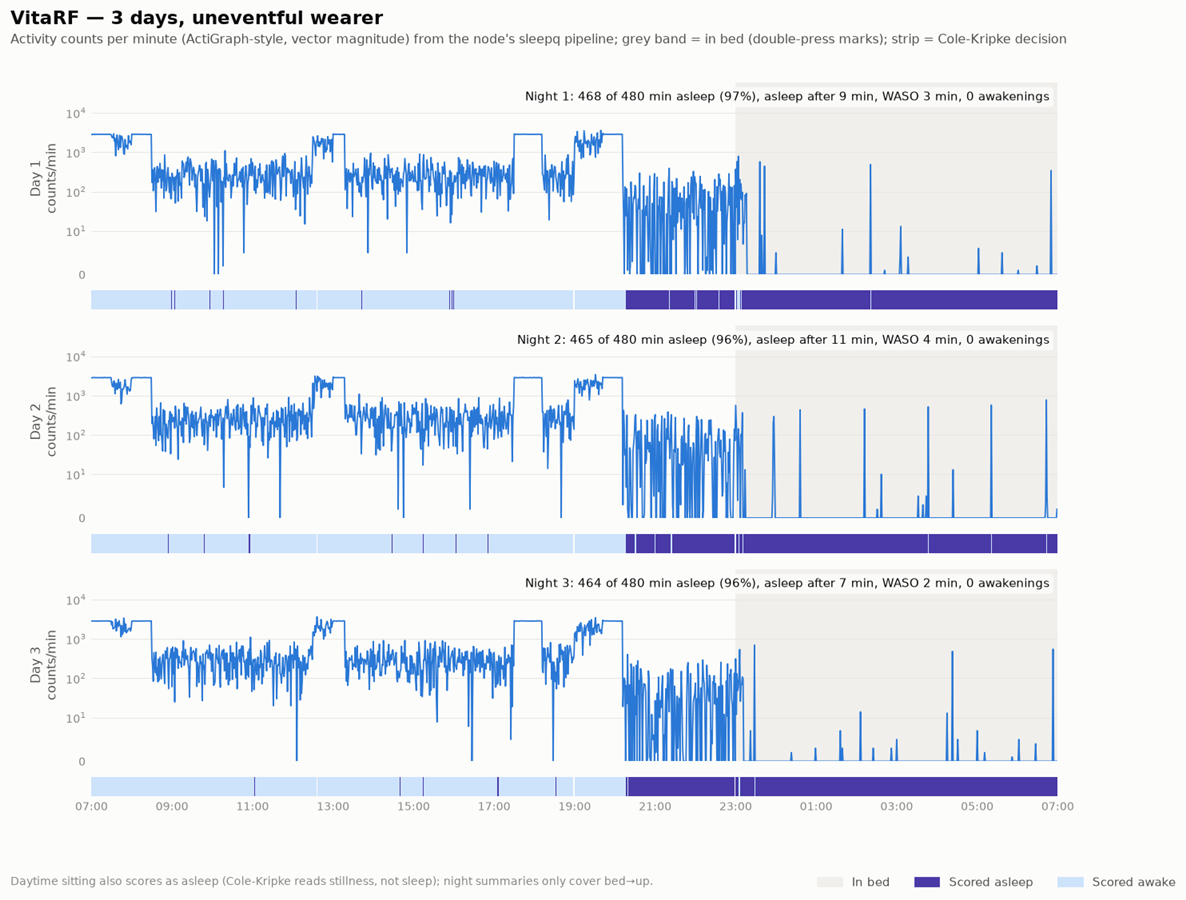
| Night | In bed | Asleep | Efficiency | Fell asleep after | WASO | Awakenings |
|---|---|---|---|---|---|---|
| 1 | 480 min | 468 min | 97 % | 9 min | 3 min | 0 |
| 2 | 480 min | 465 min | 96 % | 11 min | 4 min | 0 |
| 3 | 480 min | 464 min | 96 % | 7 min | 2 min | 0 |
Time in bed was between 420 and 480 minutes across the three nights. To compare the nights in minutes rather than percentages, the table scales each night to a 480-minute window. Onset latency is 7–11 minutes. The night-time posture changes show as spikes, and Cole–Kripke rides through them, as designed. The fall detector raised no candidates in the 72 hours.
The chart also shows the main limitation. From about 20:15 the evening on the sofa scores as asleep, and so do scattered quiet minutes at the desk: 502 of the 2868 daytime minutes. Cole–Kripke measures stillness, not sleep. That's why the night summary only uses the window between the two button presses, and why the live asleep flag shouldn't be trusted on its own during the day.
Limits and next steps
These are the parts not yet validated:
- Sleep: the algorithm is good at detecting sleep and weaker at detecting quiet wakefulness. Lying awake still will count as sleep, so expect it to overestimate sleep somewhat.
- Falls: the thresholds come from the literature and the wrist adjustments above. They haven't been tuned on real falls with a person. The known weak spots are a jump followed by standing still, which looks like a fall, and a faller who gets up straight away, which is missed by the stillness check. The next step is labelled falls onto a mat, plus a day of ordinary wear, to tune on.
- The cancel countdown exists because of these limits. The alert should not be connected to an emergency service without it.
Final notes
The LIS2DE12 does both jobs from one 50 Hz stream. The sleep counts follow ActiGraph's published method and match its reference data. Sleep scoring runs in integer arithmetic on the MCU. The fall detector runs on a 400 mg free-fall threshold, tuned for the wrist. Every fall goes through a 15 s countdown before anyone is told.
All the code is in the repository: the driver in firmware/lib/lis2de12.[ch], the algorithms in firmware/lib/actcounts.[ch], sleepq.[ch] and fall_detect.[ch], the node integration in firmware/vitarf_node/app_motion.c, and the host tests and the 72-hour run in firmware/tests (make test, make three-day).
Repo Link: https://gitlab.com/arvindsa/vitarf-e14
Thank You
A Huge thank you for my Grandma for assisting with data collection and a Huge thanks to my Friend Ayush Who helped me with coding in of the Aceelerometer & Sleep Algorithms,
References
- Neishabouri A. et al., "Quantification of acceleration as activity counts in ActiGraph wearable", Scientific Reports 12, 11958 (2022). https://doi.org/10.1038/s41598-022-16003-x
- Cole R.J., Kripke D.F., Gruen W., Mullaney D.J., Gillin J.C., "Automatic sleep/wake identification from wrist activity", Sleep 15(5):461–469 (1992)
- Bourke A.K., O'Brien J.V., Lyons G.M., "Evaluation of a threshold-based tri-axial accelerometer fall detection algorithm", Gait & Posture 26(2):194–199 (2007)
- Kangas M. et al., "Comparison of low-complexity fall detection algorithms for body attached accelerometers", Gait & Posture 28(2):285–291 (2008)
- Sucerquia A., López J.D., Vargas-Bonilla J.F., "SisFall: A Fall and Movement Dataset", Sensors 17(1):198 (2017)
actigraph/agcounts(reference counts implementation) and theactigraph.sleeprR package (Cole–Kripke reference)

