element14 Community
element14 Community
    Register Log In
  • Site
  • Search
  • Log In Register
  • Community Hub
    Community Hub
    • What's New on element14
    • Feedback and Support
    • Benefits of Membership
    • Personal Blogs
    • Members Area
    • Achievement Levels
  • Learn
    Learn
    • Ask an Expert
    • eBooks
    • element14 presents
    • Learning Center
    • Tech Spotlight
    • STEM Academy
    • Webinars, Training and Events
    • Learning Groups
  • Technologies
    Technologies
    • 3D Printing
    • FPGA
    • Industrial Automation
    • Internet of Things
    • Power & Energy
    • Sensors
    • Technology Groups
  • Challenges & Projects
    Challenges & Projects
    • Design Challenges
    • element14 presents Projects
    • Project14
    • Arduino Projects
    • Raspberry Pi Projects
    • Project Groups
  • Products
    Products
    • Arduino
    • Avnet & Tria Boards Community
    • Dev Tools
    • Manufacturers
    • Multicomp Pro
    • Product Groups
    • Raspberry Pi
    • RoadTests & Reviews
  • About Us
  • Store
    Store
    • Visit Your Store
    • Choose another store...
      • Europe
      •  Austria (German)
      •  Belgium (Dutch, French)
      •  Bulgaria (Bulgarian)
      •  Czech Republic (Czech)
      •  Denmark (Danish)
      •  Estonia (Estonian)
      •  Finland (Finnish)
      •  France (French)
      •  Germany (German)
      •  Hungary (Hungarian)
      •  Ireland
      •  Israel
      •  Italy (Italian)
      •  Latvia (Latvian)
      •  
      •  Lithuania (Lithuanian)
      •  Netherlands (Dutch)
      •  Norway (Norwegian)
      •  Poland (Polish)
      •  Portugal (Portuguese)
      •  Romania (Romanian)
      •  Russia (Russian)
      •  Slovakia (Slovak)
      •  Slovenia (Slovenian)
      •  Spain (Spanish)
      •  Sweden (Swedish)
      •  Switzerland(German, French)
      •  Turkey (Turkish)
      •  United Kingdom
      • Asia Pacific
      •  Australia
      •  China
      •  Hong Kong
      •  India
      • Japan
      •  Korea (Korean)
      •  Malaysia
      •  New Zealand
      •  Philippines
      •  Singapore
      •  Taiwan
      •  Thailand (Thai)
      • Vietnam
      • Americas
      •  Brazil (Portuguese)
      •  Canada
      •  Mexico (Spanish)
      •  United States
      Can't find the country/region you're looking for? Visit our export site or find a local distributor.
  • Translate
  • Profile
  • Settings
Community Hub
Community Hub
Member's Forum What part am I looking for?
  • Blog
  • Forum
  • Documents
  • Quiz
  • Events
  • Leaderboard
  • Polls
  • Files
  • Members
  • Mentions
  • Sub-Groups
  • Tags
  • More
  • Cancel
  • New
Join Community Hub to participate - click to join for free!
Actions
  • Share
  • More
  • Cancel
Forum Thread Details
  • State Verified Answer
  • Replies 22 replies
  • Answers 11 answers
  • Subscribers 571 subscribers
  • Views 1805 views
  • Users 0 members are here
Related

What part am I looking for?

justphred
justphred over 5 years ago

Hey all, I recently decided to dive headlong into the micro controller world, with a project I am working on. I'm in way over my head and Amy trying to find a place to get some assistance.


I am in the planning phase so far and am trying to figure out what part I need for a specific section of my project.


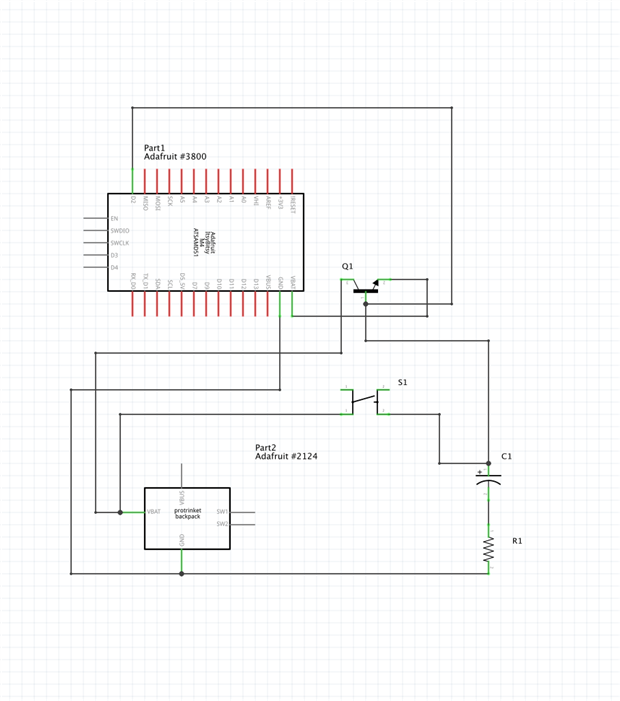
Essentially, I am trying to create a software power button. So I don't have to have a Switch and a button. this project is fairly small and I am trying to save as much space as I can. I have mapped out how I THINK it should work, and have attached a quick diagram. Here is a run down of how I think it will work...


  • Power comes in to the Mystery Part from a battery (a 3.7v 420mAH lipo) and is sent to a momentary switch.
  • When the momentary switch is pressed the path of the battery power flips from going to the switch to going to the micro controller. There by powering on the system. (flipping the Mystery Part from RED position to GREEN)
  • The Momentary switch is now being seen by the micro controller. Which will be programed to send a signal to the Mystery Part when the Switch is held down for 5+ seconds.
  • The Signal coming in from the micro controller switches the battery power back to the momentary switch, thus cutting power to the system and powering it off (flipping the  Mystery Part from GREEN position back to RED)


The Grey box on the diagram is the mystery part. Any help in figuring out what I need to make this happen would be appreciated.

Attachments:
image
  • Sign in to reply
  • Cancel

Top Replies

  • genebren
    genebren over 5 years ago +5 verified
    Michael, There are a few things that you might new to think about, before you can make use of your Mystery part. You are planning on using a Lipo battery which has a typical voltage of 3.7 volts. In reality…
  • dougw
    dougw over 5 years ago +3 suggested
    If I understand the requirement, I think it could be done with 3 FETs and your momentary SPST push button. One PFET turns power on to the MCU. This PFET is turned on by an NFET which is turned on by the…
  • justphred
    justphred over 5 years ago in reply to dougw +2 suggested
    I think I understand what you are getting at here. The only issue is I want to use the push button with the MCU to activate other things while this project is on and running. Would the switch still be…
Parents
  • genebren
    0 genebren over 5 years ago

    Michael,


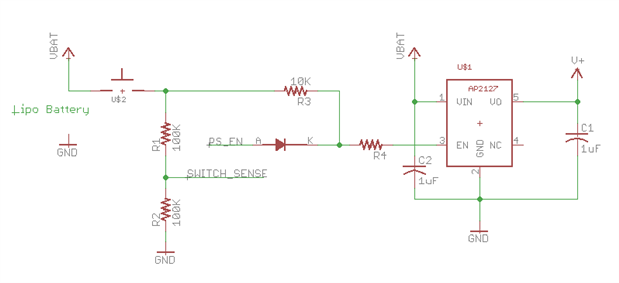
    There are a few things that you might new to think about, before you can make use of your Mystery part.  You are planning on using a Lipo battery which has a typical voltage of 3.7 volts.  In reality this battery will supply between 4.2V and 2.5V.  This will have some influence over which microprocessor you will use.  What I typically do for battery driven circuits is to use a voltage regulator to provide a fixed voltage to the microprocessor (which will be less than the battery voltage), so with a single Lipo battery, I will use a 2.5V regulator.   Here is a circuit that I have used in several designs:


    image


    When the switch is press with the circuit off, the battery voltage is used to enable the regulator (AP2127-2.5 or a MIC5504-2.5), allowing it to generate V+ (in this case 2.5V).  The Microprocessor is started and it needs to then drive PS_EN high, thus holding the regulator on.  To turn the circuit off, the voltage at SWITCH_SENSE is monitored by the microprocessor and when the voltage is held high for an extended time (like 5 sec in your example) the microprocessor drives PS_EN low.  When the switch is released, the circuit then shuts down.


    This might seem like a lot to do, in order to switch power on and off, but this circuit gives you a lot of flexibility in it's functionality.  You can also add a circuit (a voltage divider like R1/R2) at the battery terminal, and measure the divider to generate a under voltage shutdown (i.e if the battery voltage drops below 2.7V).  Or you could use the microprocessor to turn the circuit off if the circuit is determined to be idle (saving battery life).


    Like anything in electronics, there are many ways to do the same thing.  You need to compare the pluses and minuses of each approach based on your needs.


    Good luck!

    Gene

    • Cancel
    • Vote Up +5 Vote Down
    • Sign in to reply
    • Verify Answer
    • Reject Answer
    • Cancel
  • justphred
    0 justphred over 5 years ago in reply to genebren

    Ok Gene, this is sounds exactly like how I want it to work, and yes it is a very complicated way to do a simple thing but you are correct that it provides a lot of possibilities. the auto off to save power was something that I had as a stretch goal that I figured I could make work if I got this working. I will look up those Regulators.


    I looked into it and the trace off of that battery board will be anywhere from 3.7v-4.2v, would the regulator you suggested still work or would I need one for a higher voltage?

    • Cancel
    • Vote Up +1 Vote Down
    • Sign in to reply
    • Verify Answer
    • Reject Answer
    • Cancel
  • genebren
    0 genebren over 5 years ago in reply to justphred

    The MIC5504-2.5 accepts input voltages in the range 2.5 to 5.5V, so yes, this should be fine. The ItsyBitsy is listed as 3.3V, but it might actually work at lower voltages.  If not, you could use a boost regulator to allow a wider voltage range (4.2V to 2.5V) to generate 3.3V (a little more complicated, but much more versatile).

    • Cancel
    • Vote Up 0 Vote Down
    • Sign in to reply
    • Verify Answer
    • Reject Answer
    • Cancel
  • justphred
    0 justphred over 5 years ago in reply to genebren

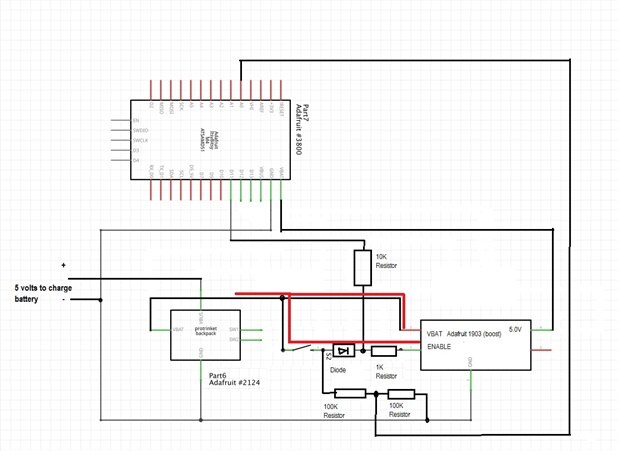
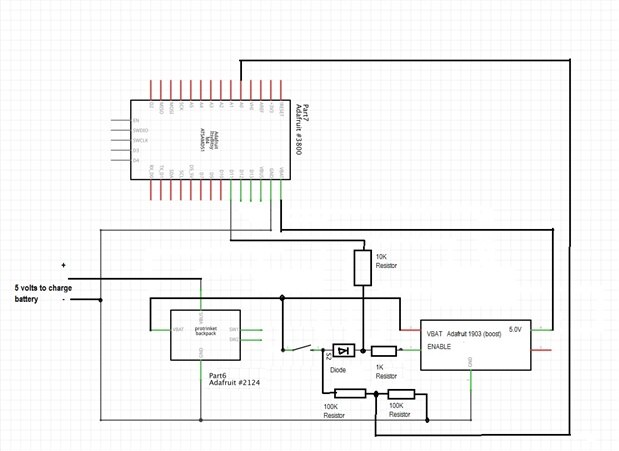
    Gene I have been going over this chip and Im trying to understand the pin out, let me know if I have this right.


    You have the V+ coming from the battery, going through a switch and then into the Enable pin 3. From there if it has current it goes out of Vout pin 5 into the MCU.


    I tried throwing the Schematic together myself to see if I understand it. I would appreciated it if you could look it over and tell me if I'm on the right track.


    image


    Tho only problem that I saw is that the momentary switch was in the batteries path. the way I was thinking it would work the switch would come after the Regulator so that I can use the same button with the MCU. But maybe I'm just not understanding something fundamental. again, any help would be awesome.

    • Cancel
    • Vote Up +1 Vote Down
    • Sign in to reply
    • Verify Answer
    • Cancel
  • genebren
    0 genebren over 5 years ago in reply to justphred

    Michael,


    The supply indicator (arrow labeled VBAT) is a virtual wire of sorts.  It connects to the battery and to pin 1 of the regulator.  The second path, from the battery to pin 3 of the regulator is the enable signal.  This signal turns of the regulator, which in turn supplies power to the microprocessor, which in turn drives PS_EN to hold the regulator on.


    Gene

    • Cancel
    • Vote Up 0 Vote Down
    • Sign in to reply
    • Verify Answer
    • Cancel
  • genebren
    0 genebren over 5 years ago in reply to justphred

    Looking at the specification for the ItsyBitsy a bit closer, the chosen regulator will not work.  The ItsyBitsy has an onboard regulator that has an input range of 6.0 to 3.3V, which generates 3.0 volts.  What you may need is a boost regulator, which accepts a range of 2.5 to 4.2V and produces either 3.3V or something higher.  I have worked with a device that accepts 2.5 to 4.2V and produces 5.0V (or some other lower voltage).  There is a test circuit that I used in a series of blogs about boost regulators and inductor choices (Choosing the correct Inductor for a DC-DC step-up regulator - Introduction , Choosing the correct Inductor for a DC-DC step-up regulator - Part 2 , Choosing the correct Inductor for a DC-DC step-up regulator - Part 3 ):


    image

    The resistor divider network was used to set the output voltage.  With a desired output value (say 3.3V) the resistors R2-R6 could be replaced with two values, and jumper block (JP1) could be removed.  Also, the enable pin (EN - pin2), would be removed from the input pin (pin 2) and wired to the enable from the earlier schematic fragment.  This would take the full voltage range of the battery (4.2V to 2.5V) and produce 3.3V for your ItsyBitsy board.

    • Cancel
    • Vote Up 0 Vote Down
    • Sign in to reply
    • Verify Answer
    • Reject Answer
    • Cancel
  • justphred
    0 justphred over 5 years ago in reply to genebren

    Gene, I'm not so sure I understand why a Regulator is the wright part. as I look at the diagram I am failing to understand how it does the original specification of switching the battery voltage between two pins.


    In your first schematic you have the momentary switch before the regulator. but in my drawing I have it after.


    I guess I'm trying to understand how a regulator works. cause I have been looking into it and to my understanding it doesn't switch anything, just keeps it at a set value.

    • Cancel
    • Vote Up +1 Vote Down
    • Sign in to reply
    • Verify Answer
    • Cancel
  • genebren
    0 genebren over 5 years ago in reply to justphred

    Michael,


    In the most general sense, a regulator is used to reduce one voltage (input) into a lower voltage (output).  In the case of the original schematic fragment that I supplied, we are using a special feature, present on these regulators, but necessarily all regulators, which is an enable input.  The enable signal, can turn the regulator into a switch, along with its voltage control function.

    image


    In the schematic, there are to paths to turn on the regulator.  The first path (through R3), passes a voltage from the battery to the enable pin of the regulator to turn it on when the switch is pressed.  Keep in mind that the regulator is powered by the battery, through the connection at pin 1 of the regulator (through the VBAT symbol).  Once the regulator is turned on, the microprocessor must use the second path (set high), through the diode (signal PS_EN) to hold the regulator on.  Then when the switch is released, this second path will hold the regulator on, until the microprocessor decides to turn it off.


    The voltage requirements of your ItsyBitsy board might require that you move away from a simple regulator, as the voltage requirement is 5.0 to 3.3 volts is hard to achieve with a regulator, in that the output voltage of the regulator will be less than the input voltage.  With an input voltage (i.e. the battery) of 4.2 to 2.5, a simple regulator will not be able to maintain the minimum voltage of 3.3 over the full charge cycle of the battery.  You could do two things:

    1. Use a 3.3 volt regulator and shut down when the output of the regulator drops below 3.3V (i.e. the battery voltage drops too low).
    2. Use a 5.0V boost regulator that can take any safe voltage from the battery and convert it to 5.0V, which the ItsyBitsy can accept and convert to 3.0V onboard.  The microprocessor could be setup to shut off the boost regulator once the battery voltage gets too low (2.5 to 2.7Volts).  The trick here is to keep the boost circuits output voltage (5.0) greater than the battery voltage (2.5 - 4.2V).
    • Cancel
    • Vote Up 0 Vote Down
    • Sign in to reply
    • Verify Answer
    • Reject Answer
    • Cancel
Reply
  • genebren
    0 genebren over 5 years ago in reply to justphred

    Michael,


    In the most general sense, a regulator is used to reduce one voltage (input) into a lower voltage (output).  In the case of the original schematic fragment that I supplied, we are using a special feature, present on these regulators, but necessarily all regulators, which is an enable input.  The enable signal, can turn the regulator into a switch, along with its voltage control function.

    image


    In the schematic, there are to paths to turn on the regulator.  The first path (through R3), passes a voltage from the battery to the enable pin of the regulator to turn it on when the switch is pressed.  Keep in mind that the regulator is powered by the battery, through the connection at pin 1 of the regulator (through the VBAT symbol).  Once the regulator is turned on, the microprocessor must use the second path (set high), through the diode (signal PS_EN) to hold the regulator on.  Then when the switch is released, this second path will hold the regulator on, until the microprocessor decides to turn it off.


    The voltage requirements of your ItsyBitsy board might require that you move away from a simple regulator, as the voltage requirement is 5.0 to 3.3 volts is hard to achieve with a regulator, in that the output voltage of the regulator will be less than the input voltage.  With an input voltage (i.e. the battery) of 4.2 to 2.5, a simple regulator will not be able to maintain the minimum voltage of 3.3 over the full charge cycle of the battery.  You could do two things:

    1. Use a 3.3 volt regulator and shut down when the output of the regulator drops below 3.3V (i.e. the battery voltage drops too low).
    2. Use a 5.0V boost regulator that can take any safe voltage from the battery and convert it to 5.0V, which the ItsyBitsy can accept and convert to 3.0V onboard.  The microprocessor could be setup to shut off the boost regulator once the battery voltage gets too low (2.5 to 2.7Volts).  The trick here is to keep the boost circuits output voltage (5.0) greater than the battery voltage (2.5 - 4.2V).
    • Cancel
    • Vote Up 0 Vote Down
    • Sign in to reply
    • Verify Answer
    • Reject Answer
    • Cancel
Children
No Data
element14 Community

element14 is the first online community specifically for engineers. Connect with your peers and get expert answers to your questions.

  • Members
  • Learn
  • Technologies
  • Challenges & Projects
  • Products
  • Store
  • About Us
  • Feedback & Support
  • FAQs
  • Terms of Use
  • Privacy Policy
  • Legal and Copyright Notices
  • Sitemap
  • Cookies

An Avnet Company © 2025 Premier Farnell Limited. All Rights Reserved.

Premier Farnell Ltd, registered in England and Wales (no 00876412), registered office: Farnell House, Forge Lane, Leeds LS12 2NE.

ICP 备案号 10220084.

Follow element14

  • X
  • Facebook
  • linkedin
  • YouTube