element14 Community
element14 Community
    Register Log In
  • Site
  • Search
  • Log In Register
  • Community Hub
    Community Hub
    • What's New on element14
    • Feedback and Support
    • Benefits of Membership
    • Personal Blogs
    • Members Area
    • Achievement Levels
  • Learn
    Learn
    • Ask an Expert
    • eBooks
    • element14 presents
    • Learning Center
    • Tech Spotlight
    • STEM Academy
    • Webinars, Training and Events
    • Learning Groups
  • Technologies
    Technologies
    • 3D Printing
    • FPGA
    • Industrial Automation
    • Internet of Things
    • Power & Energy
    • Sensors
    • Technology Groups
  • Challenges & Projects
    Challenges & Projects
    • Design Challenges
    • element14 presents Projects
    • Project14
    • Arduino Projects
    • Raspberry Pi Projects
    • Project Groups
  • Products
    Products
    • Arduino
    • Avnet & Tria Boards Community
    • Dev Tools
    • Manufacturers
    • Multicomp Pro
    • Product Groups
    • Raspberry Pi
    • RoadTests & Reviews
  • About Us
    About the element14 Community
  • Store
    Store
    • Visit Your Store
    • Choose another store...
      • Europe
      •  Austria (German)
      •  Belgium (Dutch, French)
      •  Bulgaria (Bulgarian)
      •  Czech Republic (Czech)
      •  Denmark (Danish)
      •  Estonia (Estonian)
      •  Finland (Finnish)
      •  France (French)
      •  Germany (German)
      •  Hungary (Hungarian)
      •  Ireland
      •  Israel
      •  Italy (Italian)
      •  Latvia (Latvian)
      •  
      •  Lithuania (Lithuanian)
      •  Netherlands (Dutch)
      •  Norway (Norwegian)
      •  Poland (Polish)
      •  Portugal (Portuguese)
      •  Romania (Romanian)
      •  Russia (Russian)
      •  Slovakia (Slovak)
      •  Slovenia (Slovenian)
      •  Spain (Spanish)
      •  Sweden (Swedish)
      •  Switzerland(German, French)
      •  Turkey (Turkish)
      •  United Kingdom
      • Asia Pacific
      •  Australia
      •  China
      •  Hong Kong
      •  India
      •  Japan
      •  Korea (Korean)
      •  Malaysia
      •  New Zealand
      •  Philippines
      •  Singapore
      •  Taiwan
      •  Thailand (Thai)
      •  Vietnam
      • Americas
      •  Brazil (Portuguese)
      •  Canada
      •  Mexico (Spanish)
      •  United States
      Can't find the country/region you're looking for? Visit our export site or find a local distributor.
  • Translate
  • Profile
  • Settings
Embedded and Microcontrollers
  • Technologies
  • More
Embedded and Microcontrollers
Blog EasyL1105 MSPM0 board: hello, world
  • Blog
  • Forum
  • Documents
  • Quiz
  • Polls
  • Files
  • Members
  • Mentions
  • Sub-Groups
  • Tags
  • More
  • Cancel
  • New
Join Embedded and Microcontrollers to participate - click to join for free!
  • Share
  • More
  • Cancel
Group Actions
  • Group RSS
  • More
  • Cancel
Engagement
  • Author Author: Jan Cumps
  • Date Created: 9 Sep 2025 7:16 PM Date Created
  • Views 1165 views
  • Likes 7 likes
  • Comments 16 comments
  • MSPM0L1105
  • MSPM0
  • easyL1105
  • texas instruments
  • ti
Related
Recommended

EasyL1105 MSPM0 board: hello, world

Jan Cumps
Jan Cumps
9 Sep 2025
EasyL1105 MSPM0 board: hello, world

 shabaz designed a development kit for the recent Texas Instruments MSPM0 microcontroller series. 
In this post, a little hello, world example. Complexity: low.

image
(post that introduces the kit)

Required hardware and software

  • EasyL1105 kit
  • USB cable to connect EasyL1105 kit to PC
  • a serial monitor (PuTTY, ...)
  • handy: an XDS110 debugger, and an IDE that supports that. I use ccstudio 20 (it also has a built-in serial monitor)

Functionality

This program sends hello, world to the MSPM0 UART0. If you put the UART jumpers on the board, the data will arrive on your PC. Like most SDK examples, I use 9600 baud, 8, N 1.

Start an empty project

In ccstudio, you create a new one based on the MSPM0L1105 empty example. Steps are explained here:  Use TI Code Composer Studio with EasyL1105 MSPM0 board . Also follow the steps there, to select the 28 pin version of the controller.

Before making any changes, build the project. This should complete successful.

If you use GCC and bootloader, start from shabaz ' example, and use make, GCC and standalone SysConfig to make the changes and build the firmware, 

SysConfig

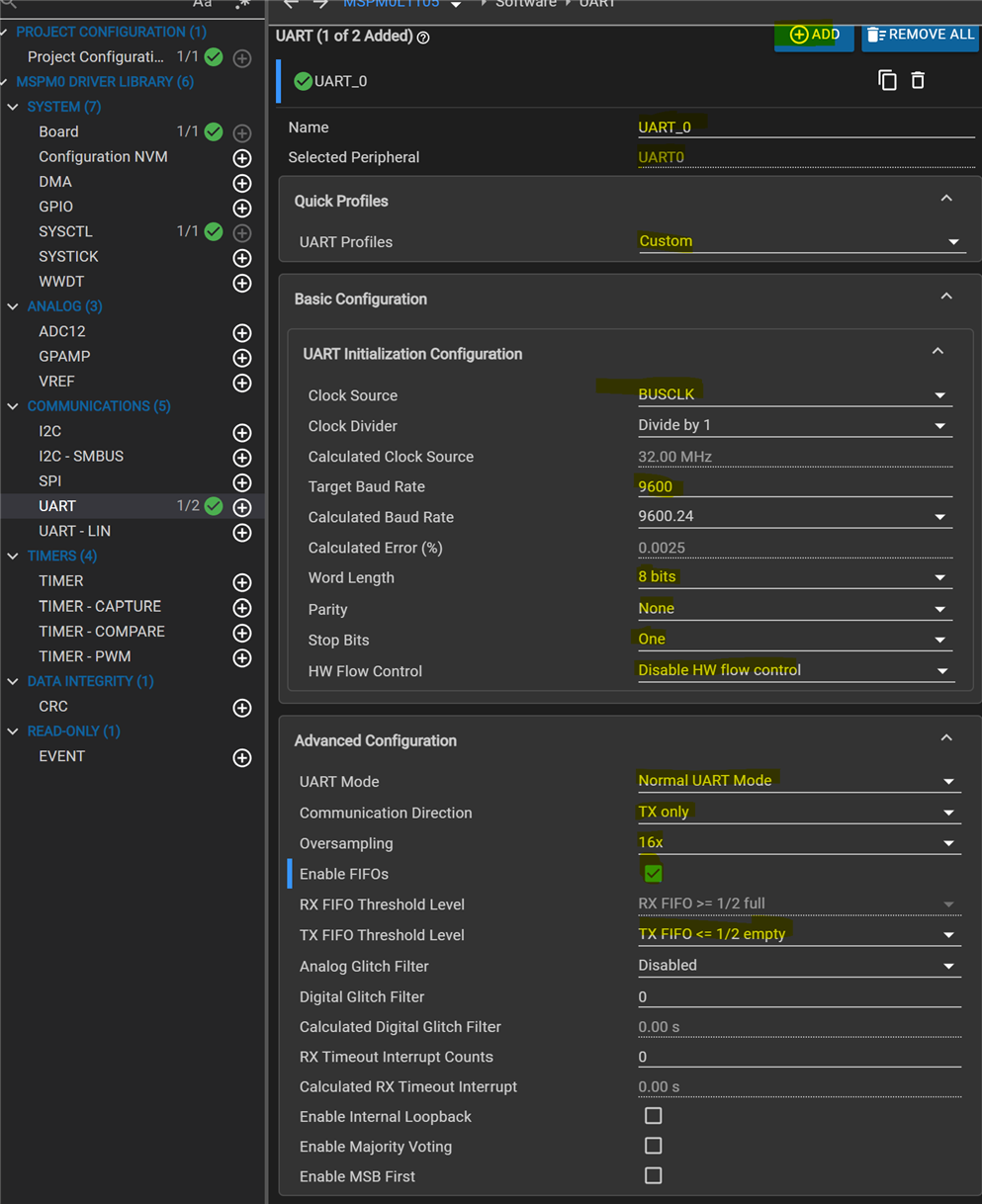
The only configuration that's required, is the UART:
image

image

In essence: UART0, transmission only, to PA17.

Code

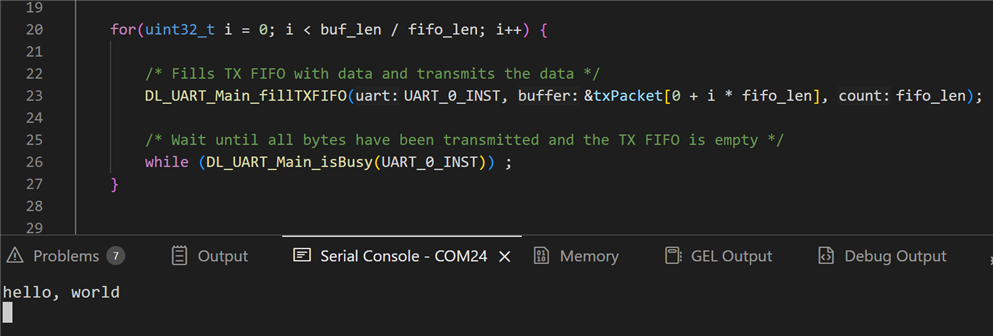
MSPM0 has 4 bytes FIFO. The string that I'm sending is 16 bytes. I let the program loop 4 times over the string, snooping a full FIFO. I wait for the next batch until the buffer is free.

#include "ti_msp_dl_config.h"

/* Delay for 5ms to ensure UART TX is idle before starting transmission */
#define UART_TX_DELAY (160000)


#define buf_len 16
#define fifo_len 4

/* Data for UART to transmit */
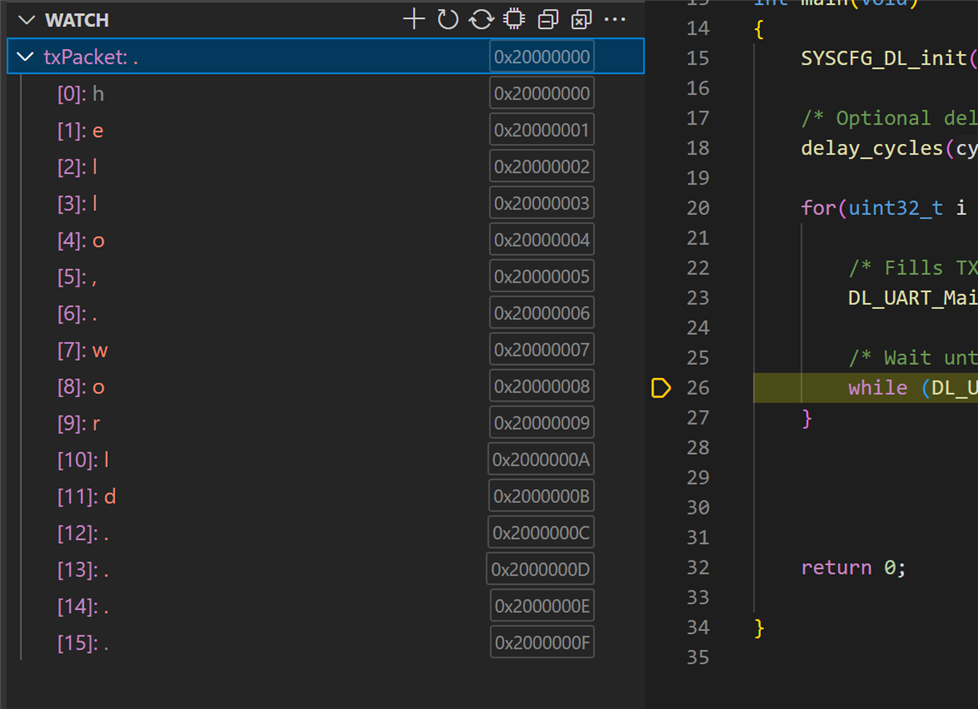
uint8_t txPacket[buf_len] = {"hello, world  \r\n"};

int main(void)
{
    SYSCFG_DL_init();

    /* Optional delay to ensure UART TX is idle before starting transmission */
    delay_cycles(UART_TX_DELAY);

    for(uint32_t i = 0; i < buf_len / fifo_len; i++) {

        /* Fills TX FIFO with data and transmits the data */
        DL_UART_Main_fillTXFIFO(UART_0_INST, &txPacket[0 + i * fifo_len], fifo_len);

        /* Wait until all bytes have been transmitted and the TX FIFO is empty */
        while (DL_UART_Main_isBusy(UART_0_INST)) ;
    }


    return 0;

}

Program and Test with ccstudio and XDS110

  • Connect an XDS110 debugger as explained here:  Cheap debugger ($6) for EasyL1105 MSPM0 board .
  • Remove all headers from the EasyL1105 - including the power ones. The debugger will power the board.
  • connect your terminal program to the debugger COM
  • start the program. It 'll show hello, world on the terminal
image

Program and Test with GCC and bootloader

  • mount only the power and BSL jumpers on the EasyL1105
  • connect the EasyL1105 USB to your PC
  • follow shabaz ' instructions to build the program and load the firmware over USB on the board:   EasyL1105: A Dev Board for the TI ARM Cortex-M0+ L-Series 
  • disconnect the board, remove BSL jumpers and place only the UART0_TX one. Plug back in.
  • connect your terminal program to the EasyL1105 COM
  • reset the EasyL1105. It 'll show hello, world on the terminal

Thank you for reading.

CCS project used in this post: EasyL1105_helloworld_20250909.zip

Related posts

  • Sign in to reply
  • Jan Cumps
    Jan Cumps 6 months ago

    checking some signal levels Slight smile

    image

    • Cancel
    • Vote Up 0 Vote Down
    • Sign in to reply
    • More
    • Cancel
  • Jan Cumps
    Jan Cumps 6 months ago in reply to Jan Cumps

    [3]Invoking: SysConfig
    [4]"C:/ti/sysconfig_1.24.0/sysconfig_cli.bat" --script "C:/Users/jancu/workspace_ccstheia/empty_mspm0l1105_nortos_gcc/empty_mspm0l1105.syscfg" -o "syscfg" -s "C:/ti/mspm0_sdk_2_06_00_05/.metadata/product.json" -d "MSPM0L110X" -p "VSSOP-28(DGS28)" -r "Default" --context "system" --compiler gcc
    [5]Running script...
    [6]Validating...
    [7]Generating Code (empty_mspm0l1105.syscfg)...
    [8]Writing C:\Users\jancu\workspace_ccstheia\empty_mspm0l1105_nortos_gcc\Debug\syscfg\device_linker.lds...
    [9]Writing C:\Users\jancu\workspace_ccstheia\empty_mspm0l1105_nortos_gcc\Debug\syscfg\device.opt...
    [10]Writing C:\Users\jancu\workspace_ccstheia\empty_mspm0l1105_nortos_gcc\Debug\syscfg\device.lds.genlibs...
    [11]Writing C:\Users\jancu\workspace_ccstheia\empty_mspm0l1105_nortos_gcc\Debug\syscfg\ti_msp_dl_config.c...
    [12]Writing C:\Users\jancu\workspace_ccstheia\empty_mspm0l1105_nortos_gcc\Debug\syscfg\ti_msp_dl_config.h...
    [13]Finished building: "../empty_mspm0l1105.syscfg"

    • Cancel
    • Vote Up 0 Vote Down
    • Sign in to reply
    • More
    • Cancel
  • Jan Cumps
    Jan Cumps 6 months ago in reply to shabaz

    > I had to copy-paste the Debug/ti_msp_dl_config.c and Debug/ti_msp_dl_config.h files one folder up

    I'm going to check how the ccstudio build generates them. There must be a SysConfig command line that generates these from the .sysconfig file.

    • Cancel
    • Vote Up 0 Vote Down
    • Sign in to reply
    • More
    • Cancel
  • shabaz
    shabaz 6 months ago in reply to shabaz

    Far cleaner makefile with AI help (only tested on Windows, not on Linux).  Now it has the project name at the top, and it doesn't require any source file names, it will build all it finds. It still expects the ti_msp_dl_config.c/h files to be in the top level folder, but I think that's fine, worst case they can be manually copied over from the Debug folder, or whoever uses sysconfig (standalone version) can place them in the same folder, since it's a bit unusual to see source files in a Debug or Release folder (although I can understand why CCS does that, since they are nevertheless not user-created source files).

    Fullscreen 5850.makefile.txt Download
    # Project Name
    PROJECT := EasyL1105_helloworld
    
    # Config
    SRCDIR  := ..
    OBJDIR  := .
    CC = "$(GCC_ARMCOMPILER_MSP)/bin/arm-none-eabi-gcc"
    OBJCOPY := "$(GCC_ARMCOMPILER_MSP)/bin/arm-none-eabi-objcopy"
    SYSCFG_H_FILES :=
    # Startup source filename, will be built from $(STARTUP).c
    STARTUP = startup_mspm0l110x_gcc
    
    CFLAGS = -I.. \
        -I. \
        -D__MSPM0L1105__ \
        -O2 \
        "-I$(MSPM0_SDK_INSTALL_DIR)/source/third_party/CMSIS/Core/Include" \
        "-I$(MSPM0_SDK_INSTALL_DIR)/source" \
        -mcpu=cortex-m0plus \
        -march=armv6-m \
        -mthumb \
        -std=c99 \
        -mfloat-abi=soft \
        -ffunction-sections \
        -fdata-sections \
        -g \
        -gstrict-dwarf \
        -Wall \
        "-I$(GCC_ARMCOMPILER_MSP)/arm-none-eabi/include/newlib-nano" \
        "-I$(GCC_ARMCOMPILER_MSP)/arm-none-eabi/include"
    
    LDFLAGS = "-L$(MSPM0_SDK_INSTALL_DIR)/source/ti/driverlib/lib/gcc/m0p/mspm0l11xx_l13xx" \
        -nostartfiles \
        -Wl,-T,$(MSPM0_SDK_INSTALL_DIR)/source/ti/devices/msp/m0p/linker_files/gcc/mspm0l1105.lds \
        "-Wl,-Map,$(PROJECT).map" \
        "-l:driverlib.a" \
        -march=armv6-m \
        -mthumb \
        -static \
        -Wl,--gc-sections \
        "-L$(GCC_ARMCOMPILER_MSP)/arm-none-eabi/lib/thumb/v6-m/nofp" \
        -lgcc \
        -lc \
        -lm \
        -lnosys \
        --specs=nano.specs
    
    # OS specific commands
    ifeq ($(OS),Windows_NT)
        RM     = cmd /c del /q /f
        RMDIR  = cmd /c rmdir /s /q
        DEVNULL = NUL
        ECHOBLANKLINE = @cmd /c echo.
    else
    # for Linux-like shells
        RM     = rm -f
        RMDIR  = rm -rf
        DEVNULL = /dev/null
        ECHOBLANKLINE = echo
    endif
    
    # source and object files
    SOURCES := $(wildcard $(SRCDIR)/*.c)
    # Convert "../foo.c" -> "build/foo.obj"
    OBJS    := $(patsubst $(SRCDIR)/%.c,$(OBJDIR)/%.obj,$(SOURCES))
    
    ELF     := $(PROJECT).out
    HEX     := $(ELF:.out=.hex)
    # default target
    .PHONY: all clean
    all: $(ELF) $(HEX)
    
    # create obj directory if it does not exist
    ifeq ($(OS),Windows_NT)
    $(OBJDIR):
    	@cmd /c "if not exist $(OBJDIR) mkdir $(OBJDIR)"
    else
    $(OBJDIR):
    	@mkdir -p "$(OBJDIR)"
    endif
    
    # Compile rule: build/foo.obj from ../foo.c
    $(OBJDIR)/%.obj: $(SRCDIR)/%.c $(SYSCFG_H_FILES) | $(OBJDIR)
    	@echo CC $<
    	@$(CC) $(CFLAGS) -c $< -o $@
    
    # startup object
    $(OBJDIR)/$(STARTUP).obj: $(MSPM0_SDK_INSTALL_DIR)/source/ti/devices/msp/m0p/startup_system_files/gcc/$(STARTUP).c | $(OBJDIR)
    	@ echo Building $@
    	@ $(CC) $(CFLAGS) $< -c -o $@
    
    # link
    $(ELF): $(OBJS) $(OBJDIR)/$(STARTUP).obj
    	@echo LD $@
    	@$(CC) $(OBJS) $(OBJDIR)/$(STARTUP).obj $(LDFLAGS) -o $@
    
    $(HEX): $(ELF)
    	$(OBJCOPY) -O ihex --gap-fill 0xFF $< $@
    
    .PHONY: clean
    clean:
    	@echo Cleaning...
    ifeq ($(OS),Windows_NT)
    	-@cmd /c "if exist $(OBJDIR)\*.obj del /q /f $(OBJDIR)\*.obj"
    	-@cmd /c "if exist $(PROJECT).out del /q /f $(PROJECT).out"
    	-@cmd /c "if exist $(PROJECT).hex del /q /f $(PROJECT).hex"
    	-@cmd /c "if exist $(PROJECT).map del /q /f $(PROJECT).map"
    else
    	-@rm -f *.obj "$(PROJECT).out" "$(PROJECT).hex" "$(PROJECT).map"
    endif


    • Cancel
    • Vote Up 0 Vote Down
    • Sign in to reply
    • More
    • Cancel
  • shabaz
    shabaz 6 months ago

    Hi Jan,

    Nice! That will be extremely useful for printf debugging andall sorts of future projects, since UART is a key interface.

    I tried with GCC, with the same makefile as before, but made these changes:

    1. search-and-replace app_L1105 with EasyL1105_helloworld

    2. search-and-replace main.c with helloworld.c

    Then, I had to copy-paste the Debug/ti_msp_dl_config.c and Debug/ti_msp_dl_config.h files one folder up, where the helloworld.c is, since the makefile doesn't expect it anywhere else currently.

    Then, it was built successfully. (The makefile is attached renamed as a .txt file).

    Based on that, I think ideally the makefile needs to be modified to have a project name at the top so that it's easily modified, and, if I can figure out how, some way that the makefile will search for the ti_msp_dl_config.c/h files in the top level folder, and if it's not there, then search a Debug folder if it exists. 

    The Keil build would be more complicated : ( there's a uvprojx project it uses, which is XML, and would need a script to make that easy to modify to change app_L1105 to the target project name plus the main.c (and any other files) would be be changed in there too, so that's a bit of a pain, but not insurmountable, if there was a major desire to always be able to build with all three options! which probably isn't a realistic need anyway! 

    Fullscreen makefile.txt Download
    ifeq ("$(SHELL)","sh.exe")
    # for Windows/DOS shell
        RM     = del
        RMDIR  = -rmdir /S /Q
        DEVNULL = NUL
        ECHOBLANKLINE = @cmd /c echo.
    else
    # for Linux-like shells
        RM     = rm -f
        RMDIR  = rm -rf
        DEVNULL = /dev/null
        ECHOBLANKLINE = echo
    endif
    
    CC = "$(GCC_ARMCOMPILER_MSP)/bin/arm-none-eabi-gcc"
    LNK = "$(GCC_ARMCOMPILER_MSP)/bin/arm-none-eabi-gcc"
    
    OBJECTS = EasyL1105_helloworld.obj ti_msp_dl_config.obj gcc_startup_mspm0l1105_gcc.obj
    NAME = EasyL1105_helloworld
    
    OBJCOPY := "$(GCC_ARMCOMPILER_MSP)/bin/arm-none-eabi-objcopy"
    ELF     := $(NAME).out
    HEX     := $(ELF:.out=.hex)
    
    CFLAGS = -I.. \
        -I. \
        -D__MSPM0L1105__ \
        -O2 \
        "-I$(MSPM0_SDK_INSTALL_DIR)/source/third_party/CMSIS/Core/Include" \
        "-I$(MSPM0_SDK_INSTALL_DIR)/source" \
        -mcpu=cortex-m0plus \
        -march=armv6-m \
        -mthumb \
        -std=c99 \
        -mfloat-abi=soft \
        -ffunction-sections \
        -fdata-sections \
        -g \
        -gstrict-dwarf \
        -Wall \
        "-I$(GCC_ARMCOMPILER_MSP)/arm-none-eabi/include/newlib-nano" \
        "-I$(GCC_ARMCOMPILER_MSP)/arm-none-eabi/include"
    
    LFLAGS = "-L$(MSPM0_SDK_INSTALL_DIR)/source/ti/driverlib/lib/gcc/m0p/mspm0l11xx_l13xx" \
        -nostartfiles \
        -Wl,-T,$(MSPM0_SDK_INSTALL_DIR)/source/ti/devices/msp/m0p/linker_files/gcc/mspm0l1105.lds \
        "-Wl,-Map,$(NAME).map" \
        "-l:driverlib.a" \
        -march=armv6-m \
        -mthumb \
        -static \
        -Wl,--gc-sections \
        "-L$(GCC_ARMCOMPILER_MSP)/arm-none-eabi/lib/thumb/v6-m/nofp" \
        -lgcc \
        -lc \
        -lm \
        -lnosys \
        --specs=nano.specs
    all: $(ELF) $(HEX)
    
    EasyL1105_helloworld.obj: ../helloworld.c $(SYSCFG_H_FILES)
    	@ echo Building $@
    	@ $(CC) $(CFLAGS) $< -c -o $@
    
    ti_msp_dl_config.obj: ../ti_msp_dl_config.c
    	@ echo Building $@
    	@ $(CC) $(CFLAGS) $< -c -o $@
    
    gcc_startup_mspm0l1105_gcc.obj: $(MSPM0_SDK_INSTALL_DIR)/source/ti/devices/msp/m0p/startup_system_files/gcc/startup_mspm0l110x_gcc.c
    	@ echo Building $@
    	@ $(CC) $(CFLAGS) $< -c -o $@
    
    $(NAME).out: $(OBJECTS)
    	@ echo linking $@
    	@ $(LNK)  $(OBJECTS)  $(LFLAGS) -o $(NAME).out
    
    $(HEX): $(ELF)
    	$(OBJCOPY) -O ihex --gap-fill 0xFF $< $@
    
    clean:
    	@ echo Cleaning...
    	@ $(RM) $(OBJECTS) > $(DEVNULL) 2>&1
    	@ $(RM) $(NAME).out > $(DEVNULL) 2>&1
    	@ $(RM) $(NAME).map > $(DEVNULL) 2>&1
    	@ $(RM) $(NAME).hex > $(DEVNULL) 2>&1


    • Cancel
    • Vote Up 0 Vote Down
    • Sign in to reply
    • More
    • Cancel
<>
element14 Community

element14 is the first online community specifically for engineers. Connect with your peers and get expert answers to your questions.

  • Members
  • Learn
  • Technologies
  • Challenges & Projects
  • Products
  • Store
  • About Us
  • Feedback & Support
  • FAQs
  • Terms of Use
  • Privacy Policy
  • Legal and Copyright Notices
  • Sitemap
  • Cookies

An Avnet Company © 2026 Premier Farnell Limited. All Rights Reserved.

Premier Farnell Ltd, registered in England and Wales (no 00876412), registered office: Farnell House, Forge Lane, Leeds LS12 2NE.

ICP 备案号 10220084.

Follow element14

  • X
  • Facebook
  • linkedin
  • YouTube