


In this blog series, I build a Texas Instruments MSPM0 example with VS Code as IDE, and CMake as build infrastructure.
Post 1 covered the software setup. In this post: build firmware,
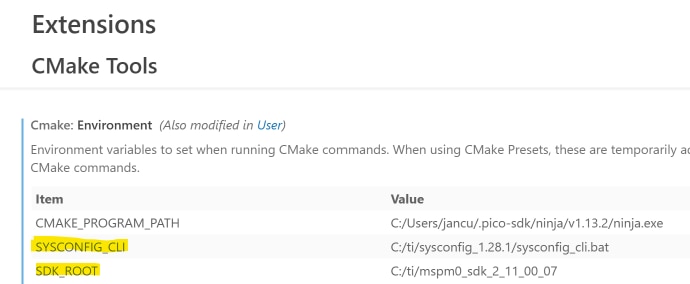
Configure Environment Variables
SDK_ROOT and SYSCONFIG_CLI:
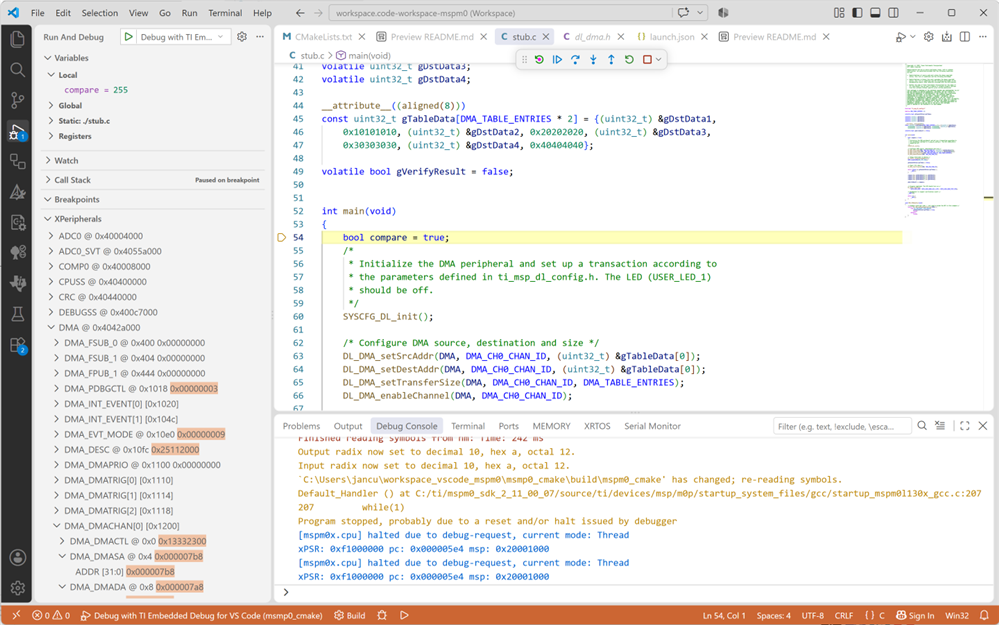
In the next post, where I use the debugger, there are a few more settings to do.
Build Project
We 'll need 3 files to build firmware for the MSPM0:
- system configuration (SysConfig)
- C source
- CMake script
The first two can be taken from any Resource Explorer project. Or one of your own designs. I reused one of the projects of TI's DMA training course: DMA move a table in memory with MSPM0
The CMake file takes more work. I started from TI's example for CLang. Then made changes so that it works for the GCC ARM cross-compiler. I used AI to resolve errors and gaps.
Before the traditional C build can run, the CMake file invokes SysConfig twice:
- to turn your device configuration settings into C code, and get linker the right command file and library list. That part is 100% based on TI's CMake script.
- to tell what startup_xxxx.c file to use for our device. I added that part.
The remainder is more traditional: gather sources, includes, libs. Compile and Link.
I added the command to also create a bootloader compatible binary (for Shabaz' Python programmer).
Here is the result:
cmake_minimum_required(VERSION 3.29)

set(CMAKE_VERBOSE_MAKEFILE ON)

set(CMAKE_C_STANDARD 11)
set(CMAKE_CXX_STANDARD 26)
set(CMAKE_EXPORT_COMPILE_COMMANDS ON)
set(CMAKE_CXX_FLAGS "${CMAKE_CXX_FLAGS} -fmodules-ts")
set(CMAKE_CXX_FLAGS "${CMAKE_CXX_FLAGS} -fcommon -fno-rtti -fno-exceptions")
set(CMAKE_CXX_FLAGS "${CMAKE_CXX_FLAGS} -ffunction-sections -fdata-sections -g -gstrict-dwarf -Wall")
set(CMAKE_CXX_STANDARD_REQUIRED ON)

# Cross compiling for a target system that is an embedded device
set(CMAKE_SYSTEM_NAME Generic)
set(CMAKE_EXE_LINKER_FLAGS "${CMAKE_EXE_LINKER_FLAGS} --specs=nosys.specs --specs=nano.specs -static -Wl,--gc-sections")
set(CMAKE_EXE_LINKER_FLAGS "${CMAKE_EXE_LINKER_FLAGS} -nostartfiles -mthumb")

# Create the project
project(
    mspm0_cmake
    LANGUAGES C  CXX     # Uses the programming language C
)

# Directory to the SDK used
# SDK_ROOT set externally
set(SDK_ROOT $ENV{SDK_ROOT})

#---------------------------------------------------------------------
# Configuration related to SysConfig
#---------------------------------------------------------------------
# Find the SysConfig command line interface (CLI) command in the system path
# SYSCONFIG_CLI set externally
set(SYSCONFIG_CLI $ENV{SYSCONFIG_CLI})

# Directory to the generated SysConfig files
set(SYSCONFIG_GENDIR ${CMAKE_BINARY_DIR}/sysconfig_generated)

# SysConfig Input Script
set(SYSCONFIG_INPUT_FILE_NAME ${CMAKE_PROJECT_NAME}.syscfg)
set(SYSCONFIG_INPUT ${CMAKE_SOURCE_DIR}/${SYSCONFIG_INPUT_FILE_NAME})
message(STATUS "SYSCONFIG_INPUT_FILE_NAME: ${SYSCONFIG_INPUT_FILE_NAME}")

# SysConfig stamp file.  Described in the block comment at the end.
set(SYSCONFIG_STAMP_FILE ${SYSCONFIG_GENDIR}/${SYSCONFIG_INPUT_FILE_NAME}.stamp)

# SysConfig invocation command line
set(SYSCONFIG_CLI_CMD
    ${SYSCONFIG_CLI}
        --script ${SYSCONFIG_INPUT}
        -o ${SYSCONFIG_GENDIR}
        --compiler gcc
        -s ${SDK_ROOT}/.metadata/product.json
)

# Ask SysConfig what files it generates.  Then categorize them.  This occurs
# when CMake configures the project.
execute_process(
    COMMAND ${SYSCONFIG_CLI_CMD} --listGeneratedFiles
    OUTPUT_VARIABLE SYSCONFIG_GEN_FILES_STR
)
string(REPLACE "\n" ";" SYSCONFIG_GEN_FILES ${SYSCONFIG_GEN_FILES_STR})

set(SYSCONFIG_GEN_CFILES        ${SYSCONFIG_GEN_FILES})
set(SYSCONFIG_GEN_HFILES        ${SYSCONFIG_GEN_FILES})
set(SYSCONFIG_GEN_LNKCMD        ${SYSCONFIG_GEN_FILES})
set(SYSCONFIG_GEN_COMPILER_OPTS ${SYSCONFIG_GEN_FILES})
set(SYSCONFIG_GEN_LNKFILE       "${SYSCONFIG_GENDIR}/device_linker.lds")

list(FILTER SYSCONFIG_GEN_CFILES        INCLUDE REGEX ".*\\.c$")
list(FILTER SYSCONFIG_GEN_HFILES        INCLUDE REGEX ".*\\.h$")
list(FILTER SYSCONFIG_GEN_LNKCMD        INCLUDE REGEX ".*\\.lds\\.")
list(FILTER SYSCONFIG_GEN_COMPILER_OPTS INCLUDE REGEX ".*\\.opt$")

# Ask SysConfig what file it references.  Then categorize it.  This occurs
# when CMake configures the project.
# Returns the fully qualified startup_mspm0xxxxx_gcc.c file for the selected device
execute_process(
    COMMAND ${SYSCONFIG_CLI_CMD} --listReferencedFiles
    OUTPUT_VARIABLE SYSCONFIG_REF_FILES_STR
)
string(REPLACE "\n" ";" SYSCONFIG_REF_FILES ${SYSCONFIG_REF_FILES_STR})

set(SYSCONFIG_REF_CFILES        ${SYSCONFIG_REF_FILES})
list(FILTER SYSCONFIG_REF_CFILES        INCLUDE REGEX ".*\\.c$")
message(STATUS "SYSCONFIG_REF_CFILES: ${SYSCONFIG_REF_CFILES}")

# Cause CMake to run when the SysConfig input is modified, because that may
# change the list of generated files
set_property(
    DIRECTORY
    APPEND
    PROPERTY CMAKE_CONFIGURE_DEPENDS ${SYSCONFIG_INPUT}
)

# Run SysConfig over the input script.  Described further in a block comment
# at the end.
add_custom_command(
    DEPENDS    ${SYSCONFIG_INPUT}
    OUTPUT     ${SYSCONFIG_STAMP_FILE}
    BYPRODUCTS ${SYSCONFIG_GEN_FILES}
    COMMAND    ${SYSCONFIG_CLI_CMD}
    COMMAND    ${CMAKE_COMMAND} -E touch ${SYSCONFIG_STAMP_FILE}
    COMMENT    "Running SysConfig on ${SYSCONFIG_INPUT}"
    VERBATIM
)
add_custom_target(SysConfig_build ALL DEPENDS ${SYSCONFIG_STAMP_FILE})

#---------------------------------------------------------------------
# Configuration related to compiling
#---------------------------------------------------------------------
set(PROCESSOR_OPTIONS
    -march=armv6s-m
    -mcpu=cortex-m0plus
    -mfloat-abi=soft
    -mlittle-endian
    -mthumb
)

# These compiler options typically change as the project evolves.  Because
# CMake replaces an undefined variable with an empty string, one way to
# disable an option is to comment out that line.
set(OPTIMIZATION_OPTION -O0)
set(LTO_OPTION          -flto)
set(DEBUG_OPTION        -gdwarf-3)

message(STATUS "SYSCONFIG_GEN_COMPILER_OPTS: ${SYSCONFIG_GEN_COMPILER_OPTS}")

# Compiler options
add_compile_options(
    ${PROCESSOR_OPTIONS}
    ${OPTIMIZATION_OPTION}
    ${LTO_OPTION}
    ${DEBUG_OPTION}
    @${SYSCONFIG_GEN_COMPILER_OPTS}
)

message(STATUS "SYSCONFIG_GEN_CFILES: ${SYSCONFIG_GEN_CFILES}")

# C files
set(SOURCES
    ${CMAKE_SOURCE_DIR}/mspm0_cmake.cpp
    ${SYSCONFIG_GEN_CFILES}
    ${SYSCONFIG_REF_CFILES} # startup_mspm0xxxxx_gcc.c file for the selected device
#    ${SDK_ROOT}/source/ti/devices/msp/m0p/startup_system_files/gcc/startup_mspm0l130x_gcc.c
)

# Cause C files to depend on the SysConfig generated compiler options file
set_source_files_properties(
    ${SOURCES}
    PROPERTIES OBJECT_DEPENDS
    ${SYSCONFIG_GEN_COMPILER_OPTS}
)

message(STATUS "SYSCONFIG_GENDIR: ${SYSCONFIG_GENDIR}")

# Directories searched for header files
include_directories(
    ${SDK_ROOT}/source
    ${SDK_ROOT}/source/third_party/CMSIS/Core/Include
    ${SYSCONFIG_GENDIR}
)

#---------------------------------------------------------------------
# Configuration related to linking
#---------------------------------------------------------------------
# Linker Options
add_link_options(
    ${LTO_OPTION}            # Required when compiling AND linking
)

# Directories searched for libraries
link_directories(
    ${SDK_ROOT}/source
)

message(STATUS "SYSCONFIG_GEN_LNKFILE: ${SYSCONFIG_GEN_LNKFILE}")
message(STATUS "SYSCONFIG_GEN_LNKCMD: ${SYSCONFIG_GEN_LNKCMD}")

set(CMAKE_EXE_LINKER_FLAGS "${CMAKE_EXE_LINKER_FLAGS} -Wl,-T ${SYSCONFIG_GEN_LNKFILE}")

message(STATUS "SOURCES: ${SOURCES}")
# Build the executable from source files in the project
add_executable( ${CMAKE_PROJECT_NAME}
    ${SOURCES}
)
add_dependencies(${CMAKE_PROJECT_NAME} SysConfig_build)

target_link_directories(${CMAKE_PROJECT_NAME} PRIVATE
)

# Libraries and linker command files
target_link_libraries( ${CMAKE_PROJECT_NAME} PRIVATE
    ${SYSCONFIG_GEN_LNKCMD}
)

get_target_property(TARGET_LIBS ${CMAKE_PROJECT_NAME} LINK_LIBRARIES)
message(STATUS "Libraries linked to ${CMAKE_PROJECT_NAME}: ${TARGET_LIBS}")

message(STATUS "SDK uses value of assignment with 'volatile'-qualified left operand ")
target_compile_options(${CMAKE_PROJECT_NAME} PRIVATE $<$<COMPILE_LANGUAGE:CXX>:-Wno-volatile>)
message(STATUS "SDK uses bitwise operation between different enumeration types ")
target_compile_options(${CMAKE_PROJECT_NAME} PRIVATE $<$<COMPILE_LANGUAGE:CXX>:-Wno-deprecated-enum-enum-conversion>)

# objcopy for bootloader compatible firmware
set(HEX_FILE ${PROJECT_BINARY_DIR}/${CMAKE_PROJECT_NAME}.hex)

# POST_BUILD
message(STATUS "ObjCopy utility: ${CMAKE_OBJCOPY}")
message(STATUS "firmware: ${PROJECT_BINARY_DIR}/${CMAKE_PROJECT_NAME}")
add_custom_command(TARGET ${CMAKE_PROJECT_NAME} POST_BUILD
    COMMAND ${CMAKE_OBJCOPY} -O ihex  --gap-fill 0xFF ${PROJECT_BINARY_DIR}/${CMAKE_PROJECT_NAME} ${HEX_FILE}
    COMMENT "creating .hex file ..."
    VERBATIM
)
The TI pages that I linked to above, go in detail over each section.
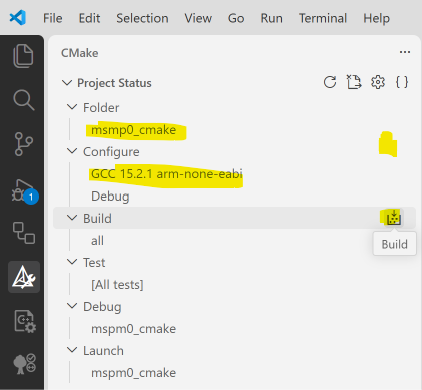
Use the VS Code CMake plugin to select the GCC compiler, and then config and build the project:
If all is well, you should get this message after config:
[cmake] -- Configuring done (4.2s)[cmake] -- Generating done (0.1s)[cmake] -- Build files have been written to: C:/Users/jancu/workspace_vscode_mspm0/msmp0_cmake/buildAnd this after build:
[build] [4/4 100% :: 1.279] Linking C executable mspm0_cmake[driver] Build completed: 00:00:01.337[build] Build finished with exit code 0You can now load this firmware to your MSPM0. Either with Uniflash, or with Shabaz' Python loader.
Or wait for the next post, where I'll build a VS Code launch script. That 'll allow you to step through your code, just like with TI's Code Composer Studio.
Thank you for reading.
post 1: MSPM0 project with VS Code, CMake and GCC - part 1: infrastructure
post 3: MSPM0 project with VS Code, CMake and GCC - part 3: debug
part of the EasyL1105 series. all posts

