element14 Community
element14 Community
    Register Log In
  • Site
  • Search
  • Log In Register
  • Community Hub
    Community Hub
    • What's New on element14
    • Feedback and Support
    • Benefits of Membership
    • Personal Blogs
    • Members Area
    • Achievement Levels
  • Learn
    Learn
    • Ask an Expert
    • eBooks
    • element14 presents
    • Learning Center
    • Tech Spotlight
    • STEM Academy
    • Webinars, Training and Events
    • Learning Groups
  • Technologies
    Technologies
    • 3D Printing
    • FPGA
    • Industrial Automation
    • Internet of Things
    • Power & Energy
    • Sensors
    • Technology Groups
  • Challenges & Projects
    Challenges & Projects
    • Design Challenges
    • element14 presents Projects
    • Project14
    • Arduino Projects
    • Raspberry Pi Projects
    • Project Groups
  • Products
    Products
    • Arduino
    • Avnet & Tria Boards Community
    • Dev Tools
    • Manufacturers
    • Multicomp Pro
    • Product Groups
    • Raspberry Pi
    • RoadTests & Reviews
  • About Us
    About the element14 Community
  • Store
    Store
    • Visit Your Store
    • Choose another store...
      • Europe
      •  Austria (German)
      •  Belgium (Dutch, French)
      •  Bulgaria (Bulgarian)
      •  Czech Republic (Czech)
      •  Denmark (Danish)
      •  Estonia (Estonian)
      •  Finland (Finnish)
      •  France (French)
      •  Germany (German)
      •  Hungary (Hungarian)
      •  Ireland
      •  Israel
      •  Italy (Italian)
      •  Latvia (Latvian)
      •  
      •  Lithuania (Lithuanian)
      •  Netherlands (Dutch)
      •  Norway (Norwegian)
      •  Poland (Polish)
      •  Portugal (Portuguese)
      •  Romania (Romanian)
      •  Russia (Russian)
      •  Slovakia (Slovak)
      •  Slovenia (Slovenian)
      •  Spain (Spanish)
      •  Sweden (Swedish)
      •  Switzerland(German, French)
      •  Turkey (Turkish)
      •  United Kingdom
      • Asia Pacific
      •  Australia
      •  China
      •  Hong Kong
      •  India
      •  Japan
      •  Korea (Korean)
      •  Malaysia
      •  New Zealand
      •  Philippines
      •  Singapore
      •  Taiwan
      •  Thailand (Thai)
      •  Vietnam
      • Americas
      •  Brazil (Portuguese)
      •  Canada
      •  Mexico (Spanish)
      •  United States
      Can't find the country/region you're looking for? Visit our export site or find a local distributor.
  • Translate
  • Profile
  • Settings
Embedded and Microcontrollers
  • Technologies
  • More
Embedded and Microcontrollers
Blog MSPM0 project with VS Code, CMake and GCC - part 4: EasyL1105 example
  • Blog
  • Forum
  • Documents
  • Quiz
  • Polls
  • Files
  • Members
  • Mentions
  • Sub-Groups
  • Tags
  • More
  • Cancel
  • New
Join Embedded and Microcontrollers to participate - click to join for free!
  • Share
  • More
  • Cancel
Group Actions
  • Group RSS
  • More
  • Cancel
Engagement
  • Author Author: Jan Cumps
  • Date Created: 4 Sep 2026 9:36 AM Date Created
  • Views 170 views
  • Likes 6 likes
  • Comments 8 comments
  • MSPM0L1105
  • ccs
  • gcc
  • MSPM0
  • easyL1105
  • VS Code
  • vscode
  • code_composer_studio
Related
Recommended

MSPM0 project with VS Code, CMake and GCC - part 4: EasyL1105 example

Jan Cumps
Jan Cumps
4 Sep 2026

In this blog series, I build a Texas Instruments MSPM0 example with VS Code as IDE, and CMake as build infrastructure.
In posts 1 - 3, I created an end to end flow, from install over build to debug.
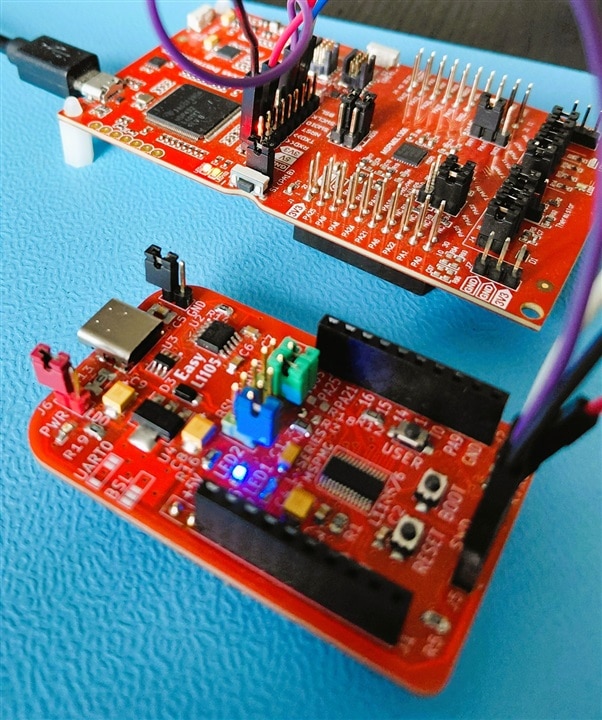
In post 4: testing it out on the EasyL1105: A Dev Board for the TI ARM Cortex-M0+ L-Series with a blinky.
image

Project and Changes

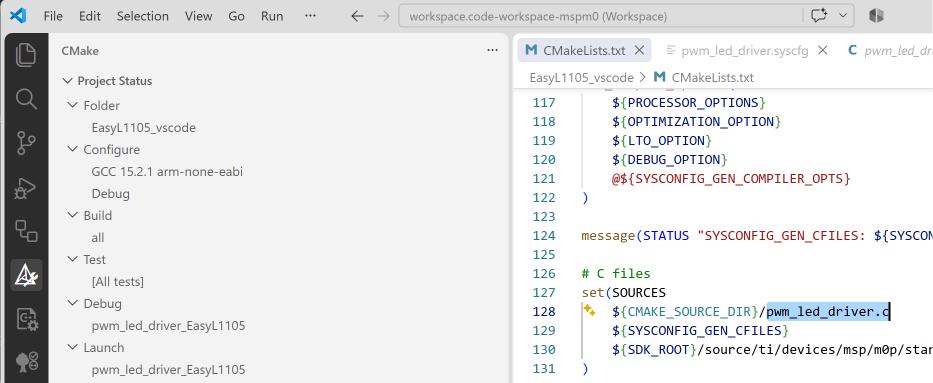
I used TI's existing pwm_led_driver example for the L1105 (project is attached at the end of this post).
image

Changes to SysConfig:

  • different GPIO for LED:
    the code I attached uses PA14, to reflect my setup. I have a blue LED on PA14..
    If you use an unaltered EasyL1105 board, edit pwm_led_driver.syscfg and change PA14 to PA26 on line 27. That's where one of its LEDs sits.

Changes to the scripts:

  • in CMakeLists.txt I changed the project name, and the file names of the sysconfig and .c file
  • in launch.json, I changed the device to MSPML1105 on line 32

Debugger

I used the on-board XSD110 from one of my LaunchPads. Works equally well with a standalone XSD110.

On the EasyL1105, I removed all jumpers (in particular the power ones). On the LaunchPad, I removed all jumpers that connect the debugger to the controller. Then I routed Ground, 3V3, nRST, SWDIO and SWCLK from debugger to EasyL1105 J5 (SWD connector).

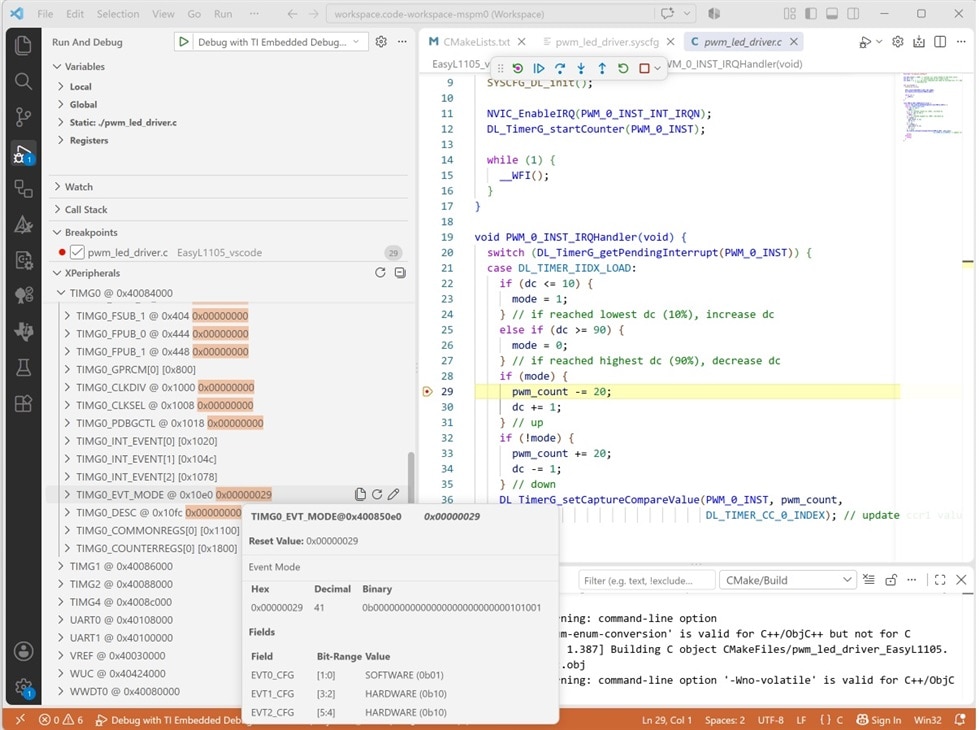
I selected the project in VS Code CMake extension. Selected GCC toolkit. Config, Build.
After that, started a debug session. All worked. The code got loaded on the MSPM0L1105, and the LED started glowing...
image

The build script also generates a .hex firmware compatible with shabaz'  python programmer.

VS Code project: EasyL1105_vscode_20260906.zip

post 3:  MSPM0 project with VS Code, CMake and GCC - part 3: debug 

post 5:  MSPM0 project with VS Code, CMake and GCC - part 5: Open .syscfg file in SysConfig GUI 

part of the EasyL1105 series. all posts

  • Sign in to reply

Top Comments

  • shabaz
    shabaz 18 days ago +1
    The MSPM0 Python programmer has just recently been updated, I set AI on it, to give it a decent scroll buffer, and also show the status at the bottom. Now it looks like a real text-based app. Also…
Parents
  • shabaz
    shabaz 18 days ago

    Hi Jan,

    This is super-useful! The integration with VS Code is really nice.

    I had a request, I was wondering, would it be possible to have a the CMakeLists.txt file not generate the sysconfig output, perhaps if specified somehow, or if the sysconfig file is not present? I'm thinking about the scenario where someone might forget to share the sysconfig file and only supply the generated output, or the scenario where someone directly touched the generated output, hence cannot regenerate the output.

    • Cancel
    • Vote Up 0 Vote Down
    • Sign in to reply
    • More
    • Cancel
  • Jan Cumps
    Jan Cumps 18 days ago in reply to shabaz

    > would it be possible to have a the CMakeLists.txt file not generate the sysconfig output, perhaps if specified somehow, or if the sysconfig file is not present?

    Running the configurator, and including the dynamically generated files, is the most complex part of the script.

    If you don't need that, you can delete the whole SYSCONFIG section, and directly deal with these 3 files:

    ti_msp_dl_config.c: add it to the executable set of sources, together with any other c file.

    ti_msp_dl_config.h should be in the "include path". Either the project root, or a folder pointed to in 

    # Directories searched for header files
    include_directories(
        # folder where ti_msp_dl_config.h is
    )

    The  linker file: you''ll need to add the right one from the SDK. You should replace the line that sets the CMAKE_LINKER_FLAGS with: 

    set(CMAKE_EXE_LINKER_FLAGS "${CMAKE_EXE_LINKER_FLAGS} -Wl,-T${SDK_ROOT}/source/ti/devices/msp/m0p/linker_files/gcc/mspm0l1105.lds")
    • Cancel
    • Vote Up 0 Vote Down
    • Sign in to reply
    • More
    • Cancel
  • Jan Cumps
    Jan Cumps 18 days ago in reply to Jan Cumps

    and also replace this:

    # Libraries and linker command files
    target_link_libraries( ${PROJECT_NAME} PRIVATE
        ${SYSCONFIG_GEN_LNKCMD}
    )
    with
    # Libraries and linker command files
    target_link_libraries( ${PROJECT_NAME} PRIVATE
        ${SDK_ROOT}/source/ti/driverlib/lib/gcc/m0p/mspm0l11xx_l13xx/driverlib.a
    )

    SysConfig makes a file that contains all libraries to link to. Called device.lds.genlibs

    If you don't use the generator, you 'll link those libraries in yourself.

    note: these libraries do not have to be mentioned:

    • gcc
    • c
    • m
    • nosys

    the toolchain pulls the right ones in, based on the flags used in the CMake script (e.g.: --specs=nano.specs)


    • Cancel
    • Vote Up 0 Vote Down
    • Sign in to reply
    • More
    • Cancel
Comment
  • Jan Cumps
    Jan Cumps 18 days ago in reply to Jan Cumps

    and also replace this:

    # Libraries and linker command files
    target_link_libraries( ${PROJECT_NAME} PRIVATE
        ${SYSCONFIG_GEN_LNKCMD}
    )
    with
    # Libraries and linker command files
    target_link_libraries( ${PROJECT_NAME} PRIVATE
        ${SDK_ROOT}/source/ti/driverlib/lib/gcc/m0p/mspm0l11xx_l13xx/driverlib.a
    )

    SysConfig makes a file that contains all libraries to link to. Called device.lds.genlibs

    If you don't use the generator, you 'll link those libraries in yourself.

    note: these libraries do not have to be mentioned:

    • gcc
    • c
    • m
    • nosys

    the toolchain pulls the right ones in, based on the flags used in the CMake script (e.g.: --specs=nano.specs)


    • Cancel
    • Vote Up 0 Vote Down
    • Sign in to reply
    • More
    • Cancel
Children
No Data
element14 Community

element14 is the first online community specifically for engineers. Connect with your peers and get expert answers to your questions.

  • Members
  • Learn
  • Technologies
  • Challenges & Projects
  • Products
  • Store
  • About Us
  • Feedback & Support
  • FAQs
  • Terms of Use
  • Privacy Policy
  • Legal and Copyright Notices
  • Sitemap
  • Cookies

An Avnet Company © 2026 Premier Farnell Limited. All Rights Reserved.

Premier Farnell Ltd, registered in England and Wales (no 00876412), registered office: Farnell House, Forge Lane, Leeds LS12 2NE.

Follow element14

  • X
  • Facebook
  • linkedin
  • YouTube